Jaremy - can you confirm if is this a user defined option, or default behaviour?I'm super jazzed for the subtitle skip back. Now I can delete my Control4 macro.


-
Thanks for visiting the Kaleidescape Owners' Forum
This forum is for the community of Kaleidescape owners, and others interested in learning about the system, equipment, services, and the company itself.It is run by a group of enthusiastic Kaleidescape owners and dealers purely as a service to this community.
This board is not affiliated in any way with Kaleidescape, Inc.
For official technical support, product information, or customer service, please visit www.kaleidescape.com
You can dismiss this box forever by clicking the "X" in the upper right corner of this message. -
You are currently in "Guest" mode and not logged in with a registered account.
The forum is free to use and most of the forum can be used by guests who are not registered....
... but we strongly encourage you to register for a full account. There is no cost to register for a full account.
Benefits of registering for a full account:
- Participate in the discussions! You must have a registered account to make posts on the forums. You will be able to start your own thread on a topic or question, or you can reply to other threads/discussions.
- Use the "Conversation" feature (known as "private messaging" on other forums) to communicate directly with any of the other users here.
- Access the Files area. The "resources" area of the forum contains many "Favorite Scene" and Script files that can dramatically increase the enjoyment of your Kaleidescape system. Go directly to great scenes in your favorite movies, created by other owners, and add automation to playback of your system with Scripts.
- You won't see this annoying notice at the top of every screen!😊
This box goes away for registered users.
You are using an out of date browser. It may not display this or other websites correctly.
You should upgrade or use an alternative browser.
You should upgrade or use an alternative browser.
KEAOS (Software) UPDATES
- Thread starter cinelife
- Start date

It is default behaviour. There is currently no setting for a user to disable/enable this function.Jaremy - can you confirm if is this a user defined option, or default behaviour?

Are we going to see the 4K / HD / SD / DV tagging reinstated on the GUI do you think?Howdy folks! In addition to the Strato M launch today, we're also beginning the rollout of new kOS versions: 10.21.0 and 8.14.0.
10.21.0 includes:
Support for Strato M
With this release, we have added support for the new Strato M movie player. Strato M is our new entry-level movie player for residential, marine, and commercial theatre systems. Strato M works on its own or as part of a larger Kaleidescape system. To learn more, visit our product page.
New UI Features
- Replay with subtitles: For Strato, rewinding or using the Replay command to go back less than 60 seconds will automatically enable subtitles until the point of rewinding is reached.
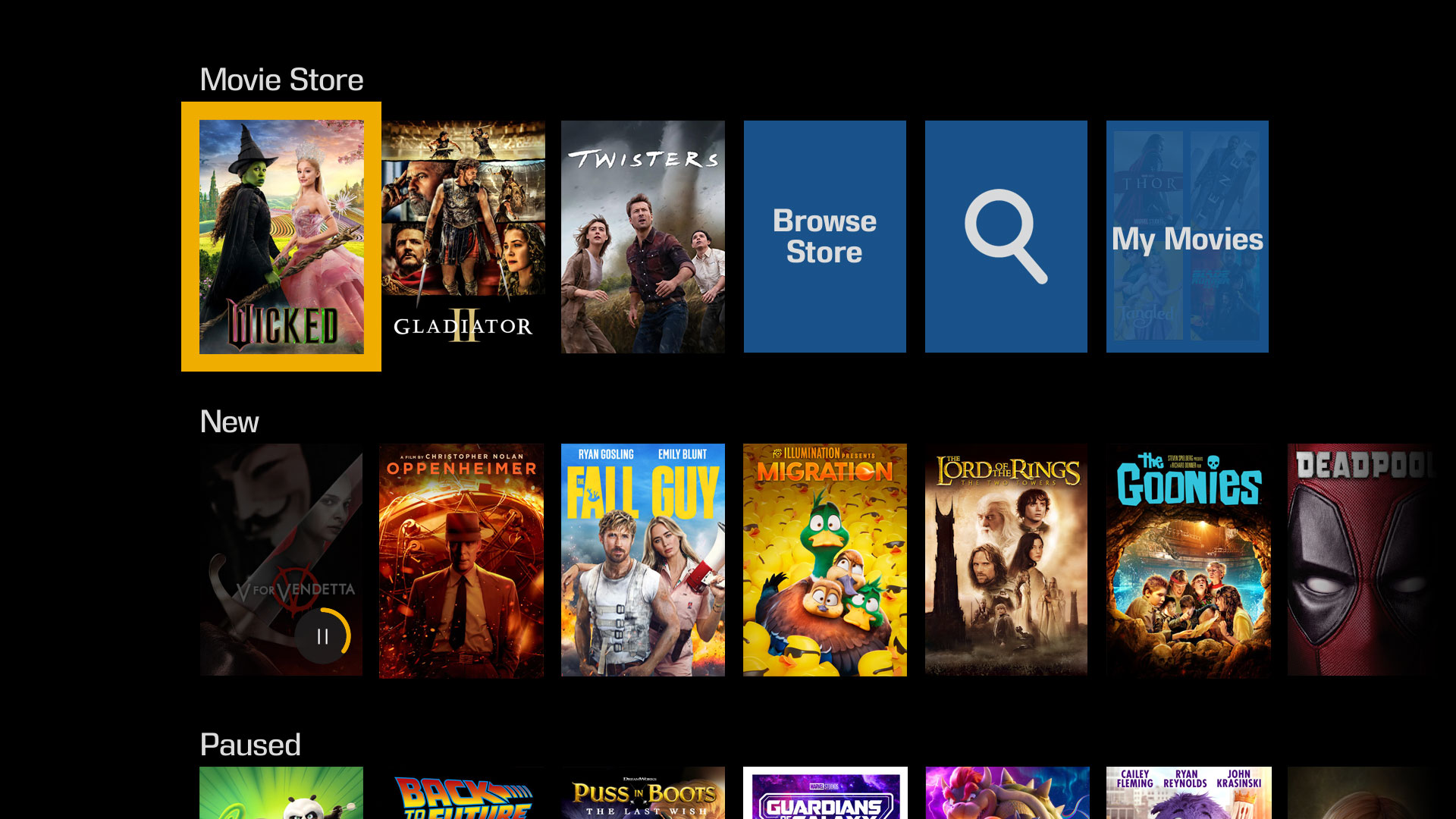
- New “My Movies” tile: In the Strato V and Strato M collections menu, a new “My Movies” tile has been added to allow customers to browse movies they own, even if they are not currently downloaded to the system.
- Support for Rotten Tomatoes “Verified Hot” rating: Rotten Tomatoes recently introduced a “Verified Hot” feature that indicates whether a movie is beloved by audiences. This will complement the “Certified Fresh Tomatometer” badge on the onscreen display.
Playback Improvements
We have improved overall playback stability for Strato V. This includes throttling movie downloads to 500Mbps during movie playback when used in standalone* mode. This is to ensure the quality of playback during movie downloads. When grouped with a server, downloads remain unaffected during movie playback. *The throttling of movie downloads also affects Strato M in standalone mode.
HDMI/HDCP Interoperability Improvements
For Strato V and Strato M, improvements have been made for legacy HDMI devices (such as AVRs and TVs) that only support HDCP 1.X. Additionally, the default video behavior has been changed to “minimize display mode changes” to provide a more robust experience out of the box for the majority of users. This will affect new installs or players that have been reset to factory settings.
Performance Improvements and Fixes
We have made several behind-the-scenes improvements to enhance performance, including:
- Terra/Terra Prime performance and stability improvements
- Added player support to enable playback of remaining HD library content on Strato V and M (after conversion of those titles to new format are made available)
- Bug fixes
I'd like to take a second to drill down a little bit on that next-to-last bullet point, about the HD content support. As I think everyone knows, we've been hard at work converting our HD content library to be playable on the Strato V (and now Strato M) platform, and the large majority of content has been converted. The last batch of titles required the addition of a new feature to the playback engine on our players, and that new feature is included in the 10.21 release on Strato and Alto payers, and in the 8.14 release on M-class Premiere players and Cinema One 2nd Generation.
What this means is that once the kOS software rollout is complete (which typically takes a few weeks), you'll start to see a significant number of HD updates released as the players will be ready to handle that content.
(8.14 is primarily a release to support these updated HD playback features, with a handful of bug fixes as well.)
Furnace Inferno
Well-known member
Definitely would want an option to turn this off, I never use subtitles (outside of non-English languages) and currently use the replay function when the audio drops out on the V not because I can’t hear what was said ordinarily.It is default behaviour. There is currently no setting for a user to disable/enable this function.
Decelerate
Active member

I’m not sure which tagging you’re referring to. If you mean the badges on the covers, no, that’s not coming back. There isn’t room on the covers to display a Dolby Vision logo, for one thing.Are we going to see the 4K / HD / SD / DV tagging reinstated on the GUI do you think?

Could those logos be added to the fly-out description similar to the store UI? Or even just onto the full info display when you drill into a title?I’m not sure which tagging you’re referring to. If you mean the badges on the covers, no, that’s not coming back. There isn’t room on the covers to display a Dolby Vision logo, for one thing.
Yes, there are some options along those lines that we’re considering. We just can’t do them on the covers themselves. Stay tuned!
Co-Star support for Strato V was added back in August, actually.Hi @MikeKobb sorry if that question was already asked, but is making the Strato V compatible with Co-Star/Premiere still happening? thanks

This is fine with me.It is default behaviour. There is currently no setting for a user to disable/enable this function.
 But of course, I would have it on if it were a toggle. I find this feature invaluable as missing dialog sometimes is unfortunately something that happens to me at 48 years old...
The macro was certainly inferior as well because, despite the best I could make it, it still required selecting the subtitle so needed manual intervention. I presume this picks the subtitle based on the language of the movie playing, so it's all automatic with the skip back.

Add me to the list that would want to disable this function. Also, one question. If I am watching a movie with subtitles enabled and do a skip back, will this turn off subtitles?It is default behaviour. There is currently no setting for a user to disable/enable this function.
John
FWIW, you can include me on the list of people who want this to be a configurable option as well. I advocate for it (and other settings) every chance I get.Add me to the list that would want to disable this function. Also, one question. If I am watching a movie with subtitles enabled and do a skip back, will this turn off subtitles?
As to your other question, subtitles will remain on if you already had them enabled when you skipped back.
Audio drop out issues can have many different causes and can be hard to diagnose. It is sometimes related to the precise set of equipment in a setup. In other cases, it can be introduced by network latency. While some drop out issues have been resolved in this kOS release, I cannot say whether your particular issue is resolved.Is this update going to resolve the audio drop out issues on the V?
We realize this is frustrating for customers and these reports are given high priority within Engineering. If anyone has audio drop out issues, I highly recommend contacting Kaleidescape Support who can work with you to diagnose the issue and find a resolution.
We are continually improving kOS and your reporting of issues to Kaleidescape Support help give us the information we need to find a resolution.
Add me to the list as well. Really needs to be a option.FWIW, you can include me on the list of people who want this to be a configurable option as well. I advocate for it (and other settings) every chance I get.
As to your other question, subtitles will remain on if you already had them enabled when you skipped back.
I’m sure anyone would like something like this , I’m replacing the covers one at a time.I’m not sure which tagging you’re referring to. If you mean the badges on the covers, no, that’s not coming back. There isn’t room on the covers to display a Dolby Vision logo, for one thing.
Attachments

- Joined
- Nov 27, 2023
- Messages
- 2,462
That's not an official Dolby Vision logo approved for licensing. There are very strict rules on what the logo can look like, what size it needs to be in relation to the image, etc. If K were to put a Dolby Vision tag on an image, it would take up the entire width by itself (or, as K says, "it's too big to fit on the poster").I’m sure anyone would like something like this , I’m replacing the covers one at a time.
Personally, I find header bars full of logos to be distracting, and I wasn't the biggest fan of the prior bottom-right tags either. I actually prefer the cleaner look of the current poster wall, though I agree that the logos should appear underneath the title in a selection.
That's not an official Dolby Vision logo approved for licensing. There are very strict rules on what the logo can look like, what size it needs to be in relation to the image, etc. If K were to put a Dolby Vision tag on an image, it would take up the entire width by itself (or, as K says, "it's too big to fit on the poster").
Personally, I find header bars full of logos to be distracting, and I wasn't the biggest fan of the prior bottom-right tags either. I actually prefer the cleaner look of the current poster wall, though I agree that the logos should appear underneath the title in a selection.
The most difficult branding guideline to work with is almost always the padding. The sample posted above is fine for a single user doing it, but another company with a licensing agreement would never be allowed to place the logos that close to the edge of the image, or that close to the other logos.
On this one, I would say no me. I think I prefer clean movie covers that just represent the content itself. Now, I do want to see full codec/technical info with logos and graphics on the pop up movie info card, for sure!I’m sure anyone would like something like this , I’m replacing the covers one at a time.

DrTechBull
Well-known member
Awesome work, team! Super exciting update—huge props to everyone involved!Howdy folks! In addition to the Strato M launch today, we're also beginning the rollout of new kOS versions: 10.21.0 and 8.14.0.
10.21.0 includes:
Support for Strato M
With this release, we have added support for the new Strato M movie player. Strato M is our new entry-level movie player for residential, marine, and commercial theatre systems. Strato M works on its own or as part of a larger Kaleidescape system. To learn more, visit our product page.
New UI Features
- Replay with subtitles: For Strato, rewinding or using the Replay command to go back less than 60 seconds will automatically enable subtitles until the point of rewinding is reached.
- New “My Movies” tile: In the Strato V and Strato M collections menu, a new “My Movies” tile has been added to allow customers to browse movies they own, even if they are not currently downloaded to the system.
- Support for Rotten Tomatoes “Verified Hot” rating: Rotten Tomatoes recently introduced a “Verified Hot” feature that indicates whether a movie is beloved by audiences. This will complement the “Certified Fresh Tomatometer” badge on the onscreen display.
Playback Improvements
We have improved overall playback stability for Strato V. This includes throttling movie downloads to 500Mbps during movie playback when used in standalone* mode. This is to ensure the quality of playback during movie downloads. When grouped with a server, downloads remain unaffected during movie playback. *The throttling of movie downloads also affects Strato M in standalone mode.
HDMI/HDCP Interoperability Improvements
For Strato V and Strato M, improvements have been made for legacy HDMI devices (such as AVRs and TVs) that only support HDCP 1.X. Additionally, the default video behavior has been changed to “minimize display mode changes” to provide a more robust experience out of the box for the majority of users. This will affect new installs or players that have been reset to factory settings.
Performance Improvements and Fixes
We have made several behind-the-scenes improvements to enhance performance, including:
- Terra/Terra Prime performance and stability improvements
- Added player support to enable playback of remaining HD library content on Strato V and M (after conversion of those titles to new format are made available)
- Bug fixes
I'd like to take a second to drill down a little bit on that next-to-last bullet point, about the HD content support. As I think everyone knows, we've been hard at work converting our HD content library to be playable on the Strato V (and now Strato M) platform, and the large majority of content has been converted. The last batch of titles required the addition of a new feature to the playback engine on our players, and that new feature is included in the 10.21 release on Strato and Alto payers, and in the 8.14 release on M-class Premiere players and Cinema One 2nd Generation.
What this means is that once the kOS software rollout is complete (which typically takes a few weeks), you'll start to see a significant number of HD updates released as the players will be ready to handle that content.
(8.14 is primarily a release to support these updated HD playback features, with a handful of bug fixes as well.)
Here’s hoping the next few updates continue to raise the bar for Kaleidescape Strato V. A few feature requests that would be amazing to see in the near future:
1. Unlock the V 1TB SSD in Grouped Mode
For users who don’t have multiple Strato V units, there should be an option in settings to tap into that redundant 1TB. Use the player’s onboard SSD would not only let us store an additional 10 4k movies to watch and delete regularly. The content I want to keep for regular watch? I’d just move it to the Terra.
2. CEC Support for Strato V
Please bring in full CEC functionality—similar to what Apple TV remote offers. Imagine using the Strato V remote to power on/off the TV, AVR, and player with a single button press. It would be a game-changer for simplicity in living room and user experience without needing any universal remote.
3. Movie Wall View- additional setting option
Give us a setting that allows us to toggle between showing all owned movies in the main cover view or just the ones downloaded locally. Yes, the “My Movies” tab in Collections is great—but a global toggle in settings would be even better for tailoring the main browsing experience without going to collection tabs. Movies will be one click away from downloading from main cover wall experience.