• Thanks for visiting the Kaleidescape Owners' Forum

    This forum is for the community of Kaleidescape owners, and others interested in learning about the system, equipment, services, and the company itself.

    It is run by a group of enthusiastic Kaleidescape owners and dealers purely as a service to this community.

    This board is not affiliated in any way with Kaleidescape, Inc.
    For official technical support, product information, or customer service, please visit www.kaleidescape.com

    You can dismiss this box forever by clicking the "X" in the upper right corner of this message.
  • You are currently in "Guest" mode and not logged in with a registered account.

    The forum is free to use and most of the forum can be used by guests who are not registered....

    ... but we strongly encourage you to register for a full account. There is no cost to register for a full account.

    Benefits of registering for a full account:

    • Participate in the discussions! You must have a registered account to make posts on the forums. You will be able to start your own thread on a topic or question, or you can reply to other threads/discussions.
    • Use the "Conversation" feature (known as "private messaging" on other forums) to communicate directly with any of the other users here.
    • Access the Files area. The "resources" area of the forum contains many "Favorite Scene" and Script files that can dramatically increase the enjoyment of your Kaleidescape system. Go directly to great scenes in your favorite movies, created by other owners, and add automation to playback of your system with Scripts.
    • You won't see this annoying notice at the top of every screen!😊

    It's easy and free to register for the forum. Just click the "Register" button in the upper right corner of this page, and follow the instructions there.

    This box goes away for registered users.

KEAOS (Software) UPDATES

My Terra and Strato C got a software update (kOS 10.18.0-25228 ). Since then movies are always played back with 60 Hz, not 23.98 Hz. Testet with Strato C > Projector directly. Menus are fine in 23,976 Hz as configured. I did not read every post back now but does someone have the same problem? Is it known already?
Do you have output set to Allow display mode changes?
 
My Terra and Strato C got a software update (kOS 10.18.0-25228 ). Since then movies are always played back with 60 Hz, not 23.98 Hz. Testet with Strato C > Projector directly. Menus are fine in 23,976 Hz as configured. I did not read every post back now but does someone have the same problem? Is it known already?
Definitely not a known problem.

As it’s the weekend, our support and engineering folks are out of the office, but we can get the ball rolling on collecting some information that may help.

If you go to your system’s browser interface, navigate to the Settings -> Components page, and click “Settings” on your player, what are the settings on the Video tab?
 
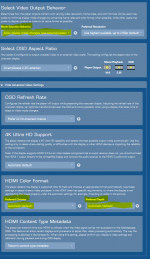
Got it to work again. But settings need to be exactly as shown in the pucture. As soon as I change some of them movies are always played back with 60 Hz again.
Especially changing chroma or depth to a fixed value will result in 60 Hz playback of movies. Before that update I was using fixed chroma 422. This will not work anymore. With automatic setting the menu is chroma 444 while movie playback is chroma 422.
 

Attachments

  • K video settings.PNG
    K video settings.PNG
    47.2 KB · Views: 37
For those who are interested, here is a general overview of what is contained in the kOS 10.18.0-25228 release:

Support for Strato V

IR remote directional pad navigation


The directional pad on the Kaleidescape remotes can now be used to control aspects of playback:
  • Left and right will scan forward and back.
  • Up and down will open and close the status overlay.
  • Select will toggle pause/play .
NOTE: This functionality will not work when playing content from a Co-Star Premiere zone and is exclusive to Encore devices running kOS 10.18.0 or later. Directional controls will behave as normal when doing disc playback in order to accommodate in-movie menus.

For further details, refer to the Using the Remote Control Knowledge Base article.

Other fixes and improvements:
  • Improved Terra DNS behaviour when changing networks.
 
Love the extra remote functionality! One suggestion, could we get an ability to do something like double-press left quickly to skip back like 10 seconds in the film, automatically turn on subtitles, then turn them off again once that 10 seconds of replay is caught up?
 
For those who are interested, here is a general overview of what is contained in the kOS 10.18.0-25228 release:

Support for Strato V

IR remote directional pad navigation


The directional pad on the Kaleidescape remotes can now be used to control aspects of playback:
  • Left and right will scan forward and back.
  • Up and down will open and close the status overlay.
  • Select will toggle pause/play .
NOTE: This functionality will not work when playing content from a Co-Star Premiere zone and is exclusive to Encore devices running kOS 10.18.0 or later. Directional controls will behave as normal when doing disc playback in order to accommodate in-movie menus.

For further details, refer to the Using the Remote Control Knowledge Base article.

Other fixes and improvements:
  • Improved Terra DNS behaviour when changing networks.
Thank you, thank you, thank you. When I first got my Strato C in April, I was trying to use the directional pad in the manner that is now available with the update. This update will be super useful in a dark room like mine.
 
Love the extra remote functionality! One suggestion, could we get an ability to do something like double-press left quickly to skip back like 10 seconds in the film, automatically turn on subtitles, then turn them off again once that 10 seconds of replay is caught up?
I like the option to do 2xx fast forward or rewind by holding down on the left or right directional side of the directional pad. Most CE remotes do some flavor or that. Once you start trying to add 6 different options into a combination of button press types, it can get messy really quickly. Less complication makes things better for the majority of users.
 
Newbie question: What is the rollout period for new kOS versions? My Strato-C is still at 10.17.2-25032. How can you predict when the new version will load, and is there any way to force the upgrade?

Update: Nevermind - I read back through the thread and answered my own dumb question.

Feature request: Add a button like every other network device in the world has to "Check for updates"!
 
Last edited:
Feature request: Add a button like every other network device in the world has to "Check for updates"!
Not an unreasonable request. However such a button would not make much of a difference. Kaleidescape systems already check for updates (and automatically download them if available) multiple times a day so odds are -- if your system is in the tranche that is getting the rollout -- by the time you click that button, it has already downloaded the update.

And once the system has been idle for at least 4 hours, it will even automatically reboot itself to apply said update if you haven't applied it manually already.

Lastly, if you _really_ want to force a check for a software update, you can reboot (one of) your servers. A software update check happens very shortly after a server reboots.
 
Love the extra remote functionality! One suggestion, could we get an ability to do something like double-press left quickly to skip back like 10 seconds in the film, automatically turn on subtitles, then turn them off again once that 10 seconds of replay is caught up?
As we have talked about this kind of operation is an excellent quality of life feature on AppleTV - would love to see it in Kaleidescape.
 
Not an unreasonable request. However such a button would not make much of a difference. Kaleidescape systems already check for updates (and automatically download them if available) multiple times a day so odds are -- if your system is in the tranche that is getting the rollout -- by the time you click that button, it has already downloaded the update.

And once the system has been idle for at least 4 hours, it will even automatically reboot itself to apply said update if you haven't applied it manually already.

Lastly, if you _really_ want to force a check for a software update, you can reboot (one of) your servers. A software update check happens very shortly after a server reboots.
Thanks for the response. I have a simple system (one Compact Terro Server, one Strato-C player) which was all idle from around 11pm last night until noonish today. Must be in the slow tranche because no updates. Pushed the restart button on the terro first, then after a few minutes on the strato. Still showing the old version. Also, no UI indication that a version upgrade is in the works - please system, don't leave me guessing...

My idea of a "check for updates" button is really more of a "update right now" button. I don't care what else is going on, or what programmatic rules are in governance - If the network is up, and if the current version is old, start pulling the new release RIGHT NOW and let me know it's happening. When the download completes, do whatever needs to be done to install it (reboots or whatever). The sys/network admin in me has no patience when it comes to delaying upgrades. If there is a feature I want that is in a new release, it seems like I have no deterministic way to get it and it might be weeks of waiting?
 
Thanks for the response. I have a simple system (one Compact Terro Server, one Strato-C player) which was all idle from around 11pm last night until noonish today. Must be in the slow tranche because no updates. Pushed the restart button on the terro first, then after a few minutes on the strato. Still showing the old version. Also, no UI indication that a version upgrade is in the works - please system, don't leave me guessing...

My idea of a "check for updates" button is really more of a "update right now" button. I don't care what else is going on, or what programmatic rules are in governance - If the network is up, and if the current version is old, start pulling the new release RIGHT NOW and let me know it's happening. When the download completes, do whatever needs to be done to install it (reboots or whatever). The sys/network admin in me has no patience when it comes to delaying upgrades. If there is a feature I want that is in a new release, it seems like I have no deterministic way to get it and it might be weeks of waiting?
In the Strato thread and somewhere in this thread, it is mentioned that the software rollout should be completed by Aug 5. I like new updates that are useful as well. But a staggered rollout can make sense. Just look at an update Rivian attempted to software rollout several months ago. That rollout bricked a few of their vehicle; same thing with a software rollout for the Chevy Blazer EV a couple months back. If both of those companies had pushed out the software update to all vehicles at once things would not have been pretty.
 
In the Strato thread and somewhere in this thread, it is mentioned that the software rollout should be completed by Aug 5. I like new updates that are useful as well. But a staggered rollout can make sense. Just look at an update Rivian attempted to software rollout several months ago. That rollout bricked a few of their vehicle; same thing with a software rollout for the Chevy Blazer EV a couple months back. If both of those companies had pushed out the software update to all vehicles at once things would not have been pretty.
Surprised you didn't mention CrowdStrike! I run Ubiquity networking equipment and a few years back the updates were abysmal - early adopting was like playing Russian roulette. Fortunately, they've cleaned it up remarkably and continue to push out updates on an agile like schedule, so there's something new every other week or so.

So I get the value of slow rollout, and for the vast majority of K users who pay no attention to these things, the slow rollout can continue to provide that buffer. I still want a button that lets me choose to have it right now. The FFW/RW and overlay control updates look cool to me and I would like that asap.
 
Keep in mind with regard to software updates that even with a reboot (or if there were a "Check for update now" button), each K system belongs to a specific group, and will not download the latest software until it is it's group's turn. As others have alluded, the roll-out happens in phases to minimize risk and limit the load on the headend servers.

Andy
 
My Strato-C is still at 10.17.2-25032. Have most users been getting the new update?
Same here, still waiting. Hopefully it fixes my issue of it not remembering where I left off if I stop in the middle of something
 
Hopefully it fixes my issue of it not remembering where I left off if I stop in the middle of something
If this is the issue I'm thinking of, it is not resolved in 10.18. What we do know is that it's caused by the server(s) getting into a bad state that causes saving certain information into the database to be rejected. For the time being, the solution is to reboot your system's server(s) if the system gets into this bad state. That clears the issue. We are continuing to try to identify the underlying cause of the problem.
 
If this is the issue I'm thinking of, it is not resolved in 10.18. What we do know is that it's caused by the server(s) getting into a bad state that causes saving certain information into the database to be rejected. For the time being, the solution is to reboot your system's server(s) if the system gets into this bad state. That clears the issue. We are continuing to try to identify the underlying cause of the problem.
Thanks Mike, I just rebooted the server!
 
Got it to work again. But settings need to be exactly as shown in the pucture. As soon as I change some of them movies are always played back with 60 Hz again.
Especially changing chroma or depth to a fixed value will result in 60 Hz playback of movies. Before that update I was using fixed chroma 422. This will not work anymore. With automatic setting the menu is chroma 444 while movie playback is chroma 422.
John and I ran this up the flagpole internally with our video experts, and there are a number of possibilities, but it's impossible to say with certainty without a bunch more information. If you want to pursue further, the most efficient way to do so will be to open a support ticket, let them know that Engineering is aware of the issue, and it should be escalated.
 
Back
Top