• Thanks for visiting the Kaleidescape Owners' Forum

    This forum is for the community of Kaleidescape owners, and others interested in learning about the system, equipment, services, and the company itself.

    It is run by a group of enthusiastic Kaleidescape owners and dealers purely as a service to this community.

    This board is not affiliated in any way with Kaleidescape, Inc.
    For official technical support, product information, or customer service, please visit www.kaleidescape.com

    You can dismiss this box forever by clicking the "X" in the upper right corner of this message.
  • You are currently in "Guest" mode and not logged in with a registered account.

    The forum is free to use and most of the forum can be used by guests who are not registered....

    ... but we strongly encourage you to register for a full account. There is no cost to register for a full account.

    Benefits of registering for a full account:

    • Participate in the discussions! You must have a registered account to make posts on the forums. You will be able to start your own thread on a topic or question, or you can reply to other threads/discussions.
    • Use the "Conversation" feature (known as "private messaging" on other forums) to communicate directly with any of the other users here.
    • Access the Files area. The "resources" area of the forum contains many "Favorite Scene" and Script files that can dramatically increase the enjoyment of your Kaleidescape system. Go directly to great scenes in your favorite movies, created by other owners, and add automation to playback of your system with Scripts.
    • You won't see this annoying notice at the top of every screen!😊

    It's easy and free to register for the forum. Just click the "Register" button in the upper right corner of this page, and follow the instructions there.

    This box goes away for registered users.

Unifi Network 9.0

I thought I would share some things I have learned along the way with setting up Unifi...specifically related to Kaleidescape.

1) If you have multiple Unifi Switches in the chain make sure setup STP priorities correctly...Unifi defaults are not good.. I went from lowest to highest...so first main switch at 4096, next "layer" at 8192, next at "12288", etc. In my case I have gateway->switch #1(4096)->switch #2(8192)-)->Strato V. All the switches are connected at 2.5g...I set the port on switch #2 where the V is forced negotiation to 1gb instead of Auto(this is generally a good idea for 1gig devices plugged into a 2.5g switch...Auto sometimes has issues).

2) Turn on Flow Control under global switch settings....this REALLY helps with the consistency of the d/l speed at the Strato V. Without flow control it would fluctuate a lot and port manager would show tx dropped.

With a few exceptions when other things are using big bandwidth and/or the K store is having issues the downloads at the Strato V are rock solid 880+ on my Spectrum 1g ISP connection with little to no tx/rx errors or drops..
 
I will have a 48-port switch at the rack. I have two more switches in my master bedroom, and they will be Araknis for now. I will upgrade them at a later time.
 
I will have a 48-port switch at the rack. I have two more switches in my master bedroom, and they will be Araknis for now. I will upgrade them at a later time.

I still have on switch which is currently a non-managed non unifi that has a bunch of low priority devices on it...like printers, Unifi Cameras,etc. While only Layer 2 switches...the Unifi Mini 2.5 have been great for chaining to other parts of the house. Great value for the cost. THe office and theater are complete diagonal opposite sides of the house...so its modem->cloud gateway fiber->unifi 2.g mini in master closet which feeds another Unifi 2.5g mini switch in the theater...my PC, XBOX and PS5 Pro are in the master bedroom. Rest of the house is on another port from the Fiber. This gives me best speeds to the most important devices :) Doubtful if I will ever have access to >1gig ISP in my lifetime in my remote area but just in case I will be ready.
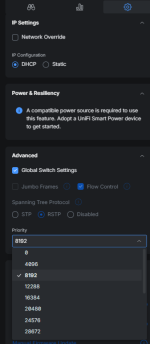
 
2) Turn on Flow Control under global switch settings....this REALLY helps with the consistency of the d/l speed at the Strato V. Without flow control it would fluctuate a lot and port manager would show tx dropped.
where is this in the latest UI version?
THANKS for these tips... want to make sure my setup is optimized as you recommended.
 
Yeah flow-control is on the settings->internet page. This is global for all switches that are set to use global switch settings.

As for the RSTP that has to be set individually for each swith under its settings.

1775741025441.png

The Topology page is good way to verify the priorities are set correctly....
1775741228517.png
 
Yeah flow-control is on the settings->internet page. This is global for all switches that are set to use global switch settings.

As for the RSTP that has to be set individually for each swith under its settings.

View attachment 9775

The Topology page is good way to verify the priorities are set correctly....
View attachment 9777
Very helpful... just set my flow control and then actually did find a switch with the wrong priority thanks to this tip. fixed that. But what is that emphasized flow path on your topology screenshot? my topology view just has the normal single hairline paths shown... is that showing some sort of high volume of traffic along that path?
 
Very helpful... just set my flow control and then actually did find a switch with the wrong priority thanks to this tip. fixed that. But what is that emphasized flow path on your topology screenshot? my topology view just has the normal single hairline paths shown... is that showing some sort of high volume of traffic along that path?
nevermind... i found the toggle "show internet traffic" that enables that view. super cool to see that. Makes me realize that I haven't really been tracking the features of Unifi console for the last couple of years.
 
I decided to listen to all of you happy customers and take the plunge! I moved to Ubiquiti products, replacing an old Orbi router with satellite and 2 unmanaged Netgear switches.

I purchased and installed a Dream Router 7 (UDR7), 2 Pro Max 16 switches, and a U7 Pro Wall. I was originally going to purchase a U7 Mesh, but some of the user reviews pointed me to other options and the U7 Pro Wall seems to work fine so far. I installed it in its table stand.

I also installed a very long (100+ feet) CAT6A cable from one end of the house to the other (from one switch to the other). I used a Blue Jeans CAT6A cable that was tested to achieve CAT6A standards. So far so good!

The UniFi interface is certainly very different from the Netgear one I'm used to. Much more complicated, but much more data too! I found it challenging to setup my simple system just like it had been previously. Terminology was different (e.g. DHCP Reservations vs. Static IP) and the complexity was much greater. In my opinion, the UniFi interface could really use more mouse over "help" information and/or more links to help webpages directly from the interface.

All that said, my UniFi system is up and running and so far so good!

Question: Do any of you subscribe to the CyberSecure Enhanced ($99/year) product?

Thanks!
 
I decided to listen to all of you happy customers and take the plunge! I moved to Ubiquiti products, replacing an old Orbi router with satellite and 2 unmanaged Netgear switches.

I purchased and installed a Dream Router 7 (UDR7), 2 Pro Max 16 switches, and a U7 Pro Wall. I was originally going to purchase a U7 Mesh, but some of the user reviews pointed me to other options and the U7 Pro Wall seems to work fine so far. I installed it in its table stand.

I also installed a very long (100+ feet) CAT6A cable from one end of the house to the other (from one switch to the other). I used a Blue Jeans CAT6A cable that was tested to achieve CAT6A standards. So far so good!

The UniFi interface is certainly very different from the Netgear one I'm used to. Much more complicated, but much more data too! I found it challenging to setup my simple system just like it had been previously. Terminology was different (e.g. DHCP Reservations vs. Static IP) and the complexity was much greater. In my opinion, the UniFi interface could really use more mouse over "help" information and/or more links to help webpages directly from the interface.

All that said, my UniFi system is up and running and so far so good!

Question: Do any of you subscribe to the CyberSecure Enhanced ($99/year) product?

Thanks!
I do subscribe to the security service, but most of the comments I see on Unifi forums say that it is overkill for a home system. I have sensitive data for work, so I guess I am being extra safe. Plus, it is a tax deduction!
 
In my opinion, the UniFi interface could really use more mouse over "help" information and/or more links to help webpages directly from the interface.
There are many settings I do not understand, but I find simply Googling "Unifi" and the specific setting will provide lots of information. I would also suggest you check out the Unifi official forum if you want to learn more:


However, if you have a problem or question, the Reddit Ubiquit thread usually gets a quicker response:


(Not sure why the Reddit link is showing like that, but it does work.)
 
Last edited:
I do subscribe to the security service, but most of the comments I see on Unifi forums say that it is overkill for a home system. I have sensitive data for work, so I guess I am being extra safe. Plus, it is a tax deduction!
I looked into the security subscription but doing some research concluded that is was way overkill for my setup. That said, I am using a PiHole which has done wonders in cutting down ads and such. According to its dashboard...close 40% of my internet traffic is blocked because it shows up on one of the blacklists I have setup. The funny thing is Roku (we have a few Roku tvs/devices in other parts of the house) is one of the top offenders. Slowly getting rid of those devices. These rokus appear to "dial home" like 100x more than any other device in the house.
 
I was considering the security option but researching revealed that throughput speed is negatively effected; Ubiquiti support has stated that seeing speeds drop from 1 Gbps to ~600 Mbps with IPS enabled is considered normal behavior. Real-world users report even larger drops: one UDM SE user saw speeds fall from 1.9 Gbps down to ~800 Mbps once traffic inspection kicked in
 
don't forget also you can screenshot anything in Unifi Network UI and paste it into ChatGPT or Claude and ask it for help or advice. Way better than typical mouse-over.

BTW, I installed Xnip for WAY better and easier screenshots (MacOS) and it is so amazing especially for AI queries. I screenshot 100 things a day and just command-tab over to claude, quick cammand-v to paste in the screenshot, and ask what i'm wondering about in a few words.

Benefit of Xnip is that you can quickly capture screenshots to clipboard, not just desktop, it can handle SCROLLING the window to capture things bigger than one screen, and you can quicly annotate it. Somtimes I capture an area and then add on a quick red arrow and ask claude "what's this setting do"?

Xnip is something i'm happy pay for... i forget how much but it's cheap. It totally changes your AI-as-a-consultant game...
I can have it examine my Home Assistant dashboards, screenfulls of yaml code, huge Unifi screens, show it entities lists, etc. Yes, you can do all this with apple's built in command-shift-5 screenshots, but you'll be 10x faster once you get the hang of xnip for rapid screenshot editing/pasting/saving
 
Last edited:
don't forget also you can screenshot anything in Unifi Network UI and paste it into ChatGPT or Claude and ask it for help or advice. Way better than typical mouse-over.

BTW, I installed Xnip for WAY better and easier screenshots (MacOS) and it is so amazing especially for AI queries. I screenshot 100 things a day and just command-tab over to claude, quick cammand-v to paste in the screenshot, and ask what i'm wondering about in a few words.

Benefit of Xnip is that you can quickly capture screenshots to clipboard, not just desktop, it can handle SCROLLING the window to capture things bigger than one screen, and you can quicly annotate it. Somtimes I capture an area and then add on a quick red arrow and ask claude "what's this setting do"?

Xnip is something i'm happy pay for... i forget how much but it's cheap. It totally changes your AI-as-a-consultant game...
I can have it examine my Home Assistant dashboards, screenfulls of yaml code, huge Unifi screens, show it entities lists, etc. Yes, you can do all this with apple's built in command-shift-5 screenshots, but you'll be 10x faster once you get the hang of xnip for rapid screenshot editing/pasting/saving
Thanks @josh !

Unfortunately, I can't take advantage of your suggestions since I don't use Apple products, and I choose not to use AI. Nonetheless, thanks for the tips!
 
Trust me ..and am as anti AI as can be but i have to admit the ai tools have really helped me dial in several of my HA scripts and automations.
 
I've become a huge fan of Ubiquiti. My whole network stack, plus NAS, cameras, and so on now is all theirs. It's too good. The cameras were key just recently as well in providing evidence for a theft in our home by our pet sitter while we were away on vacation.
 
One thing about Unifi...is I am always finding things in the UI for some reason I never noticed before. This "infrastructure" view was kinda cool..quickly showing layout of switches, priorities, port usage and switch cpu/mem usage:

1776865219217.png
 
UniFi equipment is robust and very customizable, though can be finicky due to unpredictable interactions with some equipment. Since replacing my old network with a dream machine pro and usw pro HD 24 I’ve had problems with widely fluctuating download speeds on my Strato E (as high as the 800s but bouncing around to the 200s, 400s, 100s, etc) with a slow overall download speed. I tried switching out cat 6 cables and making UniFi setting changes (both from recommendations here and other forum) with no resolution in sight. WiFiman indicates that my download speed exceeds 1 Gbit/s on isolated speed tests. Other network-connected equipment seems to be functioning properly. I’m concerned that Comcast may be throttling my cable internet speeds, though they provide no clarification when I call customer support. I’ll probably consider trying another router or consider using a VPN. I realize that I haven’t provided all the details of my system in this post, but does anyone note a similar experience with either UniFi products or Comcast cable internet with Kaleidescape? I’ve also reached out directly to Kaleidescape—they were very helpful in doing internal troubleshooting and found no issues with my Strato E or the Kaleidescape server.
 
Back
Top