• Thanks for visiting the Kaleidescape Owners' Forum

    This forum is for the community of Kaleidescape owners, and others interested in learning about the system, equipment, services, and the company itself.

    It is run by a group of enthusiastic Kaleidescape owners and dealers purely as a service to this community.

    This board is not affiliated in any way with Kaleidescape, Inc.
    For official technical support, product information, or customer service, please visit www.kaleidescape.com

    You can dismiss this box forever by clicking the "X" in the upper right corner of this message.
  • You are currently in "Guest" mode and not logged in with a registered account.

    The forum is free to use and most of the forum can be used by guests who are not registered....

    ... but we strongly encourage you to register for a full account. There is no cost to register for a full account.

    Benefits of registering for a full account:

    • Participate in the discussions! You must have a registered account to make posts on the forums. You will be able to start your own thread on a topic or question, or you can reply to other threads/discussions.
    • Use the "Conversation" feature (known as "private messaging" on other forums) to communicate directly with any of the other users here.
    • Access the Files area. The "resources" area of the forum contains many "Favorite Scene" and Script files that can dramatically increase the enjoyment of your Kaleidescape system. Go directly to great scenes in your favorite movies, created by other owners, and add automation to playback of your system with Scripts.
    • You won't see this annoying notice at the top of every screen!😊

    It's easy and free to register for the forum. Just click the "Register" button in the upper right corner of this page, and follow the instructions there.

    This box goes away for registered users.

NEWS: Strato K Movie Player with 8K capability and new "4K Cinematic" full-chroma & higher bitrate support

I recently added an AVPro Edge 8K 4x4 matrix to the my system. I was using an AVPro Distribution Amplifier before to split the video from the audio from my Strato K, but decided to use a matrix instead to allow other devices to also split their signals. However, I have had significant problems getting the Strato K and matrix to play nice with each other, especially in passing Dolby Atmos and DTS-HD-MA. I do not have this problem with my Apple TV or PS5. Both of those work through the matrix without issue.

I have been on the phone with AVPro and they are perplexed by my issue but doing a deep dive into it.

Nevertheless, I found that putting an AVPro Edge Distribution Amplifier between the Strato K and matrix fixed the problem. It is bizarre to both me and AVPro support, but Strato K > Matrix > Arcam AV40 would not allow Dolby Atmos or DTS-HD-MA. However, Strato K > DA > Matrix > Arcam works perfect for all surround formats.

Now, one more interesting detail... The DA that I am using in the chain is the older 40Gbps one, not the current 48Gbps model (like the one linked a few posts above). When I tried the 48Gbps one in the chain, the same issue with Dolby Atmos and DTS-HD-MA occurred. Something about the older model DA just works for the chain.

All of this to say, my experimenting has narrowed down the problem to something between the Strato K and 48Gbps matrix and DA. Fortunately, AVPro is getting a Strato K in their lab to work with, so I hope they figure it out. But given all the problems people are seeing with Trinnov 8K boards and the Strato K, I am thinking there is something off with the Strato K HDMI.
I don't suppose you've tried the 40Gbps AVPro Edge 4x2 HDMI 8K60 Matrix Switcher? I believe I am trying to address the same concerns you are, but was thinking a 4x2 matrix should be fine. And the 4x2 matrix just happens to be 40Gbps, not 48Gbps, and so maybe it will work? Of course, it would be good to understand what the root cause of your issue is -- please post here when you and AVPro figure it out!
 
I don't suppose you've tried the 40Gbps AVPro Edge 4x2 HDMI 8K60 Matrix Switcher? I believe I am trying to address the same concerns you are, but was thinking a 4x2 matrix should be fine. And the 4x2 matrix just happens to be 40Gbps, not 48Gbps, and so maybe it will work? Of course, it would be good to understand what the root cause of your issue is -- please post here when you and AVPro figure it out!
No, I haven't. I have a few AVPro Edge devices but not that one (at least not yet). I have thought about adding it to expand the inputs available on my 4x4.

Given that the 40Gbps DA works well, but the 48Gbps DA and 4x4 Matrix don't play nicely, I would hedge to bet the 40Gbps 4x2 would work. AVPro did tell me that there can be differences between how Matrices and DAs perform just given design differences.

But now that you have brought this up, I am really curious to see if it would work. I may order one.
 
Last edited:
I can confirm that today's Trinnov Altitude update to version 4.4.5 did NOT resolve the HDMI 2.1 issues. I'm still able to get HDMI 2.1 working for the session if I do a full reboot of the Strato K and then it works until it goes to standby and theater is turned off.

Kaleidescape just says to switch to HDMI 2.0 for now which is annoying. Then my menu doesn't work right at 60Hz as it has letterboxing on all 4 sides for some reason with my settings. 24Hz menu works fine. All current 4KC content should work fine at HDMI 2.0 speeds, but 8K content and 4K60 4:4:4 content will not be fully supported.

I'm really curious if ANY Strato K users have reliable HDMI 2.1 connections getting FRL2 and FRL3 output that stays working on every startup. If so, what is your video chain?
 
I can confirm that today's Trinnov Altitude update to version 4.4.5 did NOT resolve the HDMI 2.1 issues. I'm still able to get HDMI 2.1 working for the session if I do a full reboot of the Strato K and then it works until it goes to standby and theater is turned off.

Kaleidescape just says to switch to HDMI 2.0 for now which is annoying. Then my menu doesn't work right at 60Hz as it has letterboxing on all 4 sides for some reason with my settings. 24Hz menu works fine. All current 4KC content should work fine at HDMI 2.0 speeds, but 8K content and 4K60 4:4:4 content will not be fully supported.

I'm really curious if ANY Strato K users have reliable HDMI 2.1 connections getting FRL2 and FRL3 output that stays working on every startup. If so, what is your video chain?
I have a Jvc nz900 hooked to an anthem avm70 8k. I can’t get a reliable hdmi 2.1 connection either. Even if I go straight from the strato k to projector it’s very unreliable. It works maybe for one video but once you go back to the desktop it loses sync and you have to reboot. The only fix that works for me is to go to hdmi 2.0 mode.
 
I have a Jvc nz900 hooked to an anthem avm70 8k. I can’t get a reliable hdmi 2.1 connection either. Even if I go straight from the strato k to projector it’s very unreliable. It works maybe for one video but once you go back to the desktop it loses sync and you have to reboot. The only fix that works for me is to go to hdmi 2.0 mode.
I have my Strato K connected through an Anthem AVM90 to a JVC RS3100. I was struggling to get a stable 2.1 connection. During troubleshooting, I discovered that it all worked perfectly if I use HDMI 2 out from the AVM to the projector. HDMI 1 out has problems. Tried moving it back and forth and the result is always the same. HDMI 1 out doesn't work, HDMI 2 is solid as a rock.

I really don't understand why. They are parallel outputs with the only difference being that HDMI 1 supports eARC, HDMI 2 does not. Very strange.
 
I have my Strato K connected through an Anthem AVM90 to a JVC RS3100. I was struggling to get a stable 2.1 connection. During troubleshooting, I discovered that it all worked perfectly if I use HDMI 2 out from the AVM to the projector. HDMI 1 out has problems. Tried moving it back and forth and the result is always the same. HDMI 1 out doesn't work, HDMI 2 is solid as a rock.

I really don't understand why. They are parallel outputs with the only difference being that HDMI 1 supports eARC, HDMI 2 does not. Very strange.
That kind of works. Everything gets converted to 8K by the Strato K player, all content gets unconverted and 8k is sent to the projector. Is there a way to send the native resolution of the source to the projector rather than always having the Strato k sending an 8k signal regardless of the source materials actual resolution?
 
I have my Strato K connected through an Anthem AVM90 to a JVC RS3100. I was struggling to get a stable 2.1 connection. During troubleshooting, I discovered that it all worked perfectly if I use HDMI 2 out from the AVM to the projector. HDMI 1 out has problems. Tried moving it back and forth and the result is always the same. HDMI 1 out doesn't work, HDMI 2 is solid as a rock.

I really don't understand why. They are parallel outputs with the only difference being that HDMI 1 supports eARC, HDMI 2 does not. Very strange.
Is your connection between the Strato K and the Anthem AVM90 showing up as FRL3 (24G) in the current video output from the Strato K local web server webpage?
 
Is your connection between the Strato K and the Anthem AVM90 showing up as FRL3 (24G) in the current video output from the Strato K local web server webpage?
Sorry, that I don't know. All I'm doing is moving the cable to the projector from one port to the adjacent port and getting a very different result.

When connected to HDMI 1 out, the Strato settings either says "This player was unable to read EDID information from video HDMI. Please ensure all connected HDMI devices are powered on, and check the HDMI cabling" or "This player was unable to negotiate an HDCP protected link over video HDMI. Please ensure all connected HDMI devices are HDCP compatible."

Moving to HDMI 2 out makes all that go away and instead it shows that all formats up to 8K 24 are supported.
 
My chain works. Sort of. I have the Strato K going to a Trinnov Altitude with the updated video card. Then directly to a JVC RS4200. According to my Strato, movies and scenes play perfectly with full resolution at a 2.1 connection. My issue is the OSD with movie covers. I get video dropouts every few seconds. Highly annoying.
 
The OSD is probably configured to run at 60Hz while the movie content is most likely 24Hz. The bandwidth requirement for the OSD is higher and causing signal integrity issues.
 
I tried lowering the refresh rate of the OSD. Even at 24 Hz, I still got the dropouts. Now I’m waiting for Trinnov and Kaleidescspe to figure things out.
 
Is your connection between the Strato K and the Anthem AVM90 showing up as FRL3 (24G) in the current video output from the Strato K local web server webpage?
Yes. On my settings page the connection shows as FRL3(24G). All content is upconverted to 8k by the Strato k player. When I called tech support they said that’s how it works. Using hdmi1 out from the anthem avm70 8k doesn’t work in 8k. Using hdmi2 out works but everything gets sent to the projector as 8k
 
Yes it does, at least on my system it does. When I called tech support they said that’s how it works. The Strato k sends 8k regardless of the source.
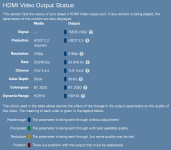
I think you must have some different settings, my Strato K does not do any video processing whatsoever and it outputs the 4KC files in the exact format they are stored in.

1789001449421.png

1789001603374.png
 
I think you must have some different settings, my Strato K does not do any video processing whatsoever and it outputs the 4KC files in the exact format they are stored in.

View attachment 11833

View attachment 11834
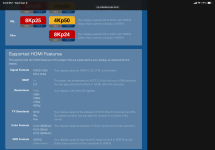
What you are showing me is that your system does not support 8k. It would say 4320p in the resolution area if it did. When I set my system to non-8k I get the same thing, native resolution. When I enable 8k everything gets sent 8k regardless of resolution in the file.
 

Attachments

  • IMG_0210.png
    IMG_0210.png
    346.6 KB · Views: 12
What you are showing me is that your system does not support 8k. It would say 4320p in the resolution area if it did. When I set my system to non-8k I get the same thing, native resolution. When I enable 8k everything gets sent 8k regardless of resolution in the file.
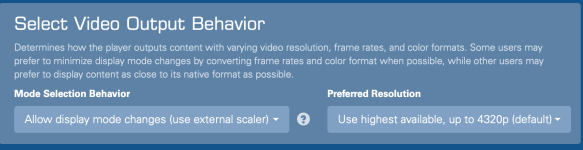
That's not correct. I can send 8K just fine. What do you have selected for video mode selection behavior. That is what should determine if the player does upscaling as you are seeing.

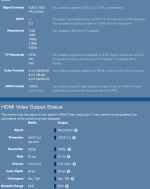
Here is my player playing Velocitas Machina in 8K.

1789003195122.png
 
Last edited:
That's not correct. I can send 8K just fine. What do you have selected for video mode selection behavior. That is what should determine if the player does upscaling as you are seeing.

Here is my player playing Velocitas Machina in 8K.

View attachment 11836
If I set it to allow changes use external scalar, the sync problems come back. But you are correct, 4K stuff gets sent 4K and 8k stuff 8k. It just loses sync easily and unpredictably when starting movies and going back to desktop. That setting is too flakey on my setup to use. If I set it to the default, allow display mode changes without external scalar it works but everything is 8k. For now that’s probably best. Letting the K do the upscaling etc.

With my setup I have 2 choices that work well. Limit to hdmi 2.0 18 gbps, or use hdmi 2.1 and use default mode changes, the one without external scalar.

I don’t have any external video processor just the Jvc and the anthem.
 
Back
Top