• Thanks for visiting the Kaleidescape Owners' Forum

    This forum is for the community of Kaleidescape owners, and others interested in learning about the system, equipment, services, and the company itself.

    It is run by a group of enthusiastic Kaleidescape owners and dealers purely as a service to this community.

    This board is not affiliated in any way with Kaleidescape, Inc.
    For official technical support, product information, or customer service, please visit www.kaleidescape.com

    You can dismiss this box forever by clicking the "X" in the upper right corner of this message.
  • You are currently in "Guest" mode and not logged in with a registered account.

    The forum is free to use and most of the forum can be used by guests who are not registered....

    ... but we strongly encourage you to register for a full account. There is no cost to register for a full account.

    Benefits of registering for a full account:

    • Participate in the discussions! You must have a registered account to make posts on the forums. You will be able to start your own thread on a topic or question, or you can reply to other threads/discussions.
    • Use the "Conversation" feature (known as "private messaging" on other forums) to communicate directly with any of the other users here.
    • Access the Files area. The "resources" area of the forum contains many "Favorite Scene" and Script files that can dramatically increase the enjoyment of your Kaleidescape system. Go directly to great scenes in your favorite movies, created by other owners, and add automation to playback of your system with Scripts.
    • You won't see this annoying notice at the top of every screen!😊

    It's easy and free to register for the forum. Just click the "Register" button in the upper right corner of this page, and follow the instructions there.

    This box goes away for registered users.

NEWS: Strato K Movie Player with 8K capability and new "4K Cinematic" full-chroma & higher bitrate support

Mine is doing the exact same thing with the Trinnov Altitude 16 set to HDMI 2.1 and the kscape set to HDMI 2.1. It shows an 8K signal coming in and then it seems like the projector is downscaling it 4K.

Also if I switch the Strato K to 2.1 and set the Trinnov to 2.0 I get no signal. If I set the Trinnov to 2.1 and the Strato K to 2.0 I get no signal. Both companies seem to be blaming one another…
 
Let's nip this one in the bud.
There is no 4K Cinematic content that is 4:4:4 @ 60Hz. The maximum framerate for 4K Cinematic content is 30 FPS.
Very interesting.

On this basis, it would seem that with the exception of 8k output, there is no need for the AVR or other devices in the chain to support HDMI 2.1, and that HDMI 2.0 will get the job done with all other content.

Assuming I'm interpreting this correctly, this is useful information.
 
If I set it to HDMI 2.0 mode everything works fine except there is no 8K. If I set it to HDMI 2.1 mode and use all the defaults, default meaning no external scalar option, it all works fine but everything is sent as 8K. It looks fine and it does not get downconverted by the projector to 4k. It looks as good as the 4K that is sent in HDMI 2.0 mode. The difference is that in the HDMI 2.0 case the projector does the upconversion to 8K because I have 8K eshift enabled on the JVC NZ900. If I use the HDMI 2.1 setting then the Kscape does the conversion to 8K and the projector displays it in 8K eshift.

If I use the settings I want to use, that is tell the Kscape that I have an external scalar, then 4K content gets sent as 4K, and 8K content gets sent as 8K. But there are massive sync issues. Sometimes when you start a movie it works fine, but going into and out of movies is a real crap shoot. Often you just lose sync somewhere in the chain and you get no picture or sound. Usually it comes back when you back out to the desktop but sometimes you have to turn off the kscape and the Anthem AVM 70 8K to get them to sync again.

Note:I noticed as one other user did, that only HDMI2 out on the Anthem AV Processor works reliably with the Kscape. If you use HDMI1 out from the Anthem AV, you have tons of sync issues no matter what you do in HDMI 2.1 mode. HDMI1 out works fine in HDMI 2.0 mode.
 
I agree with you. I am in no rush to suffer the newer quirks that 2.1 brings.
 
Let's nip this one in the bud.
There is no 4K Cinematic content that is 4:4:4 @ 60Hz. The maximum framerate for 4K Cinematic content is 30 FPS.
The Kaleidescape menu, if set to 60Hz, is limited on HDMI 2.0. Either chroma or bit depth needs to be lowered.
 
Which would you lower?
I have my Strato K setup to prefer 10 bit color as I find that is the best way to minimize processing in the player if you mostly watch HDR content.

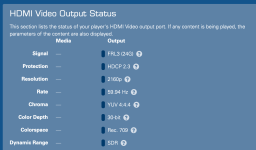
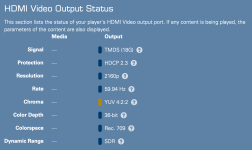
Here are screenshots of my Kaleidescape menu first in HDMI 2.1 mode and then HDMI 2.0. However, for some reason in my system, Strato K set to HDMI 2.0 and 60Hz OSD creates letterboxing on all 4 sides of the image. Changing to 24Hz OSD fixes that in HDMI 2.0 mode. And I'm not sure why in HDMI 2.0 mode it decides to output 36 bit color depth when I have it set to prefer 30 bit:

1789053524239.png

1789053647955.png
 
Hmmmm....I think I just discovered what works reliably in my system for HDMI 2.1 from Strato K. I could always get Strato K working if I restarted the player after theater is turned on and that would resolve the "No Signal" issue. But then after I turned off the room, next time I turned it back on, I would get a few HDMI syncs during startup and I'd see the Kaleidescape menu in HD for a few seconds, but then when it did the last sync to HDMI 2.1 it would go back to No Signal until I restarted the Player.

However, I just figured out that if I change the input on the Trinnov to Apple TV prior to powering down the room, then next time I turn the room back on the temporary HDMI syncs during Trinnov startup happen on Apple TV and I see that menu fine and then finally the Trinnov switches inputs to Kaleidescape as the final step and everything works great in HDMI 2.1.

So it seems that the Strato K does not like handling multiple different HDMI syncs during startup?

I'm also currently testing if the inverse works on my system. If I power off the room while on Strato K input, but then startup the room from Control4 by "Watch AppleTV" it seems to also work great in HDMI 2.1 mode on my Strato K.

So, in my system, I will just always startup the room on Apple TV. It seems like my issue only shows up if Strato K is both the selected input when the room got shut down and the selected input at startup. P.S. this only seems to work if the Strato K wasn't previously stuck on No Signal. If that happens, restart Strato K. But then after that, my system seems to be happy turning off and on as long as my startup device is not Strato K.

Your mileage may vary, but I'd love to have someone else try to test this in their room if they were having similar HDMI 2.1 issues with Strato K.

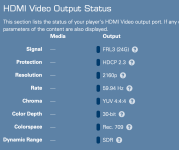
I should add that this is working with 60Hz menus which is what I prefer:
1789059272450.png
 
Last edited:
Got my K setup yesterday, not actually watched anything yet as I also got a couple of new subs and had to dismantle the front sound stage to fit the stacks in.

First impressions, I expected the UI to be much sharper but actually it’s pretty similar to the upscaled V UI, the main benefit is it’s much smoother without the scaling artifacts like stair stepping which means it looks more polished. I’ve got it running through a Lumagen so it’s limited to HDMI 2.0 and didn’t have any issues with that side of things.

It’s telling me Turtle Odyssey is available in 4K Cinematic and since I have the SDR and HDR10 versions pre-installed still I’ve queued that one up and use it for comparisons without needing a ton of space. Will need to do a full recalibration of the room first though!

@MikeKobb @J.Green just had a query about the 4K Cinematic titles in the UK. I’ve noticed a number of WB titles not getting updates here, first they were missing DV (and most still are) but they also aren’t getting the Cinematic updates in particular from my collection I’ve noticed the following movies:

The Hobbit 1 & 2
The Hangover 1 & 2
Edge of Tomorrow
A Star is Born
Batman Begins
Interstellar

Is there any particular reason we aren’t getting those updates? The Hobbit might be a delay since we got the LoTR EE and it’s only just dropped but the others have been outstanding for a while and some of the other Nolan films in particular which didn’t get updated for a while then later did but those two there’s been no sign of updates.
 
Got my K setup yesterday, not actually watched anything yet as I also got a couple of new subs and had to dismantle the front sound stage to fit the stacks in.

First impressions, I expected the UI to be much sharper but actually it’s pretty similar to the upscaled V UI, the main benefit is it’s much smoother without the scaling artifacts like stair stepping which means it looks more polished. I’ve got it running through a Lumagen so it’s limited to HDMI 2.0 and didn’t have any issues with that side of things.

It’s telling me Turtle Odyssey is available in 4K Cinematic and since I have the SDR and HDR10 versions pre-installed still I’ve queued that one up and use it for comparisons without needing a ton of space. Will need to do a full recalibration of the room first though!

@MikeKobb @J.Green just had a query about the 4K Cinematic titles in the UK. I’ve noticed a number of WB titles not getting updates here, first they were missing DV (and most still are) but they also aren’t getting the Cinematic updates in particular from my collection I’ve noticed the following movies:

The Hobbit 1 & 2
The Hangover 1 & 2
Edge of Tomorrow
A Star is Born
Batman Begins
Interstellar

Is there any particular reason we aren’t getting those updates? The Hobbit might be a delay since we got the LoTR EE and it’s only just dropped but the others have been outstanding for a while and some of the other Nolan films in particular which didn’t get updated for a while then later did but those two there’s been no sign of updates.
Looks like the Hobbit movies Edge of Tomorrow and A Star is Born have been updated now but the other older missing ones not.
 
@MikeKobb now that K is using more modern SoCs, are there any plans to implement the missing trick play features such as slow motion and frame advance from pause?
 
I´ve got a couple of Ks incoming this week and have a setup with Trinnov Altitude32 (with HDMI 2.1 board) and AltitudeCI (also HDMI2.1) and madVR Envy Extreme MK2 at hand. Will do some tests and report back.
Did some quick tests today with both our AltitudeCI and 16 (both HDMI 2.1 board, inputs set to 2.1). Between the Christie M-4K25 projector (HDMI 2.0) and the Trinnov output 2 sits the Envy Extreme MK2. All devices in the rack connected via Kordz 8K cables. The connection between the Envy output and the Christie is a CelerityTec HDMI 2.1 full-fiber cable.
OSD on the K was set to "auto" which set it to 60hz 3840x2160. I tested with 4KC DV, 4KC HDR10 and 4KC SDR content.
With both Altitudes, I got an immediate, stable connection. Switching back and forth between the OSD and movie content (I also played the 8K demo clip).
However, when I turned the system down and up again, I got just a black image on the projector. It seemed as if the chain was really outputing a black image, as I didn´t see a "no signal" message neither from the Envy, nor the projector. I could also see the K OSD on my preview monitor which is connected to the bypass port of Envy.
Both the Envy and the Altitude (CI in this case) reported a valid incoming signal (checked via the Envy IPControl tool).
A reboot of the Envy resolved the issue and I got the K OSD on both the monitor and the projector.
So in my case, the Envy seems to be the issue. Especially with the observation that the output port was outputing an image.
Unfortunately, I don´t have any more time to do more troubleshooting as the units I have here are already sold again.
 
Back
Top