• Thanks for visiting the Kaleidescape Owners' Forum

    This forum is for the community of Kaleidescape owners, and others interested in learning about the system, equipment, services, and the company itself.

    It is run by a group of enthusiastic Kaleidescape owners and dealers purely as a service to this community.

    This board is not affiliated in any way with Kaleidescape, Inc.
    For official technical support, product information, or customer service, please visit www.kaleidescape.com

    You can dismiss this box forever by clicking the "X" in the upper right corner of this message.
  • You are currently in "Guest" mode and not logged in with a registered account.

    The forum is free to use and most of the forum can be used by guests who are not registered....

    ... but we strongly encourage you to register for a full account. There is no cost to register for a full account.

    Benefits of registering for a full account:

    • Participate in the discussions! You must have a registered account to make posts on the forums. You will be able to start your own thread on a topic or question, or you can reply to other threads/discussions.
    • Use the "Conversation" feature (known as "private messaging" on other forums) to communicate directly with any of the other users here.
    • Access the Files area. The "resources" area of the forum contains many "Favorite Scene" and Script files that can dramatically increase the enjoyment of your Kaleidescape system. Go directly to great scenes in your favorite movies, created by other owners, and add automation to playback of your system with Scripts.
    • You won't see this annoying notice at the top of every screen!😊

    It's easy and free to register for the forum. Just click the "Register" button in the upper right corner of this page, and follow the instructions there.

    This box goes away for registered users.

Help me understand real benefit of Lumagen or MadVR

I won’t enter the Lumagen vs MadVR debate either but I have a Lumagen which for me is far superior to the MadVR for my use case. Plus for the same reason I didn’t get a Trinnov, I don’t like machines that are just off the shelf PC parts under the hood, even though the PC I have in the room has a 12 year old CPU still going strong, I don’t trust them as much.
One of the nice things about having „just off the shelf PC parts under hood“ (there‘s not so much of that under a Trinnov-hood) is, that it is very likely that you‘ll get replacement parts if sonething goes wrong.
With regards to Trinnov, we have clients with units in the 2-digit s/n-range (from 2014) which just got a refresh and a new 5 year warranty.
 
Do you do any other processing with 3D? Curious if there's any other advantages there, and how much a processor can do and still send a 3D Frame Packed signal that will be acceptable to a projector.
Can only comment to the Envy: It can do the same processing to 3D than to 2D content. Only exception is motion interpolation, which only works for 2D at the moment.
 
Great question!!

I preordered the madvr envy core and am awaiting for it to be released. From my perspective, I am primarily looking forward to the aspect ratio management. I have a cinescope screen and think it will be nice to have the screen auto adjusted for movies that are not 2.4 ratio. It also is annoying to watch certain movies where they change aspect ratio in specific scenes (interstellar, etc.).

Although its their entry level product, it's still a hefty price tag if that is the only benefit I am getting it for! I don't watch much live TV but do host Superbowl parties. I am looking forward to having the screen stretched this year as well. As far as the other features, do you think there will be much noticeable difference for me? (I am using an Epson ls12000 projector).. The product has dynamic tone mapping, so not sure if that will improve or bring the quality of the picture closer to Dolby vision, since we all know projectors don't currently have dolby vision.
 
One of the nice things about having „just off the shelf PC parts under hood“ (there‘s not so much of that under a Trinnov-hood) is, that it is very likely that you‘ll get replacement parts if sonething goes wrong.
With regards to Trinnov, we have clients with units in the 2-digit s/n-range (from 2014) which just got a refresh and a new 5 year warranty.
I meant more around the stability of the system itself rather than hardware, Lyngdorf which is the processor I went for had a similar upgrade option for my MP-60 to HDMI 2.1 but I didn’t bother since I have no need for 2.1. Trinnov also has some audio sync issues which I wouldn’t be happy with.

Pros and cons with everything.
 
Great question!!

I preordered the madvr envy core and am awaiting for it to be released. From my perspective, I am primarily looking forward to the aspect ratio management. I have a cinescope screen and think it will be nice to have the screen auto adjusted for movies that are not 2.4 ratio. It also is annoying to watch certain movies where they change aspect ratio in specific scenes (interstellar, etc.).

Although its their entry level product, it's still a hefty price tag if that is the only benefit I am getting it for! I don't watch much live TV but do host Superbowl parties. I am looking forward to having the screen stretched this year as well. As far as the other features, do you think there will be much noticeable difference for me? (I am using an Epson ls12000 projector).. The product has dynamic tone mapping, so not sure if that will improve or bring the quality of the picture closer to Dolby vision, since we all know projectors don't currently have dolby vision.
I have worked with multiple people who use an Envy with the LS12000, and the benefits for HDR content are as significant, if not moreso, as it is with JVC, referencing the image comparisons I posted above. So I have every expectation that you'll enjoy the improvement in picture quality with HDR content.

And honestly, at this point, I consider having an Envy or LRP as an almost essential component for anyone with a scope screen. I lived with the old zoom/shift/focus with manually applied lens memory for several years, and now not having to even think about, or do anything about, what the aspect ratio is of what I want to watch is a huge benefit. Add the improvement for HDR content, which definitely exceeds what the JVC's tone mapping provides on its own, made the purchase decision quite easy.
 
Can only comment to the Envy: It can do the same processing to 3D than to 2D content. Only exception is motion interpolation, which only works for 2D at the moment.
Thanks. Given that there's no HDR to work with on 3D sources, I think we're at a "no benefit" place. Most (all?) projectors won't trigger 3D functionality if anything but a 1080p SDR image is being received, so this makes sense. That's on projector manufacturers, and is a shame because I think a processor could likely upscale films to 4K HFR which would give legacy 3D content a little breathing room for the future.

Oh well. Thanks for the confirmation!
 
Thanks. Given that there's no HDR to work with on 3D sources, I think we're at a "no benefit" place. Most (all?) projectors won't trigger 3D functionality if anything but a 1080p SDR image is being received, so this makes sense. That's on projector manufacturers, and is a shame because I think a processor could likely upscale films to 4K HFR which would give legacy 3D content a little breathing room for the future.

Oh well. Thanks for the confirmation!
The Envy does provide something called a 3D "Luminance Boost." It obviously can't increase the projector's light output, but it does brighten up the picture to some degree, which can be helpful. The creator of madVR described it this way when he introduced it:

"...a brand new feature for 3D lovers: Basically you can boost the 3D brightness by up to 4x in the Envy Display Calibration. This is done using Envy's tone mapping algorithm, so it will not clip highlights. However, boosting brightness a lot can potentially cost a bit of image depth and highlight detail."

I've played around some with this, and it works fairly well. Just something to play around with for 3D lovers.
 
I have a JVC RS540 and while it does HDR, it doesn't have its own DTM capabilities. I was supplementing it with a Panny UB420.

When I joined the Kscape crew last year, I was shocked to see that all HDR content was so dim that it couldn't be watched. I purchased a Lumagen and linked up with @KDeering to dial it in as I didn't feel like doing it myself.

The results were like getting a whole new projector! 😃

The HDR content through the Panny UB420 couldn't get as vivid since the DTM settings were limited for that specific model. Futhermore, I no longer needed my external Darbee DVP-5000S for 1080p content. Plus my Darbee processing was now applied to all inputs not just the single input that was covered by the standalone model.

Lesson learned in this scenario was that I should've purchased a Lumagen or MadEnvy much earlier in the life of my theater room. 😣
 
I have a JVC RS540 and while it does HDR, it doesn't have its own DTM capabilities. I was supplementing it with a Panny UB420.

When I joined the Kscape crew last year, I was shocked to see that all HDR content was so dim that it couldn't be watched. I purchased a Lumagen and linked up with @KDeering to dial it in as I didn't feel like doing it myself.

The results were like getting a whole new projector! 😃

The HDR content through the Panny UB420 couldn't get as vivid since the DTM settings were limited for that specific model. Futhermore, I no longer needed my external Darbee DVP-5000S for 1080p content. Plus my Darbee processing was now applied to all inputs not just the single input that was covered by the standalone model.

Lesson learned in this scenario was that I should've purchased a Lumagen or MadEnvy much earlier in the life of my theater room. 😣
I have the same projector and the same opinion. I added the Lumagen because I kept going in circles and couldn’t decide what projector to upgrade to, waiting for product line updates, paralysis by analysis. Still have the projector and a Lumagen from Kris.

It’s the one piece of my home theater I wish I’d have bought years ago. Not only the tone mapping but the aspect ratio management and platform stability. Rock solid.
 
Thanks. Given that there's no HDR to work with on 3D sources, I think we're at a "no benefit" place. Most (all?) projectors won't trigger 3D functionality if anything but a 1080p SDR image is being received, so this makes sense. That's on projector manufacturers, and is a shame because I think a processor could likely upscale films to 4K HFR which would give legacy 3D content a little breathing room for the future.

Oh well. Thanks for the confirmation!
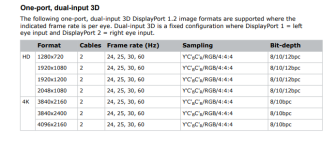
There are a couple of projectors which can handle more then 1080p as 3D. For instance our Christie showroom projector can handle 3D with 4K and 60hz. So i‘m eagerly for madVR to come up with something to utilize that.
You can also apply different calibration (3Dluts) to 3D and also donsome adjustments in the chain, e.g. put the projector at 100% laser when 3D content is received.
 
There are a couple of projectors which can handle more then 1080p as 3D. For instance our Christie showroom projector can handle 3D with 4K and 60hz. So i‘m eagerly for madVR to come up with something to utilize that.
You can also apply different calibration (3Dluts) to 3D and also do some adjustments in the chain, e.g. put the projector at 100% laser when 3D content is received.
Are you saying you can send a signal that is 4k/60 3D and have it recognized as 3D by the Projector? If so how is that signal generated by the source?

Or that the Projector takes a 1080p/24 3D signal from the source, and scales it to 4k/60? The JVC will upscale it to 4k (3840x2160 though, not 4096x2160), but keeps it at 24fps.

Just curious what is different with your showroom setup, as 3D is such an odd, constrained format which creates a variety of limitations.
 
Are you saying you can send a signal that is 4k/60 3D and have it recognized as 3D by the Projector? If so how is that signal generated by the source?

Or that the Projector takes a 1080p/24 3D signal from the source, and scales it to 4k/60? The JVC will upscale it to 4k (3840x2160 though, not 4096x2160), but keeps it at 24fps.

Just curious what is different with your showroom setup, as 3D is such an odd, constrained format which creates a variety of limitations.
We´ve got a Christie M-4K25 with the Mirage 3D option.
The projector can handle 3D up to to 4096x2160@60hz from the source. The signal can be fed using dual/multi HDMI/SDI/DisplayPort cables.
Such a configuration is used in commercial cinema installations.
So in theory, an Envy could create an upscaled and motion interpolated dual 4096/3840x2160 at 48 or 60hz and feed it to the projector using two outputs in parallel. I´ve talked with madshi about it and he said it should be doable. However, it´s pretty low on the priority list...
1731847459486.png
 
Jumping on this thread with Lumagen vs madVR topology question, hope that's ok. :)

There is one obvious difference I see when integrating these devices into the video chain:
  • Lumagen goes: video sources, to Lumagen, to separate outputs to AV receiver/processor and display.
  • madVR goes: video sources, to AV receiver/processor, to madVR, to display.
Are there any advantages/disadvantages to the different topologies?

For example:
  • With Lumagen you need a model with enough current and future inputs, but with madVR you rely on your AV processor/receiver to have enough inputs (which is usually plenty).
  • With madVR is there a risk your AV receiver/processor might be inadvertently manipulating the video signal before it gets to the madVR?
I'm not suggesting one design is better/worse, I'm just curious what the experts have to say on the subject. Thanks!
 
Jumping on this thread with Lumagen vs madVR topology question, hope that's ok. :)

There is one obvious difference I see when integrating these devices into the video chain:
  • Lumagen goes: video sources, to Lumagen, to separate outputs to AV receiver/processor and display.
  • madVR goes: video sources, to AV receiver/processor, to madVR, to display.
Are there any advantages/disadvantages to the different topologies?

For example:
  • With Lumagen you need a model with enough current and future inputs, but with madVR you rely on your AV processor/receiver to have enough inputs (which is usually plenty).
  • With madVR is there a risk your AV receiver/processor might be inadvertently manipulating the video signal before it gets to the madVR?
I'm not suggesting one design is better/worse, I'm just curious what the experts have to say on the subject. Thanks!

Theoretically the Lumagen is capable of faster HDMI switching.
The Lumagen is also capable of creating custom settings for each input for more complicated systems - compensate for different audio sync settings, scaling preferences, anamorphic settings, etc on a source-by-source basis.

There are likely other benefits that go over my head. There are also benefits that are no longer as advantageous as they were 8 years ago when the Radiance Pro was launched, or 20+ years ago when Lumagen got into the business.

That said, more and more people seem to be using only a single input on the Lumagen, allowing their audio processor to do the switching and then run that output into the Lumagen, resulting in the new 4140 model, 1in/1out.
 
Jumping on this thread with Lumagen vs madVR topology question, hope that's ok. :)

There is one obvious difference I see when integrating these devices into the video chain:
  • Lumagen goes: video sources, to Lumagen, to separate outputs to AV receiver/processor and display.
  • madVR goes: video sources, to AV receiver/processor, to madVR, to display.
Are there any advantages/disadvantages to the different topologies?

For example:
  • With Lumagen you need a model with enough current and future inputs, but with madVR you rely on your AV processor/receiver to have enough inputs (which is usually plenty).
  • With madVR is there a risk your AV receiver/processor might be inadvertently manipulating the video signal before it gets to the madVR?
I'm not suggesting one design is better/worse, I'm just curious what the experts have to say on the subject. Thanks!
I have a Lumagen, so I can only speak from my experience with it:

I built my theater room in 2016 and only had a 1080p projector at the time, JVC X-500R.

To reduce equipment heat and lights in the theater room, I installed most equipment (processor, amps, equalizers, etc.) into my son's closet in the adjacent room. One 15 foot HDMI cable was routed to my projector from my Oppo 103D (located in the theater room) while another 50 foot cable was routed to the projector from my Marantz processor in my son's closet to support other electronics such as PS4, Nintendo Switch, etc.

Welp! When I entered the 4K age, the HDMI cable from my Marantz processor was too long to support full 60Hz 4K. I couldn't shorten the length of the cable due to the distances between the rooms. Thankfully, the Lumagen allowed me full 4K 60 Hz video support as it only needed to go 15 ft to the projector while sending the audio to the Marantz projector in the other room.

For me, Lumagen helped me to overcome 4K video signal hurdles without making major changes to my theater room setup. (I have 450 ft of cables going through the attic as they're routed from my theater room to the closet in my son's room. 😬)
 
Theoretically the Lumagen is capable of faster HDMI switching.
The Lumagen is also capable of creating custom settings for each input for more complicated systems - compensate for different audio sync settings, scaling preferences, anamorphic settings, etc on a source-by-source basis.
You can do that with the Envy as well using setting-profiles. But need to switch these settings manually/with a control system.
On the other hand, if you do the source switching via Lumagen, you lose the ability to apply different settings to different sources in the AVR/processor as they all go into the same input.
By having the Lumagen do the source switching, you also lose the AVR/processors OSD (if there is any).

So having a video processor after the AVR/processor only in the video chain seems to be the natural choice for me. And you can do that with both VPs as mentioned.
This has also the advantage that are free with placement of the VP - closer to the projector or closer to the rest of the equipment.
 
You can do that with the Envy as well using setting-profiles. But need to switch these settings manually/with a control system.
On the other hand, if you do the source switching via Lumagen, you lose the ability to apply different settings to different sources in the AVR/processor as they all go into the same input.
By having the Lumagen do the source switching, you also lose the AVR/processors OSD (if there is any).

So having a video processor after the AVR/processor only in the video chain seems to be the natural choice for me. And you can do that with both VPs as mentioned.
This has also the advantage that are free with placement of the VP - closer to the projector or closer to the rest of the equipment.
Seems to me the natural choice would be the processor that allows either placement, depending on user setup (which change over time).
 
Seems to me the natural choice would be the processor that allows either placement, depending on user setup (which change over time).
If it happens to be that after a looong list of requirements it turns out out the only differentiator between two processor would be processor placement options, then i´d agree with you. ;)
 
You can do that with the Envy as well using setting-profiles. But need to switch these settings manually/with a control system.
On the other hand, if you do the source switching via Lumagen, you lose the ability to apply different settings to different sources in the AVR/processor as they all go into the same input.
By having the Lumagen do the source switching, you also lose the AVR/processors OSD (if there is any).

So having a video processor after the AVR/processor only in the video chain seems to be the natural choice for me. And you can do that with both VPs as mentioned.
This has also the advantage that are free with placement of the VP - closer to the projector or closer to the rest of the equipment.
Thinking through this, if you use a Trinnov for switching you can have correct sound levels/processing per input but then you lose the Lumagen setup per input variables. Pick your poison?
 
Thinking through this, if you use a Trinnov for switching you can have correct sound levels/processing per input but then you lose the Lumagen setup per input variables. Pick your poison?
Sort of...
What you can do with the Trinnov is to define dedicated sources with different settings, but have them point to the same HDMI input.
But then, you would need to select the source both in the Lumagen and in the Trinnov.
You can solve this by using a control system, but then you have total freedom anyway and can adjust setting in each component according to the selected source anyway.
 
Back
Top