It often came up in discussion about subtitles that this could get sticky when there are multiple options. So, which one does it choose when there are multiples of the selected language (or if someone didn't configure one in the settings) - something selected by K or the first one and hope it's right (and enforce uniformity of ordering on the store crew?)It is default behaviour. There is currently no setting for a user to disable/enable this function.


-
Thanks for visiting the Kaleidescape Owners' Forum
This forum is for the community of Kaleidescape owners, and others interested in learning about the system, equipment, services, and the company itself.It is run by a group of enthusiastic Kaleidescape owners and dealers purely as a service to this community.
This board is not affiliated in any way with Kaleidescape, Inc.
For official technical support, product information, or customer service, please visit www.kaleidescape.com
You can dismiss this box forever by clicking the "X" in the upper right corner of this message. -
You are currently in "Guest" mode and not logged in with a registered account.
The forum is free to use and most of the forum can be used by guests who are not registered....
... but we strongly encourage you to register for a full account. There is no cost to register for a full account.
Benefits of registering for a full account:
- Participate in the discussions! You must have a registered account to make posts on the forums. You will be able to start your own thread on a topic or question, or you can reply to other threads/discussions.
- Use the "Conversation" feature (known as "private messaging" on other forums) to communicate directly with any of the other users here.
- Access the Files area. The "resources" area of the forum contains many "Favorite Scene" and Script files that can dramatically increase the enjoyment of your Kaleidescape system. Go directly to great scenes in your favorite movies, created by other owners, and add automation to playback of your system with Scripts.
- You won't see this annoying notice at the top of every screen!😊
This box goes away for registered users.
You are using an out of date browser. It may not display this or other websites correctly.
You should upgrade or use an alternative browser.
You should upgrade or use an alternative browser.
KEAOS (Software) UPDATES
- Thread starter cinelife
- Start date

Can someone confirm if the new skip back feature with the subtitles enabled works off any certain button on the current Strato remote? Or is it only in control system commands?
I can confirm it works great mapping the record button of my Halo remote in C4.
I can confirm it works great mapping the record button of my Halo remote in C4.

It does not require a control system.Can someone confirm if the new skip back feature with the subtitles enabled works off any certain button on the current Strato remote? Or is it only in control system commands?
I can confirm it works great mapping the record button of my Halo remote in C4.
The Replay with Subtitles feature will automatically be triggered by:
- reverse trickplay ("rewind") as long as you only jump back 60 seconds or less (doesn't matter whether you initiate it with an IR remote or an IP remote).
- control protocol REPLAY command (pro-tip: you can stack REPLAY commands to jump back more than 10 seconds).
Redraven
Active member
I have a strato v and received the latest update this morning. I'm glad that the my movie tile was added. It makes it really easy to see my collection and download a movie from the screen instead of using the app on my phone. Also, I'm happy the way replay with subtitles was implemented. It only stays on to just the point when you began reversing. That was my concern that it would stay on the entire time. That's reason why I don't like the way it is implemented by Apple TV. In Apple Tv, it'll stay on the entire time until you manually turn it off; even when you switch to other apps such as Pluto.
- Joined
- Nov 27, 2023
- Messages
- 2,462
Can you tell us more about this? I'm very curious about this feature and have yet to see a breakdown anywhere. Is it just a shortcut to the My Movies section of the K Store?I'm glad that the my movie tile was added. It makes it really easy to see my collection and download a movie from the screen instead of using the app on my phone.
Redraven
Active member
Yes, it's a shortcut to the My Movies section. However, there isn't a way to filter between what has been downloaded or not. It just show all movies in your collection.Can you tell us more about this? I'm very curious about this feature and have yet to see a breakdown anywhere. Is it just a shortcut to the My Movies section of the K Store?


Nice update! Well done!
Speaking of new categories, I'd still love to be able to hide categories that I never use - Songs, Scenes, Played...
Speaking of new categories, I'd still love to be able to hide categories that I never use - Songs, Scenes, Played...

They roll them out slowly in groups. Be patient.Still haven’t received my update. Any thoughts?
Ty!They roll them out slowly in groups. Be patient.
Can anyone confirm if there is an intentional feature with subtitle replay that the first time it is used in a movie it pulls up the bottom control bar (I assume to allow selecting a language for subtitles). I am seeing this behavior and just want to make sure it is intentional.

No, that's not part of the feature as far as I know. I just tried it on my player and did not see that behavior. What remote are you using, and how are you backing up (rewind, skip back, etc.?)
Yes, that would be my suspicion. If the skip-back function has been mapped to a button on the remote, it's possible that there's also some additional programming that's been set up within Control4 to do something when that button is pressed. Were you previously using @Techthusiasm's macro? I believe that it pops up the subtitle list.
Do you have a default subtitle language selected in your settings? Isn't there a selection in the player's onscreen interface (not the web interface) for setting a default?Can anyone confirm if there is an intentional feature with subtitle replay that the first time it is used in a movie it pulls up the bottom control bar (I assume to allow selecting a language for subtitles). I am seeing this behavior and just want to make sure it is intentional.

ZeroDarkFuga
Well-known member
- Joined
- Oct 20, 2022
- Messages
- 272
Received this as well and very interested in this info as well @MikeKobb and @J.Green…..thank you!Just got 10.21.1-25944 this AM. Wonder what was in there.
Hard drive activity has been going on for about an hour, always wondered what was going on right after an update.
Some people were not fans of the automatic subtitles when skipping back and wanted a "Turn Off" flag. It would be nice if they added that. I love the auto subtitles myself, but this would be great for those that don't like it.Just got 10.21.1-25944 this AM. Wonder what was in there.
Hard drive activity has been going on for about an hour, always wondered what was going on right after an update.
Just got 10.21.1-25944 this AM. Wonder what was in there.
Hard drive activity has been going on for about an hour, always wondered what was going on right after an update.
Just a couple of bug fixes to the scripts interface in the browser interface and a fix to the Strato V/M playback engine to resolve and issue that could lead to a playback stall after chapter skipping.Received this as well and very interested in this info as well @MikeKobb and @J.Green…..thank you!
Hello everyone. We have commenced the rollout of kOS 10.22.0-26159.
Changes include:
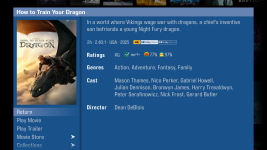
Update to Movie Details Sheet
The movie details sheets in your library of the onscreen display have been updated to align with the onscreen store, including the addition of Rotten Tomatoes and Common Sense Media ratings.
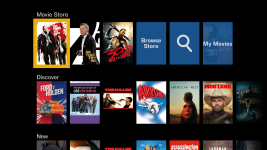
Collections Menu Updates for Strato V, E, and M
The following updates to the collections row menu have been implemented for Strato V, E, and M movie players.
Performance Improvements and Fixes
We have made several behind-the-scenes improvements to enhance performance, including:
Changes include:
Update to Movie Details Sheet
The movie details sheets in your library of the onscreen display have been updated to align with the onscreen store, including the addition of Rotten Tomatoes and Common Sense Media ratings.
Collections Menu Updates for Strato V, E, and M
The following updates to the collections row menu have been implemented for Strato V, E, and M movie players.
- Discover Row: For grouped players, there is now a Discover row in the collections menu that shows a random selection of movies that are downloaded to the system. The content refreshes daily to show different movies in your collection.
- Rentals Row: The Rentals row has been moved above the New row so that you can easily find rented movies that may expire.
- Scripts Row: For systems that have scripts, you will now see them listed in the collections menu with a generic cover and the title of the script overlaid.
Performance Improvements and Fixes
We have made several behind-the-scenes improvements to enhance performance, including:
- Reduced the bandwidth consumption and download time of movie store database updates
- Support for conversion of more HD library content for Strato V, E, and M
- HDMI/HDCP Interoperability Improvements
- Bug fixes