• Thanks for visiting the Kaleidescape Owners' Forum

    This forum is for the community of Kaleidescape owners, and others interested in learning about the system, equipment, services, and the company itself.

    It is run by a group of enthusiastic Kaleidescape owners and dealers purely as a service to this community.

    This board is not affiliated in any way with Kaleidescape, Inc.
    For official technical support, product information, or customer service, please visit www.kaleidescape.com

    You can dismiss this box forever by clicking the "X" in the upper right corner of this message.
  • You are currently in "Guest" mode and not logged in with a registered account.

    The forum is free to use and most of the forum can be used by guests who are not registered....

    ... but we strongly encourage you to register for a full account. There is no cost to register for a full account.

    Benefits of registering for a full account:

    • Participate in the discussions! You must have a registered account to make posts on the forums. You will be able to start your own thread on a topic or question, or you can reply to other threads/discussions.
    • Use the "Conversation" feature (known as "private messaging" on other forums) to communicate directly with any of the other users here.
    • Access the Files area. The "resources" area of the forum contains many "Favorite Scene" and Script files that can dramatically increase the enjoyment of your Kaleidescape system. Go directly to great scenes in your favorite movies, created by other owners, and add automation to playback of your system with Scripts.
    • You won't see this annoying notice at the top of every screen!😊

    It's easy and free to register for the forum. Just click the "Register" button in the upper right corner of this page, and follow the instructions there.

    This box goes away for registered users.

NEWS: Strato V Player Announced

Just an update:
The updated Android version of our mobile app with Dolby Vision support is released and available on the Google Play store.

The update for the iOS version is still wending its way through Apple's approval process but will hopefully be available soon.
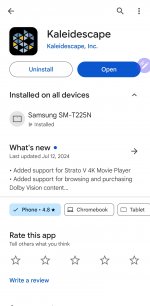
Not seeing the update available. Last updated 7/12. This is on my Samsung S23 Ultra
 

Attachments

  • Screenshot_20240719_160531_Google Play Store.jpg
    Screenshot_20240719_160531_Google Play Store.jpg
    467.6 KB · Views: 12
That's it. I'm not sure why the date is showing wrong, but the most current version is 1.16.0. Maybe the date reflects when we had it staged on the Play Store pending our final testing.
 
That's it. I'm not sure why the date is showing wrong, but the most current version is 1.16.0. Maybe the date reflects when we had it staged on the Play Store pending our final testing.
It's not allowing offering me a chance to update it. The app doesn't look any different when I open it. Is it possible the notes were updated and the actual new app hasn't synced yet? My version says 1.16.0-2733
 
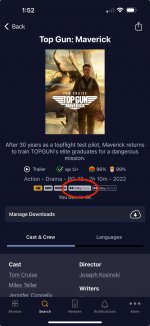
1.16.0 is the most current version. Looks like you're already up to date. Pick a movie like Top Gun: Maverick and view the details. You should see that it shows a Dolby Vision version available now.
 
1.16.0 is the most current version. Looks like you're already up to date. Pick a movie like Top Gun: Maverick and view the details. You should see that it shows a Dolby Vision version available now.
I see that now and the video audio quality sort. Very sharp thanks!
 
1.16.0 is the most current version. Looks like you're already up to date. Pick a movie like Top Gun: Maverick and view the details. You should see that it shows a Dolby Vision version available now.
Is that “IF” you have a Strato V in your system? Because I do not see that version available on my browse movies from IOS app
 
Is that “IF” you have a Strato V in your system? Because I do not see that version available on my browse movies from IOS app
No, this is visible for all customers. If you don't see it, please go to More -> About and make sure that you're running 1.16.0.

IMG_F92E680C8426-1.jpeg
 
I just got my Strato V. I’m in the process of activating it and setting it up. I’m stuck on the activation screen because I want to put in my dealer partner’s referral code name but they’re not getting back to me and I’m so eager to get this thing going!

Can I leave that blank and then contact KScape later to add the referral code so we each get the ($100?) movie store credits? @MikeKobb or @J.Green ?

I tried calling them but every number goes to voicemail. They must be super busy with new V activations! 😊

Hi folks,

I already got things squared away with HarperVision (there was a misunderstanding), but just for others who may see this and have questions: per the Terms & Conditions of the Referral Program, authorized Kaleidescape dealers and Kaleidescape employees are not eligible to participate.

With that being said, this is a good time to remind everybody that we do have a Referral Program! If you have a friend for whom the Strato V may be just the Kaleidescape system they've been waiting for, by all means share your referral code with them. When they use your code while registering their new system, you will each receive $100 in credit for use on the movie store! Details at the link above.
 
Certain titles, such as Gravity, have had different versions. If you downloaded an earlier version (e.g. Theatrical version) that is no longer available in the K-Store, the title will not appear at all in the Strato V Readiness "report" in any of the categories
With gadgetman’s approval we took a look and got to the bottom of this. The reason it doesn’t show up for him is that Gravity is not downloaded to his system. Currently, the readiness report only shows content on your system. We’re looking at adding an option to show all owned content.
 
All the V I ordered this week (including my own) have shipped and should be arriving starting Monday/Tuesday. Super excited! I'm going to run the V in stand-alone mode to get a feel for it and spin out new YouTube content. I have a big video planned for Monday (hopefully) as well. I think I might stick with the V stand-alone only for a while as well to really dig into the experience.
 
Questions on the "new" HD versions.

1. I don't have a V just yet, but the new HD versions play fine on all other Encore systems? (Alto, Strato, ...)

2. Also, seeing I packed my Altos full of HD movies and fine-tuned the storage to less than 1GB of lost space, I suppose re-downloading new HD versions will not automatically go to the system it replaces a movie on, but on the fastest system?

3. And size-wise, are the new versions of the HD movies different sizes compared to their old encoding?
 
I've mentioned it before, and I know I'm not alone in wanting this badly, but a local storage manager / optimizer would really make everyone's life so much easier.

1. Download to the fastest system (as it is now)
2. Local storage manager would allow users to move movies and extras around to other components to optimize use of that storage
3. Delete or re-download things like extras

If all this COULD be done via APIs today (K to confirm), perhaps someone with coding background could just code it to run on an iPad.
 
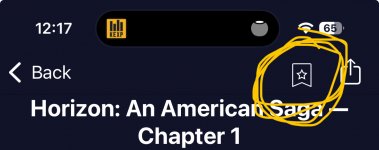
Maybe I’m missing it but can you add titles on the app to your wishlist? If not, this should be added.

All my orders to my clients have shipped as well.
 
Questions on the "new" HD versions.

1. I don't have a V just yet, but the new HD versions play fine on all other Encore systems? (Alto, Strato, ...)

2. Also, seeing I packed my Altos full of HD movies and fine-tuned the storage to less than 1GB of lost space, I suppose re-downloading new HD versions will not automatically go to the system it replaces a movie on, but on the fastest system?

3. And size-wise, are the new versions of the HD movies different sizes compared to their old encoding?

#1: Already answered above, but it’s a huge thread and easy to miss: Yes, the HD versions play fine on all HD-capable Kaleidescape players.
#2: The way updates work is that the new version is downloaded to your system, and once downloaded, the old version is deleted. This keeps the movie available during the update and also allows us to restore things like collection membership. For this reason, especially if your systems are jam-packed full, they are not guaranteed to download to the same component.
#3: They may be different, although not necessarily substantially so.

I've mentioned it before, and I know I'm not alone in wanting this badly, but a local storage manager / optimizer would really make everyone's life so much easier.

1. Download to the fastest system (as it is now)
2. Local storage manager would allow users to move movies and extras around to other components to optimize use of that storage
3. Delete or re-download things like extras

If all this COULD be done via APIs today (K to confirm), perhaps someone with coding background could just code it to run on an iPad.
There are no APIs exposed that would permit this type of third-party app.

A manual storage manager like you describe in #2 is really kind of contrary to the intent of the Kaleidescape system, which is to be as hands-off and automatic as possible. What would be more likely to come would be improvements to the automatic management. It sounds like in your case, an option (or even a default behavior) to save 4K-capable storage for 4K content until other storage is exhausted would probably accomplish what you wanted, correct?

One improvement that is part of the updated HD format is that in most cases, the extras are now bundled into a separate object, so I expect there to be more options for extras in the future.
 
#1: Already answered above, but it’s a huge thread and easy to miss: Yes, the HD versions play fine on all HD-capable Kaleidescape players.
#2: The way updates work is that the new version is downloaded to your system, and once downloaded, the old version is deleted. This keeps the movie available during the update and also allows us to restore things like collection membership. For this reason, especially if your systems are jam-packed full, they are not guaranteed to download to the same component.
#3: They may be different, although not necessarily substantially so.


There are no APIs exposed that would permit this type of third-party app.

A manual storage manager like you describe in #2 is really kind of contrary to the intent of the Kaleidescape system, which is to be as hands-off and automatic as possible. What would be more likely to come would be improvements to the automatic management. It sounds like in your case, an option (or even a default behavior) to save 4K-capable storage for 4K content until other storage is exhausted would probably accomplish what you wanted, correct?

One improvement that is part of the updated HD format is that in most cases, the extras are now bundled into a separate object, so I expect there to be more options for extras in the future.
I’ll add my two cents on what I think would make sense for automatic storage management.

Currently, the device with the fastest download speeds is filled first. This makes sense to get the fastest download speeds, but that storage can fill up.

It would be awesome if the servers could automatically move content to the slower devices over the local network.

For example:
A system with a compact Terra Prime SSD and full size Terra HDD. Downloads go to the SSD first, but content is moved in the background to the Terra HDD to preserve space for fast downloads.

Another example:
A system with a Terra and an Alto. Content would download to the Terra first for fast download, but HD content would be moved to the Alto to preserve fast downloads and space for 4k content.

There are several scenarios that this could be helpful, but I’m sure that would be hard to get right in all situations. It would probably have to be somewhat configurable.

(I also just realized that this is probably not the right place to discuss this. This thread is busy enough as it is.)
 
I’ll add my two cents on what I think would make sense for automatic storage management.

Currently, the device with the fastest download speeds is filled first. This makes sense to get the fastest download speeds, but that storage can fill up.

It would be awesome if the servers could automatically move content to the slower devices over the local network.

For example:
A system with a compact Terra Prime SSD and full size Terra HDD. Downloads go to the SSD first, but content is moved in the background to the Terra HDD to preserve space for fast downloads.

Another example:
A system with a Terra and an Alto. Content would download to the Terra first for fast download, but HD content would be moved to the Alto to preserve fast downloads and space for 4k content.

There are several scenarios that this could be helpful, but I’m sure that would be hard to get right in all situations. It would probably have to be somewhat configurable.

(I also just realized that this is probably not the right place to discuss this. This thread is busy enough as it is.)
I made a separate thread in the relevant forum (y)
 
Back
Top