• Thanks for visiting the Kaleidescape Owners' Forum

    This forum is for the community of Kaleidescape owners, and others interested in learning about the system, equipment, services, and the company itself.

    It is run by a group of enthusiastic Kaleidescape owners and dealers purely as a service to this community.

    This board is not affiliated in any way with Kaleidescape, Inc.
    For official technical support, product information, or customer service, please visit www.kaleidescape.com

    You can dismiss this box forever by clicking the "X" in the upper right corner of this message.
  • You are currently in "Guest" mode and not logged in with a registered account.

    The forum is free to use and most of the forum can be used by guests who are not registered....

    ... but we strongly encourage you to register for a full account. There is no cost to register for a full account.

    Benefits of registering for a full account:

    • Participate in the discussions! You must have a registered account to make posts on the forums. You will be able to start your own thread on a topic or question, or you can reply to other threads/discussions.
    • Use the "Conversation" feature (known as "private messaging" on other forums) to communicate directly with any of the other users here.
    • Access the Files area. The "resources" area of the forum contains many "Favorite Scene" and Script files that can dramatically increase the enjoyment of your Kaleidescape system. Go directly to great scenes in your favorite movies, created by other owners, and add automation to playback of your system with Scripts.
    • You won't see this annoying notice at the top of every screen!😊

    It's easy and free to register for the forum. Just click the "Register" button in the upper right corner of this page, and follow the instructions there.

    This box goes away for registered users.

NEWS: Strato K Movie Player with 8K capability and new "4K Cinematic" full-chroma & higher bitrate support

Interesting....I have 135" and sit ~10ft. Your review has me intrigued. Sadly, that is about as far as it will go....wife will never approve spending another $5k on a player :(
Not intending to start something between you and your wife... but 5k is retail so i am sure you can find a little discount from one of the dealers, plus at least 2k trade-in. just saying
 
Hi,
Can’t wait to see reviews of the Strato K and what our members think.
Out of curiosity I downloaded a 4k Cinematic movie “Avatar Fie and Ash”, which normally would take 12 minutes to download at 1gb, but it sure took 25 minutes.; will Kaleidoscape change their amount of space available to include how many Cinematic 4k movies and adjust the amount of 4k, HD movies etc?
Thanks for all the great informative content.
 
Hi,
Can’t wait to see reviews of the Strato K and what our members think.
Out of curiosity I downloaded a 4k Cinematic movie “Avatar Fie and Ash”, which normally would take 12 minutes to download at 1gb, but it sure took 25 minutes.; will Kaleidoscape change their amount of space available to include how many Cinematic 4k movies and adjust the amount of 4k, HD movies etc?
Thanks for all the great informative content.
I'm pretty sure i read already that the space calculations have already compensated for the Cinematic 4k movies
 
will Kaleidoscape change their amount of space available to include how many Cinematic 4k movies and adjust the amount of 4k, HD movies etc
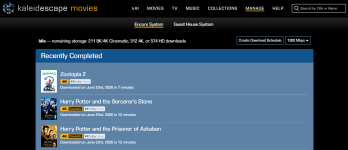
Has already been done.
On the store download page:
1782249634305.png

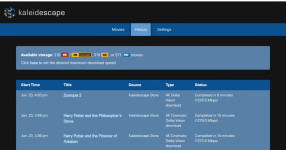
and on the local browser interface History page (you need to be running kOS 26.1.0):
1782249799131.png

It has also been updated on the OSD Settings place but I don't have a screenshot of that handy.
 
Holy moly. @OUTATIME 's Popcorn Ready chrome extension saved my 56 Scenes and most of the structure of my 4 Scripts through the 4K Cinematic conversion. If any of you have Scenes or Scripts you've made, I highly recommend installing Popcorn Ready and have it capture the start times of all your Scenes.

It's also much easier to use, letting you search for films instead of scrolling through your whole list. Just get it!

Screenshot 2026-06-23 at 5.30.22 PM.png
 
Could one of the tech nerds tell me whether MadVR can exploit this? My minimal understanding of full chroma is that it matters more for things like sharp text edges than for video.
 
With regard to the HD re-encoding project, just like the Strato V/E/M, the Strato K will not play a title yet if it still awaits re-encoding. For example the following title will not play yet on the Strato K:


Having said that, out of the over 1000 HD titles in our library, the above title is the only remaining that needs re-encoding. The Strato C does play it of course. So my solution is to continue to keep the Strato C hooked to same display device as the Strato K in order to play it.

Cheers,
Alan
Good to see I'm not the only one waiting for this.

Looking at the individual titles, I believe it's just one of the symphonies that is still awaiting the re-encode. But frustrating to have the box set and not be able to enjoy any of them!
 
Good to see I'm not the only one waiting for this. Looking at the individual titles, I believe it's just one of the symphonies that is still awaiting the re-encode. But frustrating to have the Mahler box set and not be able to enjoy any of them!

Good news! Kaleidescape said that this title was waiting on an update to their conversion tools. That update will be finished shortly, and then titles that depended on that update will be processed, including the Mahler. Assuming that no issues arise, it should be converted and available in the next couple of weeks.
 
Having a friendly *ahem* conversation with someone on another board and ran some interesting numbers. I'm tracking 130 of the "4K Cinematic" titles on my crazy spreadsheet that have comparable 4K discs already on the market. Napkin math says average video bitrate across the 4K Cinematic titles is easily over 103 mbps. Relatively tight grouping and they're all rather consistent (talking +/- 6 mbps for the most part). 🤓 Now the 4K discs? No kidding 58.21 mbps average video bitrate (including any DV enhancement layers) and they're all over the place at 36.53-81.93 mbps. 😬 The bar chart marketing put out is accurate. If anything they might have given up a bit when they put discs at 60 mbps. :p
 
Was scheduled to get mine around 10AM-2PM today but...

Booooo.gif
origin_6a6418.gif


🤬

Last scan was Santa Rosa NM around lunchtime today. I'm sure FedEx will figure it out overnight. 😳

Oh...I sent in my first requests: Total Recall (2012) and Battle Los Angeles. Figured if they could do "The Tourist" they could get me a couple of my favorite old school 4K's in cinematic!
 
Interesting....I have 135" and sit ~10ft. Your review has me intrigued. Sadly, that is about as far as it will go....wife will never approve spending another $5k on a player :(

Don't spend 5k. Sell your V and spend a couple K (on a K!)

Then when she's not looking just install it in the V's place and it's like it was always there! :p
 
Could one of the tech nerds tell me whether MadVR can exploit this? My minimal understanding of full chroma is that it matters more for things like sharp text edges than for video.
Yes, any Envy can handle 4:4:4.

EDIT: Let me add some more info to that. In the following a quote from the developer from back early 2022. The Envy does full 4:4:4 processing since the very beginning:
"Pipeline bitdepth is an interesting topic. A pipeline can use either integer or floating point math, and you can have a pipeline in either 4:2:2 or 4:4:4, and you can count bitdepth either per component or per pixel. Envy's pipeline is full 4:4:4, from start to finish. If the input signal is 4:2:2 or 4:2:0, Envy always upscales chroma to 4:4:4 in the first step, usually using AI chroma upscaling. If you want to see some bitdepth per pixel numbers, here you go:

8bit per component 4:2:2 = 16bit per pixel
10bit per component 4:2:2 = 20bit per pixel
12bit per component 4:2:2 = 24bit per pixel
16bit per component 4:2:2 = 32bit per pixel
16bit per component 4:4:4 = 48bit per pixel (Envy temporary buffers)
32bit per component 4:4:4 = 96bit per pixel (Envy calculations)

It could be argued that the bitdepth only needs to be high enough to not introduce any banding (or other) artifacts, so maybe Envy is going overboard here. But that's just the native bitdepth Direct3D GPUs are working in, so it doesn't cost us anything. Now if you'd ask me how many bits a video processing pipeline needs to have, I don't really know. But surely it doesn't hurt to be on the safe side."
 
Last edited:
Back
Top