• Thanks for visiting the Kaleidescape Owners' Forum

    This forum is for the community of Kaleidescape owners, and others interested in learning about the system, equipment, services, and the company itself.

    It is run by a group of enthusiastic Kaleidescape owners and dealers purely as a service to this community.

    This board is not affiliated in any way with Kaleidescape, Inc.
    For official technical support, product information, or customer service, please visit www.kaleidescape.com

    You can dismiss this box forever by clicking the "X" in the upper right corner of this message.
  • You are currently in "Guest" mode and not logged in with a registered account.

    The forum is free to use and most of the forum can be used by guests who are not registered....

    ... but we strongly encourage you to register for a full account. There is no cost to register for a full account.

    Benefits of registering for a full account:

    • Participate in the discussions! You must have a registered account to make posts on the forums. You will be able to start your own thread on a topic or question, or you can reply to other threads/discussions.
    • Use the "Conversation" feature (known as "private messaging" on other forums) to communicate directly with any of the other users here.
    • Access the Files area. The "resources" area of the forum contains many "Favorite Scene" and Script files that can dramatically increase the enjoyment of your Kaleidescape system. Go directly to great scenes in your favorite movies, created by other owners, and add automation to playback of your system with Scripts.
    • You won't see this annoying notice at the top of every screen!😊

    It's easy and free to register for the forum. Just click the "Register" button in the upper right corner of this page, and follow the instructions there.

    This box goes away for registered users.

NEWS: Strato K Movie Player with 8K capability and new "4K Cinematic" full-chroma & higher bitrate support

$4,995 is correct. The Strato V remains available and is now priced at $3,995.
Just noticed that in the UK The K is priced at £4500. That's approx a $1000/20% more currently. That follows the trend I guess but it still sucks :)

I think they should just give them away for free obviously ;) .... but then I still believe in Santa too ;)
 
But that wouldn´t tell you the chroma of the content (which I believe was the reason behind the question), just what the Strato is outputting to the Lumagen, right? So if you set your Strato C to output 444, it would even now report 444.
Agree. It shows what the player is outputting. There is nothing I am aware of telling you what the file actually is.
 
Agree. It shows what the player is outputting. There is nothing I am aware of telling you what the file actually is.
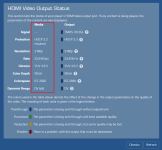
The HDMI Capabilities tool that is available in the system browser interface shows both what the media file's metadata is and what the player is outputting:
1782322709440.png
 
Last edited:
Running a MadVR Extreme MK2 with JVC NZ9 (soon to be Christie Mk25). Even though the MK2 has 2.0 HDMI input, on paper there seems to be no reason to upgrade to the MK3 (I am not a gamer). Does anyone have real world experience with this? Seems like the MK2 can handle the Strato K????
Imho, Strato K is just the precursor for bigger things down the line. You don’t want to second guess yourself each time. Therefore I have the extreme MK3 on order. Buy once, cry once. I’m moving from the Epson LS12000 to the JVC Nz800, as I got a killer deal on a mint (less than 100 hours used) NZ800. For existing users i think MK2 should be fine, but for new buyers, I would recommend at least getting the MK2 with premium pack or MK3.
 
The HDMI Capabilities tool that is available in the system browser interface shows both what the media files metadata is and what the player is outputting:
View attachment 10493
Fantastic! I know in the player setup there is an auto option for chroma format but I imagine that uses the EDID from the display to chose which space to output. Would it be possible to have an option to output whatever the file is in natively?
 
I know in the player setup there is an auto option for chroma format but I imagine that uses the EDID from the display to chose which space to output. Would it be possible to have an option to output whatever the file is in natively?
I'm not clear on whether your asking about a setting that will output the movie using the same chroma format (since that's what was first being talked about) or a setting that will output the movie using the same colorspace (since you say, "...chose which space to output"). Either way, if all of the advanced video options are left on "Automatic" and you set the player's video output behaviour to "Allow display mode changes (use external scaler)" then the movie will be output using the original chroma and colorspace.
 
I'm not clear on whether your asking about a setting that will output the movie using the same chroma format (since that's what was first being talked about) or a setting that will output the movie using the same colorspace (since you say, "...chose which space to output"). Either way, if all of the advanced video options are left on "Automatic" and you set the player's video output behaviour to "Allow display mode changes (use external scaler)" then the movie will be output using the original chroma and colorspace.
I am only talking about chroma, sorry for the confusion. I was under the impression from talking to your engineering side before that auto would output based on what the display EDID requests. I’ll have to test this out when I’m back home. Thanks!
 
I am only talking about chroma, sorry for the confusion. I was under the impression from talking to your engineering side before that auto would output based on what the display EDID requests. I’ll have to test this out when I’m back home. Thanks!
Thanks for the clarification.

An Automatic setting for Preferred Chroma will, indeed, choose an appropriate chroma value based on the EDID supplied by the display assuming that you've left the top-level Video Output behaviour set to "Minimize display mode changes" or "Allow display mode changes". But if you set it to "Allow display mode changes (use external scaler)" then the video will be output as it is encoded in the media file.
 
Thanks for the clarification.

An Automatic setting for Preferred Chroma will, indeed, choose an appropriate chroma value based on the EDID supplied by the display assuming that you've left the top-level Video Output behaviour set to "Minimize display mode changes" or "Allow display mode changes". But if you set it to "Allow display mode changes (use external scaler)" then the video will be output as it is encoded in the media file.
That is how I always have it set so thanks for the info!!
 
The HDMI Capabilities tool that is available in the system browser interface shows both what the media file's metadata is and what the player is outputting:
View attachment 10493
Exactly what I was wondering about. Glad to see it's still there for us nerds! (y)

Also glad to hear "external scaler" combined with auto modes still sticks to native output when possible.
 
Last edited:
The HDMI Capabilities tool that is available in the system browser interface shows both what the media file's metadata is and what the player is outputting:
Now someone needs to volunteer to review all the 4K Cinematic releases in the browser to document their chromas. I know there are people here who love Excel!
 
I never mentioned extreme in my post.
Hm, you mentioned in your post you have an Extreme MK3 incoming, then mentioned "get the MK2 with permium pack or MK3". Quoting a post where the user mentioned he has an Extreme MK2. Actually, it was all about the Extreme. ;)
Anyway, seems to be a misunderstanding.
 
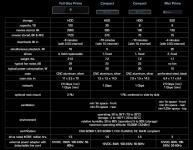
Not sure if this has already been reported, but something seems wrong with K's hard drive comparison chart for the new movie format. Their new column for how many movies are stored in 8K and 4KC (4K Cinematic) doesn't seem correct for the 30TB Compact Terra Server:
1782331828164.png

120TB drive: Stores 2000 4K movies or 1125 8K/4KC movies (the drive holds 56.25% of the number of 8K/4KC movies compared to 4K movies)
8TB drives: Stores 130 4K movies or 75 8K/4KC movies (the drive holds 57.7% of the number of 8K/4KC movies compared to 4K movies)
but the same analysis for the 30TB drive:
30TB drive: Stores 500 4K movies or 375 8K/4KC movies (the drive holds 75% of the number of 8K/4KC movies compared to 4K movies)

If the relative numbers shown for the 8TB and 120TB are applied to the 30TB drive, it should hold 281 to 288 8k/4KC movies not 375.
 
Hm, you mentioned in your post you have an Extreme MK3 incoming, then mentioned "get the MK2 with permium pack or MK3". Quoting a post where the user mentioned he has an Extreme MK2. Actually, it was all about the Extreme. ;)
Anyway, seems to be a misunderstanding.
Yeah, there was no mention of extreme mk2 in my recommendation to the member, i thought that was understood. You need to stop reading posts too deeply and chill out. (Insert wink emoji).
 
Could one of the tech nerds tell me whether MadVR can exploit this? My minimal understanding of full chroma is that it matters more for things like sharp text edges than video
 
Back
Top