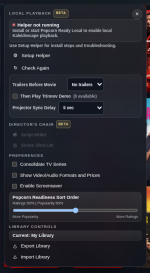
I appreciate the work...I know dealing with Linux can be a problem.
I downloaded 3.0.1 and it appears to have installed but still getting "Helper not running". I have restarted Chrome several times. Did the Check again a few times as well.
Code:
./install-native-host.sh
Installed Popcorn Ready Local Helper at /home/rafael/.local/share/popcorn-ready-local/helper/popcorn-ready-local
Registered Chrome Native Messaging manifests for user scope.
View attachment 10277
Are you running the Flatpak version of Google Chrome? If so, try to run the command below to copy the native-messaging manifest into the Flatpak Chrome config area and grant the sandbox access to the helper binary:
APP_ID=com.google.Chrome
HOST=com.popcornready.local
HELPER_DIR="$HOME/.local/share/popcorn-ready-local/helper"
HELPER="$HELPER_DIR/popcorn-ready-local"
SOURCE_MANIFEST="$HOME/.config/google-chrome/NativeMessagingHosts/$HOST.json"
FLATPAK_MANIFEST_DIR="$HOME/.var/app/$APP_ID/config/google-chrome/NativeMessagingHosts"
FLATPAK_MANIFEST="$FLATPAK_MANIFEST_DIR/$HOST.json"
mkdir -p "$FLATPAK_MANIFEST_DIR"
cp "$SOURCE_MANIFEST" "$FLATPAK_MANIFEST"
flatpak override --user --filesystem="$HELPER_DIR:ro" "$APP_ID"
echo "== Flatpak manifest =="
cat "$FLATPAK_MANIFEST"
echo "== Helper binary =="
ls -l "$HELPER"
file "$HELPER"
flatpak kill "$APP_ID" 2>/dev/null || true
echo "Now fully reopen Google Chrome, then click Check Again in Popcorn Ready."
Afterwards, If that still says “Helper not running” after you click Check Again, can you then run this debug bundle and send the output:
APP_ID=com.google.Chrome
HOST=com.popcornready.local
HELPER="$HOME/.local/share/popcorn-ready-local/helper/popcorn-ready-local"
echo "== Flatpak app =="
flatpak info "$APP_ID" | sed -n '1,80p'
echo "== Flatpak permissions =="
flatpak info --show-permissions "$APP_ID"
echo "== Manifest locations =="
for p in \
"$HOME/.config/google-chrome/NativeMessagingHosts/$HOST.json" \
"$HOME/.var/app/$APP_ID/config/google-chrome/NativeMessagingHosts/$HOST.json"
do
echo "--- $p"
[ -f "$p" ] && ls -l "$p" && cat "$p" || echo "missing"
done
echo "== Can sandbox see manifest and helper? =="
flatpak run --command=sh "$APP_ID" -c '
echo "HOME=$HOME"
echo "XDG_CONFIG_HOME=$XDG_CONFIG_HOME"
echo "--- manifest"
ls -l "$XDG_CONFIG_HOME/google-chrome/NativeMessagingHosts/com.popcornready.local.json" 2>&1
cat "$XDG_CONFIG_HOME/google-chrome/NativeMessagingHosts/com.popcornready.local.json" 2>&1
echo "--- helper"
ls -l "'"$HELPER"'" 2>&1
"'"$HELPER"'" -h 2>&1 | head -20
'