

-
Thanks for visiting the Kaleidescape Owners' Forum
This forum is for the community of Kaleidescape owners, and others interested in learning about the system, equipment, services, and the company itself.It is run by a group of enthusiastic Kaleidescape owners and dealers purely as a service to this community.
This board is not affiliated in any way with Kaleidescape, Inc.
For official technical support, product information, or customer service, please visit www.kaleidescape.com
You can dismiss this box forever by clicking the "X" in the upper right corner of this message. -
You are currently in "Guest" mode and not logged in with a registered account.
The forum is free to use and most of the forum can be used by guests who are not registered....
... but we strongly encourage you to register for a full account. There is no cost to register for a full account.
Benefits of registering for a full account:
- Participate in the discussions! You must have a registered account to make posts on the forums. You will be able to start your own thread on a topic or question, or you can reply to other threads/discussions.
- Use the "Conversation" feature (known as "private messaging" on other forums) to communicate directly with any of the other users here.
- Access the Files area. The "resources" area of the forum contains many "Favorite Scene" and Script files that can dramatically increase the enjoyment of your Kaleidescape system. Go directly to great scenes in your favorite movies, created by other owners, and add automation to playback of your system with Scripts.
- You won't see this annoying notice at the top of every screen!😊
This box goes away for registered users.
You are using an out of date browser. It may not display this or other websites correctly.
You should upgrade or use an alternative browser.
You should upgrade or use an alternative browser.
Popcorn Ready - Chrome extension for Kaleidescape users
- Thread starter OUTATIME
- Start date

Question for you - I apologize if you've already covered this.
On the main page, there's a button "Recommendations". When I hit this button, it always brings up the same recommendations, no matter where I've set the slider between "More Popularity" and "More Ratings". Also, despite having "Personal Library" selected, it chooses movies I don't own. Can you explain what the button "Recommendations" does?
I'm loving this extension. Keep up the great work!
On the main page, there's a button "Recommendations". When I hit this button, it always brings up the same recommendations, no matter where I've set the slider between "More Popularity" and "More Ratings". Also, despite having "Personal Library" selected, it chooses movies I don't own. Can you explain what the button "Recommendations" does?
I'm loving this extension. Keep up the great work!
The slider is specifically for the custom “Pocorn Readiness” sort order.Question for you - I apologize if you've already covered this.
On the main page, there's a button "Recommendations". When I hit this button, it always brings up the same recommendations, no matter where I've set the slider between "More Popularity" and "More Ratings". Also, despite having "Personal Library" selected, it chooses movies I don't own. Can you explain what the button "Recommendations" does?
I'm loving this extension. Keep up the great work!
The recommendations button is based on your full library so that behavior is expected.
But if you want to see recommendations just based off one specific movie, then click the movie title in the inspector window that shows the movie details.
Hope that helps!
The recommendations are based off TMDB and I would say that they are just OK, in my opinion. It will only show you movies you don't already own that are available on Kaleidescape. The idea is that they are potential movies to buy.
And if you’re just looking for a random movie from your exiting personal library to watch, then you can apply whatever filters you want to narrow the list down and then click the Random button.
And if you’re just looking for a random movie from your exiting personal library to watch, then you can apply whatever filters you want to narrow the list down and then click the Random button.
Last edited:
Version 2.0 submitted to the store. The old legacy cards view is officially gone and the rest of the user interface has been updated to better match the Wall view. Many other improvements as well. As always, please let me know if you have any issues after you get the update.
Attachments

Decelerate
Active member

Hmmmm....that is a strange one. Are you using Chrome or an alternative browser? Here's what mine looks like on Chrome:Looks good. The text for library controls is the same color as the background and is thus not viewable.
See below.

Decelerate
Active member
Hmmmm....that is a strange one. Are you using Chrome or an alternative browser? Here's what mine looks like on Chrome:
View attachment 9887
Weird. Using chrome on a Mac.
Figured it out. You don't have dark mode enabled in Chrome or on your Mac and I do. I will get it fixed so the text is always light on the dark background.Weird. Using chrome on a Mac.
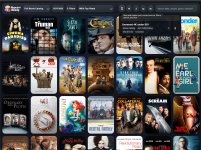
Another big update in version 2.1 which is now in the Chrome store! The toolbar has been reworked and should now also scale better to smaller windows, such as iPad size resolutions. The big new feature is saved views which take into account your data source, filters, sort order, and even search terms and allows you to save a view and name it. Then you can run that view later! In my example, I made a view for unowned 4K movies in the Kaleidescape catalog that are currently under $10 and have them ordered by IMDb rating. Also, made a new word mark version of the logo and put that in the top left for branding and that is now the button to get random movie selections to watch. Enjoy!

Don678
Active member
- Joined
- Aug 3, 2024
- Messages
- 36
IMDb ratings and links coming in 1.6.1 later today along with sorts/filters by IMDb ratings...
View attachment 9831
I love being able to sort by IMDB ratings and being able to go to the site with a click. What a great addition. Thank you.
Your app is sooo AWSOME!!
Every update you make is fun to checkout.
I have a request, that I realize may be difficult or impossible. I’m still one of the users that have a legacy Premiere system, with DVDs and BluRays. Is there any way to incorporate those movies?
Also, I know you can go to your chrome browser and do a random selection from a collection. Is there anyway to bring that functionality to the app directly?
Thanks again, and keep up the great work!
Dave Little
Every update you make is fun to checkout.
I have a request, that I realize may be difficult or impossible. I’m still one of the users that have a legacy Premiere system, with DVDs and BluRays. Is there any way to incorporate those movies?
Also, I know you can go to your chrome browser and do a random selection from a collection. Is there anyway to bring that functionality to the app directly?
Thanks again, and keep up the great work!
Dave Little
I know very little about the legacy systems. Are you able to see those titles at all via the Kaleidescape movie store website? If not, how can you see that list?Your app is sooo AWSOME!!
Every update you make is fun to checkout.
I have a request, that I realize may be difficult or impossible. I’m still one of the users that have a legacy Premiere system, with DVDs and BluRays. Is there any way to incorporate those movies?
Also, I know you can go to your chrome browser and do a random selection from a collection. Is there anyway to bring that functionality to the app directly?
Thanks again, and keep up the great work!
Dave Little
I’m not currently talking directly to the equipment in your house although I would love to be able to play movies from Popcorn Ready similar to how the old Second Screen app works.
There's a web browser interface to the Premiere system, similar to the one for the Strato system. On the TV/screen, Kaleidescape app, and second screen app, all of the titles are incorporated into one interface.
I'm guessing since you asked that question, you don't have an older Premiere system, so I'm guessing it would be almost impossible to add it to your interface.
Thanks again for all of the hard work on your app!
I'm guessing since you asked that question, you don't have an older Premiere system, so I'm guessing it would be almost impossible to add it to your interface.
Thanks again for all of the hard work on your app!
I assume you can only access it from within your network? I checked the SCP API Kaleidescape has on their website but it doesn't have functionality to get your movie list or collections. I would need access to the API that the Second Screen app uses.
Last edited:
Decelerate
Active member
Would it be possible to sort by runtime?
Yes, I'll push that out today. ThanksWould it be possible to sort by runtime?
I haven't posted any updates in a while, but I have been working a lot on a huge v3 update for Popcorn Ready. Local playback controls, collection management, user scene creation, user scene archive (to help you rebuild them when movie updates remove them), script creation, etc. I'm not exactly sure yet when I'll get wrapped up and finish testing but I'll make a new post with some release notes when I'm ready.
Special thanks to @MikeKobb for helping me get approved for Kaleidescape API access to make these features possible.
Special thanks to @MikeKobb for helping me get approved for Kaleidescape API access to make these features possible.
I just switched from Chrome to Firefox for a variety of reasons, and it's working out well. The only downside is that I am no longer able to use Popcorn Ready. I suspect the answer is no, but is there any chance you might be able to implement this down the road?