• Thanks for visiting the Kaleidescape Owners' Forum

    This forum is for the community of Kaleidescape owners, and others interested in learning about the system, equipment, services, and the company itself.

    It is run by a group of enthusiastic Kaleidescape owners and dealers purely as a service to this community.

    This board is not affiliated in any way with Kaleidescape, Inc.
    For official technical support, product information, or customer service, please visit www.kaleidescape.com

    You can dismiss this box forever by clicking the "X" in the upper right corner of this message.
  • You are currently in "Guest" mode and not logged in with a registered account.

    The forum is free to use and most of the forum can be used by guests who are not registered....

    ... but we strongly encourage you to register for a full account. There is no cost to register for a full account.

    Benefits of registering for a full account:

    • Participate in the discussions! You must have a registered account to make posts on the forums. You will be able to start your own thread on a topic or question, or you can reply to other threads/discussions.
    • Use the "Conversation" feature (known as "private messaging" on other forums) to communicate directly with any of the other users here.
    • Access the Files area. The "resources" area of the forum contains many "Favorite Scene" and Script files that can dramatically increase the enjoyment of your Kaleidescape system. Go directly to great scenes in your favorite movies, created by other owners, and add automation to playback of your system with Scripts.
    • You won't see this annoying notice at the top of every screen!😊

    It's easy and free to register for the forum. Just click the "Register" button in the upper right corner of this page, and follow the instructions there.

    This box goes away for registered users.

Popcorn Ready - Chrome extension for Kaleidescape users

It is just a way to sort. I can change it to A-Z like you have set and same thing.
Any chance you could try another browser like Chrome or another variant that allows Chrome extensions and see if it works in that one? I'm drawing a blank on what could cause that behavior for you but I'm really curious. I'll try downloading Arc myself tomorrow to see how it behaves for me.
 
@J.Chitwood I wonder if maybe a blocker in Arc is the cause. Below is what Gemini suggested trying. Please let me know if you give this a try.

How to Disable Shields in Arc​

Arc hides the URL bar by default to keep things clean, so the user has to reveal it first.

  1. Reveal the Command Bar: Have the user open your movie display page and press Cmd + L (Mac) or Ctrl + L(Windows) to bring up the URL bar at the top of the screen.
  2. Open Site Controls: Click the Site Control icon located on the left or right side of the URL. (It usually looks like a padlock or a set of adjustment sliders).
  3. Toggle the Blocker: In the menu that drops down, look for a toggle that says "Block ads on this site" or click into "Site Settings" to disable the shields.
  4. Refresh: Reload the extension page and see if scrolling down triggers the next 40 movies.
 
@DLCPhoto and @Don678 Those requests should be in now.

Popcorn Ready 1.4.3

Version 1.4.3 focuses on Wall-mode polish, richer media details, and smoother browsing.

Highlights:

  • Added direct Rotten Tomatoes links from critic and audience score badges (this may not be perfect as it relies on title matching)
  • Expanded media badges to show SDR, HDR, Dolby Vision, and Dolby Atmos
  • Improved 4K handling so titles can show multiple 4K format variants when available
  • Replaced the old quality checkboxes with a simpler Minimum Quality filter
  • Added arrow-key navigation across the Wall while keeping the inspector open
  • Refined the Wall inspector layout for more consistent rows and cleaner chip organization
  • Improved fast Wall scrolling so posters load more reliably during rapid browsing
 
In case it helps anyone else out, I’ve managed to get Popcorn Ready onto my Apple iPad, as I don’t use a laptop or desktop. Apple block Chrome extensions, but a quick google search led me to the Orion browser, which permits the same. So I downloaded Orion (from the Apple App Store), navigated to the Chrome Store in the Orion browser, installed the Popcorn ready extension, then navigated to My Movies in the Kstore, and selected the extension from the … (three dots button) in the top right corner. A new web-page opens and bingo, all in working order!!

So I can now browse Popcorn Ready via the iPad any where I like, including in front of the cinema screen. Winner, winner, chicken dinner as we say in the UK 😃

Many thanks @OUTATIME, great app, I really appreciate your efforts.
 
In case it helps anyone else out, I’ve managed to get Popcorn Ready onto my Apple iPad, as I don’t use a laptop or desktop. Apple block Chrome extensions, but a quick google search led me to the Orion browser, which permits the same. So I downloaded Orion (from the Apple App Store), navigated to the Chrome Store in the Orion browser, installed the Popcorn ready extension, then navigated to My Movies in the Kstore, and selected the extension from the … (three dots button) in the top right corner. A new web-page opens and bingo, all in working order!!

So I can now browse Popcorn Ready via the iPad any where I like, including in front of the cinema screen. Winner, winner, chicken dinner as we say in the UK 😃

Many thanks @OUTATIME, great app, I really appreciate your efforts.
That’s awesome! Great idea. Curious how well the wall mode works with touch?
 
Your work is fantastic and greatly appreciated. I love the extension and it is the only reason I use Chrome.

Quick questions: The movies, when sorted from newest purchase to last purchased, are missing my last (approx) 15 purchases from the K-Store. Anything I should be doing so that it refreshes?

And, in wall view, I am not able to scroll the webpage so that I can see more movies. Any advice?
 
Last edited:
Your work is fantastic and greatly appreciated. I love the extension and it is the only reason I use Chrome.

Quick questions: The movies, when sorted from newest purchase to last purchased, are missing my last (approx) 15 purchases from the K-Store. Anything I should be doing so that it refreshes?

And, in wall view, I am not able to scroll the webpage so that I can see more movie. Any advice?
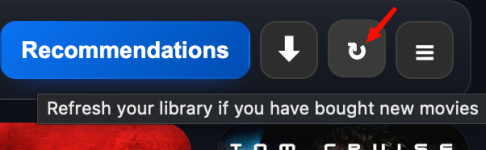
Click the reload icon in top right corner to fetch your library after you have bought titles. I’ll also check as that should really check every day at least to compare your most recently purchased title in your cached library vs store. If it’s not already doing that I will make sure it does.
 
Your work is fantastic and greatly appreciated. I love the extension and it is the only reason I use Chrome.

Quick questions: The movies, when sorted from newest purchase to last purchased, are missing my last (approx) 15 purchases from the K-Store. Anything I should be doing so that it refreshes?

And, in wall view, I am not able to scroll the webpage so that I can see more movie. Any advice?
Hmmmm....you're the second user that has mentioned only seeing the initial page of movies on wall view and not being able to scroll. You're the first using Chrome though. Curious if you also see the disclaimer footer at the bottom of the page past those initial 40 or so movies even though there may be hundreds more to show below? Could you please post or DM me a screenshot of your page? I had suggested to the other user it may be related to something like an ad blocker modifying how the page works....but I'm wondering now if it's something different maybe related to you guys having more vertical screen real estate to work with than I've been testing with. I'm going to make a quick change in the code and post an update in a few minutes.
 
I was able to recreate this wall scrolling unavailable bug that both @gadgetman and @J.Chitwood reported. Thank you both!!! I zoomed out on my page so my wall had more screen real estate to work with. If the page was able to display a full 40 movies completely and footer it never entered into endless scrolling mode. I made the bug fix and tested and it should work for you when I get 1.4.4 uploaded soon. I'm going to also add the occasional automatic library freshness check so that if you've purchased new movies they will automatically end up in your library in Popcorn Ready eventually. But if you've ever bought something and want to refresh immediately, just click the reload button:
1774312692509.png
 
I was able to recreate this wall scrolling unavailable bug that both @gadgetman and @J.Chitwood reported. Thank you both!!! I zoomed out on my page so my wall had more screen real estate to work with. If the page was able to display a full 40 movies completely and footer it never entered into endless scrolling mode. I made the bug fix and tested and it should work for you when I get 1.4.4 uploaded soon. I'm going to also add the occasional automatic library freshness check so that if you've purchased new movies they will automatically end up in your library in Popcorn Ready eventually. But if you've ever bought something and want to refresh immediately, just click the reload button:
View attachment 9710
Works like a charm! Thank you
 
That’s awesome! Great idea. Curious how well the wall mode works with touch?
It works absolutely fine in terms of navigation and functionality. However, as you scroll the movie tiles flash off (very briefly) and on again. And if you scroll too quickly the page crashes and hangs before reloading (slowly). So I’ve found scrolling gently is the best option to avoid that. Let me know if you need any more details. Many thanks.
 
It works absolutely fine in terms of navigation and functionality. However, as you scroll the movie tiles flash off (very briefly) and on again. And if you scroll too quickly the page crashes and hangs before reloading (slowly). So I’ve found scrolling gently is the best option to avoid that. Let me know if you need any more details. Many thanks.
That’s helpful. I will see what I can do to try to avoid the flashing. It’s a lot of high resolution posters so I really need to optimize how it loads.
 
It works absolutely fine in terms of navigation and functionality. However, as you scroll the movie tiles flash off (very briefly) and on again. And if you scroll too quickly the page crashes and hangs before reloading (slowly). So I’ve found scrolling gently is the best option to avoid that. Let me know if you need any more details. Many thanks.
I just submitted version 1.4.7 with better optimizations for initial page loading, caching , and scrolling. Please let me know how this works on your iPad when you get a chance after you get the upgrade. Thanks for the feedback!
 
I just submitted version 1.4.7 with better optimizations for initial page loading, caching , and scrolling. Please let me know how this works on your iPad when you get a chance after you get the upgrade. Thanks for the feedback!
Hi, sorry for the delayed response, I had trouble getting Orion to update the Popcorn Ready Chrome extension. I ended up deleting the installed version (1.4.3) and reinstalling the latest version (1.5.0) from the Chrome Store onto my iPad. It doesn’t seem to pull through automatically, or may be I’m missing a setting? Anyways. the scrolling on Wall view is significantly improved, with virtually no “flashing’ of the tiles and no crashing of the page, including at the end of the movie list. Fab, many thanks!
 
v1.5.4 now has an updated recommendations view if you're in wall mode that matches that look better.

@Rihoward If you get a chance to manually upgrade, I'd love to hear how well this view works on the iPad. Both the recommendations wall view and the finale of the random movie night mode use larger posters and autoload the inspector window on the right. On laptop/desktop you can use arrow keys to move between selected movies. I'm not sure how this will look and work on the smaller touch screen of iPad.
 
In case it helps anyone else out, I’ve managed to get Popcorn Ready onto my Apple iPad, as I don’t use a laptop or desktop. Apple block Chrome extensions, but a quick google search led me to the Orion browser, which permits the same. So I downloaded Orion (from the Apple App Store), navigated to the Chrome Store in the Orion browser, installed the Popcorn ready extension, then navigated to My Movies in the Kstore, and selected the extension from the … (three dots button) in the top right corner. A new web-page opens and bingo, all in working order!!

So I can now browse Popcorn Ready via the iPad any where I like, including in front of the cinema screen. Winner, winner, chicken dinner as we say in the UK 😃

Many thanks @OUTATIME, great app, I really appreciate your efforts.
What does the icon look like on the app store for Orion browser? I did a search and 4 or 5 different apps popped up. Is it this one:

Orion.jpg
 
@OUTATIME – as a classic Popcorn Ready user, I didn't realize that it was now integrated on the K store directly until a few seconds ago when I noticed it in the store navigation! Holy moly, that's fantastic! Congratulations!!!!@!!!!
 
Back
Top