

-
Thanks for visiting the Kaleidescape Owners' Forum
This forum is for the community of Kaleidescape owners, and others interested in learning about the system, equipment, services, and the company itself.It is run by a group of enthusiastic Kaleidescape owners and dealers purely as a service to this community.
This board is not affiliated in any way with Kaleidescape, Inc.
For official technical support, product information, or customer service, please visit www.kaleidescape.com
You can dismiss this box forever by clicking the "X" in the upper right corner of this message. -
You are currently in "Guest" mode and not logged in with a registered account.
The forum is free to use and most of the forum can be used by guests who are not registered....
... but we strongly encourage you to register for a full account. There is no cost to register for a full account.
Benefits of registering for a full account:
- Participate in the discussions! You must have a registered account to make posts on the forums. You will be able to start your own thread on a topic or question, or you can reply to other threads/discussions.
- Use the "Conversation" feature (known as "private messaging" on other forums) to communicate directly with any of the other users here.
- Access the Files area. The "resources" area of the forum contains many "Favorite Scene" and Script files that can dramatically increase the enjoyment of your Kaleidescape system. Go directly to great scenes in your favorite movies, created by other owners, and add automation to playback of your system with Scripts.
- You won't see this annoying notice at the top of every screen!😊
This box goes away for registered users.
You are using an out of date browser. It may not display this or other websites correctly.
You should upgrade or use an alternative browser.
You should upgrade or use an alternative browser.
Popcorn Ready - Chrome extension for Kaleidescape users
- Thread starter OUTATIME
- Start date

- Joined
- Dec 4, 2024
- Messages
- 401
Thank you!@OUTATIME - Popcorn Ready is great!
Would you be willing/able to add a way to manually mark movies as "Watched" or "Unwatched"? Sometimes I would like to filter just the movies I bought but haven't watched yet.
Thanks!
I've thought about managing a watchlist but there are some limitations and lots of overlap with the watch soon collection on Kaleidescape. I wish there were API access to the Kaleidescape collections as I would love to be able to manage those from Popcorn Ready.
Currently, Popcorn Ready has no remote storage whatsoever at the user level. Each user fetches an enriched catalog file from R2 cloud storage but then everything is stored in the browser. If I were really managing a separate watchlist, I'd probably want to use some other local storage that is more persistent as a user could easily switch browsers, delete cookies/storage, etc and I wouldn't want that to delete a watchlist they've spent time working on. It's all doable, but I just don't really love it as it would be so much better if it was really managing the Watch Soon (and other) collections because then it is also viewable on the Kaleidescape player UI. Oh, and it would be great if there were an API to call to play a movie from Popcorn Ready on a specific player in my system.
- Joined
- Dec 4, 2024
- Messages
- 401
TMDB Top Rated sort order added in 1.3.6Great idea. The Top Rated on TMDB also seems pretty valuable.
Got it working on Edge now. Looking very good, thanks!@lujan Below is what Codex GPT 5.4 suggested as possible blocks for this extension. Please let me know if you have any success getting it working. Thanks!!!
If you use Microsoft Edge, Popcorn Ready should usually work. But some Edge privacy settings can block the extension from seeing that you’re signed in to Kaleidescape, even if the Kaleidescape website itself opens fine.
Please check these:
1. Make sure you’re signed in to Kaleidescape in Edge
Open [Kaleidescape Movie Store](https://www.kaleidescape.com/movie-store/) in the same Edge window/profile where you use the extension.
If you see your library/account normally, that part is good.
If it asks you to sign in, please sign in there first, then try the extension again.
2. Check Edge “Tracking prevention”
In Edge, open `edge://settings/privacy`
Look for `Tracking prevention`.
If it is set to `Strict`, change it to `Balanced` and try again.
`Strict` can sometimes block the extension from using your Kaleidescape sign-in correctly.
3. Check whether cookies are being blocked
In Edge, open `edge://settings/content/cookies`
Make sure these are true:
- `Allow sites to save and read cookie data` is turned on
- `Block third-party cookies` is turned off for testing, or Kaleidescape is allowed as an exception
If needed, add Kaleidescape as an allowed site:
- `High-Fidelity Movies for Your Home Theater - Kaleidescape`
- `[*.]kaleidescape.com`
4. Check for privacy/ad-block extensions
If you use extensions like ad blockers, privacy blockers, anti-tracking tools, or script blockers, they may interfere.
For testing:
- Temporarily turn those off
- Refresh Kaleidescape
- Open Popcorn Ready again
If it starts working, one of those extensions is likely the cause.
5. Make sure you are in the right Edge profile
Sometimes people are signed into Kaleidescape in one Edge profile, but the extension is installed in another.
Please confirm:
- The extension is installed in the same Edge profile where Kaleidescape is signed in
6. Try a simple refresh sequence
After checking the items above:
- Open Kaleidescape Movie Store
- Make sure you are signed in
- Refresh that tab
- Close the Popcorn Ready tab if open
- Open Popcorn Ready again
Short version:
- Signed in to Kaleidescape in Edge
- Tracking prevention = `Balanced`
- Cookies allowed
- Privacy/ad-block extensions temporarily off
- Same Edge profile for both Kaleidescape and Popcorn Ready
Thank you!
I've thought about managing a watchlist but there are some limitations and lots of overlap with the watch soon collection on Kaleidescape. I wish there were API access to the Kaleidescape collections as I would love to be able to manage those from Popcorn Ready.
Currently, Popcorn Ready has no remote storage whatsoever at the user level. Each user fetches an enriched catalog file from R2 cloud storage but then everything is stored in the browser. If I were really managing a separate watchlist, I'd probably want to use some other local storage that is more persistent as a user could easily switch browsers, delete cookies/storage, etc and I wouldn't want that to delete a watchlist they've spent time working on. It's all doable, but I just don't really love it as it would be so much better if it was really managing the Watch Soon (and other) collections because then it is also viewable on the Kaleidescape player UI. Oh, and it would be great if there were an API to call to play a movie from Popcorn Ready on a specific player in my system.
I don't use a server, only a V, so I can't create collections.
I have been using a really cool iPhone app (MyWatchlist) to track the movies I purchase and haven't watched.
Thanks for getting back to me!
- Joined
- Dec 4, 2024
- Messages
- 401
Ah, I didn't realize that a standalone V cannot do collections. It's definitely doable in Popcorn Ready, I think I'd just have you select a cloud storage drive that I could sync your watchlist to so that you wouldn't lose it if you reinstall browser, clear cache, get a new computer, etc.I don't use a server, only a V, so I can't create collections.
I have been using a really cool iPhone app (MyWatchlist) to track the movies I purchase and haven't watched.
Thanks for getting back to me!
I'll look into that more soon. Thanks
- Joined
- Dec 4, 2024
- Messages
- 401
I just found out that Trakt.tv has a very nice API. I would be able to sync your Kaleidescape library to your Trakt collection (only adding, not removing so we don't lose any discs or other media you already have in Trakt. Could also allow managing a "Watch soon" list. That would solve the persistent storage problem I mentioned in Popcorn Ready as it would be synced to Trakt. Would also make your Watch Soon list available on your phone in the Trakt app.
Is this a feature that some of you would be interested in?
Is this a feature that some of you would be interested in?
I only recently discovered Trakt and like it a lot. Having the Watch Soon option would be great, as I'm currently using a notepad file to track these, so having it in Popcorn would simplify this.I just found out that Trakt.tv has a very nice API. I would be able to sync your Kaleidescape library to your Trakt collection (only adding, not removing so we don't lose any discs or other media you already have in Trakt. Could also allow managing a "Watch soon" list. That would solve the persistent storage problem I mentioned in Popcorn Ready as it would be synced to Trakt. Would also make your Watch Soon list available on your phone in the Trakt app.
Is this a feature that some of you would be interested in?
Thanks!
- Joined
- Dec 4, 2024
- Messages
- 401
Curious if you already pay for Trakt VIP? It looks like without it this integration would be limited to 250 movies in the free tier.I only recently discovered Trakt and like it a lot. Having the Watch Soon option would be great, as I'm currently using a notepad file to track these, so having it in Popcorn would simplify this.
Thanks!
I would be willing to pay for an account with Trakt at least to try it out. I appreciate you looking into this, but please don't put in too much effort just for me!I just found out that Trakt.tv has a very nice API. I would be able to sync your Kaleidescape library to your Trakt collection (only adding, not removing so we don't lose any discs or other media you already have in Trakt. Could also allow managing a "Watch soon" list. That would solve the persistent storage problem I mentioned in Popcorn Ready as it would be synced to Trakt. Would also make your Watch Soon list available on your phone in the Trakt app.
Is this a feature that some of you would be interested in?
Thanks again!
- Joined
- Dec 4, 2024
- Messages
- 401
Did you put your whole Kaleidescape library into the Trakt Library/Collection? Curious if you also put in your physical library? I currently have my physical library stored in Blu-Ray.com's app.I only recently discovered Trakt and like it a lot. Having the Watch Soon option would be great, as I'm currently using a notepad file to track these, so having it in Popcorn would simplify this.
Thanks!
Probably could be options to the potential Trakt integration if you sync full library, watchlist, or both, or neither. Many users could stay under the 250 free tier limit....especially if only syncing a watchlist.
Curious if you already pay for Trakt VIP? It looks like without it this integration would be limited to 250 movies in the free tier.
I'm using the free version only. I primarily use it to find where I can stream a given movie or show, as I find it a little better than the 'justwatch' site I used to use. I haven't explored its other capabilities yet, so can't really help there.Did you put your whole Kaleidescape library into the Trakt Library/Collection? Curious if you also put in your physical library? I currently have my physical library stored in Blu-Ray.com's app.
Probably could be options to the potential Trakt integration if you sync full library, watchlist, or both, or neither. Many users could stay under the 250 free tier limit....especially if only syncing a watchlist.
On my physical library, I have used CollectorZ, and pay for that annually. But now that I've shifted to KScape for most new purchases, I'm not sure where I'll go with that!
- Joined
- Dec 4, 2024
- Messages
- 401
I just checked out the Movie Tracker app but I don't see any way I could sync your Kaleidescape library to it unfortunately.In addition to CLZ Web, I use Movie Tracker, which is available for Mac and iPhone (and syncs properly). This app allows you track availability on streaming services.
- Joined
- Dec 4, 2024
- Messages
- 401
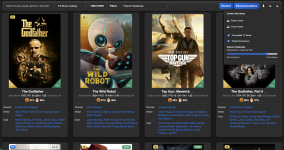
OK, this one is kind of unique and fun. In v1.3.7 which is submitted and will roll out soon, there is a new "Popcorn Readiness" sort order that you can use on your personal library or on the full Kaleidescape movie catalog. It's a blend of current Kaleidescape popularity and ratings (50% RT critic, 25% RT Audience, 25% TMDB ratings w/ really low number of votes on a movie having a confidence penalty). But the cool thing is that in the settings you can personalize how much preference you want to give to popularity vs ratings and as you adjust that slider the changes are lighting quick in the application. Give it a try!



I loaded your extension a couple of days ago, and just updated it tonight. I'm LOVING this! The slot machine animation is so fun. Have you thought of designing an iOS app? Kaleidescape should definitely offer you a job as a consultant.
Dave Little
Dave Little
- Joined
- Dec 4, 2024
- Messages
- 401
Glad that you are enjoying it! While I do have a background in software and was a developer for a while many years ago, I fell like I was more of a project manager/consultant for Popcorn Ready with Codex doing all of the coding. I'm really just having fun playing around with the latest AI development tools. It's really amazing how much better they are now than when I worked on this project last year. I literally never reviewed a single line of code over these past few weeks working with Codex.I loaded your extension a couple of days ago, and just updated it tonight. I'm LOVING this! The slot machine animation is so fun. Have you thought of designing an iOS app? Kaleidescape should definitely offer you a job as a consultant.
Dave Little
Kind of like how the bouncing DVD logo screensaver reminded me of Pong...the random movie picker just seemed like a slot machine was such a good fit. My other idea for the random movie picker was a Movie Wall of all of the posters like Kaleidescape is known for and then when you activate it there would be some sort of animation and posters would disappear until only 3 random ones remain. That idea seemed like a good fit as well. Seems funny now with all of the functionality added to Popcorn Ready, but the original goal of the project was literally just to pick random movies from my library to watch as I sometimes have trouble deciding. Ha!

really great. love the new slot machine mini-game.
Any thoughts on future ability to tweak my own personal recommendation algorithm? easiest might be let me hit a quick "thumbs up" (good recommendation), "thumbs down" (not such a good recommendation), and "remove" (I never want this one recommended).
Like right now, mine shows "St. Elmo's Fire" as a recommendation for me. I watched that movie about a month ago, so would like to tell Popcorn Ready to remove it as a future suggestion.
This could start to lead you to a real personalized recommendation system, customiezed for each user, based on explicit and implicit data on movies you get from a user.
Anyways, love how this has evolved... it's really well done!
Any thoughts on future ability to tweak my own personal recommendation algorithm? easiest might be let me hit a quick "thumbs up" (good recommendation), "thumbs down" (not such a good recommendation), and "remove" (I never want this one recommended).
Like right now, mine shows "St. Elmo's Fire" as a recommendation for me. I watched that movie about a month ago, so would like to tell Popcorn Ready to remove it as a future suggestion.
This could start to lead you to a real personalized recommendation system, customiezed for each user, based on explicit and implicit data on movies you get from a user.
Anyways, love how this has evolved... it's really well done!