• Thanks for visiting the Kaleidescape Owners' Forum

    This forum is for the community of Kaleidescape owners, and others interested in learning about the system, equipment, services, and the company itself.

    It is run by a group of enthusiastic Kaleidescape owners and dealers purely as a service to this community.

    This board is not affiliated in any way with Kaleidescape, Inc.
    For official technical support, product information, or customer service, please visit www.kaleidescape.com

    You can dismiss this box forever by clicking the "X" in the upper right corner of this message.
  • You are currently in "Guest" mode and not logged in with a registered account.

    The forum is free to use and most of the forum can be used by guests who are not registered....

    ... but we strongly encourage you to register for a full account. There is no cost to register for a full account.

    Benefits of registering for a full account:

    • Participate in the discussions! You must have a registered account to make posts on the forums. You will be able to start your own thread on a topic or question, or you can reply to other threads/discussions.
    • Use the "Conversation" feature (known as "private messaging" on other forums) to communicate directly with any of the other users here.
    • Access the Files area. The "resources" area of the forum contains many "Favorite Scene" and Script files that can dramatically increase the enjoyment of your Kaleidescape system. Go directly to great scenes in your favorite movies, created by other owners, and add automation to playback of your system with Scripts.
    • You won't see this annoying notice at the top of every screen!😊

    It's easy and free to register for the forum. Just click the "Register" button in the upper right corner of this page, and follow the instructions there.

    This box goes away for registered users.

Popcorn Ready app for iOS

I haven't looked into TV show recommendations yet...I think I would have to tweak the criteria and scoring since cast/crew can change by season. I'll have to research if I have all of the other metadata for TV shows. So, I can possibly get this added soon for TV.

Let me know how well you think the movie recommendations work. And you can tweak the formula for recommendations in settings.
I meant that, using TV shows included in one's library, could be used to generate movie recommendations, not necessarily to generate TV recommendations. For example, I would use Day of the Jackal TV Series as one of my choices to generate movie recommendations.
 
Is there a way to see Movie Updates? I have been using the ability to upgrade, but can’t figure out the Update side of things. Am I missing something?
 
Build 160 adds a sort by file size (largest first) to the remove section of download manager. Thanks to @Sasquatch @andy and @Roobot for this idea. It is useful for me as I'm limited on storage so I'm always looking for something to delete off the server.
I wasn’t aware of this app, so thanks for tagging me.

I tried this out but there was no file size sort when I’m on the Downloaded tab (unless you meant something else by “download manager”?). Also, most of the sorts don’t seem to work. The only ones that do are alphabetical, runtime, and release date; others just do alphabetical.

Confirmed build 160. If it matters it was a fresh install and I haven’t yet hooked it up to my store account.
Interesting, never seen the sorts not working but try connecting to your store account as well as your local system.

After that, in download manager if you go to remove you should see the file size sort.
 
Interesting, never seen the sorts not working but try connecting to your store account as well as your local system.

After that, in download manager if you go to remove you should see the file size sort.
Okay, I found the download manager. It wasn’t there earlier because my player was in standby, so I had just been looking at the ‘Downloaded’ section. This is really helpful; thank you!

The sorting also does work now that I connected the app to my store account. It sort of makes sense that the purchased date wouldn’t have been available before, but I still find it weird stuff like critic score sort wasn’t working. 🤷‍♂️

P.S. nice one on the feature that shows the movies in a franchise in order. I was sick of looking up things like the order of the Pirates of the Caribbean movies.
 
On the ‘Downloads’ menu, I can only see the contents of one system, even though there is another that is registered, there is no way to switch over to it?
Tia
 
I'm curious: did you have to get official API approval for this? To an Android user, considering that Kscape has publicly said that they have no timeline on a better Android app, I may try to take this into my own hands.
 
On the ‘Downloads’ menu, I can only see the contents of one system, even though there is another that is registered, there is no way to switch over to it?
Tia
You can change systems from the Settings (gear) screen which you can get to from the screen before where you are browsing/searching/sorting your current downloaded titles.
 
I'm curious: did you have to get official API approval for this? To an Android user, considering that Kscape has publicly said that they have no timeline on a better Android app, I may try to take this into my own hands.
Yes, I did get official API access from Kaleidescape and I’m very grateful for that.
 
I am getting ‘player rejected command: Popcorn code 4’
 
It is stuck on Cinema 2,
it sees a Strato S and a K, but I get the error when I try to connect to them
Using Prime 120tb server
 
There is a Co-Star system associated with the Strato S
 
There is a Co-Star system associated with the Strato S
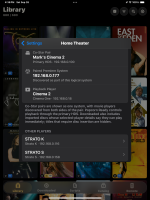
Thanks for the follow up! Could you please send a screenshot of Settings → Home Theater, showing “Cinema 2” and the Strato S/K entries? The key detail is whether those appear under Other Players or Other Systems.
 
Hi, two questions / requests:

(1) I notice that my Collections show only those I created, and not (notably) "played" movies, which is a default collection. Would you be able to include those default collections (which include also "paused") so that I could filter those movies I've already watched and paused?

(2) Is there a way, or can you create a way, to "batch" include a group of movies to a collection? For example, I created a collection "Dolby Atmos" and would like to add all movies in my downloaded library to that collection. But, given the number of movies I have, it is not realistic to tick off each movie. I would like to add all movies with Dolby Atmos to that collection with one tap. Since one can filter by Dolby Atmos, it seems that you should be able to do this. The same would be true of other filter options, such as Dolby Vision (listed under Quality) so that I could add all DV movies to a collection.
 
Here it is: I can’t get either of the Stratos to be selected
 

Attachments

  • IMG_0501.png
    IMG_0501.png
    1.8 MB · Views: 6
I just pushed build 163 which has a potential fix for the Co-Star system issue.

It also includes the ability to switch systems directly from the download manager screens.
 
Back
Top