• Thanks for visiting the Kaleidescape Owners' Forum

    This forum is for the community of Kaleidescape owners, and others interested in learning about the system, equipment, services, and the company itself.

    It is run by a group of enthusiastic Kaleidescape owners and dealers purely as a service to this community.

    This board is not affiliated in any way with Kaleidescape, Inc.
    For official technical support, product information, or customer service, please visit www.kaleidescape.com

    You can dismiss this box forever by clicking the "X" in the upper right corner of this message.
  • You are currently in "Guest" mode and not logged in with a registered account.

    The forum is free to use and most of the forum can be used by guests who are not registered....

    ... but we strongly encourage you to register for a full account. There is no cost to register for a full account.

    Benefits of registering for a full account:

    • Participate in the discussions! You must have a registered account to make posts on the forums. You will be able to start your own thread on a topic or question, or you can reply to other threads/discussions.
    • Use the "Conversation" feature (known as "private messaging" on other forums) to communicate directly with any of the other users here.
    • Access the Files area. The "resources" area of the forum contains many "Favorite Scene" and Script files that can dramatically increase the enjoyment of your Kaleidescape system. Go directly to great scenes in your favorite movies, created by other owners, and add automation to playback of your system with Scripts.
    • You won't see this annoying notice at the top of every screen!😊

    It's easy and free to register for the forum. Just click the "Register" button in the upper right corner of this page, and follow the instructions there.

    This box goes away for registered users.

Popcorn Ready app for iOS

Just tested 86 and still unable to get it to work. Definitely on same network and tried with player both awake and in standby.
Hmmm, interesting. Can you please try this and let me know what you see? I'll have a chance later tonight to try to recreate this issue myself.

  • Tap Settings → Refresh Library once and keep the app open until it finishes.
  • Open Browse Options → Collection and check the “Membership last refreshed” timestamp.
 
First, a sincere thank you for the effort that went into this. I’ve been enjoying some of the more subtle features that are technically accessible in the official K app but require a little more steps to get to, like being able to quickly switch between the entire library and just titles that are currently downloaded. Still having fun learning all the things you can do with it.

For the collections filter just added, it’s not returning movies in my library that are part of a collection but not currently downloaded. Is that a known limitation? When using the K browser interface I’m able to see them, so seems theoretically possible at least.
Quick question: which Kaleidescape interface are you looking at to manage collections where you can see movies that are not currently downloaded? I'm using the local web server and I only can see currently downloaded titles there.
 
When refreshing library I was able to get an updated timestamp in Browse Options → Collection, but still no filter results for titles not downloaded.

I’m using the ip address of my server and selecting the Movies tab. That also happens to include all discs that I’ve catalogued, but none of those are assigned to any of my K collections.
 
Ohhh, I think I figured it out. My last statement is technically incorrect. The titles I’m referencing I happen to also have on disc. I was assuming they were displaying as part of my K library, but just the disc version is showing. Just confirmed other titles not downloaded and only owned on K are not present. Sorry for the wild goose chase 😬
 
Ohhh, I think I figured it out. My last statement is technically incorrect. The titles I’m referencing I happen to also have on disc. I was assuming they were displaying as part of my K library, but just the disc version is showing. Just confirmed other titles not downloaded and only owned on K are not present. Sorry for the wild goose chase 😬
That's actually possibly a different shortcoming though. I don't have a CoStar system so I'm not exactly sure how those work. Are you able to add your disc titles to your collections? Does it matter if the disc is loaded and immediately playable?
 
That's actually possibly a different shortcoming though. I don't have a CoStar system so I'm not exactly sure how those work. Are you able to add your disc titles to your collections? Does it matter if the disc is loaded and immediately playable?
Sorry, no costar system here. Those are just the D2D catalog scans I did, and strangely I do have the ability to add them to collections even without owning the title on K.
 
Sorry, no costar system here. Those are just the D2D catalog scans I did, and strangely I do have the ability to add them to collections even without owning the title on K.
Oh, that is very strange! I've scanned some discs but then I think I deleted them from my library in Kaleidescape so they don't show anymore.
 
DVDs by any chance? If you scan a DVD for D2D then it shows up on your movie wall. You can safely delete these without removing any D2D offers. (FYI, this is tied to legacy functionality which is why someone called out Costar.)
 
Yeah I may decide to do that yet. I just recently added a server, so the Movies tab is a new feature I’m getting used to. Doesn’t exist in standalone world.
 
Your amazing, works awesome. I’m always blown away with the talents that people have and how generous they are to share them.
 
I’ve never researched Plex because I don’t have it. What would you want to see from the streaming services?
It’s likely harder w the streaming services. Plex would be ideal since its content that is owned, like Kscape. Ideally it would show what you could watch via streaming services based off of kacape moves. So you own Madmen S1 on escape, it would show where you could watch season 2 based on you streaming services or you could purchase via kscape. I like the Plex integration since I have a Plex server w 2k movies. I’m sure other kscape owners might also have movies they converted to a digital format on a local server. Ideally it would create the video wall of kscape using content and plex content. Then allow you to find like moves of the combined.
 
It’s likely harder w the streaming services. Plex would be ideal since its content that is owned, like Kscape. Ideally it would show what you could watch via streaming services based off of kacape moves. So you own Madmen S1 on escape, it would show where you could watch season 2 based on you streaming services or you could purchase via kscape. I like the Plex integration since I have a Plex server w 2k movies. I’m sure other kscape owners might also have movies they converted to a digital format on a local server. Ideally it would create the video wall of kscape using content and plex content. Then allow you to find like moves of the combined.
I'm going to hold off on Plex for a bit as that will be a pain for me to test without a system.

But I am tackling streaming availability. This can be hidden if you don't want to see the Streaming tab. This will work for titles that may not be available on Kaleidescape as well. Here's a preview:

IMG_8597.png
 
Thoughts on a poster view?
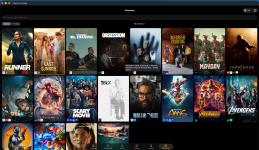
During playback, the app would display the movie poster and when not playing, it could cycle through your movie collection. In theory, this could be displayed on a poster-style TV via an iPhone, or eventually via an Apple TV app version.
 
Thoughts on a poster view?
During playback, the app would display the movie poster and when not playing, it could cycle through your movie collection. In theory, this could be displayed on a poster-style TV via an iPhone, or eventually via an Apple TV app version.
It’s not part of this app but I’m actually doing that on an ePaper display. You need a small piece of software running locally on a server 24x7 to do it so I didn’t release it, but it’s very simple.
 
Build 89 posted to TestFlight with the Streaming availability search. There are multiple views that mirror your choice of how dense of a poster wall you want or a list view and it just uses the same setting you've selected for your Kaleidescape experience in the app. Supports many countries. Many of the streaming services are redundant such as a premium version vs an ad supported version. I may clean that up in the future.

1788625051398.png
 
Great app!
I am installing a new Prime server and would like to do a clean install of my movies: I am told there is a ‘download all’ option somewhere: can someone tell me where to find it?
Is it in this app or just the K app?
 
Looks like I need to add a download all option to Popcorn Ready as it’s possible now but you have to click a plus next to each movie.

I don’t believe that is in either app currently but I could just be missing it on the official app. It is on the Kaleidescape website if you goto My Movies. But first make sure that you setup download preferences for the new system so that your preferred formats are automatically selected.
 
I have been trying to decide how to set download preferences: I could set it to cinematic only, or add a lower format so it plays on Strato S
 
I have been trying to decide how to set download preferences: I could set it to cinematic only, or add a lower format so it plays on Strato S
I setup my Strato V as a separate system for that reason and my Terra just serves the Strato K.
 
Amazing App, thankyou!

I think KS have really dropped the ball with management/download tools with the introduction of Cinematic, it's a complete mess and there's no easy way to set things up to only download what you want and get rid of what you don't. When added to the fact it then thinks C_DV is an 'upgrade' even when that's not the preference.

I now have Strato K for the Cinema (JVC NZ800) for which I want C_HDR10 if available, C_DV if not, then C_SDR as last resort (for non C I want, HDR10>DV>4KSDR).

I also have Strato E, so that's set to prefer 4KDV. Was thinking I might put the Strato C in another room, but I'm not sure I can be bothered with having to also have 4KHDR10 or lower for that too!

What it really needs is an extension to the Movies tab of the System that let you find films by quality type easily see other formats available - the preferences didn't seem to work for an hour or so after they were set, so I got a load of C_DV downloaded, but of course finding out which ones are there because it was a mistake and which are there because there's no C_HDR10 is pretty much impossible.
 
Back
Top