• Thanks for visiting the Kaleidescape Owners' Forum

    This forum is for the community of Kaleidescape owners, and others interested in learning about the system, equipment, services, and the company itself.

    It is run by a group of enthusiastic Kaleidescape owners and dealers purely as a service to this community.

    This board is not affiliated in any way with Kaleidescape, Inc.
    For official technical support, product information, or customer service, please visit www.kaleidescape.com

    You can dismiss this box forever by clicking the "X" in the upper right corner of this message.
  • You are currently in "Guest" mode and not logged in with a registered account.

    The forum is free to use and most of the forum can be used by guests who are not registered....

    ... but we strongly encourage you to register for a full account. There is no cost to register for a full account.

    Benefits of registering for a full account:

    • Participate in the discussions! You must have a registered account to make posts on the forums. You will be able to start your own thread on a topic or question, or you can reply to other threads/discussions.
    • Use the "Conversation" feature (known as "private messaging" on other forums) to communicate directly with any of the other users here.
    • Access the Files area. The "resources" area of the forum contains many "Favorite Scene" and Script files that can dramatically increase the enjoyment of your Kaleidescape system. Go directly to great scenes in your favorite movies, created by other owners, and add automation to playback of your system with Scripts.
    • You won't see this annoying notice at the top of every screen!😊

    It's easy and free to register for the forum. Just click the "Register" button in the upper right corner of this page, and follow the instructions there.

    This box goes away for registered users.

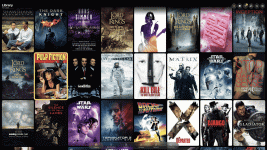
Popcorn Ready app for iOS

Amazing App, thankyou!

I think KS have really dropped the ball with management/download tools with the introduction of Cinematic, it's a complete mess and there's no easy way to set things up to only download what you want and get rid of what you don't. When added to the fact it then thinks C_DV is an 'upgrade' even when that's not the preference.

I now have Strato K for the Cinema (JVC NZ800) for which I want C_HDR10 if available, C_DV if not, then C_SDR as last resort (for non C I want, HDR10>DV>4KSDR).

I also have Strato E, so that's set to prefer 4KDV. Was thinking I might put the Strato C in another room, but I'm not sure I can be bothered with having to also have 4KHDR10 or lower for that too!

What it really needs is an extension to the Movies tab of the System that let you find films by quality type easily see other formats available - the preferences didn't seem to work for an hour or so after they were set, so I got a load of C_DV downloaded, but of course finding out which ones are there because it was a mistake and which are there because there's no C_HDR10 is pretty much impossible.
The new download preferences Kaleidescape released were a big improvement for me. But there still could be some room for improvement.

I've tried to think in terms of "Tools" when adding some features to Popcorn Ready that Kaleidescape doesn't support. The tool to Upgrade Existing titles from the app is a good example which handles your last paragraph well and then there's a tool to remove the old secondary versions when done. And I also added filters to see the exact formats you have downloaded if you want to handle things individually instead of through the tools.
 
Great app!
I am installing a new Prime server and would like to do a clean install of my movies: I am told there is a ‘download all’ option somewhere: can someone tell me where to find it?
Is it in this app or just the K app?
I just added Download All tool in build 97. Thanks for the feedback.
 
Yep, I used the Upgrade Existing tool, which saved me a ton of time but unfortunately not before I'd already downloaded some wrong C_DV ones. It's odd that KS haven't thought about this sort of tool.
 
Ok here is one more;
Add an ‘Intermission’ button to play screen
 
Ok here is one more;
Add an ‘Intermission’ button to play screen
Hmmm, is that something that you use to turn lights up with a control system? Does Kaleidescape app support it? I will research when I get a chance…thanks!
 
K supports it: it is similar to ‘pause’ but it throws cover art on the screen
 
Last edited:
K supports it: it is similar to ‘pause’ but it throws cover art on the screen
In build 98, I just added an Intermission Toggle in the Now Playing screen as well as the Remote. I'll be away from my theater most of the day so I haven't been able to test it yet, so please let me know how it works if you have a chance to try it out. Thanks!
 
Back
Top