
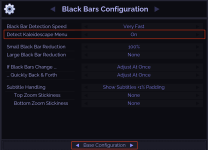
I guess he´s refering to this one:


It is run by a group of enthusiastic Kaleidescape owners and dealers purely as a service to this community.
You can dismiss this box forever by clicking the "X" in the upper right corner of this message.
... but we strongly encourage you to register for a full account. There is no cost to register for a full account.
This box goes away for registered users.
I tried to change the Depth to 4:2:2 and it worked to where I was getting Cinematic HDR10 content but I'm not getting the 4:4:4 chroma sampling when this title is supposed to have it (Ballerina: From the World of John Wick). I was getting 4:2:2 instead. Here are a couple of screenshots of the information the K is getting when playing this content:Yeah, so it looks like you've already done that. You might try changing the Preferred Depth to 4:2:2 if that's an option. And I forget what AVR you have, because sometimes HDMI Signal Format settings there can cause HDMI issues. So you might check those, and see if any changes there have any impact.
And there's always the HDMI cable interconnects that can have problems - make sure they're 2-3 meters, passive (rather than active or fiberoptic).
If none of this helps, and if KScape doesn't come back with anything, let me know and we can potentially look at this in real time.

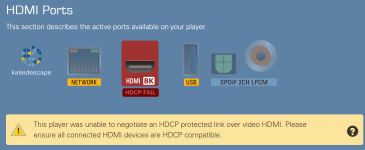
Yes, I saw that buy not sure how to correct it and if a cable, which one to replace since there are 3 cables in the chain.I´m sure you noticed, but you´re having a HDCP issue. That´s the reason for the black screen/no signal.

Yes, I saw that buy not sure how to correct it and if a cable, which one to replace since there are 3 cables in the chain.
That’s the one.I guess he´s refering to this one:
View attachment 12185
Thanks, but turning this Off didn't make a difference in my case.Actually one more thing to ask. Is the kscape menu setting turned on in the envy? That was another issue that caused the no signal on my screen. I had to turn it off.
We often use an EDID manager like the one they recommended, sometimes a similar one from AVPro, to act as an "intermediary" with HDMI/EDID communications between one device and another. The more common scenario is when a long cable is needed between Envy and Projector.Regarding the issue I'm having with Cinematic HDR10 content, I got this response from Kaleidescape support:
"...
One thing that can help in situations like this is to add an HDMI reclocker in the chain. The one that I most commonly recommend is the Dr HDMI 8k:
Dr HDMI™ 8K 48GBPS | HDFury.com | Connect and Fix everything in HDMI
This can help manage the HDMI signal throughout the chain and prevent dropouts or missed handshakes.
..."
I'm confused about this because I thought that the MadVR Envy was supposed to take care of these types of issues? Any thoughts?
I've also ordered another HDMI cable to replace the one I suspect could be the issue. I'll report back if it fixed it nor not.
I just bought the AVPro Edge HDMI Manager but don’t really need it. I would be happy to send it to you for you to test out.Regarding the issue I'm having with Cinematic HDR10 content, I got this response from Kaleidescape support:
"...
One thing that can help in situations like this is to add an HDMI reclocker in the chain. The one that I most commonly recommend is the Dr HDMI 8k:
Dr HDMI™ 8K 48GBPS | HDFury.com | Connect and Fix everything in HDMI
This can help manage the HDMI signal throughout the chain and prevent dropouts or missed handshakes.
..."
I'm confused about this because I thought that the MadVR Envy was supposed to take care of these types of issues? Any thoughts?
I've also ordered another HDMI cable to replace the one I suspect could be the issue. I'll report back if it fixed it nor not.
 www.avproglobal.com
Appreciate it! I just got the new HDMI cable today but get to install it until tomorrow. I will send a PM if it doesn't work.I just bought the AVPro Edge HDMI Manager but don’t really need it. I would be happy to send it to you for you to test out.
48Gbps EDID Manager
The AC-EDID-X is a compact, inline device designed to manage and manipulate Extended Display Identification Data (EDID) between HDMI source and sink devices. By emulating or altering EDID information, the AC-EDID-X ensures stable handshakes, eliminates compatibility issues, and maintains...
I do have an older HDMI cable that is also long between MadVR and TV.We often use an EDID manager like the one they recommended, sometimes a similar one from AVPro, to act as an "intermediary" with HDMI/EDID communications between one device and another. The more common scenario is when a long cable is needed between Envy and Projector.
But if any 2 devices are aren't communicating well with each other, having a "middle man," so to speak, can help. Each talks well with the middle man, and neither has to talk to each other. That's a crude way of describing it, but that's how I visualize what's going on.
Trying another cable is definitely worth considering, as those EDID managers are not an inexpensive option. And check the HDMI Signal Format settings in your Audio Processor, as they can contribute to the communication breakdown. I had problems between the Strato C and my Arcam AV41, which was eventually solved by a firmware update to the Arcam. So you might check that as well.
That can potentially be an issue here. HDMI troubleshooting is a pain in the butt.I do have an older HDMI cable that is also long between MadVR and TV.
Hm, you didn´t mention that, yet. HDMI (and specifically HDCP in this case) is something related to the whole chain. HDCP is handled out between sink and source, so if there´s a week link anywhere in the chain, the whole chain breaks down.I do have an older HDMI cable that is also long between MadVR and TV.
 www.avproglobal.com
I'm not a Trinnov user myself, but have worked with quite a few. There is a specific HDMI 2.1 Board Firmware Update that has been needed in the past to address issues like this. This is something that needs to be done by a Dealer or Trinnov, as the end-user can't do it themselves.I bought this cable:
I was watching content this morning where everything was working fine on content other than the Strato K. I then switched over to the K and started to watch a script where I had both the DV and HDR10 Cinematic versions downloaded. I then noticed that when playing the HDR10C content, it was only 4:2:2 chroma. I then thought that there are some titles where the HDR10C content is only 4:2:2.
I then tried to play titles that are known HDR10C and 4:4:4 like "The Matrix" and "Dune". When I played one of those titles in HDR10C, the screen was completely black, with nothing, not even a "no signal" message which is entirely different than yesterday. I then switched over to the Apple TV source and also a completely black screen. I then switched over to a source connected directly to the TV and everything was fine. This makes me think that it's either the Trinnov audio processor (which is not supposed to do anything with video) or the MadVR Envy video processor. I did reboot both the TV as well as the MadVR to no avail. The last time I tried to play anything before turning everything Off, there was nothing on the screen at all. I didn't try and reboot the Trinnov though.
I'm thinking why all these issues with HDR10 4:4:4 content since it's all supposed to work with HDMI 2.0?
Are there any Trinnov users who experienced this issue and did you try to change the K HDMI source setting from HDMI 2.1 to HDMI 2.0?
I'm thinking that at this point I should try the EDID manager.
This only started happening very recently so I'm also wondering if it has to do with the latest K update that I got on October 1, 2026?
This would be easy to test with just connecting the player directly to the Envy, bypassing the Trinnov. And vice versa, leaving the Trinnov in the chain and bypassing the Envy.This makes me think that it's either the Trinnov audio processor (which is not supposed to do anything with video) or the MadVR Envy video processor.
This would also be relatively easy to test on your side. Just set it to 2.0 and see what happens.Are there any Trinnov users who experienced this issue and did you try to change the K HDMI source setting from HDMI 2.1 to HDMI 2.0?
4:4:4 requires a lot more bandwith than 4:2:0 or 4:2:2, so it can still be a cable issue. As you mentioned, there are three cables in the chain: K to Trinnov, Trinnov to Envy, Envy to TV.I'm thinking why all these issues with HDR10 4:4:4 content since it's all supposed to work with HDMI 2.0?
I only got it a couple of weeks ago so I'm sure that's not the case.I'm not a Trinnov user myself, but have worked with quite a few. There is a specific HDMI 2.1 Board Firmware Update that has been needed in the past to address issues like this. This is something that needs to be done by a Dealer or Trinnov, as the end-user can't do it themselves.
If that hasn't been looked at, I would contact your Dealer and/or Trinnov, to see if yours needs that update.
You could well be right, but still a good idea to confirm. If it hasn't had the update applied, you could end up chasing your tail for a while.I only got it a couple of weeks ago so I'm sure that's not the case.