• Thanks for visiting the Kaleidescape Owners' Forum

    This forum is for the community of Kaleidescape owners, and others interested in learning about the system, equipment, services, and the company itself.

    It is run by a group of enthusiastic Kaleidescape owners and dealers purely as a service to this community.

    This board is not affiliated in any way with Kaleidescape, Inc.
    For official technical support, product information, or customer service, please visit www.kaleidescape.com

    You can dismiss this box forever by clicking the "X" in the upper right corner of this message.
  • You are currently in "Guest" mode and not logged in with a registered account.

    The forum is free to use and most of the forum can be used by guests who are not registered....

    ... but we strongly encourage you to register for a full account. There is no cost to register for a full account.

    Benefits of registering for a full account:

    • Participate in the discussions! You must have a registered account to make posts on the forums. You will be able to start your own thread on a topic or question, or you can reply to other threads/discussions.
    • Use the "Conversation" feature (known as "private messaging" on other forums) to communicate directly with any of the other users here.
    • Access the Files area. The "resources" area of the forum contains many "Favorite Scene" and Script files that can dramatically increase the enjoyment of your Kaleidescape system. Go directly to great scenes in your favorite movies, created by other owners, and add automation to playback of your system with Scripts.
    • You won't see this annoying notice at the top of every screen!😊

    It's easy and free to register for the forum. Just click the "Register" button in the upper right corner of this page, and follow the instructions there.

    This box goes away for registered users.

NEWS: Strato K Movie Player with 8K capability and new "4K Cinematic" full-chroma & higher bitrate support

Considering the large files to be downloaded now with Cinematic and the speed at theca they download - It would be great if you can force Kaleidescape to download movies on a designated Terra Server.
If that could be done, I would use my Terra SSD to download movies for impulse buy quicker downloads ( 6 to 9 minutes for cinematic over 2 GBPS internet service) and a Prime Terra to store movies which need to sit in the server rewatched scripts etc and leave the rest in the cloud.
I hope @MikeKobb or someone else can shed some light on this.
 
Considering the large files to be downloaded now with Cinematic and the speed at theca they download - It would be great if you can force Kaleidescape to download movies on a designated Terra Server.
If that could be done, I would use my Terra SSD to download movies for impulse buy quicker downloads ( 6 to 9 minutes for cinematic over 2 GBPS internet service) and a Prime Terra to store movies which need to sit in the server rewatched scripts etc and leave the rest in the cloud.
I hope @MikeKobb or someone else can shed some light on this.
As I am considering my options to increase servers, that feature would be nice to see.

Another “help-out” would be if K-scape unlocked the player drives for use in addition to Terras. Unless you hit the max of 4 servers, of course.
 
The Radiance Pro would not pass lossless audio bitstreams, but ultimately I got rid of it because I was sick of the blue screen of death resulting from input switching or resolution changes, which then required me to mess with cables and restarting devices and standing on one leg or my head with fingers crossed hoping to get a picture back up on my screen. It was not worth the trouble.
I'm assuming that "would not pass" was a typo, because the Radiance Pro certainly does pass lossless bitstream audio. Sorry to hear you had so much trouble. I've not had the sorts of issues you describe with mine, but we have different equipment, so there could be an interop issue that you're hitting that I don't.

I'm planning on buying the Co-Star...I'm not sure how that would play with another device to strip out the audio to send to the Krell.
There's always some risk when adding another HDMI device to the chain, so it's hard to predict without trying it
 
Me too - running Strato K on Sony A95L - My understanding, and I defer to Rmarci or Mike Kobb here, Dolby Vision runs 4:2:2 and SDR can do 4:4:4. So, you'll see Cinematic 4K Dolby Vision (HDR) as a separate version as Cinematic 4K SDR - one example of this is Blade Runner 2049. You'll see both versions listed. You can download both and do A/B to determine which you like best. And, on the A95L, you can set Picture settings separately for each SDR and Dolby Vision. Just need to be playing a Dolby Vision movie and with the Sony A95L remote, navigate to the Picture settings - in order to affect changes to the Dolby Vision playback.

View attachment 10626
Also good to know info about the title. For example, with BR2049, the peak of the HDR grade is barely over the SDR. Deakins doesn’t really do aggressive HDR so you may find you like the SDR grade more than the DV one for this title.

Also, for the Nolan titles, the same applies plus the black levels are not raised if you do the 4K SDR versions rather than the HDR ones.
 
Considering the large files to be downloaded now with Cinematic and the speed at theca they download - It would be great if you can force Kaleidescape to download movies on a designated Terra Server.
If that could be done, I would use my Terra SSD to download movies for impulse buy quicker downloads ( 6 to 9 minutes for cinematic over 2 GBPS internet service) and a Prime Terra to store movies which need to sit in the server rewatched scripts etc and leave the rest in the cloud.
I hope @MikeKobb or someone else can shed some light on this.
I like todo's idea. The 8TB SSD Terra Prime is so much faster at downloading large files (like the new 4K Cinematic movies), it would be great if somehow the system kept spare space on the SSD (for "impulse" downloads).

Here are two possible implementation scenarios:
- Perhaps a user could allow a buffer of unused space on the SSD to be always kept free for new downloads?
- For people with multiple Terra servers, it would be wonderful if the system could fill-up space on the slower drive first.

Probably too difficult to implement, but it is nice to dream...
 
I like todo's idea. The 8TB SSD Terra Prime is so much faster at downloading large files (like the new 4K Cinematic movies), it would be great if somehow the system kept spare space on the SSD (for "impulse" downloads).

Here are two possible implementation scenarios:
- Perhaps a user could allow a buffer of unused space on the SSD to be always kept free for new downloads?
- For people with multiple Terra servers, it would be wonderful if the system could fill-up space on the slower drive first.

Probably too difficult to implement, but it is nice to dream...
It may be that my first "wish list" option above happens automatically. If the SSD drive is full and a user requests a new movie download, the system could download at full speed as it is simply overwriting an existing unused movie to create space.

But, if there are multiple Terra servers (a fast SSD and a slower HDD), would a user get the faster SSD download speed?

(sorry that these discussions should probably be in a different thread about storage options and system architecture)
 
I like todo's idea. The 8TB SSD Terra Prime is so much faster at downloading large files (like the new 4K Cinematic movies), it would be great if somehow the system kept spare space on the SSD (for "impulse" downloads).

Here are two possible implementation scenarios:
- Perhaps a user could allow a buffer of unused space on the SSD to be always kept free for new downloads?
- For people with multiple Terra servers, it would be wonderful if the system could fill-up space on the slower drive first.

Probably too difficult to implement, but it is nice to dream...

The 2nd option will not work because in this case if you have say SSD server and a Slower server the system will fill the slower server first while the question was if there is a way to get the SSD fulfill impulse requests OR say friends come over and you want to watch a movie but it is on the cloud.
The best would be - if you have a default method to download (which is how it works today seamlessly) but then you can have a option where when you select a movie you press download OR you can check mark download in XYZ server.
 
Just installed my K player and am unable to output 2020 and HDR, even though my strato S displays 2020 and HDR in same vieo chain so must be a player setting in K player. I can't figure out what setting is incorrect.
 
Just installed my K player and am unable to output 2020 and HDR, even though my strato S displays 2020 and HDR in same vieo chain so must be a player setting in K player. I can't figure out what setting is incorrect.
How is the player hooked up? What’s the full video chain from Strato to display?
 
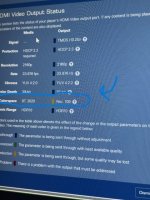
Same video chain Strato S and replacement K player(replaced Strato C that passed rec 2020 and HDR perfect) K player to Atlona switcher output to Madvr Extreme output to projector. Input to Madver shows rec709 and SDR.
 
Just installed my K player and am unable to output 2020 and HDR, even though my strato S displays 2020 and HDR in same vieo chain so must be a player setting in K player. I can't figure out what setting is incorrect.
Have you taken a look at this .pdf file?
 

Attachments

I haven't seen this question posted yet (unless I missed it):

The Strato M will convert and play HDR/DV downloads, but can it also convert and play/scale down 4K cinematic files as well like it would with the Strato V? If not, will this feature/fix be available in the future?

I use the Strato M on my Kuro 141 exclusively and this was a huge space saving benefit, so my question is relevant from this perspective (i.e., can I have one Strato K 4K cinematic file and use the Strato M to down convert that file as I do now with a regular HDR/DV file download, or do I need to keep a separate non 4K cinematic HDR/DV file if I want to use The Strato M in the same way as I do now.)?
 
I haven't seen this question posted yet (unless I missed it):

The Strato M will convert and play HDR/DV downloads, but can it also convert and play/scale down 4K cinematic files as well like it would with the Strato V? If not, will this feature/fix be available in the future?

I use the Strato M on my Kuro 141 exclusively and this was a huge space saving benefit, so my question is relevant from this perspective (i.e., can I have one Strato K 4K cinematic file and use the Strato M to down convert that file as I do now with a regular HDR/DV file download, or do I need to keep a separate non 4K cinematic HDR/DV file if I want to use The Strato M in the same way as I do now.)?
It cannot, but neither can the Strato V, E, or C. The only player that can play the 4K Cinematic files is the Strato K, whether or not being output at their native resolution. You’ll need separate files for any 4K Cinematic downloads if you want to watch the same content on a Strato M, when you have a Strato K in the same system. This is a limitation of the chipset in the players, so wont change with any future firmware updates.
 
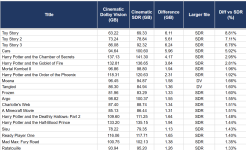
So, I went through all 180 movies and shows currently available in Cinematic. Of these, 149 are available in both Cinematic SDR and Cinematic Dolby Vision. On average, the Cinematic SDR file size exceeds the Cinematic DV file size by only 0.88% (the median difference is 0.68%, where again SDR size exceeds DV size) -- so the differences are generally quite small. That said, there are a few titles for which the differential is meaningfully larger. Below are the 20 movies with the largest absolute file-size differentials (occasionally, the DV file is larger). Any theories on why the top handful on this list have noticeably larger file sizes for SDR? If DV is in fact always 4:2:2, could this handful of titles be larger in Cinematic SDR because they're 4:4:4? Btw, I did this using Claude Cowork -- I did spot check though.


1782776735362.png
 
Last edited:
Something is limiting the players color space output to rec709 and SDR
 

Attachments

  • IMG_1928.jpeg
    IMG_1928.jpeg
    83.6 KB · Views: 21
FYI: another HDR10/SDR only 4k cinematic title: Devil wears Prada.
 
After looking at Techenthusiasm Interview with @MikeKobb I believe the best serving (technically) files will be HDR 4:4:4 12 Bit tone mapped by a Artisan or a Mad VR
 
Back
Top