• Thanks for visiting the Kaleidescape Owners' Forum

    This forum is for the community of Kaleidescape owners, and others interested in learning about the system, equipment, services, and the company itself.

    It is run by a group of enthusiastic Kaleidescape owners and dealers purely as a service to this community.

    This board is not affiliated in any way with Kaleidescape, Inc.
    For official technical support, product information, or customer service, please visit www.kaleidescape.com

    You can dismiss this box forever by clicking the "X" in the upper right corner of this message.
  • You are currently in "Guest" mode and not logged in with a registered account.

    The forum is free to use and most of the forum can be used by guests who are not registered....

    ... but we strongly encourage you to register for a full account. There is no cost to register for a full account.

    Benefits of registering for a full account:

    • Participate in the discussions! You must have a registered account to make posts on the forums. You will be able to start your own thread on a topic or question, or you can reply to other threads/discussions.
    • Use the "Conversation" feature (known as "private messaging" on other forums) to communicate directly with any of the other users here.
    • Access the Files area. The "resources" area of the forum contains many "Favorite Scene" and Script files that can dramatically increase the enjoyment of your Kaleidescape system. Go directly to great scenes in your favorite movies, created by other owners, and add automation to playback of your system with Scripts.
    • You won't see this annoying notice at the top of every screen!😊

    It's easy and free to register for the forum. Just click the "Register" button in the upper right corner of this page, and follow the instructions there.

    This box goes away for registered users.

KEAOS (Software) UPDATES

Shouldn't be. Keep in mind that the detail sheet redesign only applies to 10.22.0. So if you are looking at a Premiere-only zone (i.e. kOS 8.15.0) you won't see the RT and CSM ratings.

But in your Co-Star zone(s), you should see the redesigned detail sheet even for content that resides on your Premiere server.
I had to double check. The Encore is version 10.22.0-26159 and Premiere is version 8.15.0-26142.

I see the Dolby Atmos and HDR logos in the new data sheet and it's also the new design. Maybe it needs to download new movie guide info or something.
 
My biggest issue is not being able to see all my movies from the Strato V. I don’t know why when it makes it really easy to pick which film to watch next when you only have 12 or so to choose from, some habits never die but it is going to cost me dearly to rectify.
You have been able to see all your movies on the Strato V since last fall. The Movie Store row has a tile called My Movies. Select "My Movies" and you will see all your movies and be able to select them for download.
 
I see the Dolby Atmos and HDR logos in the new data sheet and it's also the new design. Maybe it needs to download new movie guide info or something.
Make sure that you're looking at details for a movie that is actually available from the movie store. The Rotten Tomatoes and Common Sense Media information is drawn from our movie store database, so if you happen to choose a movie on your Premiere system that is not available from our store, you will not see those ratings. I believe TV series also do not show those ratings because we only capture the information for feature films, so choose a feature film.

If it still doesn't show up, it could be that your system is updating its store database.
 
You have been able to see all your movies on the Strato V since last fall. The Movie Store row has a tile called My Movies. Select "My Movies" and you will see all your movies and be able to select them for download.
The issue I have with the "My Movies" selection on the Strato V is that you can't control the order of the movies (or at least I haven't figured out how to do it). I would like to be able to select alphabetical or order of purchase. Also, when you stop on a title and select the first button to the left (not sure what it is called), the movies rearrange with like titles grouped together. However, the movies shown now include movies you don't own. I would like the option to see only movies that I own in K-Scape.
 
The issue I have with the "My Movies" selection on the Strato V is that you can't control the order of the movies (or at least I haven't figured out how to do it). I would like to be able to select alphabetical or order of purchase. Also, when you stop on a title and select the first button to the left (not sure what it is called), the movies rearrange with like titles grouped together. However, the movies shown now include movies you don't own. I would like the option to see only movies that I own in K-Scape.

I really like these suggestions!
 
  • Like
Reactions: Jae
The issue I have with the "My Movies" selection on the Strato V is that you can't control the order of the movies (or at least I haven't figured out how to do it). I would like to be able to select alphabetical or order of purchase. Also, when you stop on a title and select the first button to the left (not sure what it is called), the movies rearrange with like titles grouped together. However, the movies shown now include movies you don't own. I would like the option to see only movies that I own in K-Scape.
I own a Strato V (with Terra server) and I can absolutely organize the cover art alphabetically or shuffle the cover art with like titles. In your K-scape settings, you can turn off the default shuffle and it will come up alphabetized, and then at the push of a remote button (shuffle command), it will shuffle to like titles. I have programmed my Unfolded Circle remote to do it and I had it programmed on my previous Harmony remote. With the K-scape remote, I'm not sure which buttons it would be. You can also pull up the alphabetized list of movies (in text format) that you own with the remote. I do not see any movies that I don't own on any of these views. I think I have a few movies that I catalogued (I forget the term K-scape uses for disc-to-digital integration) into my system that haven't been purchased in digital version yet, but they show in My Movies.
 
I own a Strato V (with Terra server) and I can absolutely organize the cover art alphabetically or shuffle the cover art with like titles. In your K-scape settings, you can turn off the default shuffle and it will come up alphabetized, and then at the push of a remote button (shuffle command), it will shuffle to like titles. I have programmed my Unfolded Circle remote to do it and I had it programmed on my previous Harmony remote. With the K-scape remote, I'm not sure which buttons it would be. You can also pull up the alphabetized list of movies (in text format) that you own with the remote. I do not see any movies that I don't own on any of these views. I think I have a few movies that I catalogued (I forget the term K-scape uses for disc-to-digital integration) into my system that haven't been purchased in digital version yet, but they show in My Movies.
What you're describing works with the Covers view. The My Movies row in the row-based Collections view does not open the regular Covers view, though. It opens a specific view in the Movie Store, which does not support the alphabetic option.
 
I love the improvements! I just desperately need to know if CEC is still in the works to come soon to the V and newer players.
 
The issue I have with the "My Movies" selection on the Strato V is that you can't control the order of the movies (or at least I haven't figured out how to do it). I would like to be able to select alphabetical or order of purchase. Also, when you stop on a title and select the first button to the left (not sure what it is called), the movies rearrange with like titles grouped together. However, the movies shown now include movies you don't own. I would like the option to see only movies that I own in K-Scape.

Yes, we need this badly, or better yet let us see all our movies in the cover view with some kind of indication that tells us if the movie is downloaded or not
 
Yes, we need this badly, or better yet let us see all our movies in the cover view with some kind of indication that tells us if the movie is downloaded or not
Like the conventional checkmarks in the corner if downloaded or a down-arrow in the corner (same grey/blue/gold background for highest-resolution owned) if it is not currently.
 
Hello everyone. We have started the rollout of kOS 10.23.0-26436.

In this release, we have implemented the new row-based collections view for all Strato players, improved collections navigation, added HDMI CEC control, and more.

Strato: Row-Based Collections View
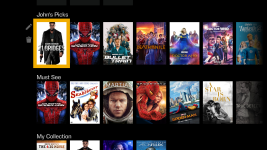
Row collections are now enabled by default on all Strato players, providing a modern, row-based collections view. The classic collections view remains available as an option on Strato 2U, S, and C.
Alto only supports the classic collections view.
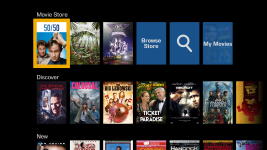
1762983089651.png
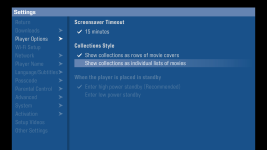
To revert to the classic collections view, navigate to Player Options in the System Settings menu of your onscreen display. The row-based collections view cannot be turned off for Strato V, E, and M. Note that your player will reboot in order to apply the change.
1762983170658.png

Strato: Improved Collections Navigation
Chapter skip navigation is now mapped to jump forward and back within the current row, making it easier to browse large collections.

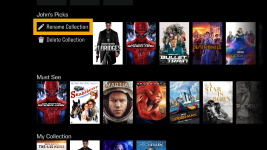
New actions for row collections (rename, delete, etc.) are available, with improved visual design. Various navigation and animation improvements were made, including better back button behavior and smoother transitions when navigating out of set views on the store.
1762983409400.png
1762983452463.png

The “Watch Soon” collection is now promoted above user collections for easier access.

HDMI CEC and Compliance (Strato V, E, and M)
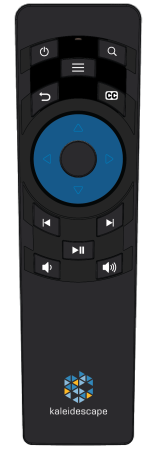
We have added HDMI CEC for Strato V, E, and M players, allowing the Kaleidescape remote to control volume and toggle power of the connected AVR or display.

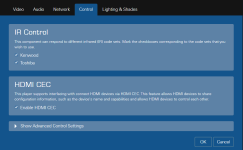
HDMI CEC is not enabled by default. To enable HDMI CEC, go to the Browser Interface, navigate to Settings, Components, and then select the Settings button beneath the player you want to enable. In the pop-up window, select the Control tab and check the Enable HDMI CEC box.
1762983574865.png

Performance Improvements and Fixes
We have made several behind-the-scenes improvements to enhance performance, including:
  • Usability improvements for Strato/Terra devices
  • Bug fixes
 
Last edited:
Whoo hoo! HDMI CEC finally, as promised! So perfect for my beach-house standalone Strato V for easy family/guest use.
🥳
 
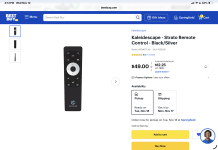
When you say Kaleidescape remote, do you mean this?
 

Attachments

  • IMG_0472.png
    IMG_0472.png
    839.9 KB · Views: 22
When you say Kaleidescape remote, do you mean this?
There's a later revision of the remote where the round directional control in the middle is blue, and that one has volume buttons on it.

I believe it also works with our older white remotes that had volume buttons, and it should work with any IR remote that can send the right volume commands. I'm double-checking on the white remote and will post an update here when I've confirmed.
 
With this update is there any chance of leveraging CEC for volume control via the iOS app?
 
Back
Top