• Thanks for visiting the Kaleidescape Owners' Forum

    This forum is for the community of Kaleidescape owners, and others interested in learning about the system, equipment, services, and the company itself.

    It is run by a group of enthusiastic Kaleidescape owners and dealers purely as a service to this community.

    This board is not affiliated in any way with Kaleidescape, Inc.
    For official technical support, product information, or customer service, please visit www.kaleidescape.com

    You can dismiss this box forever by clicking the "X" in the upper right corner of this message.
  • You are currently in "Guest" mode and not logged in with a registered account.

    The forum is free to use and most of the forum can be used by guests who are not registered....

    ... but we strongly encourage you to register for a full account. There is no cost to register for a full account.

    Benefits of registering for a full account:

    • Participate in the discussions! You must have a registered account to make posts on the forums. You will be able to start your own thread on a topic or question, or you can reply to other threads/discussions.
    • Use the "Conversation" feature (known as "private messaging" on other forums) to communicate directly with any of the other users here.
    • Access the Files area. The "resources" area of the forum contains many "Favorite Scene" and Script files that can dramatically increase the enjoyment of your Kaleidescape system. Go directly to great scenes in your favorite movies, created by other owners, and add automation to playback of your system with Scripts.
    • You won't see this annoying notice at the top of every screen!😊

    It's easy and free to register for the forum. Just click the "Register" button in the upper right corner of this page, and follow the instructions there.

    This box goes away for registered users.

KEAOS (Software) UPDATES

Make sure all of the Audioquest cables have their arrows pointed in the correct direction, i.e. from the Strato K towards the display device, for all stops along the way. I've encountered HDMI handshake issues due directional cables being "pointed" the wrong direction.
 
I tried the Kordz PRS4 after reading others having good results with it
Yes, that´s what we´ve used in the past as well. Interesting that they didn´t work for you.
However, the PRS4 are end of life now and have been replaced with the 96Gbps PRS5.
 
I used the supplied AudioQuest cable from Strato K to Lyngdorf MP40 2.1 and then Ruipro fibre to NZ7. Can watch the 8K demo clip
 
We are aware of some HDMI interoperability issues that have been reported, and we have some improvements currently in testing, but those were not ready for this release.
Is there any idea of how long it might be before testing is done and a new firmware is released to hopefully fix some of the issues. I am an affected user. Support has suggested that I buy a separate HDFury device to help with the issue. However, I'd rather wait for a firmware update to see if that fixes it before I spend $550 on a fix. Thanks!!
 
The next release of kOS (version 26.2.0-27268) has been released from Engineering and will begin rollout this week. This release includes the following changes and improvements:

New Hardware Platform: Terra Prime NVMe
  • Added system software support for new Terra Prime NVMe server.
HDMI & Display Compatibility for Strato K
  • Improved stability of HDMI 2.1 signalling.
  • 8K HDMI interoperability improvements. Strato K can now switch between TDMS and FRL modes as needed without requiring reboot.
  • Improved video mode switching between Dolby Vision, HDR, and standard video, reducing delays and temporary resolution drops.
HDMI-CEC Communication
  • Corrected startup CEC messaging so connected TVs and receivers accurately detect whether the player is active or in standby.
  • Improved CEC device identification to work more consistently across different TV brands.
On-Screen Display & Navigation
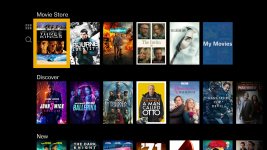
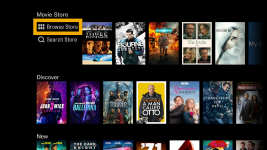
  • Reorganised the on-screen Store menu layout, moving navigation buttons to the side to display more featured movie titles.
    1794410968562.png1794410984244.png
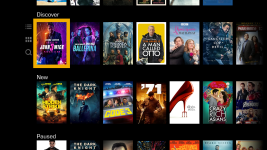
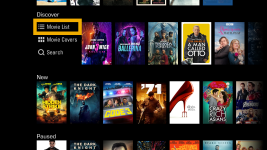
  • Added shortcuts in the Discover menu to jump directly to movie lists, cover art collections, or search.
    1794411027733.png1794411051846.png
Platform Updates
  • Improved download speed controls so systems adhere more closely to configured speed limits and provide accurate completion estimates.
  • Bug fixes
The software rollout commenced this week and will proceed in stages over the coming weeks.
 
It would be interesting to see if we set the Strato K settings back to defaults after the update, would the "no signal" no longer occur?
 
@J.Green Good to see the software improvements. Any chance will see functionality that allows changes to subtitle size/color etc. in near term?

Subtitles are too bright and large for TV users.

The next release of kOS (version 26.2.0-27268) has been released from Engineering and will begin rollout this week. This release includes the following changes and improvements:

New Hardware Platform: Terra Prime NVMe
  • Added system software support for new Terra Prime NVMe server.
HDMI & Display Compatibility for Strato K
  • Improved stability of HDMI 2.1 signalling.
  • 8K HDMI interoperability improvements. Strato K can now switch between TDMS and FRL modes as needed without requiring reboot.
  • Improved video mode switching between Dolby Vision, HDR, and standard video, reducing delays and temporary resolution drops.
HDMI-CEC Communication
  • Corrected startup CEC messaging so connected TVs and receivers accurately detect whether the player is active or in standby.
  • Improved CEC device identification to work more consistently across different TV brands.
On-Screen Display & Navigation
Platform Updates
  • Improved download speed controls so systems adhere more closely to configured speed limits and provide accurate completion estimates.
  • Bug fixes
The software rollout commenced this week and will proceed in stages over the coming weeks.
 
Back
Top