• Thanks for visiting the Kaleidescape Owners' Forum

    This forum is for the community of Kaleidescape owners, and others interested in learning about the system, equipment, services, and the company itself.

    It is run by a group of enthusiastic Kaleidescape owners and dealers purely as a service to this community.

    This board is not affiliated in any way with Kaleidescape, Inc.
    For official technical support, product information, or customer service, please visit www.kaleidescape.com

    You can dismiss this box forever by clicking the "X" in the upper right corner of this message.
  • You are currently in "Guest" mode and not logged in with a registered account.

    The forum is free to use and most of the forum can be used by guests who are not registered....

    ... but we strongly encourage you to register for a full account. There is no cost to register for a full account.

    Benefits of registering for a full account:

    • Participate in the discussions! You must have a registered account to make posts on the forums. You will be able to start your own thread on a topic or question, or you can reply to other threads/discussions.
    • Use the "Conversation" feature (known as "private messaging" on other forums) to communicate directly with any of the other users here.
    • Access the Files area. The "resources" area of the forum contains many "Favorite Scene" and Script files that can dramatically increase the enjoyment of your Kaleidescape system. Go directly to great scenes in your favorite movies, created by other owners, and add automation to playback of your system with Scripts.
    • You won't see this annoying notice at the top of every screen!😊

    It's easy and free to register for the forum. Just click the "Register" button in the upper right corner of this page, and follow the instructions there.

    This box goes away for registered users.

Popcorn Ready app for iOS

My app isn't accurately updating the favorites and watch soon folders on my home system. I"ve tried updating the it under the Home Theatre option in settings, but nothing seems to change. Should I try just deleting the system and then adding back?
 
My app isn't accurately updating the favorites and watch soon folders on my home system. I"ve tried updating the it under the Home Theatre option in settings, but nothing seems to change. Should I try just deleting the system and then adding back?
I'll come up with a workaround in a future release, but I bet it's because your player is in standby. Try waking up your player from the remote tab and then refresh your library from settings. Thanks for pointing that out.
 
Thanks, I'll give it a try when I get home. And as always, just thanks for making the app in general, I love it.
New build 168 is pushed to TestFlight and managing collections should now still work even if the local active player is in Standby mode. Thanks again for finding that issue.
 
I just found out about this app so I am just trying it on my iPhone 13 with iOS 26.

In general, it’s nice looking… but I’m a bit confused because I see all sorts of features being discussed by the developer and other people here they’re supposedly on the app, but I see almost none of them on my iPhone app. It seems very bare bones compared to what’s being discussed here.

Any explanation for this?

I can’t find anywhere to who switch to list view.

I don’t see anywhere to manage downloads.

I’m also wondering, does this app only show you movies that you own or can you browse the store? (so far I can only see movies that I own.)

Thanks.
 
^
You need to install the TestFlight IOS app first: from there it will install the latest version of Popcorn
The latest version via TestFlight is V.9.0 Build 168
 
I just found out about this app so I am just trying it on my iPhone 13 with iOS 26.

In general, it’s nice looking… but I’m a bit confused because I see all sorts of features being discussed by the developer and other people here they’re supposedly on the app, but I see almost none of them on my iPhone app. It seems very bare bones compared to what’s being discussed here.

Any explanation for this?

I can’t find anywhere to who switch to list view.

I don’t see anywhere to manage downloads.

I’m also wondering, does this app only show you movies that you own or can you browse the store? (so far I can only see movies that I own.)

Thanks.
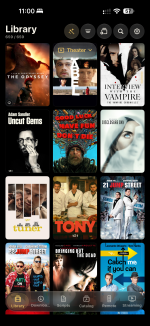
Hi Brody - as @markrubin says above, you should be getting Popcorn Ready through TestFlight. If you are, then your main screen should look like this screenshot below and there are buttons on the bottom to change whether you're looking at library, catalog, etc. On the top are buttons for filters, settings, etc. In there you'll find the options to change your view to more/less dense poster walls or even a list. If you are in fact on the latest version and all of those buttons are somehow missing, please let me know and I'll try to get it resolved if there's a compatibility issue with your device.

IMG_8817.png
 
Hi Brody - as @markrubin says above, you should be getting Popcorn Ready through TestFlight. If you are, then your main screen should look like this screenshot below and there are buttons on the bottom to change whether you're looking at library, catalog, etc. On the top are buttons for filters, settings, etc. In there you'll find the options to change your view to more/less dense poster walls or even a list. If you are in fact on the latest version and all of those buttons are somehow missing, please let me know and I'll try to get it resolved if there's a compatibility issue with your device.

View attachment 12364

Thanks for responding.

I am using Testflight

Popcorn Ready version :

0.9.0 (98)

On an iPhone 13 with iOS 18.7.8
(I thought I was on iOS 26, but I was mistaken)

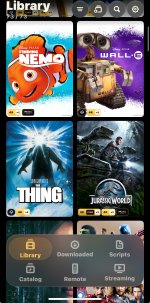
This is what my library screen looks like:

1792181198823.jpeg

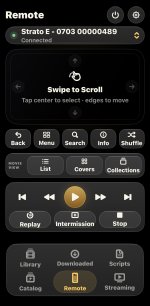
And remote screen:

1792180713025.jpeg

There are no options in any of the menus to change the look of the library or catalogue screen.. no adjustments for cover sizes or to choose a list view.

I think somewhere earlier in the thread you mentioned there was some thing to do with download functionality as well on the app? If so, I’m not seeing that anywhere either.

Mostly, I’m missing lots of functionality from the Kscape app in this version of the Popcorn app (for instance, purchasing movies downloading movies managing downloads, the convenient categories in the Kscape store eg new, special pricing, etc…. Whereas the catalogue feature on the popcorn app just floods the screen with all the movies, and the movie covers are so large that it takes even longer to scroll through them.
 
Thanks for responding.

I am using Testflight

Popcorn Ready version :

0.9.0 (98)

On an iPhone 13 with iOS 18.7.8
(I thought I was on iOS 26, but I was mistaken)

This is what my library screen looks like:

View attachment 12369

And remote screen:

View attachment 12367

There are no options in any of the menus to change the look of the library or catalogue screen.. no adjustments for cover sizes or to choose a list view.

I think somewhere earlier in the thread you mentioned there was some thing to do with download functionality as well on the app? If so, I’m not seeing that anywhere either.

Mostly, I’m missing lots of functionality from the Kscape app in this version of the Popcorn app (for instance, purchasing movies downloading movies managing downloads, the convenient categories in the Kscape store eg new, special pricing, etc…. Whereas the catalogue feature on the popcorn app just floods the screen with all the movies, and the movie covers are so large that it takes even longer to scroll through them.
Unfortunately I am only supporting the last 2 versions of iOS (27 and 26) so that’s why you are stuck on such an old version of Popcorn Ready and that build will likely expire soon as TestFlight builds are only valid for 90 days.
 
Unfortunately I am only supporting the last 2 versions of iOS (27 and 26) so that’s why you are stuck on such an old version of Popcorn Ready and that build will likely expire soon as TestFlight builds are only valid for 90 days.

Ah… got it thanks!

When I realized I was only on iOS 18, I started to suspect that.

Maybe this will finally get me to update my iOS.
 
I know in the past you didn't have any interest in a TVOS version but just wondering if that's a feasible port from the iOS version now that it is turning out so well? It would totally solve my one major gripe with a standalone Strato of having a group of people be able to browse the entire owned collection on the big screen. Like when my kids (who don't have phones) want to pick a movie with their friends. Thanks.
 
I know in the past you didn't have any interest in a TVOS version but just wondering if that's a feasible port from the iOS version now that it is turning out so well? It would totally solve my one major gripe with a standalone Strato of having a group of people be able to browse the entire owned collection on the big screen. Like when my kids (who don't have phones) want to pick a movie with their friends. Thanks.
Not ideal, but this works for us.
 
I know in the past you didn't have any interest in a TVOS version but just wondering if that's a feasible port from the iOS version now that it is turning out so well? It would totally solve my one major gripe with a standalone Strato of having a group of people be able to browse the entire owned collection on the big screen. Like when my kids (who don't have phones) want to pick a movie with their friends. Thanks.
Probably not at this time. I'm working on making iPhone Duo look good right now. Hope to release an update soon.
 
I'm going to start a new thread with iPhone Duo in the title to try to attract iPhone Duo users to test Popcorn Ready once I release the build with good Duo support. I don't have the Duo, so I'm only able to test on the simulator myself. If you have a Duo in hand already, hang tight and I'll get you a release very soon that should look and work well for you. Thanks!!!
 
Any idea when you will release iOS to production? Everything seemed to work perfectly for me. Though I have a Duo, I'm using the app on my iPhone Air.
 
Any idea when you will release iOS to production? Everything seemed to work perfectly for me. Though I have a Duo, I'm using the app on my iPhone Air.
Keeping it in TestFlight for now while I'm still working on it quite a bit makes it much easier for me to push out new releases faster. Once it's in the App Store then there are delays for Apple reviews, etc.

But maybe after Duo is solid then I'll slow down and at that point I'll put it in the store instead of releasing via TestFlight. One downside with TestFlight is that builds expire after 90 days. So if I'm ever going to go more than 90 days without a new build I need it in the store instead.

I'm trying to do custom layouts for Duo because I really don't like how apps look on the Duo with the big blank bar on the right in portrait mode...especially on the small outer screen. Hopefully, once I push out this first Duo build to TestFlight you'll be able to test it on your device and give me some feedback. Sometimes it's hard to catch everything in the simulator. Thanks!!!
 
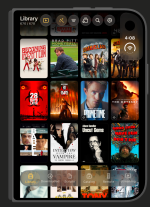
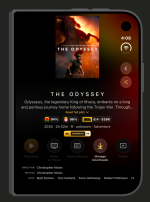
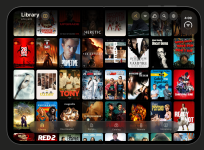
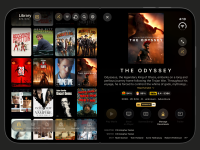
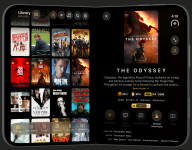
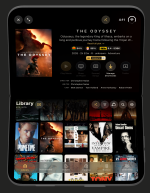
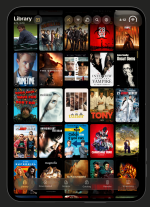
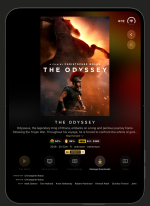
OK, build 172 is now released to TestFlight and this build has my first attempt at iPhone Duo support! I don't have the device so this is only tested on the simulator so far so I would really appreciate feedback (both positive and negative) from any users that already have a Duo. Here are a few poses of the Duo:

1793138916794.png
1793138944563.png
1793138986459.png
1793139019028.png
1793139047065.png
1793139081632.png
1793139143874.png
1793139168347.png
 
Last edited:
Tested only for a few minutes but, so far, it looks great ! You've done what most app developers have not done for the Duo. Greatly appreciated. Will continue to test. Thanks
 
Hi,

Did some more testing and, with a couple of possible exceptions, everything looks fantastic and as you posted (above).

I particularly like the way you used the 2 screens when the Duo is unfolded.

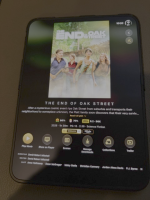
However, on this front, if the inner screen is not folded, you see the two panels (library on left, chosen film on right) in landscape mode, but not in portrait mode. To see the two screens in portrait mode on the inner screen, you need to fold the Duo. I don't know if this is intended or not, or whether you could not see it the simulator. See screenshots A and B below.

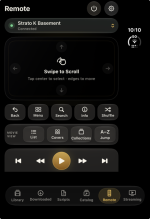
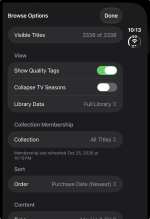
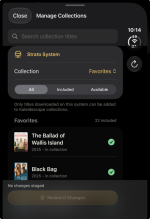
The only other issues I encountered with UI relates to Remote, Browse Options and Manage Collections, when the Duo is closed (folded): I don't know whether you intended to leave the right side black (as if not optimized for the Duo) or not. See screenshots 1,2 and 3 below.

I'm very impressed. This work is a testament to your talent and also a wake-up call to other developers who have far more time and resources devoted to iOS development but have not yet optimized their apps or have not done so as well as you.

Thanks again for your wonderful work and, if you want me to test anything in particular, please don't hesitate to DM me.
 

Attachments

  • Screenshot A.png
    Screenshot A.png
    385 KB · Views: 10
  • Screenshot B.png
    Screenshot B.png
    380.5 KB · Views: 10
  • Screenshot 1.png
    Screenshot 1.png
    139.4 KB · Views: 10
  • Screenshot 2.png
    Screenshot 2.png
    251.6 KB · Views: 10
  • Screenshot 3.png
    Screenshot 3.png
    135.1 KB · Views: 10
Last edited:
Hi,

Did some more testing and, with a couple of possible exceptions, everything looks fantastic and as you posted (above).

I particularly like the way you used the 2 screens when the Duo is unfolded.

However, on this front, if the inner screen is not folded, you see the two panels (library on left, chosen film on right) in landscape mode, but not in portrait mode. To see the two screens in portrait mode on the inner screen, you need to fold the Duo. I don't know if this is intended or not, or whether you could not see it the simulator. See screenshots A and B below.

The only other issues I encountered with UI relates to Remote, Browse Options and Manage Collections, when the Duo is closed (folded): I don't know whether you intended to leave the right side black (as if not optimized for the Duo) or not. See screenshots 1,2 and 3 below.

I'm very impressed. This work is a testament to your talent and also a wake-up call to other developers who have far more time and resources devoted to iOS development but have not yet optimized their apps or have not done so as well as you.

Thanks again for your wonderful work and, if you want me to test anything in particular, please don't hesitate to DM me.
This is great feedback, thanks!!! About portrait mode, I didn't add the split screen primarily because I didn't do it for iPad either...only landscape. But then I was thinking about the tabletop pose and thought it may be neat to scroll movies on the bottom and see the details of a selected movie on top screen. I could pretty easily make that split screen also work in the unfolded portrait layout.

Those other screens you pointed out could definitely use a bit more polish although I'm not sure if that will mean extending further to the reserved space on the right or some other changes to make them look better. I think you'll see a lot of apps keep that right side reserved. However, for an artwork heavy layout like I have for the main pages, I dislike the big blank bar on the right and definitely think it's worth doing the additional work to use that space.

One question: for the Duo, under settings in Popcorn Ready, do you prefer Small or Medium for the Browse Layout? It was tough for me to pick a default when looking on the sim. I stuck with Medium, but I almost chose Small.
 
Back
Top