• Thanks for visiting the Kaleidescape Owners' Forum

    This forum is for the community of Kaleidescape owners, and others interested in learning about the system, equipment, services, and the company itself.

    It is run by a group of enthusiastic Kaleidescape owners and dealers purely as a service to this community.

    This board is not affiliated in any way with Kaleidescape, Inc.
    For official technical support, product information, or customer service, please visit www.kaleidescape.com

    You can dismiss this box forever by clicking the "X" in the upper right corner of this message.
  • You are currently in "Guest" mode and not logged in with a registered account.

    The forum is free to use and most of the forum can be used by guests who are not registered....

    ... but we strongly encourage you to register for a full account. There is no cost to register for a full account.

    Benefits of registering for a full account:

    • Participate in the discussions! You must have a registered account to make posts on the forums. You will be able to start your own thread on a topic or question, or you can reply to other threads/discussions.
    • Use the "Conversation" feature (known as "private messaging" on other forums) to communicate directly with any of the other users here.
    • Access the Files area. The "resources" area of the forum contains many "Favorite Scene" and Script files that can dramatically increase the enjoyment of your Kaleidescape system. Go directly to great scenes in your favorite movies, created by other owners, and add automation to playback of your system with Scripts.
    • You won't see this annoying notice at the top of every screen!😊

    It's easy and free to register for the forum. Just click the "Register" button in the upper right corner of this page, and follow the instructions there.

    This box goes away for registered users.

Strato V: UI resolution limited to 1080, not 4k!

I'm not really aware of anything special you would need to do. I will double-check with others on the team about this, but since you're adding artwork on the Premiere system, I believe that the maximum size that the system stores is 1080 pixels tall (the full height of a 1080p frame). I don't think there's a benefit to using larger artwork because the Premiere server is going to scale whatever files you upload to the needed sizes anyway.

When using Co-Star, the Strato system fetches the full-height artwork from the Premiere system and scales it to the sizes that it needs. This is generally still scaling the image down because nearly all of the images on the OSD are comparatively small. The exception is the big cover in the Collections place, and maybe the cover used for Intermission. Those would be scaled up if needed.

Let me ask some folks tomorrow and I'll update here if there's any additional information.
 
I have a friend who is getting a demo of Kaleidescape in his home theater as I type this. Having seen and experienced his room, I rather suspect it would have cost well into 7-figures US (the screen must be at least 200 inches, front speakers are Gauder Akustik RC11's...).

Needless to say I have let him know that he shouldn't worry too much if he's not impressed with the cover art, and to focus on the actual content, but I rather suspect his dealer will be very clear about how he will almost certainly be better off with a C for his room, even if - as is almost certainly the case - the dealer is taking round a V to show off the content quality.

The rationale for the 1080p UI was explained close to two and a half months ago. The member concerned first raised his concerns two months after that. Two months during which it had been discussed and explained in great detail here. Certainly more than sufficient time for anyone to have independently done their own research on Kaleidescape, found this forum, and read it; or for every dealer on the planet to be aware of the situation and ensure that any prospective customer was cognisant of the limitation.

I guess I have a rather simple question for those members here whose dealers did not explain to them at the time of demo/purchase that the Strato V UI is in 1080p; and who believe they have been somehow conned into the purchase; and who now surely must very clearly understand that the V is never going to be creating the UI in 4K...

"What would it take to resolve the issue to your satisfaction?"
 
Last edited:
Can you set the cover screen to 1080P and let a Lumagen upscale if we desire? SJ
 
Can you set the cover screen to 1080P and let a Lumagen upscale if we desire? SJ
Not currently, my hope is that this will be changed in the future. I think ideally the "Allow display mode changes (use external scaler)" setting should be updated in the future to output the UI in 1080p when selected on the Strato V and let the external device perform that UI upscaling.
 
Beyond the guideline of higher image resolution is better, is anyone aware of other factors to ensure the best display on the K cover wall view?
I got some feedback from the team, and generally my previous answer stands, although they did say that the master images we start with are typically ~3,000 pixels tall. If you have art available at that sort of size, it may produce slightly better results once the Premiere server scales it to the appropriate sizes.
 
I got some feedback from the team, and generally my previous answer stands, although they did say that the master images we start with are typically ~3,000 pixels tall. If you have art available at that sort of size, it may produce slightly better results once the Premiere server scales it to the appropriate sizes.
Thank You! I'll keep this in mind going forward
 
...the master images we start with are typically ~3,000 pixels tall...
Really? Wow. I had watched a YouTube video from @Techthusiasm that I swore said custom art was limited to 756x1080, and that's what I've been working with. Is there a specific size limit (recommendation) or is it that larger images may be less efficient?
 
It will definitely accept an image larger than that. As a test, I just uploaded a 1500x1500 image for a concert disc that I bought recently that hasn't gone through the loan program yet, and that worked fine. There's probably a limit but I don't know what it is.

One of our experts with the image processing stuff noted that something one should try to avoid is uploading an image that is close to the target size that will be needed. So actually, 756x1080 is probably not a great fit. The big image size in the Collections place is slightly smaller than 1080 tall on Premiere because it has to leave room for the ribbon at the bottom and a bit of margin, and scaling an image down from a given size to a slightly smaller size can introduce significant artifacts. Scaling from a substantially larger size to the same target resolution will produce better results. If you can get something taller than 2160, that's ideal
 
It will definitely accept an image larger than that. As a test, I just uploaded a 1500x1500 image for a concert disc that I bought recently that hasn't gone through the loan program yet, and that worked fine. There's probably a limit but I don't know what it is.

One of our experts with the image processing stuff noted that something one should try to avoid is uploading an image that is close to the target size that will be needed. So actually, 756x1080 is probably not a great fit. The big image size in the Collections place is slightly smaller than 1080 tall on Premiere because it has to leave room for the ribbon at the bottom and a bit of margin, and scaling an image down from a given size to a slightly smaller size can introduce significant artifacts. Scaling from a substantially larger size to the same target resolution will produce better results. If you can get something taller than 2160, that's ideal
Is that all specific to the Premiere use case? If I’m using a Strato C and Compact Terra 22TB, what is the maximum image size I should optimize for? I was following the Techthusiasm recommendation of 756x1080 as well, nearly all my covers are replacements of the existing covers.
 
I definitely would not use 756x1080 on Strato. That's going to result in images having to be scaled up for some of the views. We're using the same size masters (roughly 3000 pixels tall) as the starting point for the cover art we process for the systems, so if you are able to do something in that rough size you should be pretty good, but if you have a larger image that should be okay.

By the way, do not use interlaced PNG images on Strato/Terra. There's a bug that results in excruciatingly slow processing of interlaced PNG on those platforms. If you're absolutely sure your PNG is not interlaced, it's fine.

One thing to consider: these images that you upload are retained on the server because we might need them to generate different sizes (e.g. if you were to enable CinemaScape). So you're using some storage when you add custom covers. It's probably a pretty trivial amount when compared to movies, though.
 
I definitely would not use 756x1080 on Strato. That's going to result in images having to be scaled up for some of the views. We're using the same size masters (roughly 3000 pixels tall) as the starting point for the cover art we process for the systems, so if you are able to do something in that rough size you should be pretty good, but if you have a larger image that should be okay.

By the way, do not use interlaced PNG images on Strato/Terra. There's a bug that results in excruciatingly slow processing of interlaced PNG on those platforms. If you're absolutely sure your PNG is not interlaced, it's fine.

One thing to consider: these images that you upload are retained on the server because we might need them to generate different sizes (e.g. if you were to enable CinemaScape). So you're using some storage when you add custom covers. It's probably a pretty trivial amount when compared to movies, though.
Thank you, I appreciate the details and context. I’ll test out some larger images this weekend when I have some time.
 
I have a friend who is getting a demo of Kaleidescape in his home theater as I type this. Having seen and experienced his room, I rather suspect it would have cost well into 7-figures US (the screen must be at least 200 inches, front speakers are Gauder Akustik RC11's...).

Needless to say I have let him know that he shouldn't worry too much if he's not impressed with the cover art, and to focus on the actual content, but I rather suspect his dealer will be very clear about how he will almost certainly be better off with a C for his room, even if - as is almost certainly the case - the dealer is taking round a V to show off the content quality.

The rationale for the 1080p UI was explained close to two and a half months ago. The member concerned first raised his concerns two months after that. Two months during which it had been discussed and explained in great detail here. Certainly more than sufficient time for anyone to have independently done their own research on Kaleidescape, found this forum, and read it; or for every dealer on the planet to be aware of the situation and ensure that any prospective customer was cognisant of the limitation.

I guess I have a rather simple question for those members here whose dealers did not explain to them at the time of demo/purchase that the Strato V UI is in 1080p; and who believe they have been somehow conned into the purchase; and who now surely must very clearly understand that the V is never going to be creating the UI in 4K...

"What would it take to resolve the issue to your satisfaction?"
I think it’s safe to say there will be a new player at some point with all the capabilities of the V but with a chipset that can render the UI in 4K. I hope there’s an extremely generous upgrade program for early buyers of the V to trade it for that upgraded player.
 
Really? Wow. I had watched a YouTube video from @Techthusiasm that I swore said custom art was limited to 756x1080, and that's what I've been working with. Is there a specific size limit (recommendation) or is it that larger images may be less efficient?

That video is probably a few years old now. 😀 I'm pretty sure when I made that video though, the system gave me a direct indication about the size required for the image.

I wonder if custom art could look any better than the stock art. Probably something I can double check or update on now that I have a Terra again. Maybe time for an updated video as well.
 
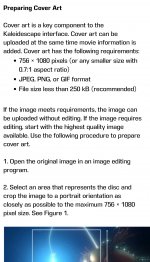
Hang on a minute, it's not just Jaremy's video that says the covers should be 756x1080, it's Kaleidescape's own support page:


@MikeKobb from what you're saying, it sounds like the company support page out of date?

I haven't had time to try 3000 pixel tall images yet, but having already converted 175 cover art images to custom art in 756x1080 resolution, and not seeing any problems from it, I'm not sure I'm going to go through this all again. Maybe I'll get higher resolution images when I hit Intermission? That seems to be the largest version of the cover as presented in the UI.
 
Hang on a minute, it's not just Jaremy's video that says the covers should be 756x1080, it's Kaleidescape's own support page:


@MikeKobb from what you're saying, it sounds like the company support page out of date?

I haven't had time to try 3000 pixel tall images yet, but having already converted 175 cover art images to custom art in 756x1080 resolution, and not seeing any problems from it, I'm not sure I'm going to go through this all again. Maybe I'll get higher resolution images when I hit Intermission? That seems to be the largest version of the cover as presented in the UI.
Screenshot added for posterity.
 

Attachments

  • Screenshot_20241012_081853_Chrome.jpg
    Screenshot_20241012_081853_Chrome.jpg
    357.5 KB · Views: 13
When I replaced all my cataloged Blu-ray Disc cover art probably 4-ish years ago on my paired Strato-alto system, I used very high resolution 3000px images, and had no issues. Sourced them from themoviedb.org. They were definitely displaying at as full of a resolution as possible on the 4K UI of the Strato too, looked fantastic in the older collections view with the very large art.
 
Last edited:
When I replaced all my cataloged Blu-ray Disc cover art probably 4-ish years ago on my paired Strato-alto system, I used very high resolution 3000px images, and had no issues. Sourced them from themoviedb.org. They were definitely displaying at as full of a resolution as possible on the 4K UI of the Strato too, looked fantastic in the older collections view with the very large art.
Oh that’s great to hear. I’m also sourcing from the same place, so hopefully not too challenging to revert those images. Maybe that’s an hour of busywork for me, but it’s also the kind of absurd minutia I can get behind knowing it will have a good result.
 
Back
Top