• Thanks for visiting the Kaleidescape Owners' Forum

    This forum is for the community of Kaleidescape owners, and others interested in learning about the system, equipment, services, and the company itself.

    It is run by a group of enthusiastic Kaleidescape owners and dealers purely as a service to this community.

    This board is not affiliated in any way with Kaleidescape, Inc.
    For official technical support, product information, or customer service, please visit www.kaleidescape.com

    You can dismiss this box forever by clicking the "X" in the upper right corner of this message.
  • You are currently in "Guest" mode and not logged in with a registered account.

    The forum is free to use and most of the forum can be used by guests who are not registered....

    ... but we strongly encourage you to register for a full account. There is no cost to register for a full account.

    Benefits of registering for a full account:

    • Participate in the discussions! You must have a registered account to make posts on the forums. You will be able to start your own thread on a topic or question, or you can reply to other threads/discussions.
    • Use the "Conversation" feature (known as "private messaging" on other forums) to communicate directly with any of the other users here.
    • Access the Files area. The "resources" area of the forum contains many "Favorite Scene" and Script files that can dramatically increase the enjoyment of your Kaleidescape system. Go directly to great scenes in your favorite movies, created by other owners, and add automation to playback of your system with Scripts.
    • You won't see this annoying notice at the top of every screen!😊

    It's easy and free to register for the forum. Just click the "Register" button in the upper right corner of this page, and follow the instructions there.

    This box goes away for registered users.

NEWS: Strato V Player Announced

Was looking forward to checking out the DV grade on the Potter movies. The HDR10 grade on #4 in particular has a couple scenes that are incredibly difficult to tone map. DV really made it more manageable and brought back (most of) the details in the highlights. Forgive the cell phone pics but it should get the point across. My phone was absolutely struggling with the dynamic range. 😵‍💫

Pics:
UB61zOtA_o.jpg


nwv4WSPt_o.jpg


LFJbNMjh_o.jpg


OPMOrsPP_o.jpg


BbA2I4Bi_o.jpg


sbJfzklx_o.jpg


YlEl33py_o.jpg


2Q1aHUb3_o.jpg

This is on a 75" Sony Z9K capable of 2600 nits and just under 700 full screen.
 
Can this player be stacked on top of another component (Blu-ray player etc)? I’m running out of real estate in my rack or I could probably order the standalone amplifier/component stand from monoprice.
In addition to not putting it on top of a hot component like an amplifier, the next most important thing is to ensure that there's space in front of and behind the player. If it gets warm enough to turn on the active cooling, air is drawn through the front and exhausted from the back.
 
Is it recommended to use the included hdmi cable with the V? I have the zezkit maya (48gbps) cable as well. I was reading some of the recent posts on the previous page, which appeared to favor the included THX certified cable (PixelGen). Thanks in advance.
 
@MikeKobb I’ve been getting audio/video dropouts when playing content while downloads are happening. It’s in grouped mode with a full size 24TB Terra. It’s very consistent and happens when playing any 4k content. Both Audio and video get very choppy, but I never get a “Difficulty Reading Movie” notification like I have seen before. I have gigabit internet, so the Terra is probably using all of its processing to handle the download instead of throttling itself to make sure it can properly serve the V. It’s not a huge problem right now because the problem goes away if I limit my download bandwidth to 600mbps.
 
Hmm. Thanks for the report. I will message you privately to get some system info
 
Fwiw, Bad boys: Ride or Die looks spectacular in DoVi. I rented this earlier on iTunes and watched it on my projector (LS12000- HDR10), but imho, it’s no match for (uncompressed) DoVI. Just checked out a couple of scenes, but intend to watch the full feature again later tonight (still evening here in SoCal). 🍻
 
Sorry to bug you guys again. But how do you pair the Kscape app (iOS) with the player? It keeps indicating no player detected. I even tried manually typing the ip address when prompted. I want to use the remote function available on the app, but I need to pair it up first.
 
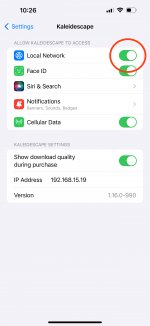
One of the most common reasons this fails is that people often click through without reading the dialog that Apple throws up on first app launch asking for permission to access the local network. Go to the Settings app, scroll down to Kaleidescape, and make sure that this is enabled:

IMG_0D94398DB1BF-1.jpeg
 
One of the most common reasons this fails is that people often click through without reading the dialog that Apple throws up on first app launch asking for permission to access the local network. Go to the Settings app, scroll down to Kaleidescape, and make sure that this is enabled:

View attachment 5349
Thanks a lot for that. I even enabled the “show download quality” feature while I was at it. It was disabled by default. Cheers!!!
 
For what it's worth, I'm not sure what HDMI enhancements specifically were made (waiting on @MikeKobb HW team detail!) but I can say that every movie and/or scene that had issues on my Strato C I have tested on the Strato V and did not encounter those similar issues.
Does that include the lip-sync issues?
 
If it had been possible to reasonably enable 4K for the OSD plane, we would have definitely done so. As it stands, it’s not supported by the SoC firmware, and I’m not aware of any intention by the chip builder to add it, or if it’s even possible for them to add it while delivering acceptable performance. Despite this limitation, of the available SoCs that we evaluated, this one was definitely the best option for multiple reasons.
@MikeKobb (or others), what do you think of the suggestion above by @JWort93 to set the V to "minimize display mode changes"?
I now have a V and find that the delays with my controller and projector are very long when switching from UI to 4K content. But I don't want to sacrifice PQ by turning that on if it will be a noticeable change.
 
@J.Green and @MikeKobb , are the DV adds happening randomly as they finish or on a daily/weekly basis?

My kids were floored with Frozen 2 (and we’ve easily watched this movie hundreds of
Times) and I find myself checking hourly due to the outstanding job of the films done so far.

Gateway drug indeed, and not just for new customers, Kaleidescape has never looked and sounded better IMO (personally, as I know others have well documented concerns and issues being worked on for their specific setups and scenarios, with all due respect to their issues)…..
 
FYI looks to have been a rather large update of the HD re-encoding process for the "Need to download a SD version copy" of HD films (including Gravity!).

I only have 3 films in my collection without an HD compatible version now (Django Unchained, Old School and Bad Santa) when I run the Strato V readiness report.

Great job and end of afternoon surprise @MikeKobb !
 
I also noticed that if you upgrade a movie from HDR10 to DV, such as Fury Road and TG: Maverick, which I just reloaded as DV since they were just updated, then the scenes you personally made and the scripts for that movie are deleted so you have to redo them manually.
User created scenes are specific to the exact version of the movie that you (or someone else) created them with. So if you replace that movie with a different version -- even if it's the same quality (e.g an upgrade from one HDR10 version to another HDR10 version) -- then the user created scenes will be lost and have to be recreated. It's a limitation of the scene system where the start and end bookmarks for the scenes are movie object specific.

So in the case where you replace an HDR10 version of the movie with a DV version, your user scenes would be lost. If you downloaded the DV version in addition to the HDR10 version, your scenes would still exist but they would only work for the HDR10 version not the DV version.
 
There is a known issue related to this, yes. There is some fine-tuning of the video pipeline that is being looked at right now to address it. We’ll add this scene as one of our test cases.
Do you have an ETA on a fix for this since it was already a known issue internally? It’s the thing holding me back from buying a V right now.
 
Back
Top