Spooky
Active member
Supporting your local dealer is much harder outside the US. You should see the prices here. Dealers here can’t buy them for what consumers pay in the US. I’m not sure why there is such a huge disparity.


It is run by a group of enthusiastic Kaleidescape owners and dealers purely as a service to this community.
You can dismiss this box forever by clicking the "X" in the upper right corner of this message.
... but we strongly encourage you to register for a full account. There is no cost to register for a full account.
This box goes away for registered users.
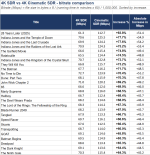
Let me just say I’m thrilled with the flawless operation of the new K and outstanding picture resolution on the movies I’ve watched.
Sounds like 2.1 still has issues, glad I haven’t ’upgraded’ my Alt 16 yet!

Legacy SDR versions of both Wicked and Wicked for Good include both the standard movie and the "Sing Along Version" of each. If you're going to calculate the average total bitrate you're going to need to double the number of minutes in the formula.Very oddly, Wicked and Wicked for Good show 22% and 38% decreases in bitrate -- if someone here owns either, it would be interesting to hear whether Cinematic looks better or worse.

My dealer helped me with this one and it turns out that not all HDR10 Cinematic titles will have chroma 4:4:4. That is the case here. My dealer asked me to download Predator: Badlands and it works great in 4:4:4.Just my first stab at some testing with the K. I have an 8K TV on a secondary location where I connected the Strato K and couldn't get any video data, only audio along with a black screen. I didn't spend a lot of time trying to figure out why, so I moved it to my primary location where I have a 4K TV. It started off with a black screen but seemed to recover soon afterwards. I did try to play my first movie on it but kept getting an error about "can't play" or something. I went to another title which played just fine, so then went back to original movie and it worked that time.
I could be incorrect about how it's supposed to work with Chroma, but I thought Dolby Vision Cinematic titles supported up to 4:2:2 and HDR10 titles could support up to 4:4:4? Last night, I was getting 4:2:2 for every title. Today, on the Bohemian title (which is 4:4:4) is only working at 1080p resolution. Very confusing.
View attachment 10675
The two movies I tested were:
Dolby Vision:

Civil War
In a fractured near-future USA, group of journalists must race through battlefields to the White House before DC falls. Action, Thriller, War. Purchase and download today in 4K Cinematic Dolby Vision with Dolby Atmos audio.www.kaleidescape.com
and
HDR10:

Bohemian Rhapsody
Flamboyant frontman Freddie Mercury wrestles with his private life during Queen's meteoric rise to fame. Drama, Biography, Music. Directed by Bryan Singer. Starring Rami Malek, Lucy Boynton, Gwilym Lee, and Ben Hardy. Purchase and download today in 4K Cinematic HDR10 with Dolby Atmos audio.
Any thoughts? Is there still a setting somewhere that might be incorrect or do some HDR10 titles only support 4:2:2? If so, has anyone found an HDR10 title that supports 4:4:4 Chroma in 4K?

That’s really interesting, because iirc, Mike alluded to the fact that HDR10 wouldn’t be entertained, if the source (mezzanine) chroma was 4:2:2. They would use C-DV in that case. Guess we need further clarification.My dealer helped me with this one and it turns out that not all HDR10 Cinematic titles will have chroma 4:4:4. That is the case here. My dealer asked me to download Predator: Badlands and it works great in 4:4:4.
Hello folks,
I wanted to share an update on the Dolby Vision to HDR10 conversion discussion.
First of all, let me apologize, because I did not understand all of the details of this when I posted about the fix to the black level issue. I would have added more detail had I known.
Anyway, as previously noted, in kOS 26.1.0, we corrected the issue with black levels in the converted playback.
We were also aware that sometimes converted Dolby Vision content was appearing a bit muted, with lower dynamic range than would be expected. We were able to make a change to partially address this issue and improve the dynamic range rendering in converted content. This change was included in 26.1 because it produced a net improvement in how the content looks subjectively when played (it's no longer muted), but it's not the fully correct solution as it can cause over-brightening.
We have a follow-on release coming shortly (26.1.1) that will fix several issues that couldn't be resolved in time for 26.1.0, and that release will include an additional change recommended by Dolby that will more closely match the HDR10 dynamics. That change is already in testing.
In addition to this, I have some other news to share. We've been evaluating the availability of mezzanine files with 4:4:4 chroma information, and happily that evaluation shows that they're very broadly available. This has driven a decision to offer 4K Cinematic HDR10 in addition to 4K Cinematic SDR and 4K Cinematic Dolby Vision for movies that have 4:4:4 mezzanine files. Strato K is able to play 4K Dolby Vision with 4:2:2 color, so adding 4K Cinematic HDR10 as well will allow us to deliver 4:4:4 color with HDR for displays that can support it. We won't do HDR10 versions of 4K Cinematic if the mezzanine files are 4:2:2, because then there's no material benefit compared to converting the Dolby Vision file during playback.
So to summarize: 4K Cinematic SDR and 4K Cinematic HDR10 will support up to 4:4:4, and 4K Cinematic Dolby Vision will support 4:2:2. You'll see those HDR10 additions begin to become available soon.
Much thanks MikeHi folks,
I'd like to address some of what @Sasquatch has said and clarify a few things related to Strato K and HDMI 2.1 interoperation.
First and foremost, let me apologize for the poor experience Sasquatch has had in getting the Strato K to handshake properly with his equipment. I'd like to assure everyone that this is being investigated. As he has just reported, the issue has been escalated to engineering for diagnosis and resolution. We'll try to replicate the same configurations in-house and we appreciate his troubleshooting and data gathering.
We did of course do various interoperability testing with the Strato K prior to shipment, but there are many combinations of video processors, audio processors/receivers, displays, and cables, and inevitably there will be some combinations that can't be tested. When we've received reports of issues, as in this case, those have been recorded and are being investigated. It's obviously important to note that problems that we discover may or may not be on our side of the connection. If we discover issues that lie in some other component, we'll do what we've always done, which is to reach out to those companies and work together to find a resolution.
Now, let me talk for a moment about HDMI 2.1 support. It is our intention to ensure that HDMI 2.1 is working properly for all devices that support it. Full stop.
I do not doubt that the message Sasquatch previously received regarding HDMI 2.1 support for 4K differed from that statement, and that's on us. There was a communication breakdown somewhere. So let me do my best to clearly state what's so and what we're doing.
I hope this clarifies where things stand, and puts some people's minds at ease.
- To restate: It is our intention to ensure that HDMI 2.1 is working properly for all devices that support it.
- With that having been said, HDMI 2.1 is not required for 4K Cinematic support. HDMI 2.0 has sufficient bandwidth for 4K Cinematic at up to 4:4:4 chroma for 24fps content. It can support 4:2:2 at up to 60fps.
- HDMI 2.1 is required for 8K. Currently there is one 8K short film available in the store, and more content is in the works.
- If someone is having interoperability issues with HDMI 2.1, and they are using 4K, then the fastest route to getting things into a usable state may be to switch to HDMI 2.0. For some people, this will be all they need to do, because they'll now have a working configuration that delivers the full benefit of 4K Cinematic. For others, as Sasquatch wrote above, this will be an interim step to get things working until whatever is preventing HDMI 2.1 from working is resolved.
- We encourage everyone to read the Strato K Installation Guide, especially the section on display settings.
- If you encounter issues that aren't resolved by following the steps in that installation guide section, we want to hear about it. Please contact support@kaliedescape.com and let us know what's going on, with as much detail as you can provide. It's always helpful if you can provide a serial number for the player in question so that we can go right to looking at the uploaded diagnostics without having to write you back to ask for that.

Hi folks,
I'd like to address some of what @Sasquatch has said and clarify a few things related to Strato K and HDMI 2.1 interoperation.
First and foremost, let me apologize for the poor experience Sasquatch has had in getting the Strato K to handshake properly with his equipment. I'd like to assure everyone that this is being investigated. As he has just reported, the issue has been escalated to engineering for diagnosis and resolution. We'll try to replicate the same configurations in-house and we appreciate his troubleshooting and data gathering.
We did of course do various interoperability testing with the Strato K prior to shipment, but there are many combinations of video processors, audio processors/receivers, displays, and cables, and inevitably there will be some combinations that can't be tested. When we've received reports of issues, as in this case, those have been recorded and are being investigated. It's obviously important to note that problems that we discover may or may not be on our side of the connection. If we discover issues that lie in some other component, we'll do what we've always done, which is to reach out to those companies and work together to find a resolution.
Now, let me talk for a moment about HDMI 2.1 support. It is our intention to ensure that HDMI 2.1 is working properly for all devices that support it. Full stop.
I do not doubt that the message Sasquatch previously received regarding HDMI 2.1 support for 4K differed from that statement, and that's on us. There was a communication breakdown somewhere. So let me do my best to clearly state what's so and what we're doing.
I hope this clarifies where things stand, and puts some people's minds at ease.
- To restate: It is our intention to ensure that HDMI 2.1 is working properly for all devices that support it.
- With that having been said, HDMI 2.1 is not required for 4K Cinematic support. HDMI 2.0 has sufficient bandwidth for 4K Cinematic at up to 4:4:4 chroma for 24fps content. It can support 4:2:2 at up to 60fps.
- HDMI 2.1 is required for 8K. Currently there is one 8K short film available in the store, and more content is in the works.
- If someone is having interoperability issues with HDMI 2.1, and they are using 4K, then the fastest route to getting things into a usable state may be to switch to HDMI 2.0. For some people, this will be all they need to do, because they'll now have a working configuration that delivers the full benefit of 4K Cinematic. For others, as Sasquatch wrote above, this will be an interim step to get things working until whatever is preventing HDMI 2.1 from working is resolved.
- We encourage everyone to read the Strato K Installation Guide, especially the section on display settings.
- If you encounter issues that aren't resolved by following the steps in that installation guide section, we want to hear about it. Please contact support@kaliedescape.com and let us know what's going on, with as much detail as you can provide. It's always helpful if you can provide a serial number for the player in question so that we can go right to looking at the uploaded diagnostics without having to write you back to ask for that.

Frank and I tested Bohemian Rhapsody and found the source is 4K Cinematic HDR10 in 4:2:2. Notably that movie has no DV formats at all, neither regular 4K DV nor 4KC DV.My dealer helped me with this one and it turns out that not all HDR10 Cinematic titles will have chroma 4:4:4. That is the case here. My dealer asked me to download Predator: Badlands and it works great in 4:4:4.
Maybe worthwhile to try an EDID cloning device, like Dr. HDMI 8k from HDFury, and use it to present the display’s EDID directly to the player. Some of these devices may have a splitter.
Thanks very much. With this correction, Wicked's bitrate rises +68% and Wicked for Good rises +52% (when going from 4k SDR to 4k Cinematic SDR). Makes sense now.Legacy SDR versions of both Wicked and Wicked for Good include both the standard movie and the "Sing Along Version" of each. If you're going to calculate the average total bitrate you're going to need to double the number of minutes in the formula.

Hi I was watching the @Techthusiasm video and Mike indicated that DV (rather than HDR10) would preserve better color depth (almost 12bit) and was therefore likely preferable to using 444 passthrough which might shut off the LG calibration (meaning DV would not come through).A quick update for LG OLED users. I'm able to confirm that playing a Cinematic 4k HDR film (i.e. The Devil Wears Prada) does come through as 4:4:4 and still uses the custom user calibration, Filmmaker Mode in my test. The PC passthrough-only worry doesn't appear to be a concern.
Both Cinematic 4k Dolby Vision and HDR10 using 4:2:2 or 4:4:4 work with calibrations, at least on my G6.
It maintained my ability to use the calibration for those modes, yes. I don't know about preserving color depth comparisons?Hi I was watching the @Techthusiasm video and Mike indicated that DV (rather than HDR10) would preserve better color depth (almost 12bit) and was therefore likely preferable to using 444 passthrough which might shut off the LG calibration (meaning DV would not come through).
But you found instead that using LG 444 passthrough did maintain DV and filmmaker modes? Correct?
We’re getting into the bleeding edge of 4K with 4:4:4, larger files, and higher bit rates. At some point it becomes objectively better with measurements and data, but subjectively hit-and-miss with what is visually better. With the Strato K I ordered objectively and am hoping for the best subjectively on a case-by-case basis. However, there’s no doubt in my mind that the Strato K, 4K Cinematic, and 8K are serious steps forward for K-scape and their customers.My first impressions of the Kaleidescape Strato K.
Installation:
Installed a new Strato K alongside a new Mini Terra Prime. Both were new out of the box and installed/connected at the same time.
Strato K (via Audioquest Cinnamon 48 3M) => LG G6 (via Audioquest Thunderbird 48 3M) eARC => Anthem MRX 1140 8K
Strato K and Mini Terra Prime with network installed directly to the same gigabit switch back to the firewall.
I was a bit surprised how easy the setup was. I literally didn’t do anything other than plug everything in. After a minute, I finalized the activation and a few settings adjustments (CEC, etc.) on the Kaleidescape App (Android) and on the TV, and it was done. It automatically created the server/player group and was ready to go. I then had it start to download several titles in 4K Cinematic (DV).
Viewing Experience:
So far I’ve only tested a few titles:
LOTR: The Two Towers, The Devil Wears Prada 2 and Super Mario Galaxy.
I can confirm that each of the DV files listed above plays in 4:2:2 and uses the DV calibration correctly on my LG G6 with 4:4:4 passthrough enabled. I do not know if this will be true once I try a 4:4:4 non DV version, TBD; but so far, so good.
Both my wife and I agree that the image simply has more richness about it than the same films (minus The Devil Wears Prada 2 being new to us yesterday) than it did with the Strato E.
In the opening sequence of LOTR: The Two Towers where Gandalf is battling the Balrog, the pop and vibrance of the flames was wonderful. You can see better clarity in the skin tones and textures; it just seems more natural and complete. Another standout is that it seems smoother somehow. For a 25-year-old film, the flow of movement is better than I recall and makes you think it’s higher FPS than it is. I don’t know why it looks this way; it just does to me.
The Devil Wears Prada 2 was a fun flick and looked very good. The most impressive scene to watch was towards the end of the film with a runway sequence in Milan featuring Lady Gaga. The contrast of the dark background, red lighting and shots of Gaga and models with the rich fashion and costume was really amazing. The richness (and accuracy) of the skin tones in contrast to the costume and environment was spectacular. I can't compare it to the Strato E since it just came out and viewing it on the Strato K was a first for us, but it was good.
With Super Mario Galaxy, the color is just surreal. Obviously, it’s all CGI, but the color volume just expands further. I wouldn’t say it looks clearer like LOTR did, but it pops more across the whole image, if that makes any sense.
In any case, I think the overall case for 4K Cinematic DV is that it is an improvement and is noticeable in the right content. I do not think it’s as big of a step up as going from HD to 4K was, but it is probably the final step in making 4K as near perfect as it will get. Perhaps someday we’ll all get 8K 4:4:4 and be equally amazed by it.
I’ve downloaded several more films to play with over the weekend; it should be fun!
