uzun
Member
Are there any release notes on what this update is supposed to fix or enhance?


It is run by a group of enthusiastic Kaleidescape owners and dealers purely as a service to this community.
You can dismiss this box forever by clicking the "X" in the upper right corner of this message.
... but we strongly encourage you to register for a full account. There is no cost to register for a full account.
This box goes away for registered users.
Not that I know of.Are there any release notes on what this update is supposed to fix or enhance?

Thank you for the impressions. What titles are you using for comparison?I just got my K a few days ago. I have an 83” LG OLED. I think it’s easier for us to see the difference. The picture is just so much cleaner, and the colors definitely pop more. The biggest improvement to me is in darker scenes. There’s not a lot of banding, and dark scenes. Look extremely clear if that makes sense.
I agree, the other day I watched the first Jurassic World movie and the dark scenes looked so great. I was amazed.I just got my K a few days ago. I have an 83” LG OLED. I think it’s easier for us to see the difference. The picture is just so much cleaner, and the colors definitely pop more. The biggest improvement to me is in darker scenes. There’s not a lot of banding, and dark scenes. Look extremely clear if that makes sense.


…this is amazing.Holy moly. @OUTATIME 's Popcorn Ready chrome extension saved my 56 Scenes and most of the structure of my 4 Scripts through the 4K Cinematic conversion. If any of you have Scenes or Scripts you've made, I highly recommend installing Popcorn Ready and have it capture the start times of all your Scenes.
It's also much easier to use, letting you search for films instead of scrolling through your whole list. Just get it!
View attachment 10477
I can’t seem to find this app…this is amazing.
Thanks to @Edgar for posting this, I had been holding off on any upgrades that had scenes until I could check this out, and just wow.
To my surprise, I had 213 scenes I had saved (in a dozen or so scripts.)
The process to keep them would have been too time consuming, so I would have opted just to keep a few.
But now?
What a great app!
Thank you @OUTATIME !! (And @Edgar for pointing it out!)

For the iOS app, for now you have to get it through TestFlight. I will get it into the App Store soon. Thanks!I can’t seem to find this app


…this is amazing.
Thanks to @Edgar for posting this, I had been holding off on any upgrades that had scenes until I could check this out, and just wow.
To my surprise, I had 213 scenes I had saved (in a dozen or so scripts.)
The process to keep them would have been too time consuming, so I would have opted just to keep a few.
But now?
What a great app!
Thank you @OUTATIME !! (And @Edgar for pointing it out!)
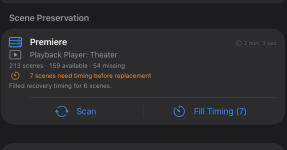 Are there step by step instructions somewhere?
Oh wow, this is certainly a lot of scenes! I'm guessing this is by far the biggest use of this feature yet so please bear with me if we run into issues. I also see that this looks like a Premiere system? I'm not sure if that adds any issues, but let's see what we can do. I asked AI to write step by step instructions for this process since I don't have any yet. Please let me know if this is helpful. If you run into more trouble, please private message me through the forum and I'll see how I can help.View attachment 12556Are there step by step instructions somewhere?
I thought I had saved all the timing, but looks like I messed up when I downloaded the upgraded/updated versions. (But still have saved a lot…)
That one looks like a bug actually so I don't think you did anything wrong. I'm guessing that it didn't get the chapter of the scene start saved correctly. How it works is it goes to the next chapter and then skips back 10 seconds at a time quickly (since there are no supported jump forward commands). In this case, it seems to be starting at 0:00. Let me see if I can build in a workaround for that issue where it figures out the appropriate start chapter itself during playback. Stay tuned on that one...thanks!Thanks @OUTATIME!
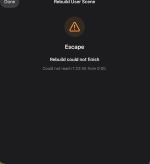
For a movie already upgraded, I get to step 6, but instead of completion, I get a long wait while it is working on finding the beginning of the scene, and then this:
Any thoughts on what I may have done wrong?
Thanks again.