• Thanks for visiting the Kaleidescape Owners' Forum

    This forum is for the community of Kaleidescape owners, and others interested in learning about the system, equipment, services, and the company itself.

    It is run by a group of enthusiastic Kaleidescape owners and dealers purely as a service to this community.

    This board is not affiliated in any way with Kaleidescape, Inc.
    For official technical support, product information, or customer service, please visit www.kaleidescape.com

    You can dismiss this box forever by clicking the "X" in the upper right corner of this message.
  • You are currently in "Guest" mode and not logged in with a registered account.

    The forum is free to use and most of the forum can be used by guests who are not registered....

    ... but we strongly encourage you to register for a full account. There is no cost to register for a full account.

    Benefits of registering for a full account:

    • Participate in the discussions! You must have a registered account to make posts on the forums. You will be able to start your own thread on a topic or question, or you can reply to other threads/discussions.
    • Use the "Conversation" feature (known as "private messaging" on other forums) to communicate directly with any of the other users here.
    • Access the Files area. The "resources" area of the forum contains many "Favorite Scene" and Script files that can dramatically increase the enjoyment of your Kaleidescape system. Go directly to great scenes in your favorite movies, created by other owners, and add automation to playback of your system with Scripts.
    • You won't see this annoying notice at the top of every screen!😊

    It's easy and free to register for the forum. Just click the "Register" button in the upper right corner of this page, and follow the instructions there.

    This box goes away for registered users.

Server upgrade advice

I'm no expert here but I think you can do that with a CoStar. It depends on whether you have a Kaleidescape disc player of some sort (M500, M700, Alto).

If your vaults are M700 and not DV700 I think you still need an M500?

I'd reach out to one of the Kaleidescape ppl here or your dealer.
Well, I currently have one M700 and one DV700 online and a second M700 in storage in case one of the active vaults fails. My current system links the Premiere system to the Terra system via CoStar and a M500 player. So I already have everything you mention.
 
I also strongly agree with K Support’s recommendation. Accomplishing this would require putting a 14-year-old file system through three separate degraded rebuilds, with the risk of losing the entire file system if any one of those failed.
Let's assume that the worst case scenario happens and the system does fail. How am I worse off than if I simply abandon the system other than the cost of the new drives? Theoretically, I could hedge that risk by buying the new drives one at a time rather than three at once.
 
Am I missing something?

In addition to the hot spare, which you’re accounting for, you also need to account for the increased parity allocation. Parity capacity must equal the largest drive in the file system. It is currently 6TB, but once a 12TB drive becomes part of the file system, the parity allocation must increase to 12TB. That consumes the other 6TB, reducing the net gain from 21TB to 15TB.

Hope that makes sense,

Andy
 
You probably need to do RAID math. I have no knowledge on how k-scape configured these but if they used RAID of some sort for redundancy and fault tolerance, it’s not straight math.
 
In addition to the hot spare, which you’re accounting for, you also need to account for the increased parity allocation. Parity capacity must equal the largest drive in the file system. It is currently 6TB, but once a 12TB drive becomes part of the file system, the parity allocation must increase to 12TB. That consumes the other 6TB, reducing the net gain from 21TB to 15TB.

Hope that makes sense,

Andy
Someone worked in IT. 😉
 
Let's assume that the worst case scenario happens and the system does fail. How am I worse off than if I simply abandon the system other than the cost of the new drives? Theoretically, I could hedge that risk by buying the new drives one at a time rather than three at once.

Agreed that you may not be worse off. It's just important to understand the risks, which it sounds like you do. I wish I could tell you the best path, but I've seen unhealthy file systems complete a rebuild that weren't expected to, and others that were perfectly healthy fail.
 
Agreed that you may not be worse off. It's just important to understand the risks, which it sounds like you do. I wish I could tell you the best path, but I've seen unhealthy file systems complete a rebuild that weren't expected to, and others that were perfectly healthy fail.
In K-scape or on servers?
 
I'm not sure that I understand your math. Right now, I have eight 3TB drives and six 6TB drives one of which is the hot spare. If I remove three of the 3TB drives, I'd lose 9TB of capacity. If I then add three 12TB drives, one of those drives would become the hot spare but the other two would come online and the 6TB drive that is currently the hot spare would come online for storage for a net increase of 21TB or so (24TB+6TB-9TB=21TB). Am I missing something?
Removing 3x3TB drives removes 9TB of storage.
12TB drive #1 becomes the hotspare. The existing 6TB hotspare gets folded into the filesystem so you would gain 6TB of space (so you're still down 3TB).
12TB drive #2 becomes the parity drive (because the parity drive has to be large enough to rebuild the largest drive in your system. But it frees up the 6TB drive what was your parity drive to now be used for data. Now you are up 3TB of free space.
12TB drive #3 becomes a full data drive gaining you another 12TB. Total new space is 15 TB.

BTW, it goes without saying that if you're going to do that, do NOT under any circumstances attempt to replace all 3 drives at once. This will result in a double disk failure and will destroy your filesystem.

One disk at a time and wait for the rebuild to be complete before replacing the next one.
 
I've wondered about this. If I go into component settings on my Terra system and select "Add Component" I'm given the option to add both of my Disc Vaults that are currently connected to my Premiere system to the Terra system. Since I wasn't sure how that would affect my systems, I never tried that. But if I could just play the discs through the Terra without ripping, that would be a perfect solution.
I checked with Kscape support and yes, you can connect a Vault to a Terra system, but it is only used for disc cataloging to get Digital Offers.
 
In addition to the hot spare, which you’re accounting for, you also need to account for the increased parity allocation. Parity capacity must equal the largest drive in the file system. It is currently 6TB, but once a 12TB drive becomes part of the file system, the parity allocation must increase to 12TB. That consumes the other 6TB, reducing the net gain from 21TB to 15TB.

Hope that makes sense,

Andy
Got it.
 
BTW, it goes without saying that if you're going to do that, do NOT under any circumstances attempt to replace all 3 drives at once. This will result in a double disk failure and will destroy your filesystem.

One disk at a time and wait for the rebuild to be complete before replacing the next one.
I would have done this anyway because I didn't know that you could do it any other way.
 
I checked with Kscape support and yes, you can connect a Vault to a Terra system, but it is only used for disc cataloging to get Digital Offers.
If you have an Alto, then it can play the discs that are stored in the vault(s).

Older Stratos (Strato, Strato S, and Strato C) can play the DVDs in a vault but not the Blu-ray discs.
 
No. Alto can be grouped with the Encore system as its own separate player.

There is an option to do Co-star Player pairing between a Strato/Strato S/Strato C and an Alto if you want to use them to act like a single playback zone but this is not supported with Strato V, E, M, or K.
 
I have a similar setup to OP and was running short on space between my Strato S (12tb) and an older Prime 24tb server: I wanted more space to go with recently added Strato K.
My plan was to add 1 or 2 compact 30 servers but was warned it would slow the system, and I should go to the Prime 120.
I added one compact 30 to try. I noticed that after adding it, all the storage was still going to the legacy units: the new compact 30 was running, but nothing was being sent to it, and the system did slow down a bit with the added server.
I returned the compact 30 and ordered a Prime 120 tb server: now all the storage is going to the new server, and the entire system is faster. Aside from the price aspect, the Prime is the way to go…..
 
[snip]
I added one compact 30 to try. I noticed that after adding it, all the storage was still going to the legacy units: the new compact 30 was running, but nothing was being sent to it,...

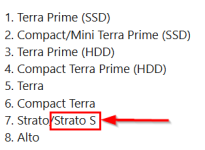
Here's a little inside baseball on how download allocations work in a multi-server system. Downloads will _always_ go to the most performant server in the system until it is full. In the case where multiple servers are the same class, the download will go to the one with more space available.

So if you had a hypothetical system that had one of each type of server in it, the downloads would go to the servers in this order:

1. Terra Prime (SSD)
2. Compact/Mini Terra Prime (SSD)
3. Terra Prime (HDD)
4. Compact Terra Prime (HDD)
5. Terra
6. Compact Terra
7. Strato/Strato S
8. Alto

The downloads would continue to target the server highest on the list until that server is full before moving down to the next tier.

BTW, don't build a system that has one of each server type in it; performance will degrade noticeably.
 
^ good info
Does a Strato S with storage count as a server?
 
So ideally should I replace the Strato S with a Strato without storage for best performance?
I still need a Strato that will support a Co Star switch
 
Back
Top