• Thanks for visiting the Kaleidescape Owners' Forum

    This forum is for the community of Kaleidescape owners, and others interested in learning about the system, equipment, services, and the company itself.

    It is run by a group of enthusiastic Kaleidescape owners and dealers purely as a service to this community.

    This board is not affiliated in any way with Kaleidescape, Inc.
    For official technical support, product information, or customer service, please visit www.kaleidescape.com

    You can dismiss this box forever by clicking the "X" in the upper right corner of this message.
  • You are currently in "Guest" mode and not logged in with a registered account.

    The forum is free to use and most of the forum can be used by guests who are not registered....

    ... but we strongly encourage you to register for a full account. There is no cost to register for a full account.

    Benefits of registering for a full account:

    • Participate in the discussions! You must have a registered account to make posts on the forums. You will be able to start your own thread on a topic or question, or you can reply to other threads/discussions.
    • Use the "Conversation" feature (known as "private messaging" on other forums) to communicate directly with any of the other users here.
    • Access the Files area. The "resources" area of the forum contains many "Favorite Scene" and Script files that can dramatically increase the enjoyment of your Kaleidescape system. Go directly to great scenes in your favorite movies, created by other owners, and add automation to playback of your system with Scripts.
    • You won't see this annoying notice at the top of every screen!😊

    It's easy and free to register for the forum. Just click the "Register" button in the upper right corner of this page, and follow the instructions there.

    This box goes away for registered users.

Popcorn Ready - Chrome extension for Kaleidescape users

really great. love the new slot machine mini-game.

Any thoughts on future ability to tweak my own personal recommendation algorithm? easiest might be let me hit a quick "thumbs up" (good recommendation), "thumbs down" (not such a good recommendation), and "remove" (I never want this one recommended).

Like right now, mine shows "St. Elmo's Fire" as a recommendation for me. I watched that movie about a month ago, so would like to tell Popcorn Ready to remove it as a future suggestion.

This could start to lead you to a real personalized recommendation system, customiezed for each user, based on explicit and implicit data on movies you get from a user.

Anyways, love how this has evolved... it's really well done!
Glad to see so many people in this community enjoying it. We're up at around 150 unique users per week now! I thought the slot machine was fun as well....but I don't love the performance the first time you go to push the button if you have a large library. It was because I was loading every movie poster from your library into memory before you could push the button so that the slot machine animation was silky smooth. But, I just pushed a new version 1.3.9.1 that is now optimized and there is no longer a delay before you can press the button even if you have a large library.

Currently, the recommendations are from TMDB and every movie in the Kaleidescape catalog has a list of TMDB recommendations (only including recommendations that are available on Kaleidescape).

Your idea is solid and I do like it, however, that would mean that I would need to implement some user storage in some manner. Right now everything can easily be refetched so the only storage is in your browser to speed things up on subsequent uses. For a feature like this, I'd need to implement some permanent storage in some manner. Most would go down the path of user accounts and cloud storage if they want the best user experience, but I guess I could just do file storage and recommend you save it in your iCloud/Google Drive storage so it's accessible on other computers or if you replace your computer. It's all doable.

Another option I could implement would be to record anonymous user library data for each user and then use that data to do my own recommendations based on what other Popcorn Ready users have. But 150 users is pretty low and I question if that would be valuable.

And yet another option would be integration with something like Trakt.tv app or maybe just using TMDB for user accounts/libraries/etc and that could play into recommendations. That would also give app access but I know Trakt would be a monthly fee to be able to store everything from your Kaleidescape library in a collection. I've not ever tried the TMDB app personally so not sure if that's any good. But their API is great!

But on a different note, I think a bigger WIN would be the ability to play a movie directly from Popcorn Ready on your Kaleidescape Player. If anyone has access to the API that the old Second Screen app uses, I'd love to see that. I've looked at the Kaleidescape System Control Protocol reference manual and that doesn't include the ability to directly play a specific movie by Title or ID. Best I could do would be automate the on screen display and search for the title and then do some button presses to play the movie. I think that doesn't sound like a great user experience though. So if anyone can get me the API to be able to play a specific movie directly from a browser via IP control, I can make it work the right way.
 
1.3.9.2 just pushed to store with even more speed optimizations to make loading/rendering more efficient across all pages.

Not completely sure what I'll work on next yet, but I'm leaning towards an optional view similar to Kaleidescape's Movie Wall that would still work with all of my sorting, filtering, searching. I just keep thinking about how cool that could look on a desktop display.

Also, I liked the idea of a leaderboard or some sort of stats about most purchased movies, trending movies, etc across the whole Popcorn Ready install base. This would use anonymized library data pushed to cloud. Sure, it's not a huge number of users, but I think this could still be interesting and could even help users discover and possibly purchase more movies.

Neither of those features above would require any sort of permanent storage for users like some of the other potential future ideas that relate to personalized recommendations or personal watchlists, etc would require. These are still a future possibility though.
 
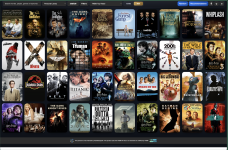
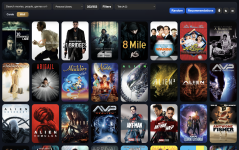
1.4.1 is available in the store. The new wall view turned out amazing and is the new default view! It is super nice to be able to scroll fast on desktop and watch all of the posters fly by. Click one to get the nice new inspection window on the right that maintains all of the old functionality from the Cards view.

1774151706012.png
 
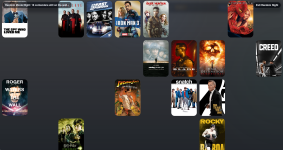
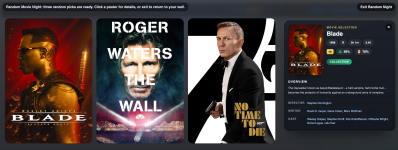
And in 1.4.2 there is a new random movie night visualization to go with the new wall mode! Movies from your current view get randomly placed on the wall and then gradually fade away one by one until only 3 remain. Click one of the 3 to open the inspection window to get more details about that movie.

1774159122239.png

1774159165224.png
 
This keeps getting better and better - thanks for all of this!

Two suggestions:

Can the Rotten Tomato icons be linked to bring up the RT website (like clicking anywhere will open the TMDB site)?

When 4k is listed, can info on whether it is SDR, HDR, DV, etc. be easily added? There are some frustrating titles where it is in 4k, but only SDR. I have mistakenly purchased titles that I would otherwise not have, had I been paying closer attention.

And, edited to add:

I just noticed that the 4K or HD tags are only present when viewing the full movie catalogue and not seen when personal library is loaded. Can these tags be added to the personal library view as well?

If you can, great, if not, no worries - this is very useful as is (and fast!).
 
This keeps getting better and better - thanks for all of this!

Two suggestions:

Can the Rotten Tomato icons be linked to bring up the RT website (like clicking anywhere will open the TMDB site)?

When 4k is listed, can info on whether it is SDR, HDR, DV, etc. be easily added? There are some frustrating titles where it is in 4k, but only SDR. I have mistakenly purchased titles that I would otherwise not have, had I been paying closer attention.

And, edited to add:

I just noticed that the 4K or HD tags are only present when viewing the full movie catalogue and not seen when personal library is loaded. Can these tags be added to the personal library view as well?

If you can, great, if not, no worries - this is very useful as is (and fast!).
Yes, those should all be doable. Actually, the missing 4K tags on your owned library is already in 1.4.2 so when chrome updates your extension you’ll get that one along with the new random movie night wall mode.
 
I love the wall update. Is it just on my end or is it limited to the 40 movies and you can't either scroll up/down or left/right to look at the rest of the movies?
 
I love the wall update. Is it just on my end or is it limited to the 40 movies and you can't either scroll up/down or left/right to look at the rest of the movies?
The only time it won’t let you scroll up and down by design is in random movie night mode. I am on MacBook and I just scroll with two fingers on trackpad. I would assume something similar on Windows or with the scroll wheel on a mouse should work, but if not please let me know.
 
Love the new Wall mode. I prefer seeing more movies at one time without information than fewer with the details.
 
Glad to see so many people in this community enjoying it. We're up at around 150 unique users per week now! I thought the slot machine was fun as well....but I don't love the performance the first time you go to push the button if you have a large library. It was because I was loading every movie poster from your library into memory before you could push the button so that the slot machine animation was silky smooth. But, I just pushed a new version 1.3.9.1 that is now optimized and there is no longer a delay before you can press the button even if you have a large library.

Currently, the recommendations are from TMDB and every movie in the Kaleidescape catalog has a list of TMDB recommendations (only including recommendations that are available on Kaleidescape).

Your idea is solid and I do like it, however, that would mean that I would need to implement some user storage in some manner. Right now everything can easily be refetched so the only storage is in your browser to speed things up on subsequent uses. For a feature like this, I'd need to implement some permanent storage in some manner. Most would go down the path of user accounts and cloud storage if they want the best user experience, but I guess I could just do file storage and recommend you save it in your iCloud/Google Drive storage so it's accessible on other computers or if you replace your computer. It's all doable.

Another option I could implement would be to record anonymous user library data for each user and then use that data to do my own recommendations based on what other Popcorn Ready users have. But 150 users is pretty low and I question if that would be valuable.

And yet another option would be integration with something like Trakt.tv app or maybe just using TMDB for user accounts/libraries/etc and that could play into recommendations. That would also give app access but I know Trakt would be a monthly fee to be able to store everything from your Kaleidescape library in a collection. I've not ever tried the TMDB app personally so not sure if that's any good. But their API is great!

But on a different note, I think a bigger WIN would be the ability to play a movie directly from Popcorn Ready on your Kaleidescape Player. If anyone has access to the API that the old Second Screen app uses, I'd love to see that. I've looked at the Kaleidescape System Control Protocol reference manual and that doesn't include the ability to directly play a specific movie by Title or ID. Best I could do would be automate the on screen display and search for the title and then do some button presses to play the movie. I think that doesn't sound like a great user experience though. So if anyone can get me the API to be able to play a specific movie directly from a browser via IP control, I can make it work the right way.

The Wall view is great. Could you add in the filter view the resolutions (SD, HD, 4k)? To be able to see the on-sale movies (excluding SD) in the Wall view and sorted price low to high I would love.
 
The Wall view is great. Could you add in the filter view the resolutions (SD, HD, 4k)? To be able to see the on-sale movies (excluding SD) in the Wall view and sorted price low to high I would love.
I think I already have that with the exception that the resolution filter is “4K only” but it sounds like you would like to be able to filter by both 4K and HD, correct?
 
I think I already have that with the exception that the resolution filter is “4K only” but it sounds like you would like to be able to filter by both 4K and HD, correct?
Yes, you have 4k but if you could add HD and SD also it would be great. I would select 4k and HD and it would ignore SD. I appreciate all your efforts!
 
I'm using Arc on Macbook. I'm not having any issues with the latest update. Have you checked the filter settings?
Thanks for that feedback. @J.Chitwood Please let me know if other websites scroll fine with normal trackpad gestures. I also just tested and down arrow also works fine to scroll...but I think it's kind of slow so I'm going to speed that up or make it progressively faster as you hold longer.
 
I am talking about this screen. When I try to scroll I get the white bar at the bottom (or whichever direction I am trying to scroll). I tried the arrow keys and that didn't do anything either. I am able to scroll on other webpages and I've tried using a mx master mouse as well. It's no biggie. On the card screen it scrolls for days.

1774234407228.png
 
And in 1.4.2 there is a new random movie night visualization to go with the new wall mode! Movies from your current view get randomly placed on the wall and then gradually fade away one by one until only 3 remain. Click one of the 3 to open the inspection window to get more details about that movie.

View attachment 9686

View attachment 9687
Thank you for all your hard work. I'm really enjoying this companion app. Is it possible to add a Redraw button when in random visualization from wall model. Currently, if someone has to redraw they have to click "exit random night" and redo random from the main page. I really like that the card model has a button that can be repeatedly pressed. Again, thanks.
 
I am talking about this screen. When I try to scroll I get the white bar at the bottom (or whichever direction I am trying to scroll). I tried the arrow keys and that didn't do anything either. I am able to scroll on other webpages and I've tried using a mx master mouse as well. It's no biggie. On the card screen it scrolls for days.

View attachment 9699
Which version of the app are you using? Because the version I'm using with Arc browser on Mac doesn't have the section "TMDB Top rated."
 

Attachments

  • Kscape popcorn ready.png
    Kscape popcorn ready.png
    8.2 MB · Views: 3
Which version of the app are you using? Because the version I'm using with Arc browser on Mac doesn't have the section "TMDB Top rated."
It is just a way to sort. I can change it to A-Z like you have set and same thing.
 
Back
Top