• Thanks for visiting the Kaleidescape Owners' Forum

    This forum is for the community of Kaleidescape owners, and others interested in learning about the system, equipment, services, and the company itself.

    It is run by a group of enthusiastic Kaleidescape owners and dealers purely as a service to this community.

    This board is not affiliated in any way with Kaleidescape, Inc.
    For official technical support, product information, or customer service, please visit www.kaleidescape.com

    You can dismiss this box forever by clicking the "X" in the upper right corner of this message.
  • You are currently in "Guest" mode and not logged in with a registered account.

    The forum is free to use and most of the forum can be used by guests who are not registered....

    ... but we strongly encourage you to register for a full account. There is no cost to register for a full account.

    Benefits of registering for a full account:

    • Participate in the discussions! You must have a registered account to make posts on the forums. You will be able to start your own thread on a topic or question, or you can reply to other threads/discussions.
    • Use the "Conversation" feature (known as "private messaging" on other forums) to communicate directly with any of the other users here.
    • Access the Files area. The "resources" area of the forum contains many "Favorite Scene" and Script files that can dramatically increase the enjoyment of your Kaleidescape system. Go directly to great scenes in your favorite movies, created by other owners, and add automation to playback of your system with Scripts.
    • You won't see this annoying notice at the top of every screen!😊

    It's easy and free to register for the forum. Just click the "Register" button in the upper right corner of this page, and follow the instructions there.

    This box goes away for registered users.

Movie Updates

There are extras listed, at least they are now, and not that I've compared for completeness. Was this a general warning or noting that some haven't made the trip?
The prior Sony release of The Dark Crystal included a wide range of Extras in HD, but this release was incompatible with the Strato E/M/V. K has since updated the HD version for compatibility and all Extras were stripped during this process (to return at a later date per K). Therefore, if someone has a Strato/S/C, had this movie previously downloaded, and triggered an update of the HD version the Extras would be removed from your Terra.
Regardless of whether they were there before, anytime it offers a new 4k+HD, and doesn't list any extras, I just manually pull a new copy of the 4k. Sadly, that will remove it from the available update list, but not likely to be much benefit in pulling the HD copy at that point anyway.
If you update 4K only, the HD update should remain on the Strato V HD Compatibility page so that you can monitor it and update it at a later date once all of the Extras are added back in.

Also, although the update showed as 4K & HD, selecting to update only triggered the 4K update and left the HD alone. So, it's a bit of a safer situation than I first thought when I posted.
 
Pacific Rim (2013) HDR version updated

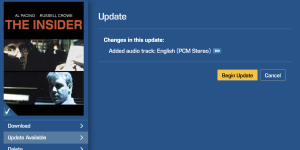
Changes in this update:
  • Additional audio tracks (PCM Stereo added)
  • Video quality improvements
  • Extras available as separate download in HD or SD
 
Odd, this one didn’t show up under “Movie Updates” on our system. Based on prior experience, if the copy on the system is identical, it will skip it, but in this case it downloaded the updated version.
Thanks to @erixon1138 for the heads up or I would have missed it.
@MikeKobb any idea why this didn’t show up under the “Movie Updates” link?
 
When you said "but in this case it downloaded the updated version", do you mean that you went to that version of the movie on the store and selected download, and it downloaded? Or did you manually go to the Update option? If you downloaded 4K HDR and you already had 4K HDR, that would be very strange and potentially lead to some undesirable behavior.
 
I have the HD version of North by Northwest and in my movie updates it shows update available. Anybody know what the update is for? I already have Atmos from the last update.
 
If you click the movie in your updates list, it will tell you what the nature of the update is.

Screenshot 2025-06-16 at 2.09.33 PM.png

On the mobile app, you need to tap the little cloud icon in the top right corner of the movie's details to see the same information.
 
When you said "but in this case it downloaded the updated version", do you mean that you went to that version of the movie on the store and selected download, and it downloaded? Or did you manually go to the Update option? If you downloaded 4K HDR and you already had 4K HDR, that would be very strange and potentially lead to some undesirable behavior.
Mike, I'm taking this to DM so as to not clog this thread. I'm guessing whatever happened was user error, but appreciate you working on it with me.
 
Last edited:
Thanks very much for the clarification. Just to quickly double-check: you had both HDR10 and Dolby Vision versions, and both downloaded again despite having them already. Correct? I'm making some inquiries.

For what it's worth, I did get the update notice for my system. I have Dolby Vision and HDR10 versions currently downloaded.

Even if a movie has an update available, as far as I know, selecting "download" again does not update it. It would just be skipped because it's there already. Unless something has changed that I don't know about.
 
Even if a movie has an update available, as far as I know, selecting "download" again does not update it. It would just be skipped because it's there already. Unless something has changed that I don't know about.
*shrug* Must be a change, because it works...
1750134954902.png

Might be a homing thing, but The Lego Movie update seems to answer the question of whether an extras-only download will live next to a full-HD download. At the very least, a good reason to send lower-resolutions to the Premiere servers.
 
The Hangover (2009) HDR version update. Maybe it's finally watchable in HDR.

Changes in this update:
  • Audio and video improvements

Hi, new Strato E owner here.

Has anyone checked out this new version of The Hangover (2009)? It doesn’t look right to me. Everything looks brightened and the colors are washed out, it honestly looks like an HDR Vivid encoding to me. I thought maybe there was a new HDR master of this movie but when I checked the Kaleidescape static MaxCLL/FALL using my Vertex, it shows the same values as other streaming services: 143 nits max and 58 nits average so something doesn't make sense here.

This is one of my favorite movies, and I’ve watched it many times on both Movies Anywhere and iTunes, so I’m very familiar with how dark it always looked, typically around 100–150 nits. I was really excited to see this new Unrated version from Kscape since I only own the Theatrical Cut on Movies Anywhere. Unfortunately, I had to stop halfway and finish the movie on Movies Anywhere because the Kscape version looked pretty bad. It had that same overly bright, washed-out look you’d expect from a TV’s “Vivid” mode, but I was using Filmmaker Mode on my display(as always).

I noticed the exact same issue with The Last of Us – Season 2. It looked three times brighter than the MAX stream, and yet both versions show identical MaxCLL/FALL metadata (1:1).

So… does Kaleidescape apply its own grading? Or are they using some form of HEVC HDR Vivid encoding? Something doesn’t add up. The other movies I watched and compared to other sources looked ok.

Sorry for my English, thank you
 
Hi, new Strato E owner here.

Has anyone checked out this new version of The Hangover (2009)? It doesn’t look right to me. Everything looks brightened and the colors are washed out, it honestly looks like an HDR Vivid encoding to me. I thought maybe there was a new HDR master of this movie but when I checked the Kaleidescape static MaxCLL/FALL using my Vertex, it shows the same values as other streaming services: 143 nits max and 58 nits average so something doesn't make sense here.

This is one of my favorite movies, and I’ve watched it many times on both Movies Anywhere and iTunes, so I’m very familiar with how dark it always looked, typically around 100–150 nits. I was really excited to see this new Unrated version from Kscape since I only own the Theatrical Cut on Movies Anywhere. Unfortunately, I had to stop halfway and finish the movie on Movies Anywhere because the Kscape version looked pretty bad. It had that same overly bright, washed-out look you’d expect from a TV’s “Vivid” mode, but I was using Filmmaker Mode on my display(as always).

I noticed the exact same issue with The Last of Us – Season 2. It looked three times brighter than the MAX stream, and yet both versions show identical MaxCLL/FALL metadata (1:1).

So… does Kaleidescape apply its own grading? Or are they using some form of HEVC HDR Vivid encoding? Something doesn’t add up. The other movies I watched and compared to other sources looked ok.

Sorry for my English, thank you
Not the best thread for this, perhaps start a new one for better visibility. But this sounds to me like your display may have different settings saved for different inputs, or the K is setup to provide a different image format than your streaming devices.
 
Not the best thread for this, perhaps start a new one for better visibility. But this sounds to me like your display may have different settings saved for different inputs, or the K is setup to provide a different image format than your streaming devices.
Thanks. But as I said, I made sure that I was in Filmmaker Mode and even used the exact same cable/input. Also, just the night before, I watched Con Air and compared it with the iTunes version and it was identical.
So far, only The Hangover and The Last of Us – Season 2 show this issue. Everything else I’ve tested seems fine.
 
Also, the Cover says ''Unrated'' but the movie is the theatrical cut version...
Unrated version is 1h48
Wow, ok, that is a BIG deal. I'm positive that the 4K version of Hangover used to be the Unrated version, because I had also downloaded the HD version to get the theatrical. I had previously checked the lengths of both, had implemented custom poster art for the theatrical, etc. (I've done this with multiple movies with alternate cuts and can't imagine that I did all of those steps incorrectly.)

I recently took the 4K HDR update assuming it was just picture improvements, but now I can see that it IS in fact the theatrical version.
@MikeKobb can you take a look at this one and see what happened??? I'm fine with adding the theatrical cut as an option for the 4K version (it's an option at both SD and HD), but I don't like the idea that I just lost the version I bought due to an update.

UPDATE: Digging through other digital stores, it appears to be the norm that the Theatrical Cut is 4K while the Unrated Cut is limited to HD. So, maybe this has always been the case? I'll wait to see what Mike might dig up, but I guess it's possible that I somehow never noticed this. Weird.
 
Last edited:
Hey folks, it looks like the Dolby Vision/Dolby Atmos updates for the original Jurassic Park trilogy have hit:

NOTE: Jurassic World is still HDR/5.1 but this is currently the same on all digital stores, Universal may be lagging on the new assets.
 
Last edited:
Hey folks, it looks like the Dolby Vision/Dolby Atmos updates for the original Jurassic Park trilogy have hit:
Thanks. For some odd reason, the 2015 movie is the only one without a Dolby Vision and Dolby Atmos update.
 
Wow, ok, that is a BIG deal. I'm positive that the 4K version of Hangover used to be the Unrated version, because I had also downloaded the HD version to get the theatrical. I had previously checked the lengths of both, had implemented custom poster art for the theatrical, etc. (I've done this with multiple movies with alternate cuts and can't imagine that I did all of those steps incorrectly.)

I recently took the 4K HDR update assuming it was just picture improvements, but now I can see that it IS in fact the theatrical version.
@MikeKobb can you take a look at this one and see what happened??? I'm fine with adding the theatrical cut as an option for the 4K version (it's an option at both SD and HD), but I don't like the idea that I just lost the version I bought due to an update.

UPDATE: Digging through other digital stores, it appears to be the norm that the Theatrical Cut is 4K while the Unrated Cut is limited to HD. So, maybe this has always been the case? I'll wait to see what Mike might dig up, but I guess it's possible that I somehow never noticed this. Weird.

I think your update for your post is correct and that it's always been like that. I have the theatrical version in HDR and SDR downloaded and the Unrated in HD. I had these downloaded like this for a couple of years so if the unrated was 4K it must have been a real long time ago. The cover has changed a couple of months ago and usually is a quick fix by mailing movies@kaleidescape.com.
 
  • Like
Reactions: Jae
Hey folks, it looks like the Dolby Vision/Dolby Atmos updates for the original Jurassic Park trilogy have hit:

NOTE: Jurassic World is still HDR/5.1 but this is currently the same on all digital stores, Universal may be lagging on the new assets.

Does anyone know if the studio has mailed out the free discs to those who already purchased the previous UHD discs yet? Asking for a friend without Kaleidescape. ;)
 
Back
Top