• Thanks for visiting the Kaleidescape Owners' Forum

    This forum is for the community of Kaleidescape owners, and others interested in learning about the system, equipment, services, and the company itself.

    It is run by a group of enthusiastic Kaleidescape owners and dealers purely as a service to this community.

    This board is not affiliated in any way with Kaleidescape, Inc.
    For official technical support, product information, or customer service, please visit www.kaleidescape.com

    You can dismiss this box forever by clicking the "X" in the upper right corner of this message.
  • You are currently in "Guest" mode and not logged in with a registered account.

    The forum is free to use and most of the forum can be used by guests who are not registered....

    ... but we strongly encourage you to register for a full account. There is no cost to register for a full account.

    Benefits of registering for a full account:

    • Participate in the discussions! You must have a registered account to make posts on the forums. You will be able to start your own thread on a topic or question, or you can reply to other threads/discussions.
    • Use the "Conversation" feature (known as "private messaging" on other forums) to communicate directly with any of the other users here.
    • Access the Files area. The "resources" area of the forum contains many "Favorite Scene" and Script files that can dramatically increase the enjoyment of your Kaleidescape system. Go directly to great scenes in your favorite movies, created by other owners, and add automation to playback of your system with Scripts.
    • You won't see this annoying notice at the top of every screen!😊

    It's easy and free to register for the forum. Just click the "Register" button in the upper right corner of this page, and follow the instructions there.

    This box goes away for registered users.

Kaleidescape & Home Assistant

A couple of us who manage AVNirvana.com are planning a YouTube livestream. One of the partners there has recently bought a Kaleidescape and a Home Assistant Green, and we're going to do a livestream where I walk him through setup of the integrations and some basic automations with the Kaleidescape.

Additionally, I have a Seymour Screen Excellence masking system controller coming soon, and while I'll likely be controlling it directly from my Lumagen, they are working on a Home Assistant integration as well, so I'll hopefully be able to cover that in my review as well.

I'll make sure to post here when we get things on the schedule. Should be a fun learning opportunity to setup HA at a theater level, versus the overload geek level that some people are undertaking.
 
A couple of us who manage AVNirvana.com are planning a YouTube livestream. One of the partners there has recently bought a Kaleidescape and a Home Assistant Green, and we're going to do a livestream where I walk him through setup of the integrations and some basic automations with the Kaleidescape.

Additionally, I have a Seymour Screen Excellence masking system controller coming soon, and while I'll likely be controlling it directly from my Lumagen, they are working on a Home Assistant integration as well, so I'll hopefully be able to cover that in my review as well.

I'll make sure to post here when we get things on the schedule. Should be a fun learning opportunity to setup HA at a theater level, versus the overload geek level that some people are undertaking.
Wow I’m super interested in tuning in if possible, or watching it later. Keep us informed.
 
I appreciate the theater level! I've got it running, but I'm sure I'm just scratching the surface. I'd love to hear more about what timing and sequencing you've experimented with and landed on, like the credits fade delay and timing. Please do share more when you can.
 
I let my lutron system handle fade delays and ramp-up/down, as I hqe already carefully set scenes on that system exactly how i like. So I just trigger those Lutron scenes from HA based on K content/playback triggers, and it works beautifully, with the timing and fades the way i want for movie playback/pause/intermission/credits/stop
 
I think fades and delays are somewhat user and hardware dependent. I am currently using a 10 second delay at the end credits, and a 60 second fade up. I think the 60 second fade is a little much for my light strips. I'll probably drop it back down to about 40 seconds. Some hardware may have limited fade capability and might only be capable of a 10 second fade.

I added the 10 second delay to make it a bit less jarring, since the Kaleidescape triggers happen immediately upon that first credit. I've been observing and seeing where 10 seconds + the fade feel, with an ultimate goal of trying to get through those 'key credits' for lead actors, director, DP, etc., before one notices the lighting is coming up. So far this is feeling pretty good.
 
I added the 10 second delay to make it a bit less jarring, since the Kaleidescape triggers happen immediately upon that first credit. I've been observing and seeing where 10 seconds + the fade feel, with an ultimate goal of trying to get through those 'key credits' for lead actors, director, DP, etc., before one notices the lighting is coming up. So far this is feeling pretty good.
I don't want to derail this convo at all (great stuff), but quick tangent: Can anyone recommend an LED "standard" bulb that offers a smooth fade? Incandescents offer great fade but I couldn't take the heat. I've tried several LED bulbs that claim smooth fades but there's always a pop on and drop off. I thought someone here might have some good recommendations, or tips on minimizing the sudden on/off effects. Thanks!
 
I don't want to derail this convo at all (great stuff), but quick tangent: Can anyone recommend an LED "standard" bulb that offers a smooth fade? Incandescents offer great fade but I couldn't take the heat. I've tried several LED bulbs that claim smooth fades but there's always a pop on and drop off. I thought someone here might have some good recommendations, or tips on minimizing the sudden on/off effects. Thanks!
Same. My 1% dim is more like 50%. It just pops on. I have the opposite issue with my Lutron Caseta fan controller. Level 4 is 100% and anything below that blows air like a loose fart.
 
They're expensive but I've found the Philips Hue products to be worth it, for these reasons. They have a much more precision dimming process, plus the fact they just always connect, they're reliable. I've had Hue products for about 8 years now and have never had a problem. Bulbs, strips, even a couple of the permanent install fixtures in my last house.
 
To get smooth fades with LED (at least with retrofits), you need a dimmer that fits to LED, preferably with a adjustable/logarithmic dimming curve. In terms of bulbs, Philips Warmglow work fairly well. They are actually two-phased bulbs: at frist, only one LED lights up and then - above a certain threshold - the rest kicks in, smoothing out a little bit the "pop on"-effect.
 
I have Home Assistant docker running on my file server and have setup to raise/dim the lights depending on state of Strato V....also went a little silly and also have Alexa make an announcement when I go into intermission :). Another automation to set MV on the Marantz to usual level upon Strato V playing. And a final one for credits that dims lights some and sets MV on the Marantz to lower setting.
Still fine tuning the delays....and my cheap smart lights/bulps (KASA KL135P2) took some effort to get working in HA....and they don't dim very well....not smooth...more like 3 noticeable "chunky steps".


I have an unused Raspberry Pi 4 that's sitting in a drawer so I'm going to give Home Assistant a try. I have a real newbie question on its capabilities: Can I use it to fully automate my HT, i.e. Turning on my TV >selecting the HDMI port>turning on the receiver>setting its input, turning on the Blu-ray player, etc, etc? I'm currently using an older URC remote that I've programed macros that will do all of that with one button push, plus having transport buttons to navigate components. As I stated in a post in another thread, the URC is long in the tooth so I'm looking at alternatives. And I did pre order the Unbroken Circle remote which will be delivered (?) at the end of the year.
 
I have an unused Raspberry Pi 4 that's sitting in a drawer so I'm going to give Home Assistant a try. I have a real newbie question on its capabilities: Can I use it to fully automate my HT, i.e. Turning on my TV >selecting the HDMI port>turning on the receiver>setting its input, turning on the Blu-ray player, etc, etc? I'm currently using an older URC remote that I've programed macros that will do all of that with one button push, plus having transport buttons to navigate components. As I stated in a post in another thread, the URC is long in the tooth so I'm looking at alternatives. And I did pre order the Unbroken Circle remote which will be delivered (?) at the end of the year.

I am uncertain about URC.

But I am able to do all that via HA using Harmony Hub....I have my activities to turn things on, set inputs, etc setup in the Harmony hub...then can trigger those activities from HA if needed. So far I have not done that since its just easier to press a button on the Harmony Elite...but it is possible.

I would not hold my breath on getting any kickstarter product delivered on time :)
 
Okay, so Home Assistant will not do the automations I want on its own, but needs to be used in conjunction with another control system such as Harmony or Control 4? My goal is to get rid of the URC and find a system that will take its place which is what I'm hoping the Unfolded Circle will do.
 
Okay, so Home Assistant will not do the automations I want on its own, but needs to be used in conjunction with another control system such as Harmony or Control 4? My goal is to get rid of the URC and find a system that will take its place which is what I'm hoping the Unfolded Circle will do.
Not exactly.

I believe if HA sees your devices and there are integrations for them then yeah you could do it all from HA.

I know my JVC ,Marantz, Strato, AppleTV and ZIdoo show up on HA with integrations but I have not done anything with them beyond monitoring power and issueing volume commands the Marantz to set MV to normal level when I start a KScape movie and muting when I exit or pause. Harmony activities are just used to turn on and turn off the system. My setup is rather simple so I bet I could do everything I do with Harmony with HA...just no need to.

Essentially if ALL your devices have IP{ control then theoretically it should be possible to automate them with just HA.

I would go ahead and setup a HA server and see what it sees and see what integrations are avail and go from there.
 
Okay, so Home Assistant will not do the automations I want on its own, but needs to be used in conjunction with another control system such as Harmony or Control 4? My goal is to get rid of the URC and find a system that will take its place which is what I'm hoping the Unfolded Circle will do.
It depends on your devices. It's very simple to go to the Home Assistant website and search for integrations for your devices. If there are integrations, each page should tell you what functions it is capable of controlling via HA. Then it's just a matter of configuring those integrations and the commands into activities and choosing a trigger for those activities. Put a motion sensor in the hallway leading to your theater and use that to turn it on. Or use an Alexa command. Or a light switch. Literally whatever device you want to use, as long as there's a Home Assistant integration for it.
 
Control of something like a Denon/Marantz AVR involves sending IR commands via network to the unit from HA.

BUt when I started down that road, I realized it was beyond me so just stuck with Harmony.

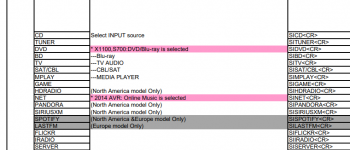
i.e there is a whole list of commands available:
HA works great, but it works even better when paired with a physical remote in the room. As I've stated many times, the beauty of HA is that you can use HA for automations and a remote for transport controls. Use your Harmony for activities and basic transport, but use HA to trigger lighting scenes based on playback status. Or use all the factory remotes that came with your hardware for transport but still automate with HA. Or any combination of whatever you want.

Use HA to tie automations and scenes to system status, not to button presses. Once you open that up, it's effortless and powerful.
 
Thanks for your input - looks like there will be a long learning curve for me on this!

not sure if what AVR you have but I just used my Marantz as example...it even allows for command name or specific IRCode.

i.e the ircode for the marantz to mute is RCKSK0410370.

The HA command would be: denonavr.get_command /goform/formiPhoneAppDirect.xml?RCKSK0410370
 
Back
Top