• Thanks for visiting the Kaleidescape Owners' Forum

    This forum is for the community of Kaleidescape owners, and others interested in learning about the system, equipment, services, and the company itself.

    It is run by a group of enthusiastic Kaleidescape owners and dealers purely as a service to this community.

    This board is not affiliated in any way with Kaleidescape, Inc.
    For official technical support, product information, or customer service, please visit www.kaleidescape.com

    You can dismiss this box forever by clicking the "X" in the upper right corner of this message.
  • You are currently in "Guest" mode and not logged in with a registered account.

    The forum is free to use and most of the forum can be used by guests who are not registered....

    ... but we strongly encourage you to register for a full account. There is no cost to register for a full account.

    Benefits of registering for a full account:

    • Participate in the discussions! You must have a registered account to make posts on the forums. You will be able to start your own thread on a topic or question, or you can reply to other threads/discussions.
    • Use the "Conversation" feature (known as "private messaging" on other forums) to communicate directly with any of the other users here.
    • Access the Files area. The "resources" area of the forum contains many "Favorite Scene" and Script files that can dramatically increase the enjoyment of your Kaleidescape system. Go directly to great scenes in your favorite movies, created by other owners, and add automation to playback of your system with Scripts.
    • You won't see this annoying notice at the top of every screen!😊

    It's easy and free to register for the forum. Just click the "Register" button in the upper right corner of this page, and follow the instructions there.

    This box goes away for registered users.

Kaleidescape & Home Assistant

I am trying to understand intermission. Indian movies are long and always have intermission unlike English movies. Does intermission means kscape creates event in the middle of movie. Appreciate it.
No, intermission is a state triggered by the user, not something embedded in the film metadata.
It depends on your remote and how it was programmed, but for me, pressing the "pause" button for longer than 1-2 seconds triggers the "intermission" state. The player pauses the movie but puts up the cover art full screen on your display. Otherwise, it's the same as pause. BUT with this state-trigger, you can have it raise the lighting when you enter that intermission state, then lower it again when you resume the movie.

My integrations, shown earlier in this thread, do all of that and it's really nice. Now i use "intermission" rather than "pause" all the time.
 
No, intermission is a state triggered by the user, not something embedded in the film metadata.
It depends on your remote and how it was programmed, but for me, pressing the "pause" button for longer than 1-2 seconds triggers the "intermission" state. The player pauses the movie but puts up the cover art full screen on your display. Otherwise, it's the same as pause. BUT with this state-trigger, you can have it raise the lighting when you enter that intermission state, then lower it again when you resume the movie.

My integrations, shown earlier in this thread, do all of that and it's really nice. Now i use "intermission" rather than "pause" all the time.

Incidentally you can simply program all that stuff to the pause trigger as well, but yes, this allows a differentiation in functionality if so desired.
 
Incidentally you can simply program all that stuff to the pause trigger as well, but yes, this allows a differentiation in functionality if so desired.
good point. Personally, i really like the differentiation. I use "pause" if my wife and i have something to discuss quickly about the movie or something else, and "intermission" if we're getting up to get a snack, bathroom break, or answer a call or something. I only want lights to come up in the latter cases.
 
I programmed my Harmony Elite to issue Intermission command on long-press of Pause.

In HA I have automation for Intermission state that raises lights and has Alex announce intermission......what would be really cool is for a way to change the intermission state to show a custom image rather than the poster. My family gets kick out the silly stuff I try to do....which I am fine with since it fuels my addiction!

i.e

1726853081123.png
 
No, intermission is a state triggered by the user, not something embedded in the film metadata.
It depends on your remote and how it was programmed, but for me, pressing the "pause" button for longer than 1-2 seconds triggers the "intermission" state. The player pauses the movie but puts up the cover art full screen on your display. Otherwise, it's the same as pause. BUT with this state-trigger, you can have it raise the lighting when you enter that intermission state, then lower it again when you resume the movie.

My integrations, shown earlier in this thread, do all of that and it's really nice. Now i use "intermission" rather than "pause" all the time.
Thanks for clearing. I wish kscape can create at middle of movie content intermission. It is good to take breaks. However, it is challenging when it stops at interesting scene.

In India every movie including English has intermission to stop in the middle of movie in the theaters. People and cafe likes for drink/food break ;-)
 
good point. Personally, i really like the differentiation. I use "pause" if my wife and i have something to discuss quickly about the movie or something else, and "intermission" if we're getting up to get a snack, bathroom break, or answer a call or something. I only want lights to come up in the latter cases.
I forked a version of my pause automation to follow the setup you described, and tried it out tonight. I think it works a lot better for me as well. The lights on for every pause was giving me an unintended strobe effect, for times when all I really wanted to do was replay what someone just said.
 
I got home assistant green and trying to setup. I don't see intermission event or credits display event on kscape. Let me know what I am missing. I see play/pause events. Appreciate it.
 
I got home assistant green and trying to setup. I don't see intermission event or credits display event on kscape. Let me know what I am missing. I see play/pause events. Appreciate it.
Two of us just answered this question for you a few posts above in this thread yesterday (#63-64) with illustrations to try to make it clear. Did you see those posts? Let us know what is still confusing after reading those.
 
I forked a version of my pause automation to follow the setup you described, and tried it out tonight. I think it works a lot better for me as well. The lights on for every pause was giving me an unintended strobe effect, for times when all I really wanted to do was replay what someone just said.
There is a replay button too. It jumps back around 10 seconds.
 
Two of us just answered this question for you a few posts above in this thread yesterday (#63-64) with illustrations to try to make it clear. Did you see those posts? Let us know what is still confusing after reading those.
I am excited to be able to use play/pause automation to control lights using Kasa switch. I still can't figure out how to create trigger for credits or intermission.
I am not able to figure out where is 'change to' button for media content to credits as explained. Do I need to configure anything in kscape device itself (like control or lighting & shading)?

I tried selecting kscape player device and clicking on '+" on 'automatcion'. It shows around 29, but does not have credits/intermission. I selected directly 'automation' and searched for entities with 'media'.

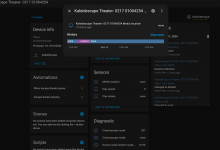
Do I need to do anything under sensors". When I selected on 'media location', I am not able to change from 'none' to anything. I will keep trying. Not sure something is not right in my setup. Thanks.

1727012245041.png
 
I am excited to be able to use play/pause automation to control lights using Kasa switch. I still can't figure out how to create trigger for credits or intermission.
I am not able to figure out where is 'change to' button for media content to credits as explained. Do I need to configure anything in kscape device itself (like control or lighting & shading)?

I tried selecting kscape player device and clicking on '+" on 'automatcion'. It shows around 29, but does not have credits/intermission. I selected directly 'automation' and searched for entities with 'media'.

Do I need to do anything under sensors". When I selected on 'media location', I am not able to change from 'none' to anything. I will keep trying. Not sure something is not right in my setup. Thanks.

View attachment 5745
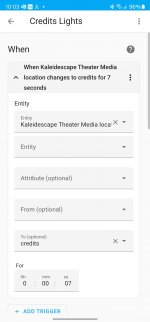
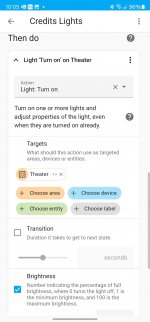
You have to type it in manually. See below. I did it by creating an automation.
 

Attachments

  • Screenshot_20240922_100303_Home Assistant.jpg
    Screenshot_20240922_100303_Home Assistant.jpg
    175.5 KB · Views: 18
  • Screenshot_20240922_100537_Home Assistant.jpg
    Screenshot_20240922_100537_Home Assistant.jpg
    254.9 KB · Views: 18
When I set media location to 'intermission', I see lights on for intermission. I am glad I got what I wanted. Appreciate everyone's help in the thread. My previous issue is if I use automation from settings->devices & services->kscape, there is big list but that list do not have entitites needed. Only if I go through 'automation & scenes' from settings, I see what is needed. I was also not sure if I need to setup anything in kscape itself. It seems everything is in home assistant interface.


All I wanted is to turn on lights for pause. I did research before and called Lutron/Kscape if there is solution other than control 4. Glad I found in this forum an it can do lot more than what I was asking. It seems home assistant integration with kscape is there quiet long time. I will explore more.
 
And following on from that...

Cross-posting this here as suggested.

Does anyone know if there is a way to get the volume controls on the iPad Second Screen app working using Home Assistant? Looking to control the volume on an Anthem AVM90.

If there is a way, but it needs to be programmed, happy to buy a crate of beer for anyone who can do it for me!
 
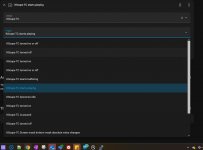
I find trigger populating following screen when I try to create automation with kscape, but it is not working. But I am able to create automation selecting entity with state. Is this trigger population supposed to work?

1728085309731.png
 
I find trigger populating following screen when I try to create automation with kscape, but it is not working. But I am able to create automation selecting entity with state. Is this trigger population supposed to work?

View attachment 5915
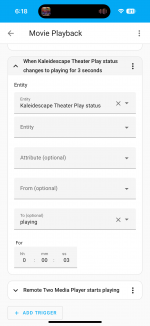
Use the Entity “Kaleidescape XYZ Play Status” and then type in “playing” in the To: field.

IMG_2881.png
 
Last edited by a moderator:
Ok so finally got the green delivered after it got sent to the wrong delivery hub and 24hr deliver turned into 5days!

Anyway that aside I’ve started to add some devices and now at a point where some aren’t in the included integrations but googling shows it is available in home assistant. So my question is how if indeed is there a way to add more integrations from elsewhere or does the software on it not allow for that?

If you can, how do you do it as I looked through all the menus and couldn’t see an obvious way and goggling wasn’t coming up with what I wanted?
 
Ok so finally got the green delivered after it got sent to the wrong delivery hub and 24hr deliver turned into 5days!

Anyway that aside I’ve started to add some devices and now at a point where some aren’t in the included integrations but googling shows it is available in home assistant. So my question is how if indeed is there a way to add more integrations from elsewhere or does the software on it not allow for that?

If you can, how do you do it as I looked through all the menus and couldn’t see an obvious way and goggling wasn’t coming up with what I wanted?
If you are looking for custom elements (like integrations), you need to go and add HACS (Home Assistant Community Store) : HACS

My guess is this is where the custom integrations are located that you are looking for. It handles those very nicely.
 
Back
Top