I've been using scripts a lot lately in order to compare the Cinematic HDR10 version with the DV version prior to watching the title. Most times, I don't notice a difference. I did notice that I liked the HDR10 version of The Matrix better than the DV version. Recently, a calibrator posted on AVS Forums that the DV version is supposed to look better though. I'm just watching what I seem to like better.


-
Thanks for visiting the Kaleidescape Owners' Forum
This forum is for the community of Kaleidescape owners, and others interested in learning about the system, equipment, services, and the company itself.It is run by a group of enthusiastic Kaleidescape owners and dealers purely as a service to this community.
This board is not affiliated in any way with Kaleidescape, Inc.
For official technical support, product information, or customer service, please visit www.kaleidescape.com
You can dismiss this box forever by clicking the "X" in the upper right corner of this message. -
You are currently in "Guest" mode and not logged in with a registered account.
The forum is free to use and most of the forum can be used by guests who are not registered....
... but we strongly encourage you to register for a full account. There is no cost to register for a full account.
Benefits of registering for a full account:
- Participate in the discussions! You must have a registered account to make posts on the forums. You will be able to start your own thread on a topic or question, or you can reply to other threads/discussions.
- Use the "Conversation" feature (known as "private messaging" on other forums) to communicate directly with any of the other users here.
- Access the Files area. The "resources" area of the forum contains many "Favorite Scene" and Script files that can dramatically increase the enjoyment of your Kaleidescape system. Go directly to great scenes in your favorite movies, created by other owners, and add automation to playback of your system with Scripts.
- You won't see this annoying notice at the top of every screen!😊
This box goes away for registered users.
You are using an out of date browser. It may not display this or other websites correctly.
You should upgrade or use an alternative browser.
You should upgrade or use an alternative browser.
Add Demo Trailer Before Watching a Film
- Thread starter Darthbishop79
- Start date
Does K have trailers that can be used as described? I got the impression that the trailers for movies were all streamed from the store.Scripts can already play trailers. The catch is that the trailer has to be a bookmarked, downloaded media object that is included as an extra from a store purchase (or is bookmarked as an extra on the disc of an imported/cataloged movie -- if you have a system capable of disc playback).
What a script can't play are streaming trailers since:
- they are provided by a 3rd-party service and thus can become unavailable at any time;
- they are of lesser video and/or audio quality and will likely look horrible on your large theatre screen (see @thrillcat 's "OMG! Dolby audio is crap!" example above); and,
- they require an active internet connection which cannot be guaranteed and would thus break your script at the most inopportune time.
Custom scenes and scripts were a big draw for me. Unfortunately, all the effort is wiped out with a title update. Physical media chapters would at least help find some demo material. "Kaleidescape Scenes" are also more scarce than one would expect.They don't even bother promoting the scripting feature, which is odd. The only promotion of scripts comes from external conversations.

- Joined
- Dec 4, 2024
- Messages
- 400
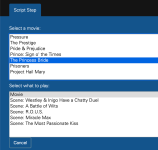
Now I'm confused. I know The Princess Bride has a trailer but it doesn't show as a step I can add. Are those trailers that you can play through the Kaleidescape remote and app not downloaded? Are those what you're describing as streaming trailers.Scripts can already play trailers. The catch is that the trailer has to be a bookmarked, downloaded media object that is included as an extra from a store purchase (or is bookmarked as an extra on the disc of an imported/cataloged movie -- if you have a system capable of disc playback).
What a script can't play are streaming trailers since:
- they are provided by a 3rd-party service and thus can become unavailable at any time;
- they are of lesser video and/or audio quality and will likely look horrible on your large theatre screen (see @thrillcat 's "OMG! Dolby audio is crap!" example above); and,
- they require an active internet connection which cannot be guaranteed and would thus break your script at the most inopportune time.
I guess I understand that....but I find it interesting that I can find the various dolby demo files to playback or include in a preroll on my whatever el cheapo media player hooked to a LCD tv with soundbar...yet I can't have them on my $4k strato player in my dedicated home theater.Imagine you don't know anything about home theater and surround sound, and someone you know invites you over to show off their "home theater." You walk in, sit down, and they have a system that's all KRACO bookshelf speakers and no sub, and everything is stuffed into a cubby hole in the entertainment center above the TV. Now they crank it up past distortion and play you a Dolby trailer. And you walk out thinking "I don't know what the hype is all about, that sounded like crap, I'm not paying for Dolby anything."
It's an exaggeration, but also it's not, and that's why Dolby doesn't allow trailer downloads like Trinnov does. That's why they're not at the beginning of discs anymore. Dolby has spent decades building a brand reputation and is now in 'Protect & Maintain' mode. They need to make sure their brand is associated with high end experiences, not every sound system that some dude hooked a few white van car subwoofers to.
Trinnov is still trying to build that brand awareness outside of the high-end boutique market. They still want people to hear the name, see something cool, and try to learn more.
Imagine you don't know anything about home theater and surround sound, and someone you know invites you over to show off their "home theater." You walk in, sit down, and they have a system that's all KRACO bookshelf speakers and no sub, and everything is stuffed into a cubby hole in the entertainment center above the TV. Now they crank it up past distortion and play you a Dolby trailer. And you walk out thinking "I don't know what the hype is all about, that sounded like crap, I'm not paying for Dolby anything."
It's an exaggeration, but also it's not, and that's why Dolby doesn't allow trailer downloads like Trinnov does. That's why they're not at the beginning of discs anymore. Dolby has spent decades building a brand reputation and is now in 'Protect & Maintain' mode. They need to make sure their brand is associated with high end experiences, not every sound system that some dude hooked a few white van car subwoofers to.
Trinnov is still trying to build that brand awareness outside of the high-end boutique market. They still want people to hear the name, see something cool, and try to learn more.
That's the same explanation I was was given about 10 years ago when I acquired several Dolby Atmos and Auro Demo disks off eBay.

You can do all that in Plex, and I got bored of having them run before movies. Maybe it would be nice to have that feature in K, just as an option, but I honestly prefer to just jump into the movie. Having no FBI warning and no menu and no trailers and no ads and just playing the movie is also a nice feature!
I do love me some scripts though. Outatime’s Popcorn Ready app helps you keep your work through updates as well.
I do love me some scripts though. Outatime’s Popcorn Ready app helps you keep your work through updates as well.

Yes.Now I'm confused. I know The Princess Bride has a trailer but it doesn't show as a step I can add. Are those trailers that you can play through the Kaleidescape remote and app not downloaded? Are those what you're describing as streaming trailers.
- Joined
- Dec 4, 2024
- Messages
- 400
Is there any way to tell, either on screen or in the app or in the local webserver page, if a specific trailer is streaming or is downloaded?Yes.

For me, even if what I wanted to play was on K, the pauses between scenes is a bit much for a preroll. Here was my solution, fwiw.

JonProphet
Well-known member
What about being able to run new or old movie trainers. Really give that old school theater experience. Something that would be played “vintage” prior to the movie yer about to watch.