• Thanks for visiting the Kaleidescape Owners' Forum

    This forum is for the community of Kaleidescape owners, and others interested in learning about the system, equipment, services, and the company itself.

    It is run by a group of enthusiastic Kaleidescape owners and dealers purely as a service to this community.

    This board is not affiliated in any way with Kaleidescape, Inc.
    For official technical support, product information, or customer service, please visit www.kaleidescape.com

    You can dismiss this box forever by clicking the "X" in the upper right corner of this message.
  • You are currently in "Guest" mode and not logged in with a registered account.

    The forum is free to use and most of the forum can be used by guests who are not registered....

    ... but we strongly encourage you to register for a full account. There is no cost to register for a full account.

    Benefits of registering for a full account:

    • Participate in the discussions! You must have a registered account to make posts on the forums. You will be able to start your own thread on a topic or question, or you can reply to other threads/discussions.
    • Use the "Conversation" feature (known as "private messaging" on other forums) to communicate directly with any of the other users here.
    • Access the Files area. The "resources" area of the forum contains many "Favorite Scene" and Script files that can dramatically increase the enjoyment of your Kaleidescape system. Go directly to great scenes in your favorite movies, created by other owners, and add automation to playback of your system with Scripts.
    • You won't see this annoying notice at the top of every screen!😊

    It's easy and free to register for the forum. Just click the "Register" button in the upper right corner of this page, and follow the instructions there.

    This box goes away for registered users.

Strato V black screen and audio cutout issues

Why is this “unfortunate “? There is absolutely nothing wrong with Profile 5 DV and is a viable and current DV format.

What evidence do you have that shows this is somehow inferior, other than not having an enhancement layer which may or may not actually “enhance” the image, depending on what the device does with it.

Speaking of the enhancement layer, @Broncowrangler this is most likely what is causing your brightness fluctuations. I used to see this with Aquaman when playing my Profle 7 Blu-ray rips using LLDV. They ended up having to be converted to Profile 5/8 using a cool drag and drop tool I use.

I was replying to the comment that suggested Kaliedescape assumed people with non DV displays had something like a HDFury or video processor that can be used to force LLDV. Doubt its true but if so it would be unfortunate assumption.

All I wish for is to be able to force the default download to be HDR10 since I do not have a DV display and most DV downloads I have viewed did not look right or as good as the HDR10 version. I know I can force download but still seems odd to download DV when the system should know its not hooked up to anything remotely capable of DV.
 
Why is this “unfortunate “? There is absolutely nothing wrong with Profile 5 DV and is a viable and current DV format.

What evidence do you have that shows this is somehow inferior, other than not having an enhancement layer which may or may not actually “enhance” the image, depending on what the device does with it.

Speaking of the enhancement layer, @Broncowrangler this is most likely what is causing your brightness fluctuations. I used to see this with Aquaman when playing my Profle 7 Blu-ray rips using LLDV. They ended up having to be converted to Profile 5/8 using a cool drag and drop tool I use.
I should probably clarify what i meant. I have seen the difference between LLDV player led and DV TV led, TV Led is always better. With my Oppo 203 I can choose between the 2. LLDV is always dimmer and color is more muted. LLDV does not know the capabilities of your TV and so applies its own tone mapping. That is not as good as the tv taking the metadata and doing the tone mapping.

I know with the V, you can choose between profile 5, tv tone mapping and profile 5 LLDV.
 
I should probably clarify what i meant. I have seen the difference between LLDV player led and DV TV led, TV Led is always better. With my Oppo 203 I can choose between the 2. LLDV is always dimmer and color is more muted. LLDV does not know the capabilities of your TV and so applies its own tone mapping. That is not as good as the tv taking the metadata and doing the tone mapping.

I know with the V, you can choose between profile 5, tv tone mapping and profile 5 LLDV.
That reminds me I had a question about one of the options in the V's settings:

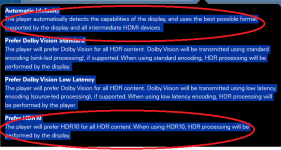
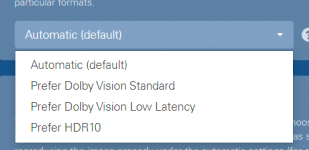
Since I dot not have DV display would I be better off forcing "Prefer HDR10"? or in my case would Auto be the same?

I am convinced there is something not right about the V when playing DV content on non DV display so wondering if elminating any "auto" things it has to do might help. Doubtful I know.

I am trying best I can to make sure to only download HDR10 versions...but in some cases like Transformers only the DV has Atmos.

1723596019573.png
 
That reminds me I had a question about one of the options in the V's settings:

Since I dot not have DV display would I be better off forcing "Prefer HDR10"? or in my case would Auto be the same?

I am convinced there is something not right about the V when playing DV content on non DV display so wondering if elminating any "auto" things it has to do might help. Doubtful I know.

I am trying best I can to make sure to only download HDR10 versions...but in some cases like Transformers only the DV has Atmos.

View attachment 5503
I think it would force everything to HDR10, even SDR. But i am not sure.
 
I think it would force everything to HDR10, even SDR. But i am not sure.
My main reason for asking was when reading the descriptions of the options...I kinda thought maybe Auto might be bugged since the intermediate device (AVR is DV capable)...I know it should just be passing along what the EDID of its connected display is but never know.

Also the Prefer HDR10 specfically says...."HDR processing will be performed by the display" which made me wonder if Auto is maybe adding some processing that it should not. It also implies for HDR conent so i assume SDR would be fine.

Logically, I think in my case where DV is not a thing...prefer HDR10 just makes sense. Just wish that applied to default downloads LOL :)

Just grasping at straws for now. I always try to configure things so im minimizing the amount of "Auto" settings required.

1723596815595.png
 
Last edited:
My main reason for asking was when reading the descriptions of the options...I kinda thought maybe Auto might be bugged since the intermediate device (AVR is DV capable)...I know it should just be passing along what the EDID of its connected display is but never know.

Also the Prefer HDR10 specfically says...."HDR processing will be performed by the display" which made me wonder if Auto is maybe adding some processing that it should not. It also implies for HDR conent so i assume SDR would be fine.

Logically, I think in my case where DV is not a thing...prefer HDR10 just makes sense. Just wish that applied to default downloads LOL :)

Just grasping at straws for now. I always try to configure things so im minimizing the amount of "Auto" settings required.

View attachment 5504
I think you are right. Prefer HDR10 is a better choice.
 
Hello all,

I just touched base with @Broncowrangler via PM to bring him up to date on some of our investigation so far, and got a bit of an update from him a well.

First things first -- he reported to me that changing his LG's picture mode to Filmmaker Mode resolved the brightness fluctuations that he had seen with Furiosa and other movies. So that's good news, and was consistent with our internal testing so far which found that our own LG (different model) could show some fluctuation in certain picture modes, but not others. For now, this seems to be an issue with the LG's processing.

Regarding the audio drops on Furiosa, there are two specific locations in the movie that have momentary audio drops when played on Strato V. We have reproduced this in-house on multiple different audio processors, and we have also found that the identical movie files play without issue on Strato C. So, it seems that there's something about this specific movie that is causing a hiccup in the bitstream on Strato V. This is good news, because it's a reproducible case that will allow our team to efficiently investigate. (For what it's worth, I watched the movie last night for the first time and thoroughly enjoyed it!)

So, excellent progress so far. More info to follow as I have it.
 
Catching up on some earlier posts in the thread here.

Is your display DV capable? If so, the fluctuations may be because with DV profile 5, the device is doing the tone mapping and not the display, which means th device is guessing what you display is capable of. DL the HDR10 version and see if it fluctuates.

So this is sort of moot now given what I just posted above, but I wanted to correct something here. Profile 5 does not equate to device-led tone mapping. As described in the original Strato thread here, Profile 5 is a way of encoding the content using a different colorspace that is a better fit to human visual perception (and by extension, to perceptual video codecs). Strato V supports tone mapping on the display side or the player side, depending upon the capabilities of the display, but the default is to let the display do the tone mapping.

I am not sure why the V plugged into a non-DV device is downloading DV version in the first place....it should default to what the display is capable of.

This was also discussed in another thread, or possibly this thread! It's hard to keep track. 🤪 To summarize, Strato V can convert Dolby Vision to HDR10 format for output, and due to some subtleties of the ICtCp color space used in Profile 5, this can actually produce slightly better results than straight HDR10 on displays that are capable of handling 12 bits per component. Having the DV version on a system with a Strato V also means that it is ready to play in Dolby Vision format if it is later connected to a Dolby Vision display.

The way that the download logic is written, if your system has a Strato V that is connected to either a Dolby Vision or an HDR10 display, we will auto-select Dolby Vision, unless the Strato V is connected to an HDR10 display and you also have a Strato C or earlier in the system connected to an HDR10 display. In that case, we'll download HDR10 because both players can play that to their connected displays.
 
Catching up on some earlier posts in the thread here.


So this is sort of moot now given what I just posted above, but I wanted to correct something here. Profile 5 does not equate to device-led tone mapping. As described in the original Strato thread here, Profile 5 is a way of encoding the content using a different colorspace that is a better fit to human visual perception (and by extension, to perceptual video codecs). Strato V supports tone mapping on the display side or the player side, depending upon the capabilities of the display, but the default is to let the display do the tone mapping.
Thanks for the clarification!
 
But pre 2024 LGs don’t have a DV Filmmmaker Mode, Cinema is the most accurate DV mode that works just like FM. In 2024 they re-named the DV Cinema mode to FM mode. HDR10 has both modes.
Like I mentioned on the previous page, i have currently downloaded the HDR10 version of furiosa. I was experiencing severe brightness fluctuations on Cinema mode, but filmmaker mode was most stable. For dolby vision, cinema home is my preferred mode (with Dolby vision iq), as I didn’t experience fluctuations.
 
@MikeKobb
Hmm, then I am wondering why in my case the DV version of several movies when played back on my JVC projector look more "subdued/dim/dark" than the HDR10 version of the the same movie. Its as if its somehow effecting how the JVC's Frame by Frame tonemapping behaves.

Also of note and not sure if it means anything...but even thou I have the JVC's "filmmaker" mode set to manual(off) ...with the Strato V...and just the Strato V it "sometimes" shows Filemaker Mode when looking at the brief info that pops up on the JVC when movie is first started..but if I bring up the info page later...the Filmmaker mode is not shown..and the JVC is using the correct mode I have configured for HDR sources..seems like some quirk with the Strato V -> JVC Projector. Few others with older Strato Cs on the avsforums have noticed similar behavior. We dont think Filmmaker mode is actually on but something is causing the JVC to briefly show that it is.

The reason I have Filmmaker mode on the JVC off is because it causes things to be a tad too dim....which is kinda what is happening with DV titles...so maybe there is something odd going on.

I still believe a user option to set what default version is is a good idea...especially for Standalone Strato V setups with non-DV displays/projectors.
 
All the JVC is showing is that "Filmmaker" mode is available, not active. It's been this way since the Z series was introduced. It does this with my Strato and Terra combo too.
 
Like I mentioned on the previous page, i have currently downloaded the HDR10 version of furiosa. I was experiencing severe brightness fluctuations on Cinema mode, but filmmaker mode was most stable. For dolby vision, cinema home is my preferred mode (with Dolby vision iq), as I didn’t experience fluctuations.
Thanks, I thought you meant it the other way around. By any chance did you check if the Dynamic Tone Mapping setting was on in Cinema mode and off in FM mode?
 
Some intermittent audio drops on fall guy (Dolby vision). 🤪. Zero issues on the new Twisters. Really quite baffling, how one particular title exhibits erratic behavior while the other performs flawlessly.

Fyi, these drops are very brief; like a momentary stutter. I was digging through forum archives and noticed that this issue is not only exclusive to the V and Denon/ Marantz equipment. This has been reported earlier on the C. The thread posted below, never pointed out a firm resolution and expired prematurely.

I have been able to temporarily resolve this issue by restarting the unit (like some members suggested on that thread) but this is not the ideal way to deal with it each time this happens.

Before I get cable centric queries, I’m using Pixelgen across the board. No drop outs with other components in case you’re wondering.

Like mentioned earlier all video issues have been resolved. (Touch wood).

Audio Dropouts Strato C
 
Back
Top