• Thanks for visiting the Kaleidescape Owners' Forum

    This forum is for the community of Kaleidescape owners, and others interested in learning about the system, equipment, services, and the company itself.

    It is run by a group of enthusiastic Kaleidescape owners and dealers purely as a service to this community.

    This board is not affiliated in any way with Kaleidescape, Inc.
    For official technical support, product information, or customer service, please visit www.kaleidescape.com

    You can dismiss this box forever by clicking the "X" in the upper right corner of this message.
  • You are currently in "Guest" mode and not logged in with a registered account.

    The forum is free to use and most of the forum can be used by guests who are not registered....

    ... but we strongly encourage you to register for a full account. There is no cost to register for a full account.

    Benefits of registering for a full account:

    • Participate in the discussions! You must have a registered account to make posts on the forums. You will be able to start your own thread on a topic or question, or you can reply to other threads/discussions.
    • Use the "Conversation" feature (known as "private messaging" on other forums) to communicate directly with any of the other users here.
    • Access the Files area. The "resources" area of the forum contains many "Favorite Scene" and Script files that can dramatically increase the enjoyment of your Kaleidescape system. Go directly to great scenes in your favorite movies, created by other owners, and add automation to playback of your system with Scripts.
    • You won't see this annoying notice at the top of every screen!😊

    It's easy and free to register for the forum. Just click the "Register" button in the upper right corner of this page, and follow the instructions there.

    This box goes away for registered users.

Popcorn Ready app for iOS

OUTATIME

Well-known member
⭐️⭐️PATRON⭐️⭐️
Joined
Dec 4, 2024
Messages
404
Hi everyone,

I’m excited to share the first public beta of the Popcorn Ready app!

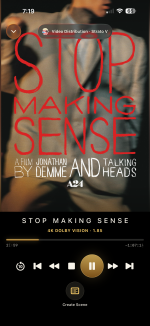
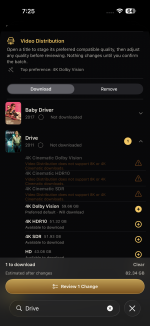
Some of you may already know Popcorn Ready as a Chrome extension, while others may be discovering it for the first time. The app brings the same general idea to a native Apple experience, with tools for browsing your movies, searching and filtering, viewing details, starting playback, and controlling your Kaleidescape system.

Popcorn Ready works on iPhone, iPad, and Macs with Apple silicon. The Mac version also includes keyboard support for browsing and navigation.

The app is being distributed through TestFlight, Apple’s system for installing and updating beta apps before they appear in the App Store.

To install:

  1. Install Apple’s free TestFlight app from the App Store.
  2. Open the link below on your iPhone, iPad, or Apple-silicon Mac.
  3. Accept the invitation and tap Install.
  4. When you first open Popcorn Ready, allow Local Network access and make sure you’re connected to the same network as your Kaleidescape system.
TestFlight link:

This is beta software, so feedback is very welcome. You can submit feedback through TestFlight or reply here with questions, suggestions, or anything that doesn’t work as expected.

Thanks to @MikeKobb at Kaleidescape for taking a look, getting this early version of the app working on a Co-Star system, and giving me the go-ahead to share the beta here!

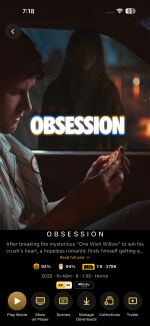
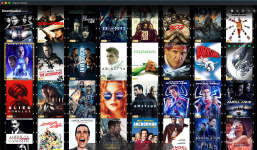
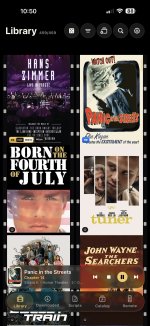
IMG_8421.pngIMG_8422.pngIMG_8423.pngIMG_8424.png
 
What a beautiful iOS app. I downloaded and set it up, and I'll mess with it this weekend. The posters look great, and my first shake for a random movie worked without issue. It was Dazed and Confused if you are curious :)
 
Thanks so much for creating iOS versions. I truly appreciate your hard work in creating the Chrome extensions (and now iOS).

Quick question: Will the Mac version be native or derived from the iPad (iOS)?
 
Thanks so much for creating iOS versions. I truly appreciate your hard work in creating the Chrome extensions (and now iOS).

Quick question: Will the Mac version be native or derived from the iPad (iOS)?
The Mac version is the iOS/iPad version so it does require a Mac with Apple Silicon. However, I did add in keyboard navigation to move between tabs, navigate and select titles, etc.
 
My word, what a great app! I’m loving the ability to create scripts and see the number of purchased movies.
I’d be more than happy to donate or pay for the full non-beta version 👏
 
Last edited:
Love the app! I will use it so much more as an app than a plug-in. Thank you for doing this!!

This might be a big ask, but is there anyway to store collections offline? I noticed that when I tested the app when not connected to my local wifi, collections were not there. In my use case, I have a collection for movies for my family to watch together, and I would like to be able to review that list when we are away from home, like out to dinner. Could the app store the data on iCloud or the phone itself and then just resync
when it next connects to the network?

Second ask. Would it be possible to add a third or even fourth smaller size for the Posters? Even the 35mm is pretty big and takes awhile to scroll through the list of movies.

I have been paying a yearly fee for a separate app to track the movies I own and want to watch on Kscape. I have deleted that app as I think Popcorn Ready will fit the need! I am happy to contribute to a fund to keep this going!!

Thanks again!!
 
Love the app! I will use it so much more as an app than a plug-in. Thank you for doing this!!

This might be a big ask, but is there anyway to store collections offline? I noticed that when I tested the app when not connected to my local wifi, collections were not there. In my use case, I have a collection for movies for my family to watch together, and I would like to be able to review that list when we are away from home, like out to dinner. Could the app store the data on iCloud or the phone itself and then just resync
when it next connects to the network?

Second ask. Would it be possible to add a third or even fourth smaller size for the Posters? Even the 35mm is pretty big and takes awhile to scroll through the list of movies.

I have been paying a yearly fee for a separate app to track the movies I own and want to watch on Kscape. I have deleted that app as I think Popcorn Ready will fit the need! I am happy to contribute to a fund to keep this going!!

Thanks again!!
I was thinking of even having an option for a list type of view.
 
Love the app! I will use it so much more as an app than a plug-in. Thank you for doing this!!

This might be a big ask, but is there anyway to store collections offline? I noticed that when I tested the app when not connected to my local wifi, collections were not there. In my use case, I have a collection for movies for my family to watch together, and I would like to be able to review that list when we are away from home, like out to dinner. Could the app store the data on iCloud or the phone itself and then just resync
when it next connects to the network?

Second ask. Would it be possible to add a third or even fourth smaller size for the Posters? Even the 35mm is pretty big and takes awhile to scroll through the list of movies.

I have been paying a yearly fee for a separate app to track the movies I own and want to watch on Kscape. I have deleted that app as I think Popcorn Ready will fit the need! I am happy to contribute to a fund to keep this going!!

Thanks again!!
Glad that you like it!

Collections are a bit tricky because unfortunately Kaleidescape doesn't expose them to the store APIs so they only work locally. I don't have any soft of backend web server or storage available for users either. That being said, it should be possible to either store locally or in your own personal iCloud and link that to the app for offline viewing....although management of collections would still be unavailable unless I persisted an offline diff of all changes and then I did the actual changes next time you open the app on your home network. By the way, I'm already doing something similar where I persist your last known full library and downloaded titles for offline mode...so a view of Collections would fit that model.

Yes, I could add smaller posters, although my goal of the aesthetic of the app was that the beauty of the app is driven by the lovely high res artwork. I did make the MacBook and iPad versions have many more columns of posters though since those devices are mostly landscape. With the large artwork my thought was that search (can search titles, cast/crew, etc) as well as the extensive filter list could make the lists more manageable. A list view, as mentioned in the post above, is another option although less aesthetically pleasing.
 
I did make the MacBook and iPad versions have many more columns of posters though since those devices are mostly landscape. With the large artwork my thought was that search (can search titles, cast/crew, etc) as well as the extensive filter list could make the lists more manageable.


You've singlehandedly given me reason to dust off the ol' I-pad again. Makes a nice movie room feature for guests.
 
Yes, I could add smaller posters, although my goal of the aesthetic of the app was that the beauty of the app is driven by the lovely high res artwork. I did make the MacBook and iPad versions have many more columns of posters though since those devices are mostly landscape. With the large artwork my thought was that search (can search titles, cast/crew, etc) as well as the extensive filter list could make the lists more manageable. A list view, as mentioned in the post above, is another option although less aesthetically pleasing.
I installed the iPad version on my MacBook, and the size of the posters is perfect there. I like the great artwork, but on the iPhone, they just feel too big. I like the list view idea someone suggested above.
 
You've singlehandedly given me reason to dust off the ol' I-pad again. Makes a nice movie room feature for guests.
Let me know what you think of the density of movies on whichever iPad you have. On my phone, I actually prefer 70mm mode with the giant posters as they look amazing in high resolution and I feel it fits the screen really nicely in portrait mode on a phone. On my MacBook in 35mm mode I get 8 across and I think that looks really nice while still keeping the artwork as the star of the show. I tried a few different iPads in the Simulators as well, but I primarily use my MacBook.

1785605062873.png
 
I installed the iPad version on my MacBook, and the size of the posters is perfect there. I like the great artwork, but on the iPhone, they just feel too big. I like the list view idea someone suggested above.
Curious which iPhone you have so I can see what it looks like in the Simulator...
 
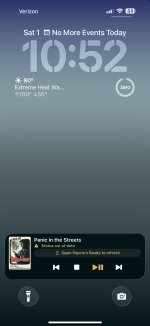
I am also curious about the "Status out of date" message on the lock screen. Why is it out of date? There is no time lapse listed, so I am not sure what is out of date.

Screenshot 2026-08-01 at 10.52.53 am.jpg
 
I am also curious about the "Status out of date" message on the lock screen. Why is it out of date? There is no time lapse listed, so I am not sure what is out of date.

View attachment 11165
This is a limitation of how Live Activities work. Once the app gets backgrounded, I can no longer know the current status of playback. However, clicking a button, like pause, should still work as a user interaction can wake the app. The right way to make this work much better would be if the local Kaleidescape system would use the Apple Push Notification Service to send push notifications from the local system to the apps. That would make lock screen and live activities be up to date. There are also some changes in iOS27 that I'm going to investigate that may bring some improvements even without Kaleidescape updating their local services.
 
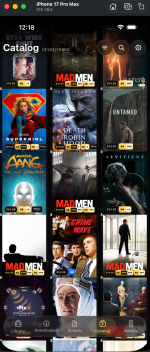
Is this dense enough for a phone view option? I need to tweak the optional price/quality badges on the bottom to get them to fit in this view. I still may consider a list view as well if I can make it look pretty.

1785608380914.png
 
Back
Top