• Thanks for visiting the Kaleidescape Owners' Forum

    This forum is for the community of Kaleidescape owners, and others interested in learning about the system, equipment, services, and the company itself.

    It is run by a group of enthusiastic Kaleidescape owners and dealers purely as a service to this community.

    This board is not affiliated in any way with Kaleidescape, Inc.
    For official technical support, product information, or customer service, please visit www.kaleidescape.com

    You can dismiss this box forever by clicking the "X" in the upper right corner of this message.
  • You are currently in "Guest" mode and not logged in with a registered account.

    The forum is free to use and most of the forum can be used by guests who are not registered....

    ... but we strongly encourage you to register for a full account. There is no cost to register for a full account.

    Benefits of registering for a full account:

    • Participate in the discussions! You must have a registered account to make posts on the forums. You will be able to start your own thread on a topic or question, or you can reply to other threads/discussions.
    • Use the "Conversation" feature (known as "private messaging" on other forums) to communicate directly with any of the other users here.
    • Access the Files area. The "resources" area of the forum contains many "Favorite Scene" and Script files that can dramatically increase the enjoyment of your Kaleidescape system. Go directly to great scenes in your favorite movies, created by other owners, and add automation to playback of your system with Scripts.
    • You won't see this annoying notice at the top of every screen!😊

    It's easy and free to register for the forum. Just click the "Register" button in the upper right corner of this page, and follow the instructions there.

    This box goes away for registered users.

What is "Cinematic?"

Yes. When playing a 4K Cinematic Dolby Vision movie while connected to a display that does not support Dolby Vision, Strato K will output a the movie in 4K Cinematic HDR10.

Your recollection is incorrect. Strato V can and will output a 4K Dolby Vision file as 4K HDR10 when necessary (e.g. when connected to an HDR10 display).
Thanks for the clarification. I appreciate it.
 
No other Stratos can play it and it won't even appear on their OSDs. All it will do is take up space on your Terra server.
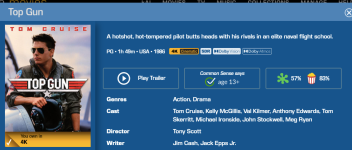
I'm not so sure about that...I only have a Strato C and 4K Cinematic version of Top Gun appears in my OSD, I downloaded it yesterday, and I had to pay for it (as I previously had the HD version).
 
Check that, it might have shown Cinematic, by may have only downloaded one of the other 4K versions (SDR, HDR), or if it for some reason did download the Cinematic version, it should have notified you that it will download, but will only be playable on the Strato-K. I'm curious as to what you find.

Jim
 
It shows the Dolby Vision label as well, even though the C doesn’t support it. I think it is essentially letting you know all the available formats the particular title supports. However the playback will be contingent upon natively supported formats like HDR10, SDR, HD.

Eraser 4k currently which I recently downloaded on my strato V, is showcasing cinematic 4k even though the V doesn’t support it.
 
I'm not so sure about that...I only have a Strato C and 4K Cinematic version of Top Gun appears in my OSD, I downloaded it yesterday, and I had to pay for it (as I previously had the HD version).
I stand by my statement. The screenshot you posted above is a detail sheet from the web store. And the badges displayed are simply indicating the highest qualities available not what was actually downloaded to your system..

If you download 4K Cinematic content to a Terra, it will only appear on the OSD of a Strato K that is part of that system. No other Stratos will show that title in any local library OSD view. The OSD store interface will show 4K Cinematic content but that's not local content.
 
Last edited:
Yes. When playing a 4K Cinematic Dolby Vision movie while connected to a display that does not support Dolby Vision, Strato K will output a the movie in 4K Cinematic HDR10.

Your recollection is incorrect. Strato V can and will output a 4K Dolby Vision file as 4K HDR10 when necessary (e.g. when connected to an HDR10 display).
Aprox how much more space on a Terra hard drive will a cinematic movie take up vs a regular 4K movie ?
 
I'm not so sure about that...I only have a Strato C and 4K Cinematic version of Top Gun appears in my OSD, I downloaded it yesterday, and I had to pay for it (as I previously had the HD version).
You can’t only have a C. The C has no storage capability so you have to have a terra for it to work. You can download these versions to a terra but you can’t play them back with a C.
 
Will there ever be a Cinematic version for HD files or is it just for 4K titles?
 
I filtered the movies I own to see which titles now show a Cinematic version. In the list, I found six titles, that I believe were previously HDR only, but now show as having a Dolby Vision version. However, when I filter for Dolby Vision, these titles do not show up. I am wondering if the titles are actually in Dolby Vision or if the detail sheets from the web store are mistakenly showing Dolby Vision.

The titles are the five Indiana Jones movies and "No Time to Die."
 
I am wondering if the titles are actually in Dolby Vision or if the detail sheets from the web store are mistakenly showing Dolby Vision.
The 4K Cinematic versions of those titles are, indeed, in Dolby Vision. I do not know why 4K Dolby Vision versions are not also available. I have inquired with the Content team.
 
The 4K Cinematic versions of those titles are, indeed, in Dolby Vision. I do not know why 4K Dolby Vision versions are not also available. I have inquired with the Content team.
I figured out my issue. I went to the download choices for a title and it shows the 4k Cinematic version is in Dolby Vision. The regular 4k choices are still HDR or SDR. That is why when I filtered for regular "4k Dolby Vision" they did not show up in the results. Thanks for checking on this.
 
I filtered the movies I own to see which titles now show a Cinematic version. In the list, I found six titles, that I believe were previously HDR only, but now show as having a Dolby Vision version. However, when I filter for Dolby Vision, these titles do not show up. I am wondering if the titles are actually in Dolby Vision or if the detail sheets from the web store are mistakenly showing Dolby Vision.

The titles are the five Indiana Jones movies and "No Time to Die."
I came on here to vent about this exact topic. Figured I would search first and see if it has come up already.

I recently spent about $80 on what I thought were disc replacement versions of titles with Dolby Vision. I buy only Dolby Vision Titles mostly because my Panasonic player has good tone mapping for HDR10 content. Tonight, I discovered the movies are only in Dolby Vision for the 4K Cinematic version! The badges on the movies are very misleading. There is no way to read it as “Dolby Vision IN 4K CINEMATIC ONLY.” I see Dolby Vision and since I have a Strato E, I’m going to assume it applies to me. Or at least that is what I did before now.

Since K does not give refunds, I’m stuck with inferior versions of movies I don’t want.
 
I filtered the movies I own to see which titles now show a Cinematic version. In the list, I found six titles, that I believe were previously HDR only, but now show as having a Dolby Vision version. However, when I filter for Dolby Vision, these titles do not show up. I am wondering if the titles are actually in Dolby Vision or if the detail sheets from the web store are mistakenly showing Dolby Vision.

The titles are the five Indiana Jones movies and "No Time to Die."
There is no way to filter for Dolby Vision specifically in relation to 4K Cinematic. You can only filter for 4K Cinematic and then see what it lists as available versions. There is no way to separate in the filtering the different versions of 4K Cinematic files. I think they should add this in the video drop down on the site so you could pick "4K Cinematic Dolby Vision" or "4K Cinematic HDR10" specifically.
 
I came on here to vent about this exact topic. Figured I would search first and see if it has come up already.

I recently spent about $80 on what I thought were disc replacement versions of titles with Dolby Vision. I buy only Dolby Vision Titles mostly because my Panasonic player has good tone mapping for HDR10 content. Tonight, I discovered the movies are only in Dolby Vision for the 4K Cinematic version! The badges on the movies are very misleading. There is no way to read it as “Dolby Vision IN 4K CINEMATIC ONLY.” I see Dolby Vision and since I have a Strato E, I’m going to assume it applies to me. Or at least that is what I did before now.

Since K does not give refunds, I’m stuck with inferior versions of movies I don’t want.
I’m sorry to hear about the bad experience. One thing I can offer, if it’s some comfort, is that if there’s a 4K Cinematic Dolby Vision version of a movie, that means that we have 4K Dolby Vision assets in house, and you should see a regular 4K Dolby Vision version arrive relatively soon. In general, we’ve produced 4K updates of all the titles for which we did 4K Cinematic versions. There are a handful where the regular 4K versions are still under review, but this is quite a small number. One of the reasons that the badge design is the way that it is is because in general, the quality versions shown for 4K Cinematic should all exist for regular 4K as well. It seems that you’ve found a couple of rare exceptions to that rule, which fortunately should be temporary.

When you shop for your system, are you using the store website, or the mobile app? If you’re using the web, there’s a new option in the movie details where you can tap on “Show All Formats”, and it will individually list all of the versions with their file sizes. So, you can check this if you really want to be sure. This is not in the mobile apps yet, but it’s coming in the next release.

Again, I apologize for this confusion, and appreciate your feedback.
 
I’m sorry to hear about the bad experience. One thing I can offer, if it’s some comfort, is that if there’s a 4K Cinematic Dolby Vision version of a movie, that means that we have 4K Dolby Vision assets in house, and you should see a regular 4K Dolby Vision version arrive relatively soon. In general, we’ve produced 4K updates of all the titles for which we did 4K Cinematic versions. There are a handful where the regular 4K versions are still under review, but this is quite a small number. One of the reasons that the badge design is the way that it is is because in general, the quality versions shown for 4K Cinematic should all exist for regular 4K as well. It seems that you’ve found a couple of rare exceptions to that rule, which fortunately should be temporary.

When you shop for your system, are you using the store website, or the mobile app? If you’re using the web, there’s a new option in the movie details where you can tap on “Show All Formats”, and it will individually list all of the versions with their file sizes. So, you can check this if you really want to be sure. This is not in the mobile apps yet, but it’s coming in the next release.

Again, I apologize for this confusion, and appreciate your feedback.
HI Mike,

I very much appreciate the response, thank you! It’s reassuring to hear that the movies will more than likely receive Standard 4K Dolby Vision versions before long. The movies I had bought, all 5 Indiana Jones as well as Toy Story 3 and 4 are all what I would assume are high profile movies, so I imagine they’d definitely get the standard 4K DV versions fairly quick. Based on what you said, it seems them not having it already is sort of an oversight.

Another user had called out when clicking “All versions” on the web version, it does show the break down but still appreciate the mention. I do tend to use the web version for purchases. Primarily it’s because on the web I can make a purchase and immediately uncheck “download to my system” since I only have a stand alone Strato E and need completely control of what I download. I can’t choose on the app to not download a movie. Nice to know the format view will be in a app update soon!

I just recently found out Kalaidescape is in Mountain View. I live in the area, in South SF.
 
Back
Top