• Thanks for visiting the Kaleidescape Owners' Forum

    This forum is for the community of Kaleidescape owners, and others interested in learning about the system, equipment, services, and the company itself.

    It is run by a group of enthusiastic Kaleidescape owners and dealers purely as a service to this community.

    This board is not affiliated in any way with Kaleidescape, Inc.
    For official technical support, product information, or customer service, please visit www.kaleidescape.com

    You can dismiss this box forever by clicking the "X" in the upper right corner of this message.
  • You are currently in "Guest" mode and not logged in with a registered account.

    The forum is free to use and most of the forum can be used by guests who are not registered....

    ... but we strongly encourage you to register for a full account. There is no cost to register for a full account.

    Benefits of registering for a full account:

    • Participate in the discussions! You must have a registered account to make posts on the forums. You will be able to start your own thread on a topic or question, or you can reply to other threads/discussions.
    • Use the "Conversation" feature (known as "private messaging" on other forums) to communicate directly with any of the other users here.
    • Access the Files area. The "resources" area of the forum contains many "Favorite Scene" and Script files that can dramatically increase the enjoyment of your Kaleidescape system. Go directly to great scenes in your favorite movies, created by other owners, and add automation to playback of your system with Scripts.
    • You won't see this annoying notice at the top of every screen!😊

    It's easy and free to register for the forum. Just click the "Register" button in the upper right corner of this page, and follow the instructions there.

    This box goes away for registered users.

Problem with projection on screen

DmitryB

Well-known member
Joined
Feb 28, 2022
Messages
577
Location
New York
Hey ya'll!

Question on an issue I'm seeing on my screen: the four corners have "spotlights" - lighter spots than the rest of the screen. Here's the background: My JVC NZ-8 was calibrated in my old home in NYC. There the projector was sitting in a soffit. I moved a few months ago to a new place. Here the projector is mounted to the ceiling, so "upside down" from the previous set-up. So the image had to be flipped and moved down significantly (when first turned on, it was projecting on to the ceiling, so moved a lot to get the image on to the wall.) The screen is the same. But the four corners here have these much brighter spots. Anybody have any idea why this is???

One other unrelated question: when professionals have set up my theaters in the past, they always set up the image to go a bit outside of the screen into the black frame. Why is that and how much is an appropriate distance to go outside of the white screen.

Thanks!
D.
 
Just a guess D, but if the projector used to be in a soffit and is now ceiling mounted, it might be using a lot more lens shift than before. I’ve heard of cases where pushing lens shift toward the extremes can affect brightness uniformity and make the corners look a bit brighter.

Another thought is the projection angle changed relative to the screen, which could make the screen reflect light differently even if it’s the same screen as before.

Not saying that’s definitely it, but could be a couple things to look at. 🤷‍♂️

Good luck!
Andy
 
Bright corners are a known issue of the JVC´s. Can be more or less on the specific unit. Is it possible to check back with the same mounting position as before? Lensshift can have indeed a big impact on the corners.
 
Thanks guys!

It is not possible to check the previous placement of the projector. But there were no light corners in the previous home. And the lens-shift was pretty significant. The image was on the ceiling when I turned the projector on in its new place, so shifting it to the wall location was a big move.

Is there any remedy for this???? I suppose one way to lessen the shift would be to tilt the projector down, but then it's not leveled and I assume that will warp the image?
 
If the lens shift is that extreme, one thing that might help is lowering the projector or the mount a bit so it doesn’t need as much vertical shift.

Tilting the projector usually isn’t ideal since that forces you into keystone correction, which most people try to avoid. Ideally the lens ends up closer to the vertical center of the screen so the shift stays more in the middle of its range.

Just thinking out loud though — hopefully someone who has run into the same thing with an NZ8 can chime in.

Andy
 
s there any remedy for this???? I suppose one way to lessen the shift would be to tilt the projector down, but then it's not leveled and I assume that will warp the image?
As @andy mentioned, tilting is not ideal.
 
Only problem with those boxes for me is my theater also doubles as my living room during off-peak hours. So whatever it is, it has to be something cute!

I did just order a ceiling adapter and will lower it a bit, even if it's noisier. Maybe just raise the volume of things up so it covers the humming of the projector! Just wondering how long of a pipe to get.
 
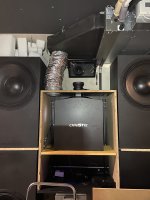
Yep. Projector is vertically mounted (will disappear completey into the rear wall construction) and projects into an angled mirror. Screen is a 184" curved screen.
What model Christie projector is this?
 
Only problem with those boxes for me is my theater also doubles as my living room during off-peak hours. So whatever it is, it has to be something cute!
The box will be completely hidden inside the rear wall construction.
Perhaps this kind of vertical install could be a solution for you as well. Until it´s not a 25.000 lumen projector, you can get away with just some fans - no need for a full AC. ;)
What model Christie projector is this?
That´s a M-4K25. I like that model very much as it is relatively small and light (even I can lift myself 😆), but has 25.000lm and throws an amazing image. The only drawback is that because it is so small and bright, you need massive fans to get the hot air out of the projector. And that means noise. Hence the husbox.
 
The box will be completely hidden inside the rear wall construction.
Perhaps this kind of vertical install could be a solution for you as well. Until it´s not a 25.000 lumen projector, you can get away with just some fans - no need for a full AC. ;)

That´s a M-4K25. I like that model very much as it is relatively small and light (even I can lift myself 😆), but has 25.000lm and throws an amazing image. The only drawback is that because it is so small and bright, you need massive fans to get the hot air out of the projector. And that means noise. Hence the husbox.
From the install picture looks like the 4KM25 is resting on its back on the wooden shelf???
Isn't where the exhaust (on the left side of the housing) of the 4KM25 is? Also there is a suction area on the other side of the(which is a weird design but thats the way it is).
Because if the exhaust is blocked the 4KM25 will melt as this PJ is a Heat Machine.
Very interesting install - I had considered a Eclipse install with mirrors but it would be a huge hassle so I settled for a 4KM25 which slips easily in my Hush box but we had to do a lot of engineering to provide cooling to the 4KM25.
 
From the install picture looks like the 4KM25 is resting on its back on the wooden shelf???
Isn't where the exhaust (on the left side of the housing) of the 4KM25 is? Also there is a suction area on the other side of the(which is a weird design but thats the way it is).
Because if the exhaust is blocked the 4KM25 will melt as this PJ is a Heat Machine.
Haha, yeah that wouldn´t work, indeed. ;) But rest assured, we know what we´re doing. :)
The projector including the bottom of the box is attached to the wall. The orange piece you see at the bottom of the projector is a barrier that is separating the hot air which is coming out of the bottom of the Christie (The M-4K has the intake on the right side and the exhaust at the rear.) and preventing it to mix back again with the cool that is flowing into the upper part of the box. If you look closer, you see the box is proceeding further down in the image.
This way, we get a cool area and a hot area. The cool air is pulled through the projector and exhausts at the bottom where it is sucked out by the AC, cooled down and fed back into the cool area. It´s a closed circuit of air.
It´s working really well. The Intake temperature never goes above 20°C even at 100% laser power with the fans staying very quiet.
The box will now get some extra sound insulation inside and the whole AC will be enclosed.
 
Back
Top