• Thanks for visiting the Kaleidescape Owners' Forum

    This forum is for the community of Kaleidescape owners, and others interested in learning about the system, equipment, services, and the company itself.

    It is run by a group of enthusiastic Kaleidescape owners and dealers purely as a service to this community.

    This board is not affiliated in any way with Kaleidescape, Inc.
    For official technical support, product information, or customer service, please visit www.kaleidescape.com

    You can dismiss this box forever by clicking the "X" in the upper right corner of this message.
  • You are currently in "Guest" mode and not logged in with a registered account.

    The forum is free to use and most of the forum can be used by guests who are not registered....

    ... but we strongly encourage you to register for a full account. There is no cost to register for a full account.

    Benefits of registering for a full account:

    • Participate in the discussions! You must have a registered account to make posts on the forums. You will be able to start your own thread on a topic or question, or you can reply to other threads/discussions.
    • Use the "Conversation" feature (known as "private messaging" on other forums) to communicate directly with any of the other users here.
    • Access the Files area. The "resources" area of the forum contains many "Favorite Scene" and Script files that can dramatically increase the enjoyment of your Kaleidescape system. Go directly to great scenes in your favorite movies, created by other owners, and add automation to playback of your system with Scripts.
    • You won't see this annoying notice at the top of every screen!😊

    It's easy and free to register for the forum. Just click the "Register" button in the upper right corner of this page, and follow the instructions there.

    This box goes away for registered users.

Popcorn Ready - Chrome extension for Kaleidescape users

OUTATIME

Well-known member
⭐️⭐️PATRON⭐️⭐️
Joined
Dec 4, 2024
Messages
402
I've created a Chrome extension for Kaleidescape users called Popcorn Ready and it is now available in the Chrome Web Store at: Popcorn Ready

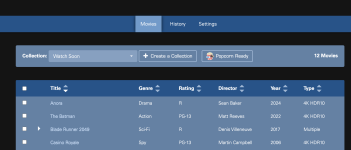
Popcorn Ready is a Chrome extension designed for Kaleidescape users to provide alternative ways to view and search your movie library featuring enhanced data from The Movie Database (TMDB).

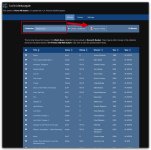
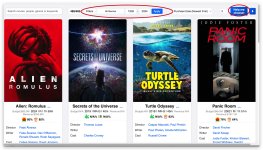
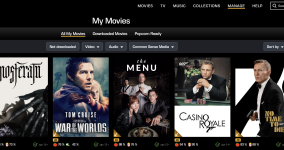
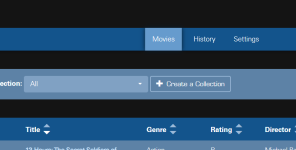
You can view, filter, search and sort your movie library either by clicking the Popcorn Ready chrome extension icon or by going to the My Movies page on the Kaleidescape Movie Store, where a content script will add a Popcorn Ready tab in the existing page. Click any movie title on the Popcorn Ready tab to open a recommendations tab that will have the top 5 recommendations provided by TMDB that are available on the Kaleidescape movie store. If you don't already own one of the recommendations, then that title will be a hyperlink to that movie on the Kaleidescape movie store.

Have too many movies, but can't decide what to watch? While in the Popcorn Ready tab you can get between 1-9 random movies to choose from.

Want a random movie from a more familiar user interface? Then navigate to your local Kaleidescape system at http://my-kaleidescape.local/movies where a content script will add a Popcorn Ready button right in that user interface that will choose a random movie and click it to bring up the details.

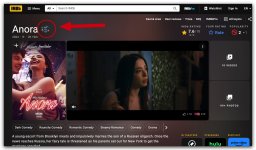
Another content script will add a Kaleidescape logo next to any title on an IMDB movie page if that title is available on the Kaleidescape movie store. Click the logo to goto the movie page on Kaleidescape.

Hope that you guys enjoy it! Let me know if you have any great ideas for enhancements. Probably not going to port to Safari at this time as I don't want to pay the $100 annual dev fee to Apple for this one small project.
 
There are disclaimers in the app itself, but I'll also add on this post: This product is not endorsed by Kaleidescape®. This product uses the TMDB API but is not endorsed or certified by TMDB.
 
This is SO cool! What a great extension.
(By the way, it works in the Brave browser too if anyone is interested...)

LOVE using it in the my-kaleidescape web interface since it can then recommend me just movies that are in my "New" or "Watch Soon" collection! That's what I was hoping for in this post when you first started showing an earlier version of this tool. You found an incredibly elegant way to implement that.

Xnip2025-03-17_09-17-35.jpeg

... and seeing the K logo magically appear on IMDB pages with link to it in the store is just brilliant!
Xnip2025-03-17_09-21-00.jpeg
Best Kaleidescaupe UI enhancement I've seen... will use it often!

This is really amazing @OUTATIME!

@Techthusiasm should feature this on one of his youtube features or at least show it off on one of his live streaming sessions.
 
Couple of questions/suggestions:
What does the "Help Me Choose" button actually do? Just seems to put up another few recommendations, but ones not on the first list of movies it brought up.

and in a future version is there a way to add to your "Filters" button to have an option to set a minimum rotten tomatoes score (critic or audience)? That would be even more awesome...
Xnip2025-03-17_09-35-29.jpg
 
Thanks!

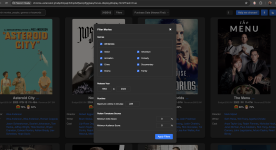
Help me choose is the original goal of the app before my scope kept expanding...it's the random movie button in my interface. So, for example, you could filter by Science Fiction from 2000-2024 and in my library that takes it from 309 titles down to 88 titles. Then if you hit Help me Choose, it will bring up 3 random choices from those 88 movies in your filter. I made them fade in over a few seconds each to add to the suspense. If you prefer a different number of random choices you can adjust between 1-9 before hitting the Help me Choose button.

A totally separate feature is that you can click any of the movie titles and that will bring up a new tab with recommendations. This tab will have up to 5 recommendations provided by TMDB for whichever movie you clicked on. I brought back the 5 best recommendations from TMDB that are available on the Kaleidescape movie store. Then, in that recommendation screen, if you don't already one those titles, you can click the title to see that movie on the Kaleidescape movie store and you can purchase it if you want.
 
First few users and first bug found. Ha

Version 1.0.1 submitted to Chrome store to fix issue with some movies not properly getting enriched movie data depending on which movie quality version you may have purchased in Kaleidescape. If you see some real movie titles with N/A similar to how it looks for "Secrets of the Universe" in Josh's screenshot...that is likely caused by the bug I just fixed. After Google accepts the new version and the store updates your extension version then that should be fixed. Note that for non movie titles....I am not enriching those currently so you'll still see N/A for your TV Series titles, etc.
 
Really awesome work! I’ve always wanted more filter functions to refine my movie selection—like comedies between 1996 and 2005.(y)
 
Thanks!

FYI - Chrome web store finally published my 1.0.1 hot fix release and the extension should auto update. This should resolve an issue where some movies may not have been getting enriched with cast/crew/genre/year data. I'm still not doing any enrichment on TV Series, so you'll still see N/A for those.
 
I love this concept. Does this only work on the local interface? I've installed the chrome extension, but don't see anything on
 
I love this concept. Does this only work on the local interface? I've installed the chrome extension, but don't see anything on
Thanks for checking it out and for the question! This gives me a chance to try to explain the features better than I did previously. Would love more feedback after you get a chance to play around with it.

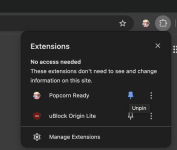
There are a couple of options for the user interface. You can directly click the Popcorn Ready icon in your chrome extension toolbar to open a new tab with the user interface. Easiest way to do this is to just pin the extension to your Chrome toolbar. 1742407106991.png

Also, in the Kaleidescape My Movies web interface for the movie store, there will just be a simple link that says "Popcorn Ready" above the filter bar. This link doesn't change the Kaleidescape UI but if you click it then it simply opens a new Chrome tab with the Popcorn Ready interface.

1742407221519.png

And then last but not least is the content script Josh had originally requested. In the local http://my-kaleidescape.local/movies interface, there's a Popcorn Ready button that simply selects a random movie from whichever collection your are currently viewing and it calls the click event that brings up the regular local Kaleidescape page for that random movie....just like if you clicked a movie title.

1742407416056.png

And then an added bonus, is the IMDB content script that Josh showed in a screenshot above. Any movie that is available on Kaleidescape will have the Kaleidescape logo next to the title in the page for that movie on IMDB.

One other thing to add, version 1.0.2 has been submitted to Google and should go live in a day or two depending on their review time. My version 1.0.1 fixed the issue with some movies not getting enhanced TMDB data, but it broke my recommendations feature. If you click any movie title in the Popcorn Ready interface, it is supposed to show you the top recommendations provided by TMDB that are available on Kaleidescape and if you don't already own one of the recommendations then you can click the title of the movie to show that page on the Kaleidescape Movie Store to see if you want to purchase it. That will be working again once 1.0.2 gets published. Chrome (or Brave) should automatically update to latest version once it is published.

Also, in case it isn't obvious from the tooltip, the Refresh Library button is doing a few things. It is downloading your latest list of Kaleidescape purchases so that your personal library is up to date if you've bought new movies. And it is also making a web call to see if there's a new version of the Enhanced Catalog available. In a separate project, I'm running a python script daily to see if Kaleidescape has made any new movies available and, if so, then I'm enhancing the metadata via the TMDB API, updating the recommendations across the catalog, and publishing the new enhanced catalog to a server that the Chrome Extension will check when you click refresh library. If there's a new catalog, then the refresh library will replace your local copy. Other than when you click refresh library, 100% of the functionality is using local chrome storage so it should be very fast and responsive even for large libraries.
 
Thanks for checking it out and for the question! This gives me a chance to try to explain the features better than I did previously. Would love more feedback after you get a chance to play around with it.
Love this. I believe this is a value added feature. Great work!
 
Other than when you click refresh library, 100% of the functionality is using local chrome storage so it should be very fast and responsive even for large libraries.
I should correct this....one thing that may require an internet connection is the cover art. Chrome does cache the images so if you've used the app recently many of the covers will be cached. The Popcorn Ready UI uses lazy loading to load 12 at a time so it feels like an endless scroll through your library but it's really rendering 12 movie cards at a time.
 
Is it possible, in a future update, to have a filter by movie length? There are many times where I only have a set amount of time 90 minutes, 2 hrs, etc. to watch a movie and want to filter that criteria. That would be amazing!
 
Is it possible, in a future update, to have a filter by movie length? There are many times where I only have a set amount of time 90 minutes, 2 hrs, etc. to watch a movie and want to filter that criteria. That would be amazing!
Yes, that is doable as is Josh's request of using critic/audience score as a filter. For your request, I'd probably just use a single filter value for "Max Runtime" instead of a range. I have all of that data, just need to figure out the filter UI since there will be a lot of filter options.

I think I mentioned in a previous post that I'm using AI to do most of the heavy lifting writing this application. I've found that the AI is incredible at Python, scripting, data manipulation, etc. But the AI is just OK at user interface and web development in general...it takes several iterations to get something decent in many cases on this web development. For those interested in playing around, I've had by far the most success with the latest Claude 3.7 Sonnet Extended Thinking model from Anthropic.
 
So this is mainly intended for those with a K store account, right?
Yes, it's focused on the movies that you own on your Kaleidescape account and recommendations based on those movies. I do have the full catalog of everything available on Kaleidescape with enhanced metadata from TMDB and that is stored locally, but I have not made a UI to just browse/search/filter the catalog and I'm not sure that really adds much value as the Kaleidescape movie store already has much of that functionality.

Right now if you tried the app without a Kaleidescape movie store account, I don't believe you'll see anything besides a message telling you that you need to login to Kaleidescape on their website first. But if there was value in expanding it to be a Kaleidescape catalog viewer as well, that wouldn't require a Kaleidescape login.
 
Version 1.0.2 with the new filters for runtime and critic/audience score has now posted to Chrome web store so you should automatically get the update if you have this extension installed. This also fixes the recommendations (click one of the movie titles from your library and a new tab will open with the top recommendations provided by TMDB that are available on Kaleidescape and if you don't own one then that recommendation movie title will be a hyperlink to that movie on the store).

If anyone is still noticing many movies that are not enriched with TMDB data for directors/writers/actors/runtime/etc please let me know. In my library I have 312 titles and 309 are enriched because 3 titles are TV and TV series will still not be enriched.

Would love additional feedback as well as any other ideas for features that will be useful for Kaleidescape owners. For example, is there any value in searching/filtering the full Kaleidescape catalog or do we think that is already covered well on the Kaleidescape movie store website? Any other things that you wish you could do with your own library? I didn't mention the existing CSV download feature, but I thought that may be useful for some people as it will download a list of your filtered movies...such as Science Fiction from 2000-2025...or don't apply any filters to get your full list as a CSV.

Thanks!
 
Amazing! Traveling now with just an iPad but can’t wait to see this when I get home.
 
Awesome. Glad we are able to see all the movies we own in a beautiful interface. In the second scree app, I liked to have filter by ratings. Wondering if it is possible to provide this feature.

Also, I can see an extension on the store but not local web page as shown here. Not sure the issue. Appreciate providing the great interface.

1742578389877.png
 
Back
Top