• Thanks for visiting the Kaleidescape Owners' Forum

    This forum is for the community of Kaleidescape owners, and others interested in learning about the system, equipment, services, and the company itself.

    It is run by a group of enthusiastic Kaleidescape owners and dealers purely as a service to this community.

    This board is not affiliated in any way with Kaleidescape, Inc.
    For official technical support, product information, or customer service, please visit www.kaleidescape.com

    You can dismiss this box forever by clicking the "X" in the upper right corner of this message.
  • You are currently in "Guest" mode and not logged in with a registered account.

    The forum is free to use and most of the forum can be used by guests who are not registered....

    ... but we strongly encourage you to register for a full account. There is no cost to register for a full account.

    Benefits of registering for a full account:

    • Participate in the discussions! You must have a registered account to make posts on the forums. You will be able to start your own thread on a topic or question, or you can reply to other threads/discussions.
    • Use the "Conversation" feature (known as "private messaging" on other forums) to communicate directly with any of the other users here.
    • Access the Files area. The "resources" area of the forum contains many "Favorite Scene" and Script files that can dramatically increase the enjoyment of your Kaleidescape system. Go directly to great scenes in your favorite movies, created by other owners, and add automation to playback of your system with Scripts.
    • You won't see this annoying notice at the top of every screen!😊

    It's easy and free to register for the forum. Just click the "Register" button in the upper right corner of this page, and follow the instructions there.

    This box goes away for registered users.

Strato V: UI resolution limited to 1080, not 4k!

I did some experimenting.

I can confirm I was able to upload a 2,000 x 3,000 movie poster image off themoviedb and it did take it. I don't feel it really improved the visual presentation though.

I'm experimenting a bit (and talking with some folks) about my setup and the UI in particular because I have the NZ900, madVR, and now a Panamorph DCR. I had been running the interface setting in 2.35 letterbox before the lens, and assumed I should leave it what way with the lens in place.

I did try the 2.35 anamorphic setting, but it doesn't work with having the madVR. It's basically like double anamorphosizing (not really a word) the image to have the K do an anamorphic horiztonal squishing and then have the madVR do it again. You end up with a horizontally squished image on the screen filling it from top to bottom.

I'm wondering though, with the madVR and the lens, is it actually better to leave the K setting in 16:9. Having the K set to 2.35 letterbox is doing one round of scaling and manipulation but then the madVR is also doing one to make it anamorphic. If I leave the K as 16:9 in the setting, then there's only round of manipulation being done by the madVR. I think this would be preferable.

I need to A/B this and test it out, but was curious to post here to discuss the idea. Am I off in my thinking here?
 
I did some experimenting.

I can confirm I was able to upload a 2,000 x 3,000 movie poster image off themoviedb and it did take it. I don't feel it really improved the visual presentation though.

I'm experimenting a bit (and talking with some folks) about my setup and the UI in particular because I have the NZ900, madVR, and now a Panamorph DCR. I had been running the interface setting in 2.35 letterbox before the lens, and assumed I should leave it what way with the lens in place.

I did try the 2.35 anamorphic setting, but it doesn't work with having the madVR. It's basically like double anamorphosizing (not really a word) the image to have the K do an anamorphic horiztonal squishing and then have the madVR do it again. You end up with a horizontally squished image on the screen filling it from top to bottom.

I'm wondering though, with the madVR and the lens, is it actually better to leave the K setting in 16:9. Having the K set to 2.35 letterbox is doing one round of scaling and manipulation but then the madVR is also doing one to make it anamorphic. If I leave the K as 16:9 in the setting, then there's only round of manipulation being done by the madVR. I think this would be preferable.

I need to A/B this and test it out, but was curious to post here to discuss the idea. Am I off in my thinking here?
In relation to the first point about movie posters, I found that a lot of the larger images on tmdb are simply blow-ups without an improvement in actual sharpness. For some, Die Hard stands out, I do see a slight improvement in resolution. Maybe the bigger advantage is not having to stretch the shape of the images. The 756x1080 resizing did slightly stretch the images, and I could tell the difference. This was particularly noticeable for posters that had iconic art, or faces of actors, for which I have the original 1-sheets for and have displayed for years. I know those faces, and they were definitely stretched to fit that odd size. Jodie Foster's face in the Silence of the Lambs poster is a good example of this.
 
I did some experimenting.

I can confirm I was able to upload a 2,000 x 3,000 movie poster image off themoviedb and it did take it. I don't feel it really improved the visual presentation though.

I'm experimenting a bit (and talking with some folks) about my setup and the UI in particular because I have the NZ900, madVR, and now a Panamorph DCR. I had been running the interface setting in 2.35 letterbox before the lens, and assumed I should leave it what way with the lens in place.

I did try the 2.35 anamorphic setting, but it doesn't work with having the madVR. It's basically like double anamorphosizing (not really a word) the image to have the K do an anamorphic horiztonal squishing and then have the madVR do it again. You end up with a horizontally squished image on the screen filling it from top to bottom.

I'm wondering though, with the madVR and the lens, is it actually better to leave the K setting in 16:9. Having the K set to 2.35 letterbox is doing one round of scaling and manipulation but then the madVR is also doing one to make it anamorphic. If I leave the K as 16:9 in the setting, then there's only round of manipulation being done by the madVR. I think this would be preferable.

I need to A/B this and test it out, but was curious to post here to discuss the idea. Am I off in my thinking here?
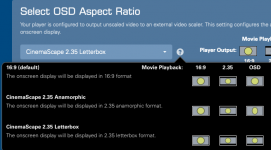
Definitely don’t do what you’re doing. You’ll be double processing any movies that aren’t 2.35. If you want the wide covers view, consider the 2.35 Native mode. That will display content in its native ratio but will do the covers in 2.35 letterbox. I’m assuming that the madVR knows that you have an anamorphic lens and will adjust accordingly?
 
Thanks, Mike. I was hoping you'd chime in. These are the three modes that I see in settings. I'm not presented with the native mode.

Letterbox is what I had been set to before the lens, but I think this results in double processing on the UI, correct, and possibly some content with both a processor and lens? I feel this needs a video once I have the full understanding.

Yes, the madVR has a setting to specify anamorphic output and then you set a stretch factor (1.25x for the DCR).

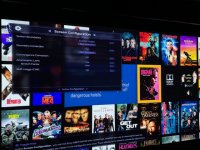
1729099899453.png
 
Thanks, Mike. I was hoping you'd chime in. These are the three modes that I see in settings. I'm not presented with the native mode.

Letterbox is what I had been set to before the lens, but I think this results in double processing on the UI, correct, and possibly some content with both a processor and lens? I feel this needs a video once I have the full understanding.

Yes, the madVR has a setting to specify anamorphic output and then you set a stretch factor (1.25x for the DCR).

View attachment 5993
CinemaScape 2.35 Native Display is not offered when you have the Video Output Behaviour set to use an external scaler.
 
CinemaScape 2.35 Native Display is not offered when you have the Video Output Behaviour set to use an external scaler.
Noted. I'll change that and give it a look. Thanks!
 
Noted. I'll change that and give it a look. Thanks!
So I just learned something. If you have the external scaler option enabled, then the CinemaScape modes actually only affect the OSD. So actually CinemaScape Letterbox will do what you want! You could get slightly better quality using anamorphic if you can somehow tell the madVR what you’re doing so it knows to just leave it alone.
 
So I just learned something. If you have the external scaler option enabled, then the CinemaScape modes actually only affect the OSD. So actually CinemaScape Letterbox will do what you want! You could get slightly better quality using anamorphic if you can somehow tell the madVR what you’re doing so it knows to just leave it alone.

I played with this briefly turning off external scaler, which did enable the native option. Changing between native option and letterbox didn't seem to have any effect in the UI presentation.

Per this info though, I'll probably go back to using external scalar and letterbox then because why not let the madVR be the scalar whenever possible.

If I wanted to get real complex, I could do some C4 programming, assuming all the control is there, to swap anamorphic modes between the K and the madVR when going between menus and content. I will do another experiment though to turn off madVR anamorphic and turn on K anamorphic just to see if the poster quality is nicer looking. I suspect if anamorphic squishing is only happening one time by either device, it won't make a difference.

I'm going to have a Strato C come through my hands shortly, so I plan to connect both the V and C in the theater and look at the UI direct A/B. Then we'll really know the difference. If it is considerable, I might go ahead and put a C back in my theater and move the V to my living room TV.
 
The Envy will not apply vertical compression to 2.35 anamorphic mode, and it will display it just as if it were being viewed on a 16:9 screen.

The way the Envy works is the screen boundaries are defined for viewable area. Everything that is then displayed within that area is scaled to fit within set boundaries.

IMG_8910.jpg

So in the case of of a 2.35/2.40:1 screen that area is fixed. So if and when black bars that fit that aspect ratio are present they are not displayed as that image area is effectively cropped out. So you would only see the scope portion of the image.

When a 16:9 image is displayed it is scaled to fit within the height of the screen.

You would not be able to tell the Envy to scale just that anamorphic mode of the OSD without a control system. One could use NLS to equally stretch side and center of the image to fill the screen but that is based on aspect not a specific UI so if someone did that it would apply to 16:9 in general. A user could make a profile to have it use one set of NLS for 16:9 but again it wouldn't know it was for just that menu so it would need user interaction, unless they use a control system like C4, RTI, etc. to Activate or Deactivate a profile group for NLS when a Play is selected in Kscape.

A user with a scope screen should use 2.35 letterbox if using an Envy as that will fill the screen.

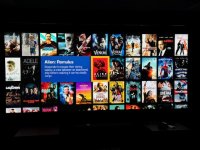
2.35 Letterbox
IMG_8913.jpg

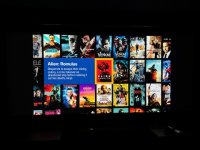
16:9 (Default)
IMG_8912.jpg

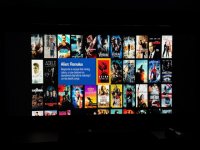
2.35 Anamorphic
IMG_8911.jpg

What you will see in the pictures above is the count for the cover art for 2.35 modes is the same with 11 left to right and the rows are the same between all three (2.35 letterbox, anamorphic, and 16:9) with 3.25 covers shown. However the the image aspect for 2.35 anamorphic displays in 16:9 as it needs vertical compression to look correct.

So really 2.35 Letterbox really should be used as it does exactly what you would want without a lot of run around to just get it back to this view anyways.
 

Attachments

  • IMG_8911.jpg
    IMG_8911.jpg
    179.7 KB · Views: 1
Sorry but most people here are too soft and forgiving. There is zero reason in 2024 that the V could not have had the same GUI resolution, at a minimum, of the earlier players. Zero. Except to save money

For a player that costs as much as it does, in an extremely expensive ecosystem, it is really shameful they did this and throwing around gobbledygook like “design tradeoffs” as the reason

There are countless 4k players for under $200 that provide 4k gui’s. You cannot say it would be technically difficult.

How can K justify this cost-saving decision for a product that this supposed to be the best in the world as the ultimate movie playback experience?
 
Sorry but most people here are too soft and forgiving. There is zero reason in 2024 that the V could not have had the same GUI resolution, at a minimum, of the earlier players. Zero. Except to save money

For a player that costs as much as it does, in an extremely expensive ecosystem, it is really shameful they did this and throwing around gobbledygook like “design tradeoffs” as the reason

There are countless 4k players for under $200 that provide 4k gui’s. You cannot say it would be technically difficult.

How can K justify this cost-saving decision for a product that this supposed to be the best in the world as the ultimate movie playback experience?
I am one of those “soft” owners that want kscape to make a tidy profit and survive well into the future.

However, you sound angry. Perhaps you should start a competitive company??
 
I thought that was the purpose of the setting to enable the Kaleidescape to transmit the content type metadata?
No that is for it to use the Graphics and Cinema flags.

If in a menu/osd it will return a flag that reads Graphic. When a Movie begins to play it will read Cinema.

Again the Envy is looking for black bars. The 2.35 anamorphic mode does not display black bars on top and bottom. When on a scope screen it will be pillar boxed showing as 16:9.

The Envy knows it is in the OSD but it sees it as 16:9
 
Sorry but most people here are too soft and forgiving........

Why aim at owners that find that aspect of the product to be acceptable (albeit compromised), and don't feel the need to be repetitively critical?? While certainly fair to make your personal opinion known, being critical of others just because they focus more on playback performance and other capabilities, seems unnecessary.

Jim
 
However, you sound angry. Perhaps you should start a competitive company??
I’ve often wondered if what Kaleidescape is doing (and not doing) is so simple, why some of the complainers don’t start something and do it right. If there’s no excuse for K to not do it, there’s no excuse for you to not do it.

While you’re at it, maybe use your infinite wisdom and power to force Arrow, Shout and Criterion into your new platform and store.

Not holding my breath.
 
Sorry but most people here are too soft and forgiving. There is zero reason in 2024 that the V could not have had the same GUI resolution, at a minimum, of the earlier players. Zero. Except to save money

For a player that costs as much as it does, in an extremely expensive ecosystem, it is really shameful they did this and throwing around gobbledygook like “design tradeoffs” as the reason

There are countless 4k players for under $200 that provide 4k gui’s. You cannot say it would be technically difficult.

How can K justify this cost-saving decision for a product that this supposed to be the best in the world as the ultimate movie playback experience?
There are not countless 4K players under $200 that offer 4K GUIs. The only mainstream one is the Apple TV 4K. No Rokus, No Android TV/Google TV devices, and no Fire TV devices offer 4K UIs. Technically speaking the PS5 and Xbox Series X do, but they’re running desktop class AMD processors with massive GPUs, and those chips aren’t really a good fit for this type of device for numerous other reasons. If we’re talking non-mainstream as well, the only ones I can think of are the new Zidoo 8K devices, and they even have a note that UI performance is diminished if you choose to render at 4K instead of 1080p, and K probably wasn’t willing to lose that 60fps smoothness their UI is known for.
 
Last edited:
Frankly I assumed this was a segmentation strategy. The Strato V is made for living room TVs, that have Dolby Vision, less accommodation for an additional server component, lower overall cost of entry, and less need for a 4K UI. The Strato C remains as the projector room choice, where a 4K UI is more needed, physical space and budget percentage are less of an issue, and Dolby Vision is not needed.

The new hardware config for the V also likely carries some first gen engineering debt, where you have to shoehorn off the shelf system on a chip options that still need to be worked out in future models. That’s what I assumed the product roadmap mentioned was a reference to.

All of this is normal-sounding to me. Also I actually worked on a streaming box platform for one of the big tech companies. These are real practical issues a product team faces. Size matters not.
 
Sorry but most people here are too soft and forgiving. There is zero reason in 2024 that the V could not have had the same GUI resolution, at a minimum, of the earlier players. Zero. Except to save money

For a player that costs as much as it does, in an extremely expensive ecosystem, it is really shameful they did this and throwing around gobbledygook like “design tradeoffs” as the reason

There are countless 4k players for under $200 that provide 4k gui’s. You cannot say it would be technically difficult.

How can K justify this cost-saving decision for a product that this supposed to be the best in the world as the ultimate movie playback experience?
To be honest, If it were not for these forums I probably would have never even known the UI was "compromised". To me th UI looked pretty much like my Roku or FireTV or other devices. I barely spend any time staring at posters anyways. I just do not think this is as bad or nefarious as some claim.

Maybe I am soft and forgiving but for me....the resolution of movie posters on a UI I barely blink at does not factor into "ultimate movie PLAYBACK experience" which the V is.
 
I find these conversations fascinating - someone getting upset with a company’s product/price. If you don’t like it or think it’s worth it, don’t buy it. You sound like a Tesla or Apple hater. A company can do the R&D and produce/price products as they see fit. If you think they are overpriced or lack features - DON’T purchase them! 🤣
 
I find these conversations fascinating - someone getting upset with a company’s product/price. If you don’t like it or think it’s worth it, don’t buy it. You sound like a Tesla or Apple hater. A company can do the R&D and produce/price products as they see fit. If you think they are overpriced or lack features - DON’T purchase them! 🤣
i think the issue is that this new player was released and it was never disclosed (initially) that it did not have a GUI that was the same as all the other recent players. It's GUI was 1080p instead of 4K. Had it been disclosed in all the original materials that it had a significant change from the other recent Strato players, then of course no one would have a right to criticize the company for the features it chose to put into it.

But many users thought they were buying an "upgrade" to the Strato C because of the new DolbyVision capability, and they found out that the GUI was lower, which was a surprise. I personally don't think it's a huge deal (I bought a V), but I don't criticize users here for expressing their disappointment given that the change was not included in the specs.

Certainly doesn't warrant your calling people here "petty and entitled" for expressing their opinion on the matter.

Since you use Apple as an example... what if the new iPhone 16 was released with a lot of fanfare, and description of its capabilities, and people bought it and THEN found out that it could only support, say, wifi 4, not wifi 5+6 like the iPhone 15 does - a downgrade that was never disclosed to the early buyers. Some buyers may never notice, some may not care much, but if someone did expect their new phone to be have at least the capabilities of their old one, with no info from Apple about this, would you call those buyers "petty" for raising the issue and wondering why Apple never disclosed this change?
 
Back
Top