• Thanks for visiting the Kaleidescape Owners' Forum

    This forum is for the community of Kaleidescape owners, and others interested in learning about the system, equipment, services, and the company itself.

    It is run by a group of enthusiastic Kaleidescape owners and dealers purely as a service to this community.

    This board is not affiliated in any way with Kaleidescape, Inc.
    For official technical support, product information, or customer service, please visit www.kaleidescape.com

    You can dismiss this box forever by clicking the "X" in the upper right corner of this message.
  • You are currently in "Guest" mode and not logged in with a registered account.

    The forum is free to use and most of the forum can be used by guests who are not registered....

    ... but we strongly encourage you to register for a full account. There is no cost to register for a full account.

    Benefits of registering for a full account:

    • Participate in the discussions! You must have a registered account to make posts on the forums. You will be able to start your own thread on a topic or question, or you can reply to other threads/discussions.
    • Use the "Conversation" feature (known as "private messaging" on other forums) to communicate directly with any of the other users here.
    • Access the Files area. The "resources" area of the forum contains many "Favorite Scene" and Script files that can dramatically increase the enjoyment of your Kaleidescape system. Go directly to great scenes in your favorite movies, created by other owners, and add automation to playback of your system with Scripts.
    • You won't see this annoying notice at the top of every screen!😊

    It's easy and free to register for the forum. Just click the "Register" button in the upper right corner of this page, and follow the instructions there.

    This box goes away for registered users.

Strato V black screen and audio cutout issues

I heard back from Kaleidescape support with this:

The receiver specifications reports that it supports the latest HDMI specifications such as 8K/60Hz and 4K/120Hz pass-through, VRR, ALLM, Dynamic HDR, HDR10+ and eARC support.

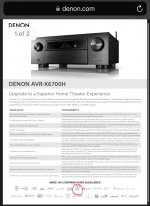
Dolby Vision is not listed as a supported feature. https://www.denon.com/en-us/product/avr-x6700h/300005.html

I responded with this:

That is not true! I have several devices connected to the AVR and it does support Dolby Vision, and that fact is indicated on the Info screen when receiving Dolby Vision signal. Here are the specs which clearly indicate that it supports Dolby Vision:

https://www.denon.com/on/demandware...eb199d/downloads/avr-x6700h-info-sheet-en.pdf
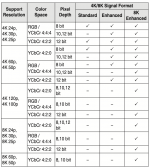
I have a Marantz SR8015 tied to a projector, so have a different experience, but I looked into it anyway. Have you changed your HDMI input from Standard to enhanced since that covers more formats?
 

Attachments

  • Image (1).png
    Image (1).png
    133.8 KB · Views: 10
I heard back from Kaleidescape support with this:

The receiver specifications reports that it supports the latest HDMI specifications such as 8K/60Hz and 4K/120Hz pass-through, VRR, ALLM, Dynamic HDR, HDR10+ and eARC support.

Dolby Vision is not listed as a supported feature. https://www.denon.com/en-us/product/avr-x6700h/300005.html

I responded with this:

That is not true! I have several devices connected to the AVR and it does support Dolby Vision, and that fact is indicated on the Info screen when receiving Dolby Vision signal. Here are the specs which clearly indicate that it supports Dolby Vision:

https://www.denon.com/on/demandware...eb199d/downloads/avr-x6700h-info-sheet-en.pdf
This is extremely concerning and disturbing if they issued a statement like that about denon 6700H.

Now are they also going to say similar things about other Denons models, Marantz, Trinnov and Anthem processors as well? Users have complained about dropouts on those processors / AVR’s as well. I posted that on another thread.

How are they passing Dolby vision with reference players like Oppo 203, Panasonic ub9000, Magnetar 900, Zidoo UHD8000 and not to mention streaming platforms like atv4k, Shield tv pro etc. I own all the above in my house with zero issues. The only player which is exhibiting erratic behavior is the V.

The cable arguments needs to be tossed out of the window. It gets exhausting. It’s one thing if other sources exhibited similar erratic behavior. There are some folks who have experience with HT with much more expensive equipment, for over 3 decades. There are no amateurs out here.

Important to note most of the issues are taking place with with users how are using this in standalone mode. Of course you will not see any issues (or less issues) if you have added this to your existing servers or if you are using a projector you will be bypassing DV entirely.

I had virtually no issues when I paired this with my ls12000 (with denon 8500H) for over a week. I didn’t buy this for use with my projector. I bought this to take advantage of Dolby vision through a
supported display. And also to use this in standalone mode. I had future plans of buying another standalone V for use with my projector (in my main HT) at a later stage instead of buying a server. But that has been stalled in this tracks, until all issues have been addressed.

Need to take responsibility and ownership and not pass the buck. Being defensive in this situation shows dubious intent/ integrity. Not good optics.
 
This is extremely concerning and disturbing if they issued a statement like that about denon 6700H.

Now are they also going to say similar things about other Denons models, Marantz, Trinnov and Anthem processors as well? Users have complained about dropouts on those processors / AVR’s as well. I posted that on another thread.

How are they passing Dolby vision with reference players like Oppo 203, Panasonic ub9000, Magnetar 900, Zidoo UHD8000 and not to mention streaming platforms like atv4k, Shield tv pro etc. I own all the above in my house with zero issues. The only player which is exhibiting erratic behavior is the V.

The cable arguments needs to be tossed out of the window. It gets exhausting. It’s one thing if other sources exhibited similar erratic behavior. There are some folks who have experience with HT with much more expensive equipment, for over 3 decades. There are no amateurs out here.

Important to note most of the issues are taking place with with users how are using this in standalone mode. Of course you will not see any issues (or less issues) if you have added this to your existing servers or if you are using a projector you will be bypassing DV entirely.

I had virtually no issues when I paired this with my ls12000 (with denon 8500H) for over a week. I didn’t buy this for use with my projector. I bought this to take advantage of Dolby vision through a
supported display. And also to use this in standalone mode. I had future plans of buying another standalone V for use with my projector (in my main HT) at a later stage instead of buying a server. But that has been stalled in this tracks, until all issues have been addressed.

Need to take responsibility and ownership and not pass the buck. Being defensive in this situation shows dubious intent/ integrity. Not good optics.
100% agree. Most modern A/V processors/receivers have passed through Dolby Vision for a couple years now. Cmon K scape we expect more than a “pass the blame” answer.
 
Important to note most of the issues are taking place with with users how are using this in standalone mode. Of course you will not see any issues (or less issues) if you have added this to your existing servers or if you are using a projector you will be bypassing DV entirely.

I am one of those new users using Strato V in standalone on a projector (so in theory "bypassing" DV) and still have encountered many of the issues others have. ANd I have done everything possible to "eliminate" DV from the equation. It could be that DV exaggerates the issues but it sure does look like there is something more basic bugged in these Strato Vs beyond DV.
 
I am one of those new users using Strato V in standalone on a projector (so in theory "bypassing" DV) and still have encountered many of the issues others have. ANd I have done everything possible to "eliminate" DV from the equation. It could be that DV exaggerates the issues but it sure does look like there is something more basic bugged in these Strato Vs beyond DV.
It could also be attributed to atmos. I have had a couple of stutters with atmos tracks on non DV titles.
 
It could also be attributed to atmos. I have had a couple of stutters with atmos on non DV titles.
Perhaps. Kinda disturbing to think ATMOS bugs would cause neon pink colors but i suppose anything is possible. :)

Given the variety of issues...black outs, messed up colors and audio dropouts....kinda points to something with the HDMI board /interface on the Strato V.
 
This is extremely concerning and disturbing if they issued a statement like that about denon 6700H.

Now are they also going to say similar things about other Denons models, Marantz, Trinnov and Anthem processors as well? Users have complained about dropouts on those processors / AVR’s as well. I posted that on another thread.

How are they passing Dolby vision with reference players like Oppo 203, Panasonic ub9000, Magnetar 900, Zidoo UHD8000 and not to mention streaming platforms like atv4k, Shield tv pro etc. I own all the above in my house with zero issues. The only player which is exhibiting erratic behavior is the V.

The cable arguments needs to be tossed out of the window. It gets exhausting. It’s one thing if other sources exhibited similar erratic behavior. There are some folks who have experience with HT with much more expensive equipment, for over 3 decades. There are no amateurs out here.

Important to note most of the issues are taking place with with users how are using this in standalone mode. Of course you will not see any issues (or less issues) if you have added this to your existing servers or if you are using a projector you will be bypassing DV entirely.

I had virtually no issues when I paired this with my ls12000 (with denon 8500H) for over a week. I didn’t buy this for use with my projector. I bought this to take advantage of Dolby vision through a
supported display. And also to use this in standalone mode. I had future plans of buying another standalone V for use with my projector (in my main HT) at a later stage instead of buying a server. But that has been stalled in this tracks, until all issues have been addressed.

Need to take responsibility and ownership and not pass the buck. Being defensive in this situation shows dubious intent/ integrity. Not good optics.
I did get another response from Kaleidescape support indicating that I should reach out to Denon. It seems like it's back to the "not our problem" so you need to contact the other device manufacturer in the equation. Not sure I will contact Denon at this point?
 
I did get another response from Kaleidescape support indicating that I should reach out to Denon. It seems like it's back to the "not our problem" so you need to contact the other device manufacturer in the equation. Not sure I will contact Denon at this point?
Unbelievable. That’s all I gotta say.
 
I did get another response from Kaleidescape support indicating that I should reach out to Denon. It seems like it's back to the "not our problem" so you need to contact the other device manufacturer in the equation. Not sure I will contact Denon at this point?
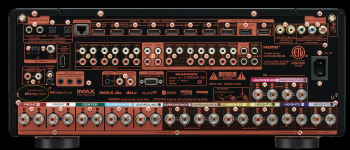
Not that I use DV...but they cannot seriously think that modern D&M AVRs do not pass DV when its listed in the manuals....product spec sheets...the box...hell even on the back of the AVR itself:

1725907400240.png
 
Hi guys, all understood, and can't argue with that logic. As implied in my comment, I'm just speculating here, obviously I have no idea why we have these differences if it's all the fault of the V. I do have a couple of clients reporting some of these problems, but the vast majority, and I've sold a bunch, are like me, no playback issues at all. This is why it's so hard to figure this out, but hopefully K's engineers will find a solution, they're a lot smarter than me. :giggle:

Jim
 
If any one posting with problems is willing to send me their Strato-V, I'll test it in my systems here.

If your one of my clients, I'll pay the shipping back and forth. I'll test it the same day, and return the following day. Given that I know mine works in this setup, it would be easy to test. PM me if interested (or email/call me).

Jim
 
Hi guys, all understood, and can't argue with that logic. As implied in my comment, I'm just speculating here, obviously I have no idea why we have these differences if it's all the fault of the V. I do have a couple of clients reporting some of these problems, but the vast majority, and I've sold a bunch, are like me, no playback issues at all. This is why it's so hard to figure this out, but hopefully K's engineers will find a solution, they're a lot smarter than me. :giggle:

Jim

If any one posting with problems is willing to send me their Strato-V, I'll test it in my systems here.

If your one of my clients, I'll pay the shipping back and forth. I'll test it the same day, and return the following day. Given that I know mine works in this setup, it would be easy to test. PM me if interested (or email/call me).

Jim
I think that’s an awesome offer thank you for putting it out there. Just out of curiosity and I know it’s a rabbit hole but are you using the supplied pixelgen cable?
 
If any one posting with problems is willing to send me their Strato-V, I'll test it in my systems here.

If your one of my clients, I'll pay the shipping back and forth. I'll test it the same day, and return the following day. Given that I know mine works in this setup, it would be easy to test. PM me if interested (or email/call me).

Jim
And also have you watched “Furiosa” and “ Twisters” in DV
/DA from start to finish with zero drop out issues audio and video?
 
And also have you watched “Furiosa” and “ Twisters” in DV
/DA from start to finish with zero drop out issues audio and video?

I have wondered since the one movie i had multiple issues with (whacked out colors and audio drop out) was with Twisters. Could all this be a problem with the files themselves and not the devices? But then again, I am not able to reliably reproduce the issues with Twisters.
 
And also have you watched “Furiosa” and “ Twisters” in DV
/DA from start to finish with zero drop out issues audio and video?

Yes to Twisters in DV, watched it with my 10 yo that wants to be a storm chaser. 😂 (No playback problems, BUT, I did think some scenes appeared darker than I would have expected.)

Yes to Furiosa in DV, BUT, only watched about half the movie, I will start it over, and watch it through to the credits and report back. I did not experience any problems with the first half.

Jim
 

Yes to Twisters in DV, watched it with my 10 yo that wants to be a storm chaser. 😂 (No playback problems, BUT, I did think some scenes appeared darker than I would have expected.)

Yes to Furiosa in DV, BUT, only watched about half the movie, I will start it over, and watch it through to the credits and report back. I did not experience any problems with the first half.

Jim
Thanks for the info. I think I’ll rewatch “Twisters” in HDR10 and see how that goes.
 
Yes, I have it set to 8K Enhanced because I have an 8K TV and one of the ports on the Denon is also 8K capable.
Have you tried just "enhanced" since there is no 8k content. Worth a shot.
 
Back
Top