• Thanks for visiting the Kaleidescape Owners' Forum

    This forum is for the community of Kaleidescape owners, and others interested in learning about the system, equipment, services, and the company itself.

    It is run by a group of enthusiastic Kaleidescape owners and dealers purely as a service to this community.

    This board is not affiliated in any way with Kaleidescape, Inc.
    For official technical support, product information, or customer service, please visit www.kaleidescape.com

    You can dismiss this box forever by clicking the "X" in the upper right corner of this message.
  • You are currently in "Guest" mode and not logged in with a registered account.

    The forum is free to use and most of the forum can be used by guests who are not registered....

    ... but we strongly encourage you to register for a full account. There is no cost to register for a full account.

    Benefits of registering for a full account:

    • Participate in the discussions! You must have a registered account to make posts on the forums. You will be able to start your own thread on a topic or question, or you can reply to other threads/discussions.
    • Use the "Conversation" feature (known as "private messaging" on other forums) to communicate directly with any of the other users here.
    • Access the Files area. The "resources" area of the forum contains many "Favorite Scene" and Script files that can dramatically increase the enjoyment of your Kaleidescape system. Go directly to great scenes in your favorite movies, created by other owners, and add automation to playback of your system with Scripts.
    • You won't see this annoying notice at the top of every screen!😊

    It's easy and free to register for the forum. Just click the "Register" button in the upper right corner of this page, and follow the instructions there.

    This box goes away for registered users.

What remote for Home Assistant?

I’m a noob with AI and coding, but I’m learning. How would I go about cloning your repo (I don’t even know what that is).

Install Claude Code on your computer. Tell it you want help installing GitHub - marcusadolfsson/astrion-custom on your remote, and that you also want Claude to help it configure your Home Assistant environment (astrion-custom/USING-CLAUDE-CODE-WITH-HOME-ASSISTANT.md at main · marcusadolfsson/astrion-custom). It will walk you through it.
 
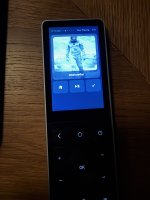
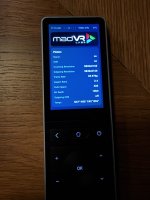
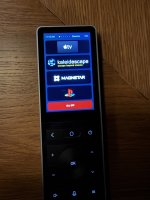
The Astrion setup has been fully running for several days now, apart from a few tweaks, and I really like what it does for me. The buttons could be a bit easier to find by feel, though it's not too bad, especially with the backlight. Battery life could be a little longer too. It looks like about 2 days off the dock per charge, so as long as you're reasonably disciplined about charging, it won't be an issue.

One thing about the setup: there are two very tiny screws at the charging area that release a small plastic piece covering the USB-C port. Don't use the supplied screwdriver. Grab one that fits better, because the screws almost stripped on me. You can plug the port into your computer over USB-C for a direct feed during the programming stage. The cover isn't going back on partly because charging over USB-C works whenever I want it, but mostly it's because my wife threw away the cover and the screws.

I like being able to customize the buttons to whatever I want. The color buttons on the bottom select the sources, and a long press (over half a second) fires my Lutron lighting scenes. Controls change with whichever source is active. Power off for the whole theater is either "ALL OFF" on page 1 of the display, or a long press of the power button.

Apple TV voice control is running too, and it's very smooth and fast. Kaleidescape voice control is set up the way another user did it, but it needs more work. It's very slow and not very accurate (probably my error). I don't see myself using it much, so that one takes a back seat for now.

The display and touchscreen are good enough for their size, and you can add or delete as much as you want on each page. There are other pages beyond the ones pictured, for individual lighting and the thermostat.

Overall, I'm happy with it. It's only been running about a week, but so far so good.
IMG_1949.jpegIMG_1950.jpegIMG_1951.jpeg
 
Extremely helpful. I started out on my own on HA and that was slow going, but Claude was a homerun for me. I used it exclusively in building the Astrion.
 
awesome, I ordered the same remote! just came in, only took 2 weeks. after I am done with my bigger HA dashboard I will jump on this as well. Yeah Claude is a big help for me too!
 
Hmm, I see they have already "teased" the Astrion Pro... I would like to think this does not mean less support fo the current model...as it really needs better software....but experience tells me otherwise. Luckily I have mine doing what I need. They have been rather quiet with regards to updates as of late.

 
I know some of you are using the custom launcher with your Astrion remotes. Have any of you tried Harmonium? I was just looking at it and I think I might give it a shot.
 
I know the OP went with the Astrion which seems like a good fit but I did just replace my dying Harmony in the theater with a Sofabaton X2 plus I'm running HA. I'm quite happy with it. The hardware is very high quality. I basically have all my startup, shutdown, input, etc activities managed via HA scripts with device control within an activity a mix of IR, BT, an IP. Plus a bunch of automations via HA. I do have IP control of everything in HA but it was just easier to use built in codes for IR/BT/IP for device control within an activity but I could use MQTT for that if desired. I like that I have the flexibility to do IR, BT, IP, HA all in one remote. Also battery life is very long and the button layout is nice.
 
Ok so I went down that path of Harmonium and it wasn't nearly as smooth as I thought it should be.

GitHub - skavan/harmonium: HA meets remote controls in the style of Harmony

My first attempt following his instructions made for some interesting issues. His interface inside of HA is fantastic. You can setup activities and make everything on the display look great very quickly. That is the real selling point of Harmonium. It is very easy customize everything. It also moves all of the processing over to HA and then the screen uses a kiosk app to display what is happening in HA. This seemed like a good idea in theory but that is where things started to fall apart for me.

Then enter this guy and his Harmonium Host. This is a custom built launcher to work with Harmonium cutting out all the bad things with the connection between the remote and HA.

GitHub - fahrer16/Harmonium_Host

I just got that setup last night and now I am on to the fun stuff of really customizing my activities and buttons and whatnot. If you have an Astrion I would highly recommend this combo. My remote finally feels like a smart remote and functions like one too. Now I just need to spend some time making it look exactly how I want.
 
After spending most of this month with Harmonium, last night I switched back to Astrion-Custom. It just fits my needs better. I only got a very basic setup up and running last night but it already functions better than anything I did with Harmonium. Harmonium was good in theory but it uses some odd logic for the dpad that I couldn't find a way around. Now, I need to get custom dialed in with all the polish that Madolfsson has.
 
Back
Top