DM sent to you as well.Send to me as well if ya don’t mind!
MadScientist


It is run by a group of enthusiastic Kaleidescape owners and dealers purely as a service to this community.
You can dismiss this box forever by clicking the "X" in the upper right corner of this message.
... but we strongly encourage you to register for a full account. There is no cost to register for a full account.
This box goes away for registered users.
DM sent to you as well.Send to me as well if ya don’t mind!

Depends on your hardware. Can you take advantage of a K? I'd recommend a server regardless. Get one with a warranty if you are looking for used.Was really hoping my next purchase was going to be a Strato K and move the V to another room. Might have to grab a used Terra first just to be able to change the poster art like this. I was hoping Kaleidescape was immune to the studios constant need to change / butcher them. Really noticed it when I picked up the Spider-Man : BND 4-movie bundle.
My initial goal was another Strato for another room. If I was going to spend the money, might as well get a K since I’ll probably change displays sooner / more often than players.Depends on your hardware. Can you take advantage of a K? I'd recommend a server regardless. Get one with a warranty if you are looking for used.
Still seeing a trickle of C players. They seem to be getting cheaper. Hard to turn down a C at $700 but it sold today. I haven't seen a server in a couple of weeks, maybe a week. If I could sell my server, and get a different server, I would. In a heart beat.My initial goal was another Strato for another room. If I was going to spend the money, might as well get a K since I’ll probably change displays sooner / more often than players.
It also feels like the flow of used Stratos and Terras has slowed quite a bit lately since most of the early adopters completed their upgrades. Now it’s just the trickle of upgraders who’ve been waiting 45 days or more for their new K’s to arrive.
Anyway - nice job on the posters and keep having fun!

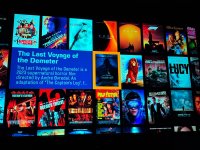
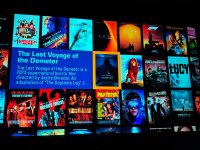
Since you’re this far in, I’ll also share a couple more of my preferences:Here the end result of my work today. I focus on posters as they would be in the theater. Click and enjoy. I’m only updating “core” movies in 4K. Stuff that won’t get deleted.
Same. Just confirming earlier comments: You simply use 1.66:1 posters from the internet and don't crop them to 1.7:1 to match K proportions? I assume the distortion is minimal and you don't consider it worth the effort to avoid?My cover posters are in a posters folder on my desktop.
Ah, sorry, yes, the distortion is not visible to me, so I don't bother with resizing.Same. Just confirming earlier comments: You simply use 1.66:1 posters from the internet and don't crop them to 1.7:1 to match K proportions? I assume the distortion is minimal and you don't consider it worth the effort to avoid?
Oh I do too! I keep the director, writer, source material, and where relevant, if a special edition adds CGI. I've learned a lot about my favorite movies from this process!1. That’s what I do but I do like to highlight the director, so I stick that in the synopsis.
I may start putting posters in sub folders and alphabetize them.
Good idea on the franchise tag.
We need more character space!!!!! I generally just put the genre and a short sentence or two reguarding the movie. No spoilers, just generalities.Ah, sorry, yes, the distortion is not visible to me, so I don't bother with resizing.
Oh I do too! I keep the director, writer, source material, and where relevant, if a special edition adds CGI. I've learned a lot about my favorite movies from this process!
I’ve settled into accepting the limitation on only showing downloads, and have been curating my onscreen collection accordingly.
Sure! I’m talking about the Movie Covers View, which I don’t think you have on the Strato E. It’s the typical view you see in Kaleidescape promotional materials. I realize I can get to the information I want in other ways, I just prefer that wall of art as my default top menu.I’m curious what that comment means.
I have the standalone Strato E player, and with the onscreen menu I can view just movies downloaded to my player (“New”)
Or I can select my movies and see the screen wall, which shows all of the movies I’ve purchased.
Are you experiencing something different or have I misinterpreted your comment?
Thanks
Sure! I’m talking about the Movie Covers View, which I don’t think you have on the Strato E. It’s the typical view you see in Kaleidescape promotional materials. I realize I can get to the information I want in other ways, I just prefer that wall of art as my default top menu.
Interesting! Maybe there was a recent update? I’ll check next time I’m in the theater.On the Strato E I get the “movie wall” of covers along with the “ swirling more movies like this “ classic Kscape effect, whether it’s viewing My Movie (purchased ) collection or browsing the store.
I remember somebody else saying they thought you had to have a server and have your movies downloaded onto the server to get that feature with your own movies that you’ve purchased, but it doesn’t seem to be the case.
On the Strato E I get the “movie wall” of covers along with the “ swirling more movies like this “ classic Kscape effect, whether it’s viewing My Movie (purchased ) collection or browsing the store.
I remember somebody else saying they thought you had to have a server and have your movies downloaded onto the server to get that feature with your own movies that you’ve purchased, but it doesn’t seem to be the case.
I thought the criticism of the E without a separate server was the 1080P movie wall (not 4K). For the full 4K movie wall with all special features a separate server is required that's my understanding.On the Strato E I get the “movie wall” of covers along with the “ swirling more movies like this “ classic Kscape effect, whether it’s viewing My Movie (purchased ) collection or browsing the store.
I remember somebody else saying they thought you had to have a server and have your movies downloaded onto the server to get that feature with your own movies that you’ve purchased, but it doesn’t seem to be the case.

On the Strato E I get the “movie wall” of covers along with the “ swirling more movies like this “ classic Kscape effect, whether it’s viewing My Movie (purchased ) collection or browsing the store.
I remember somebody else saying they thought you had to have a server and have your movies downloaded onto the server to get that feature with your own movies that you’ve purchased, but it doesn’t seem to be the case.
Those are two different places.Interesting! Maybe there was a recent update? I’ll check next time I’m in the theater.
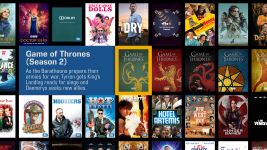

Those are two different places.
The Movie Covers Place that @Edgar is referring to is only available on players that are grouped with a server and thus have the full Kaleidescape OSD (i.e. Movie List, Movie Covers, and Movie Collections places). It only shows content that is downloaded to your local library. For example:
View attachment 12359
Note the lack of a Rotten Tomatoes rating on the detail flyout and no ownership snipes on the bottom left corner of the cover art images. This view is not available on Strato E/V/K players running in standalone mode. Given the limited amount of storage, having this view would be pointless because you'd just see the same 5-10 cover art images repeated over and over.
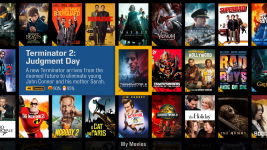
The collection that you load by selecting the "My Movies" tile on the Row Collections place navigates you to the My Movies collection on the OSD Store. This is a collection of all of the movies you have purchased from the Kaleidescape store and is not dependent on the content being downloaded to your local library.
View attachment 12360
Notice the Rotten Tomatoes score in the detail flyout and the ownership snipes in the bottom left corner of the cover art images along with the banner at the bottom telling you the name of the collection you are currently viewing. This view is available on all Stratos that have access to the OSD store including Strato E/V/K players that are running in standalone mode.