JonProphet
Well-known member
Ok I got u my friend. It’s still the app but if you aren’t using a physical remote you are using the app anyhow. Solid choice if you are using an iPad too.No the onscreen GUI.


It is run by a group of enthusiastic Kaleidescape owners and dealers purely as a service to this community.
You can dismiss this box forever by clicking the "X" in the upper right corner of this message.
... but we strongly encourage you to register for a full account. There is no cost to register for a full account.
This box goes away for registered users.
Ok I got u my friend. It’s still the app but if you aren’t using a physical remote you are using the app anyhow. Solid choice if you are using an iPad too.No the onscreen GUI.
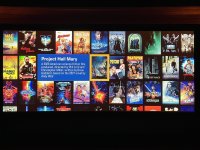
I don't think the cover view ("movie wall") is supposed to be a comprehensive view of your collection. It's more of a fun way to explore some of your movies and find something to watch if you don't know what you want, or find movies similar to something you liked.My gripe with the My Movies wall is the repetition of movie covers.
When I first owned only something like 10 movies I would look at the My Movies section and I would get a wall populated with those movies, but the entire wall was filled with double or tripled up images of the same movie covers.
This made it very confusing in terms of getting a quick understanding of how many movies were actually available.
And even now that I’ve got over 50 movies, if I’m scrolling through them on the wall the wall never ends. It just keeps randomly doubling movie covers simply to keep the movie wall filled. But that makes it very confusing to navigate visually to say the least! I need to see only the movies I have available, individually, so that when I finish scrolling the movies I know I’ve come to the end of my movie library. But as it is, the scrolling is atlas, so I’m never quite sure if I’ve seen everything or if I’m now seeing doubles of what I’ve seen already.
The views you are referencing are only available if you have a server and even then it’s only movies downloaded not everything in your library.I don't think the cover view ("movie wall") is supposed to be a comprehensive view of your collection. It's more of a fun way to explore some of your movies and find something to watch if you don't know what you want, or find movies similar to something you liked.
If you want to see everything* you own, that's what the list view is good for. You can sort by any of the columns, so you could find something short to watch, see all your Horror movies, etc.
Keep in mind you can switch views at any time and it will keep the focused movie the same. So you could sort the list view by genre, focus a specific horror movie, then switch to the cover view and start playing around with the re-flow functionality to find similar titles.
Note that if you turn off the re-flow feature for the cover view, it will output them in alphabetical order. It's still not really what you want because of the infinite scrolling in every direction.
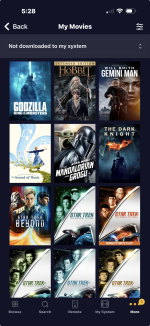
* = Of course it's limited to movies you have downloaded. As mentioned, this is a highly requested feature. In a world with 10-minute 4K downloads, it'd be great if it could show everything you own and just have a little cloud icon or something on the non-downloaded ones.
In the meantime, someone mentioned the Chrome extension, but there's also a Popcorn Ready iOS app that can help fill some of these gaps if you really want more options to view everything you own in a cover view with advanced filters.
The movie wall to me is cool at first, then it’s just a screen saver. We do list view. It only shows what’s downloaded. I know this doesn’t help you doc. Just giving my over inflated opinion. lol.The views you are referencing are only available if you have a server and even then it’s only movies downloaded not everything in your library.
I don't think the cover view ("movie wall") is supposed to be a comprehensive view of your collection. It's more of a fun way to explore some of your movies and find something to watch if you don't know what you want, or find movies similar to something you liked.
If you want to see everything* you own, that's what the list view is good for. You can sort by any of the columns, so you could find something short to watch, see all your Horror movies, etc.
Keep in mind you can switch views at any time and it will keep the focused movie the same. So you could sort the list view by genre, focus a specific horror movie, then switch to the cover view and start playing around with the re-flow functionality to find similar titles.
Note that if you turn off the re-flow feature for the cover view, it will output them in alphabetical order. It's still not really what you want because of the infinite scrolling in every direction.
* = Of course it's limited to movies you have downloaded. As mentioned, this is a highly requested feature. In a world with 10-minute 4K downloads, it'd be great if it could show everything you own and just have a little cloud icon or something on the non-downloaded ones.
In the meantime, someone mentioned the Chrome extension, but there's also a Popcorn Ready iOS app that can help fill some of these gaps if you really want more options to view everything you own in a cover view with advanced filters.

It’s a ploy to sell larger servers!I don't think the cover view ("movie wall") is supposed to be a comprehensive view of your collection. It's more of a fun way to explore some of your movies and find something to watch if you don't know what you want, or find movies similar to something you liked.
If you want to see everything* you own, that's what the list view is good for. You can sort by any of the columns, so you could find something short to watch, see all your Horror movies, etc.
Keep in mind you can switch views at any time and it will keep the focused movie the same. So you could sort the list view by genre, focus a specific horror movie, then switch to the cover view and start playing around with the re-flow functionality to find similar titles.
Note that if you turn off the re-flow feature for the cover view, it will output them in alphabetical order. It's still not really what you want because of the infinite scrolling in every direction.
* = Of course it's limited to movies you have downloaded. As mentioned, this is a highly requested feature. In a world with 10-minute 4K downloads, it'd be great if it could show everything you own and just have a little cloud icon or something on the non-downloaded ones.
In the meantime, someone mentioned the Chrome extension, but there's also a Popcorn Ready iOS app that can help fill some of these gaps if you really want more options to view everything you own in a cover view with advanced filters.

Agree and it would be helpful to have the ability to "hide" certain movies that may be inappropriate for young children based on parental choice, not movie Rating.
DM finally sent to you. Sorry for the delay.me, too! Please DM me the rental program you use to see if it's better than the one I use.
Send to me as well if ya don’t mind!DM finally sent to you. Sorry for the delay.
MadScientist


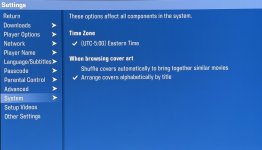
If you go to System > Settings after hitting the menu button, there’s an option under system that can disable the auto-shuffle of movie covers to sort alphabetically instead.How do you set every in alphabetical?
My movies are all over the place with no logic at all..
I own a KS K
Thank for the well written synopsis. Surely you weren’t aided by AI.Wow, lots of new owners here! Welcome welcome welcome!
I agree with a lot of these observations. I’ve settled into accepting the limitation on only showing downloads, and have been curating my onscreen collection accordingly. I currently have 316 movies downloaded to server, about 90% are my top core movies and the rest are current releases that people have an interest in that I’m good to re-watch. Mostly 4K Cinematic and 4K HDR, about 10% HD. So yes, my fix was to buy more storage. I started with 22GB and bought another 30GB later.
I also have 159 4K HDR disc exclusives running on my Plex via AppleTV, plus 79 BD disc exclusives and 12 DVD exclusives. My Plex also holds fan edits, fan restorations, 35mm scans, documentaries, concerts, standups, and all TV shows. Again, because K is limited in presentation, it won’t nest all seasons of a show under a single entry — it shows each season separately at the top level. But okay, that’s fine, that just frees up more space for movies. And so the one K screen that shows what’s available represents a tightly focused set of just fiction movies. My K is my movie platform.
While Plex has far greater curation options than K, I’ve rearranged my Plex top level movie library to reflect the same balance of core and current releases, so the experience is consistent between sources. All those other categories I mentioned above have their own separate libraries.
For my K, I’ve replaced all the poster art and the synopses. For the posters, I replaced all the modern, garish marketing art with each film’s original 1-sheet derived art from tmdb.org. I replaced all the spoiler-filled synopses with the first sentence from Wikipedia, which just lists basic facts and filmmakers. It all looks, feels, and works better as a unified and elegant menu to select movies for myself and guests, without giving away the inciting incident right before I hit play. I like that K at least has that level of customization. I have it addressing my important issues, and I can work around its limitations.
As for the UI, after trying all of them for a while, I settled on using the cover wall UI and keeping everything in alphabetical order. That’s great if I know what I want to watch. If I want to browse, I hit shuffle on a film I’m roughly in the mood for, just not exactly that one, and the K will flurry all my films around and group similar films around my starting point. It’s both cool and helpful.
View attachment 12331


Strange..If you go to System > Settings after hitting the menu button, there’s an option under system that can disable the auto-shuffle of movie covers to sort alphabetically instead.
However, I just confirmed this only applies to the movie wall for downloaded titles. It has no bearing on the My Movies option accessed through the store. That still displays all of your purchased titles in random order.
View attachment 12332View attachment 12333
Are you running a standalone player? It may be only available after a server is added, I can’t remember.Strange..
I dont have that option?
I only see Time zone, nothing else.
Yess, only the KS KAre you running a standalone player? It may be only available after a server is added, I can’t remember.
Sir, time for an upgrade! If you are frugalYess, only the KS K