• Thanks for visiting the Kaleidescape Owners' Forum

    This forum is for the community of Kaleidescape owners, and others interested in learning about the system, equipment, services, and the company itself.

    It is run by a group of enthusiastic Kaleidescape owners and dealers purely as a service to this community.

    This board is not affiliated in any way with Kaleidescape, Inc.
    For official technical support, product information, or customer service, please visit www.kaleidescape.com

    You can dismiss this box forever by clicking the "X" in the upper right corner of this message.
  • You are currently in "Guest" mode and not logged in with a registered account.

    The forum is free to use and most of the forum can be used by guests who are not registered....

    ... but we strongly encourage you to register for a full account. There is no cost to register for a full account.

    Benefits of registering for a full account:

    • Participate in the discussions! You must have a registered account to make posts on the forums. You will be able to start your own thread on a topic or question, or you can reply to other threads/discussions.
    • Use the "Conversation" feature (known as "private messaging" on other forums) to communicate directly with any of the other users here.
    • Access the Files area. The "resources" area of the forum contains many "Favorite Scene" and Script files that can dramatically increase the enjoyment of your Kaleidescape system. Go directly to great scenes in your favorite movies, created by other owners, and add automation to playback of your system with Scripts.
    • You won't see this annoying notice at the top of every screen!😊

    It's easy and free to register for the forum. Just click the "Register" button in the upper right corner of this page, and follow the instructions there.

    This box goes away for registered users.

NEWS: Strato K Movie Player with 8K capability and new "4K Cinematic" full-chroma & higher bitrate support

I honestly think the non cinematic also looks better on the Strato K over the V. 🤷🏼one reason I’m waiting on Rmarci to do his testing. It’s what my eyes are telling me, I’d like to know if I’m just crazy lol I’m going to sell the V
That’s what some of the participants on that Youthman video were also alluding to.
 
More impressions:
Fast and Furious - the best I’ve ever seen the movie look, colors really pop on this one.
Star Trek into Darkness - disappointing. The disc appears to be brighter and retains the imax shots, the brightness and screen size increase during IMAX makes the disc also look sharper.
Fellowship of the Ring - an upgrade to disc, details are more clear, especially in the Mines where it’s dark, return of the king it’s an obvious improvement over the disc, fellowship not as obvious. DNR seems used more on fellowship than return, but this is not K, discs are the same way.
Ballerina - wow! More clarity..during the fast action I can really see what’s going on more clearly and in the the darkness. I’ve sampled a lot of stuff… the Strato K with cinematic is an upgrade.. and while on some things it’s very settle, on others it’s very obvious. Good job with this Kaleidescape. Now I just need to figure out why fast forwarding and rewinding triggers the subtitles to randomly come on sometimes, same bug on my Strato V. I’ll fast forward, subtitles are turned on, I have to open the menu turn them off🤷🏼 Not a big deal. I never thought the Strato V poster wall being 1080p verses 4k was a big deal… but now after using the Strato K’s 4k wall… it’s a big deal lol so much nicer.
 
Now I just need to figure out why fast forwarding and rewinding triggers the subtitles to randomly come on sometimes, same bug on my Strato V.
They shouldn't be coming on when you FF but they do get turned on when/if you rewind. It's not random and it's not a bug; it's a feature. When you rewind or skip backwards, the subtitles will be turned on and will remain on until you reach the point in playback where you originally rewound. At that point, the subtitles will automatically turn off again. It's essentially a "what did they just say" feature where it's presumed that you skipped backward because you missed some line of dialogue.

Personally, I'd like a user setting exposed to be able to enable/disable that feature and I'm still lobbying hard for it every chance I get.
 
They shouldn't be coming on when you FF but they do get turned on when/if you rewind. It's not random and it's not a bug; it's a feature. When you rewind or skip backwards, the subtitles will be turned on and will remain on until you reach the point in playback where you originally rewound. At that point, the subtitles will automatically turn off again. It's essentially a "what did they just say" feature where it's presumed that you skipped backward because you missed some line of dialogue.

Personally, I'd like a user setting exposed to be able to enable/disable that feature and I'm still lobbying hard for it every chance I get.

That’s excellent to know… thank you!!
 
They shouldn't be coming on when you FF but they do get turned on when/if you rewind. It's not random and it's not a bug; it's a feature. When you rewind or skip backwards, the subtitles will be turned on and will remain on until you reach the point in playback where you originally rewound. At that point, the subtitles will automatically turn off again. It's essentially a "what did they just say" feature where it's presumed that you skipped backward because you missed some line of dialogue.

Personally, I'd like a user setting exposed to be able to enable/disable that feature and I'm still lobbying hard for it every chance I get.
1786567735467.png
 
Well it’s happened, constantly reading this damn thread and I’ve put in an order for a K!

I really don’t expect it to be much different but I “need” to know now for my own sanity and at the very least I’ll get the 4K UI to play with and a couple more years on the warranty. Trading in my V but still not cheap here in the UK to swap and we don’t have the 2nd hand market to easily sell stuff on privately.
 
Well it’s happened, constantly reading this damn thread and I’ve put in an order for a K!

I really don’t expect it to be much different but I “need” to know now for my own sanity and at the very least I’ll get the 4K UI to play with and a couple more years on the warranty. Trading in my V but still not cheap here in the UK to swap and we don’t have the 2nd hand market to easily sell stuff on privately.

Not sure what equipment you will be using, on my Sony A95L the difference is significant on certain titles, some titles it isn’t… the 4k UI definitely is much nicer, which was a gripe I had with the V, premium 4k device with a 1080p UI is simply a bad idea imho.
As I’ve stated before… I’ll bet when @Rmarci does his thing, he will discover the regular 4k streams look better on the K than the V as well… if not .. Gear Acquisition Syndrome has got me
 
Not sure what equipment you will be using, on my Sony A95L the difference is significant on certain titles, some titles it isn’t… the 4k UI definitely is much nicer, which was a gripe I had with the V, premium 4k device with a 1080p UI is simply a bad idea imho.
As I’ve stated before… I’ll bet when @Rmarci does his thing, he will discover the regular 4k streams look better on the K than the V as well… if not .. Gear Acquisition Syndrome has got me
I have a JVC NZ8 and Lumagen on a 3.2m wide 16:9 screen and I run with the filter for 100% P3 and also my calibrator kept it in place for SDR as they don’t quite fully cover rec.709 without it. I do have OLEDs and QD OLEDs but I don’t do any serious viewing on them anymore so won’t test on those.

I’ll be comparing vs discs/NAS rather than the V since that will be going back before I get the K. Will most likely pause at the same point on the K and NAS and do a back and forth just so I can see exactly what the differences are and then I will do scenes to see if motion is improved and/or the differences in stills are noticeable in motion.

I’m expecting a 0-2% difference but we shall see. I’ve not actually watched anything on the V for a while as I’ve been going through the disc backlog, 135 films to go but my KScape backlog keeps expanding, it’s a losing battle!
 
I have a JVC NZ8 and Lumagen on a 3.2m wide 16:9 screen and I run with the filter for 100% P3 and also my calibrator kept it in place for SDR as they don’t quite fully cover rec.709 without it. I do have OLEDs and QD OLEDs but I don’t do any serious viewing on them anymore so won’t test on those.

I’ll be comparing vs discs/NAS rather than the V since that will be going back before I get the K. Will most likely pause at the same point on the K and NAS and do a back and forth just so I can see exactly what the differences are and then I will do scenes to see if motion is improved and/or the differences in stills are noticeable in motion.

I’m expecting a 0-2% difference but we shall see. I’ve not actually watched anything on the V for a while as I’ve been going through the disc backlog, 135 films to go but my KScape backlog keeps expanding, it’s a losing battle!

Keep those expectations there and you’ll be more than pleasantly surprised. I was expecting the same thing!!
 
IMG_2532.png

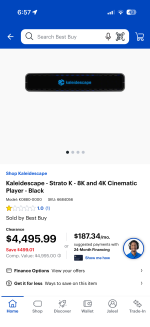
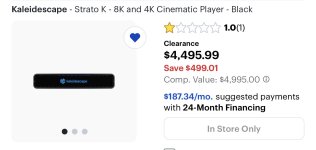
The Strato K is $500 off on the BestBuy website here in the US… just $500 more than the V right now. If you’ve been thinking about getting one the time is now.
 
Last edited by a moderator:
The Strato K is $500 off on the BestBuy website here in the US… just $500 more than the V right now. If you’ve been thinking about getting one the time is now.
It looks like it's In Store Only and the website won't let you search stock by store. So, gonna have to give each a call and hope they'll do a stock check for you. My guess is they're few and far between at this point.
 
IMG_1727.jpeg
Seems strange that they list the new K as a “Clearance” item. None of the other Stratos are on clearance.
 
Last edited by a moderator:
It looks like it's In Store Only and the website won't let you search stock by store. So, gonna have to give each a call and hope they'll do a stock check for you. My guess is they're few and far between at this point.
it’s said in-store only since launch. I took that as in you must place the order “in-store only” but I could be wrong..
 
They shouldn't be coming on when you FF but they do get turned on when/if you rewind. It's not random and it's not a bug; it's a feature. When you rewind or skip backwards, the subtitles will be turned on and will remain on until you reach the point in playback where you originally rewound. At that point, the subtitles will automatically turn off again. It's essentially a "what did they just say" feature where it's presumed that you skipped backward because you missed some line of dialogue.

Personally, I'd like a user setting exposed to be able to enable/disable that feature and I'm still lobbying hard for it every chance I get.
Wow…. I did not realised that, is this experienced in Strato C as well?
I have been turning on subtitles and then rewind 😁
 
Back
Top