LOL too funny


-
Thanks for visiting the Kaleidescape Owners' Forum
This forum is for the community of Kaleidescape owners, and others interested in learning about the system, equipment, services, and the company itself.It is run by a group of enthusiastic Kaleidescape owners and dealers purely as a service to this community.
This board is not affiliated in any way with Kaleidescape, Inc.
For official technical support, product information, or customer service, please visit www.kaleidescape.com
You can dismiss this box forever by clicking the "X" in the upper right corner of this message. -
You are currently in "Guest" mode and not logged in with a registered account.
The forum is free to use and most of the forum can be used by guests who are not registered....
... but we strongly encourage you to register for a full account. There is no cost to register for a full account.
Benefits of registering for a full account:
- Participate in the discussions! You must have a registered account to make posts on the forums. You will be able to start your own thread on a topic or question, or you can reply to other threads/discussions.
- Use the "Conversation" feature (known as "private messaging" on other forums) to communicate directly with any of the other users here.
- Access the Files area. The "resources" area of the forum contains many "Favorite Scene" and Script files that can dramatically increase the enjoyment of your Kaleidescape system. Go directly to great scenes in your favorite movies, created by other owners, and add automation to playback of your system with Scripts.
- You won't see this annoying notice at the top of every screen!😊
This box goes away for registered users.
You are using an out of date browser. It may not display this or other websites correctly.
You should upgrade or use an alternative browser.
You should upgrade or use an alternative browser.
NEWS: Strato K Movie Player with 8K capability and new "4K Cinematic" full-chroma & higher bitrate support
- Thread starter josh
- Start date
MarvinTheAndroid
Well-known member
Honestly, I am sure that for many people, especially those that perhaps only settle down properly to watch 1 or 2 movies a week, a server will soon start to become a nice to have rather than a necessity. Indeed with 8gb internet starting to become more readily available if they stuck a 10gb PHY in the sK I could probably quite happily live with the storage it has and dispense with a server altogether. I do sometimes wonder though if the absolute limit on download times is hampered by K's servers given how long files seem to take to pre-stage/prepare before actually starting to transfer.I have a basic system with a Strato C and a Compact Terra. The new video format is certainly one incentive to upgrade to a Strato K, but just as appealing to me would be the ability to use that fast 1TB of flash storage (since I have access to 2 Gbps fiber internet). With the price of flash storage these days, to pay for it and not be able to use it is definitely a disincentive to upgrade. A Strato K without storage at a lower price would also be a good solution, as mentioned by others already.

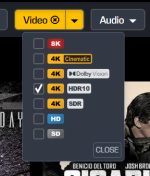
This was done intentionally as trying to show all of the available formats at the top of the page would result in a real mess of icons that would be hard to parse.SOmething else that I can see becoming annoying is that now when I go look at a movie on the store it does not show all the tags...so have to select Show all Formats to see them all..
One can always use the filter bar at the top of the page to only show content that is available in HDR10 for example.

rbienstock
Well-known member
- Joined
- Feb 5, 2008
- Messages
- 205
I currently have a single DV capable TV. When I put the Strato K into my system, I assume that this will give me the option of downloading the 4K-Cinematic version of my previous purchases. Won't that mean that I will still have a redundant HDR or UHD version on my system? When I try to remove a title, aren't all versions get removed (including the newly downloaded 4K-Cinematic version). What's the proper workflow for upgrading?
Yeah, that is an option. Seems like this should be more smart....Kaleidescape knows what my system has...why show me 4k Cinematic tag instead of HDR10 as best available when It knows I neither have a Strato K nor a DV capable display. Luckily via support I was able to get my account tagged to default to download HDR10 over DV but honestly that should have been a user option.This was done intentionally as trying to show all of the available formats at the top of the page would result in a real mess of icons that would be hard to parse.
One can always use the filter bar at the top of the page to only show content that is available in HDR10 for example.
View attachment 10365
I know minor stuff... And I know the real reason......constant reminder to buy a Strato K


Just do it from your desktop on your local MyKaleidescape page. You can easily delete in bulk selecting whatever versions you don't want. Also an easy way to see which movies have multiple versions downloaded.I currently have a single DV capable TV. When I put the Strato K into my system, I assume that this will give me the option of downloading the 4K-Cinematic version of my previous purchases. Won't that mean that I will still have a redundant HDR or UHD version on my system? When I try to remove a title, aren't all versions get removed (including the newly downloaded 4K-Cinematic version). What's the proper workflow for upgrading?
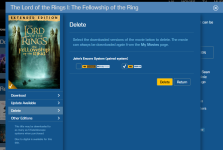
The workflow I've been using to upgrade my content is as follows:I currently have a single DV capable TV. When I put the Strato K into my system, I assume that this will give me the option of downloading the 4K-Cinematic version of my previous purchases. Won't that mean that I will still have a redundant HDR or UHD version on my system? When I try to remove a title, aren't all versions get removed (including the newly downloaded 4K-Cinematic version). What's the proper workflow for upgrading?
- Queue the 4K Cinematic version for download.
- Once the download has completed use the web store interface to delete the redundant versions:

It's already been stated that if you have a Strato K, it will be able to provide an HDR10 signal on the fly based on the DV version, so for Strato K owners, a 4K Cinematic HDR10 version will not be created or necessary, unless there is not a 4K Cinematic DV file available.Speaking of that, I was just about to post this but thought it might be better to reply to your post:
I'm guessing we're going to have to pay even more attention to the formats with this "Cinematic" version since it appears like there may be titles that have this "Cinematic" version but not contain HDR as shown here:
View attachment 10360
I always do every download from the desktop. Makes it pretty easy doing it that way. For instance, a lot of times it will try to download "Extras" which I quickly remove at that time as well.Just do it from your desktop on your local MyKaleidescape page. You can easily delete in bulk selecting whatever versions you don't want. Also an easy way to see which movies have multiple versions downloaded.
Decelerate
Active member
Interested to see if this 4k cinematic will yield tangible realworld improvements or if it is mostly marketing. Kscape's own promo material emphasizes 4k cinematic vs 4k streaming.
Also the storage is a bit of a head scratcher. If this is going to support larger 8k formats, one would expect a commensurate increase in onboard storage.
Also the storage is a bit of a head scratcher. If this is going to support larger 8k formats, one would expect a commensurate increase in onboard storage.

I was surprised to see it only has a gigabit connection. As a flagship player with standalone capability, I would have thought it would be 2.5gbps like the prime.
I like the concept, but likely will not get one anytime soon. Definitely a win for home cinema.
I like the concept, but likely will not get one anytime soon. Definitely a win for home cinema.
J.Chitwood
Well-known member
I imagine that, with how ubiquitous large-format TVs are becoming, the K will be a great addition to the lineup, since most of them will support 4:4:4 chroma out of the box. I can't wait to see some comparisons between the K and the V & E in the coming weeks.

My video is up on my channel.
I too was hoping maybe we'd see a 2.5 Gbe Ethernet port on this model. I'm kind of surprised that the HDMI bandwidth on the spec sheet says up to 24 Gbps too, not the full 48. My gaming PC runs the full 48, but then again it is outputting 4K/120 at 4:4:4 or RGB not just 4K/60 or 24.
I think the real winner here is the 4Kc format. 8K is still pretty early, so I'm prepared to not get too much expectation around that.
I too was hoping maybe we'd see a 2.5 Gbe Ethernet port on this model. I'm kind of surprised that the HDMI bandwidth on the spec sheet says up to 24 Gbps too, not the full 48. My gaming PC runs the full 48, but then again it is outputting 4K/120 at 4:4:4 or RGB not just 4K/60 or 24.
I think the real winner here is the 4Kc format. 8K is still pretty early, so I'm prepared to not get too much expectation around that.

I've ordered my K as well. Keeping my Strato C because I love it.
While I wait impatiently for my K to arrive, I'll delete some less important movies off the server. Hmm. I see what you did there, Kaleidescape!
While I wait impatiently for my K to arrive, I'll delete some less important movies off the server. Hmm. I see what you did there, Kaleidescape!

- Joined
- Jul 22, 2024
- Messages
- 1,034
I don’t understand why the Kaleidescape store doesn’t have this available to order. They give you an option to buy online, but when you choose the Kscape option, Kscape store doesn’t have this listed. They have the E/M though. Need to strike when the pan is hot.
Fwiw I don’t plan on selling the V, I’m gonna keep that as well. Lot of sweat and blood associated with that fella.
Fwiw I don’t plan on selling the V, I’m gonna keep that as well. Lot of sweat and blood associated with that fella.
Last edited:
I didn’t even realize K had their own store for ordering directly until your comment haha. But I agree, should be up there.I don’t understand why the Kaleidescape store doesn’t have this available to order. They give you an option to buy online, but when you choose the Kscape option, Kscape store doesn’t have this listed. They have the E/M though. Need to strike when the pan is hot.
- Joined
- Jul 22, 2024
- Messages
- 1,034
I mean bestbuy has been showing sold out since morning and the other dealers listed on the website are not offering firm timelines. In that scenario I would prefer to source the piece of equipment from the main provider.I didn’t even realize K had their own store for ordering directly until your comment haha. But I agree, should be up there.
Will it also access movies stored on a Strato S? More specifically, can I use the Strato K as the front end and a Strato S and Terra for movie storage?The Strato K will operate the same way as the Strato V/Strato E: if you group it with a Terra server, the internal storage of the Strato K is disabled and any content on the drive is erased. You'll need to redownload any of that content to your Terra.
If/when you switch the Strato K back to standalone mode, the internal storage drive is reactivated (but will be empty).