• Thanks for visiting the Kaleidescape Owners' Forum

    This forum is for the community of Kaleidescape owners, and others interested in learning about the system, equipment, services, and the company itself.

    It is run by a group of enthusiastic Kaleidescape owners and dealers purely as a service to this community.

    This board is not affiliated in any way with Kaleidescape, Inc.
    For official technical support, product information, or customer service, please visit www.kaleidescape.com

    You can dismiss this box forever by clicking the "X" in the upper right corner of this message.
  • You are currently in "Guest" mode and not logged in with a registered account.

    The forum is free to use and most of the forum can be used by guests who are not registered....

    ... but we strongly encourage you to register for a full account. There is no cost to register for a full account.

    Benefits of registering for a full account:

    • Participate in the discussions! You must have a registered account to make posts on the forums. You will be able to start your own thread on a topic or question, or you can reply to other threads/discussions.
    • Use the "Conversation" feature (known as "private messaging" on other forums) to communicate directly with any of the other users here.
    • Access the Files area. The "resources" area of the forum contains many "Favorite Scene" and Script files that can dramatically increase the enjoyment of your Kaleidescape system. Go directly to great scenes in your favorite movies, created by other owners, and add automation to playback of your system with Scripts.
    • You won't see this annoying notice at the top of every screen!😊

    It's easy and free to register for the forum. Just click the "Register" button in the upper right corner of this page, and follow the instructions there.

    This box goes away for registered users.

NEWS: Strato K Movie Player with 8K capability and new "4K Cinematic" full-chroma & higher bitrate support

A little addendum to my previous post. I sampled some more titles in 4K_C and I'm regularly seeing additional detail. It's not universal though. Both "The Hunger Games: Mockingjay - Part 1" and "3:10 to Yuma" (2007) appeared to be a wash (detail-wise) when compared to the legacy KScape encodes. It's like there's just nothing left to reveal from the master. The notable image stability and motion resolution improvements I mentioned previously are still there...just no detail improvement. They're the best they're ever going to look but I think it would be a stretch to call these two as "Incredible!" 🫤 I'm sure they won't be the last either.
 
Last edited:
A little addendum to my previous post. I sampled some more titles in 4K_C and I'm regularly seeing additional detail. It's not universal though. Both "The Hunger Games: Mockingjay - Part 1" and "3:10 to Yuma" (2007) appeared to be a wash (detail-wise) when compared to the legacy KScape encodes. It's like there's just nothing left to reveal from the master. The notable image stability and motion resolution improvements I mentioned previously are still there...just no detail improvement. They're the best they're ever going to look but I think it would be a stretch to call these two as "Incredible!" 🫤 I'm sure they won't be the last either.

3:10 is one of my all time favorites - unfortunately not much as happened in video improvement to it since the Blu Ray days. We did get DTS X with the 4K - I was looking forward to the Cinematic viewing on my K - but looks like its been maxed out so no improvements can be extracted.
 
A little addendum to my previous post. I sampled some more titles in 4K_C and I'm regularly seeing additional detail. It's not universal though. Both "The Hunger Games: Mockingjay - Part 1" and "3:10 to Yuma" (2007) appeared to be a wash (detail-wise) when compared to the legacy KScape encodes. It's like there's just nothing left to reveal from the master. The notable image stability and motion resolution improvements I mentioned previously are still there...just no detail improvement. They're the best they're ever going to look but I think it would be a stretch to call these two as "Incredible!" 🫤 I'm sure they won't be the last either.
Try to check out some of the LOTR (extended versions). I just checked out Return of the King (extended ver.) on my Sony A95L 77” QD-OLED and it’s quite sensational. I briefly moved my K from my primary HT, to do some test drives on the OLED in my secondary setup. I’m really digging the results; so much so that I'm having a hard time deciding if I should keep the K paired with the OLED or in the HT. Lol

Return of the King: 4k cinematic Dolby Vision 228GB file (compared to regular version 150). Are you kidding me?
 
Try to check out some of the LOTR (extended versions). I just checked out Return of the King (extended ver.) on my Sony A95L 77” QD-OLED and it’s quite sensational. I briefly moved my K from my primary HT, to do some test drives on the OLED in my secondary setup. I’m really digging the results; so much so that I'm having a hard time deciding if I should keep the K paired with the OLED or in the HT. Lol

Return of the King: 4k cinematic Dolby Vision 228GB file (compared to regular version 150). Are you kidding me?

228GB Return of The King?! Wow. For evaluation, I hope people take a look at Blade Runner 2049, the new Mad Maxes, and the new Dunes. I imagine they’re gorgeous.

I feel your indecision about where to keep the K. I’m starting to think a K Mini might be in my future for my secondary location instead of my “old” V, just so I don’t have to manage needing 4K Cinematic and regular 4K files. You know they’re going to do a K Mini, right?!
 
For those with OLEDs, confirmed with my Samsung S95D that 4:4:4 just works as longs as the HDMI Input is set to signal plus without bypassing the professional calibration. Note, that calibration on a Samsung works different than LG’s and isn’t stored as a default on the system board.

I plan to play around with my LG G4 and LG G5 after the kids go to bed tonight, but I’d assume it works the same as long as 4:4:4 pass through is enabled. Will report back after trying. I at least got all 3 K’s installed before it’s time to get the kids.


View attachment 10544
Confirmed that it works just fine on LG G4 and G5’s by enabling 4:4:4 pass through and deep color. I will say that if you go Home > Settings > General > External Devices 4:4:4 pass through will be grayed out. You need to go directly to settings when on the HDMI input in order for it to be an enabled option.

Got lucky in that I did it that way on the G5, so I fussed around a bit when it was grayed out on the G4 until I figured out the path to the settings menu impacted whether or not it presented as an option.
 
Confirmed that it works just fine on LG G4 and G5’s by enabling 4:4:4 pass through and deep color. I will say that if you go Home > Settings > General > External Devices 4:4:4 pass through will be grayed out. You need to go directly to settings when on the HDMI input in order for it to be an enabled option.

Got lucky in that I did it that way on the G5, so I fussed around a bit when it was grayed out on the G4 until I figured out the path to the settings menu impacted whether or not it presented as an option.
Do the LGs still show DV with the 444 passthrough on?
 
Is K-scape getting higher grade studio masters, or is this simply 4:2:0 that the Strato K is upsampling. I'm guessing it's the latter, in which case the Strato K is just doing the upsampling instead of your image processor/display.
The masters from the studio are either 4:2:2 or 4:4:4. We are preserving the original chroma in the 4K Cinematic files, not upsampling.
 
Do the LGs still show DV with the 444 passthrough on?

Watching a non-DV movie with my 4 year old right now, so I’ll check with a 4K cinematic DV movie a bit later. The player sees the TV has a DV eligible panel (screenshot below), so I don’t see why it wouldn’t. Chain for this particular player is Strato K > Marantz AV 10 > LG 77 G4. I’ll try playing a 4K cinematic DV on the G5 later, which is a Strato K > Trinnov Altitude 32 w/ HDMI 2.1 board > LG 77 G5.

IMG_0019.png
 
Watching a non-DV movie with my 4 year old right now, so I’ll check with a 4K cinematic DV movie a bit later. The player sees the TV has a DV eligible panel (screenshot below), so I don’t see why it wouldn’t. Chain for this particular player is Strato K > Marantz AV 10 > LG 77 G4. I’ll try playing a 4K cinematic DV on the G5 later, which is a Strato K > Trinnov Altitude 32 w/ HDMI 2.1 board > LG 77 G5.

View attachment 10545
So sorry to bother you, I know you’re watching with your little one. So please respond when you can.

On the K under advance settings, have you selected “allow display mode changes” with external scaler?
 
Last edited:
Try to check out some of the LOTR (extended versions).
Will do! I've got one for you...Elf! I wasn't that excited about that one as I didn't think there would be much more there over the well-authored disc. I mean really...it's a medium budget holiday comedy...right? Wrongo! You've gotta see it. I got like 3 seconds into the first scene and had to go grab my wife so she could check it out. She was annoyed until I hit play. 🙄 Both our jaws were on the floor. I'm not sure if it was my new Bravia 9 II putting in the work also but color, clothing textures, and facial detail were absolutely jaw dropping. 🤯 She actually said "that was worth grabbing me for" and if you're married you know that's a rare win. :LOL:

Watched Star Wars: Episode I - The Phantom Menace in its entirety just now in 4K_C DV and it looks as great as it can. If anything, the dated effects stand out even more now. Digital compositing and variability in the CGI are more obvious that I ever remember seeing. Occasionally, live action shots of faces punch way above how they've looked in the past. Go forward 3 minutes and there will be an obviously low-res effect or digitally shot live action scene that will remind you it's the Phantom Menace. 😋 One outstanding thing that stood out was all the multi-colored confetti and streamers flying everywhere during the finale celebration scene...an absolute nightmare for compression...but it was incredibly well composed...dare I say faultless. (y) Quite a testament to what an encode like this gets you. Should be a great test/demo scene.

On the other end of the scale from the excellence of Elf I ran into my first obvious encode issue...lifted blacks (letterboxes and all) in Batman Begins in 4K_C DV. It's VERY obvious as soon as you start a scene. You can't miss it. Letterboxes light right up. Once the scene ends and the UI goes to the "End of Scene" graphic the blacks drop back down to normal, and the hold graphic background looks black as night. I think this is a one-and-done as no other titles I've seen exhibit this (glaring) issue. I've already reported this via email to the content team so hopefully they'll figure it out shortly.
 
Will do! I've got one for you...Elf! I wasn't that excited about that one as I didn't think there would be much more there over the well-authored disc. I mean really...it's a medium budget holiday comedy...right? Wrongo! You've gotta see it. I got like 3 seconds into the first scene and had to go grab my wife so she could check it out. She was annoyed until I hit play. 🙄 Both our jaws were on the floor. I'm not sure if it was my new Bravia 9 II putting in the work also but color, clothing textures, and facial detail were absolutely jaw dropping. 🤯She actually said "that was worth grabbing me for" and if you're married you know that's a rare win. :LOL:

Watched Star Wars: Episode I - The Phantom Menace in its entirety just now in 4K_C DV and it looks as great as it can. If anything, the dated effects stand out even more now. Digital compositing and variability in the CGI are more obvious that I ever remember seeing. Occasionally, live action shots of faces punch way above how they've looked in the past. Go forward 3 minutes and there will be an obviously low-res effect or digitally shot live action scene that will remind you it's the Phantom Menace. 😋 One outstanding thing that stood out was all the multi-colored confetti and streamers flying everywhere during the finale celebration scene...an absolute nightmare for compression...but it was incredibly well composed...dare I say faultless. (y) Quite a testament to what an encode like this gets you. Should be a great test/demo scene.

On the other end of the scale from the excellence of Elf I ran into my first obvious encode issue...lifted blacks (letterboxes and all) in Batman Begins in 4K_C DV. It's VERY obvious as soon as you start a scene. You can't miss it. Letterboxes light right up. Once the scene ends and the UI goes to the "End of Scene" graphic the blacks drop back down to normal, and the hold graphic background looks black as night. I think this is a one-and-done as no other titles I've seen exhibit this (glaring) issue. I've already reported this via email to the content team so hopefully they'll figure it out shortly.
The Nolan films have always had lifted blacks in HDR versions. You have to use the 4K SDR versions for proper black levels. With the way he films it shouldn’t be a big deal in terms of HDR or wide color anyways.
 
What display/PJ are using?
I am using a Sony Bravia 9 tv. Going to try tomorrow with Samsung Qn990f 8k tv. To demo 8k short plus how cinematic 4k upscale. Yet to try on my Sony projector. Don’t project much these days no longer have a dedicated theater room. Only use pj for outdoor night use.
 
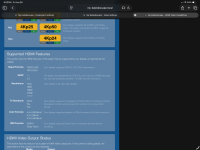
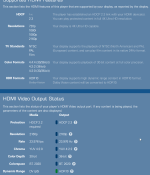
This is what my Strato V is reporting as the capabilities of my video chain:

TVCapabilities.png

The chain is K going to Denon AVR, the AVR to MadVR Core MKII (without premium package) and then over to the TV (no projector).

I'm seeing that I should not have to do anything with the settings once the Strato K comes in, correct?
 
This is what my Strato V is reporting as the capabilities of my video chain:

View attachment 10566

The chain is K going to Denon AVR, the AVR to MadVR Core MKII (without premium package) and then over to the TV (no projector).

I'm seeing that I should not have to do anything with the settings once the Strato K comes in, correct?
Is it the Kaleidescape that is converting 4:2:0 to 4:2:2? I’m curious if K always does that or if it’s best left alone (if possible) assuming the madVR might do it better? Should you als look at the input and output of downstream devices? So, show the Denon’s input and output as reported by the Denon’s Info button, and what the madVR Envy reports as its input and output. Did you disable the Denon’s video processing?
 
It took me a while to wrap my head around the chroma resolution changes here. I thought it might be helpful to post a table. The two key conclusions I've come to: 1) 4:2:2 4k is roughly similar to a chroma resolution of 2.8K; 2) 4:2:0 8k has a full 4k chroma matrix, just like 4:4:4 4k Cinematic -- but you get the added benefit of a full 8k of luminance resolution.

Sampling Format
Luma Matrix​
Chroma Matrix​
Effective Chroma Resolution​
Notes
4:2:0 4K (the dark age before Strato K)
3840w x 2160h​
1920w x 1080h​
2K​
2K chroma resolution
4:2:2 4K (Cinematic 4k variant possible with Strato K)
3840w x 2160h​
1920w x 2160h​
~2.8K​
Horizontal chroma resolution is halved but vertical chroma resolution is uncompressed. In pixel count terms, since we halve the number of pixels vs 4k, and setting aside the fact that chroma resolution is only halved in the horizontal dimension but not in the vertical dimension, we have the same quantity of chroma subsamples that you would find on a 2.8K 16:9 display. So I’m loosely calling this 2.8K chroma resolution.
4:4:4 4K (Cinematic 4k variant possible with Strato K)
3840w x 2160h​
3840w x 2160h​
4K​
4K chroma resolution
8K 4:2:0 (possible with Strato K)
7680w x 4320h​
3840w x 2160h​
4K​
4k chroma resolution. We get the same chroma resolution of 4:4:4 4K (Cinematic), but we gain the benefit of 8k luma resolution.
 
Will do! I've got one for you...Elf! I wasn't that excited about that one as I didn't think there would be much more there over the well-authored disc. I mean really...it's a medium budget holiday comedy...right? Wrongo! You've gotta see it. I got like 3 seconds into the first scene and had to go grab my wife so she could check it out. She was annoyed until I hit play. 🙄 Both our jaws were on the floor. I'm not sure if it was my new Bravia 9 II putting in the work also but color, clothing textures, and facial detail were absolutely jaw dropping. 🤯She actually said "that was worth grabbing me for" and if you're married you know that's a rare win. :LOL:

Watched Star Wars: Episode I - The Phantom Menace in its entirety just now in 4K_C DV and it looks as great as it can. If anything, the dated effects stand out even more now. Digital compositing and variability in the CGI are more obvious that I ever remember seeing. Occasionally, live action shots of faces punch way above how they've looked in the past. Go forward 3 minutes and there will be an obviously low-res effect or digitally shot live action scene that will remind you it's the Phantom Menace. 😋 One outstanding thing that stood out was all the multi-colored confetti and streamers flying everywhere during the finale celebration scene...an absolute nightmare for compression...but it was incredibly well composed...dare I say faultless. (y) Quite a testament to what an encode like this gets you. Should be a great test/demo scene.

On the other end of the scale from the excellence of Elf I ran into my first obvious encode issue...lifted blacks (letterboxes and all) in Batman Begins in 4K_C DV. It's VERY obvious as soon as you start a scene. You can't miss it. Letterboxes light right up. Once the scene ends and the UI goes to the "End of Scene" graphic the blacks drop back down to normal, and the hold graphic background looks black as night. I think this is a one-and-done as no other titles I've seen exhibit this (glaring) issue. I've already reported this via email to the content team so hopefully they'll figure it out shortly.

Since you have a new Bravia 9 II, are you comparing the original 4K to the new Cinematic both on the new TV? I ask because some of the improvement may be present with the original 4K displayed on your new and improved Bravia 9 II.
 
I have been trying, but can't seem to find out what my display does internally. I have LG G5 83 inch. 4::4:4 passthrough setting is meant for computers and nullifies calibration and many picture adjustments. This seems to imply but I can't say for sure, that with 4:4:4 passthrough turned off, all signal is converted to 4:2:2 for processing. If I am wrong and someone knows something, please let me know.
 
Last edited:
Is it the Kaleidescape that is converting 4:2:0 to 4:2:2? I’m curious if K always does that or if it’s best left alone (if possible) assuming the madVR might do it better? Should you als look at the input and output of downstream devices? So, show the Denon’s input and output as reported by the Denon’s Info button, and what the madVR Envy reports as its input and output. Did you disable the Denon’s video processing?
420 can only be output in 60p. Since most video is 24p, the player has to output either 422 or 444 or RGB. This has always been the case since DVD.
 
Back
Top