• Thanks for visiting the Kaleidescape Owners' Forum

    This forum is for the community of Kaleidescape owners, and others interested in learning about the system, equipment, services, and the company itself.

    It is run by a group of enthusiastic Kaleidescape owners and dealers purely as a service to this community.

    This board is not affiliated in any way with Kaleidescape, Inc.
    For official technical support, product information, or customer service, please visit www.kaleidescape.com

    You can dismiss this box forever by clicking the "X" in the upper right corner of this message.
  • You are currently in "Guest" mode and not logged in with a registered account.

    The forum is free to use and most of the forum can be used by guests who are not registered....

    ... but we strongly encourage you to register for a full account. There is no cost to register for a full account.

    Benefits of registering for a full account:

    • Participate in the discussions! You must have a registered account to make posts on the forums. You will be able to start your own thread on a topic or question, or you can reply to other threads/discussions.
    • Use the "Conversation" feature (known as "private messaging" on other forums) to communicate directly with any of the other users here.
    • Access the Files area. The "resources" area of the forum contains many "Favorite Scene" and Script files that can dramatically increase the enjoyment of your Kaleidescape system. Go directly to great scenes in your favorite movies, created by other owners, and add automation to playback of your system with Scripts.
    • You won't see this annoying notice at the top of every screen!😊

    It's easy and free to register for the forum. Just click the "Register" button in the upper right corner of this page, and follow the instructions there.

    This box goes away for registered users.

Positioning of Menu within movie frame

newtothis

Member
Joined
Dec 10, 2024
Messages
15
Location
Los Angeles
Hi kscapeowners,

Is it possible to configure Kaleidescape (I run a Strato V and have a Terra Prime coming in a few days) to position the menu (eg when I pause a movie) entirely within the movie image, ie not over the black bars? I have a MadVR in the chain, which rescales the image (including the menu) to fit but it makes for a jumpy experience.

Thanks!
 
As far as pausing, have you tried the Intermission button? Seems like that image might fit without rescaling?
 
I'm not sure, it's hooked up to my Crestron remote. Will check what functionality it maps too.

An example is the blue box with the forward/rewind arrow. Kaleidescape places it in the top right corner of the full image, which in the case of a Cinemascope movie ends up being on the top right corner of the top black bar. MadVr then scales that down for me to fit in my CinemaScope screen. Rather than that I'd want to have that display on the top right corner of the movie frame, to avoid having to do any scaling.
 
My Strato S is configured in CinemaScape mode to reposition those blue playback wedges. I'm not in front of it right now, but believe the CinemaScape mode determines where the wedges appear ... or it has something to do with the reposition subtitles setting (but this doesn't sound right??).

Maybe someone else will chime in before I have time to look at mine, but I do know it is supported (at least on older Strato players).

Andy
 
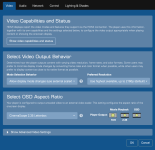
Hm interesting -- and good to hear -- that works for you. Maybe it's just a configuration issue on my end then. My "Select OSD Aspect Ratio" setting is set to "CinemaScape 2.35 Letterbox", which seems right to me but I guess it could be wrong?
 
Mine is set to Cinemascope aspect ratio and any FF/REW/Pause status indicators are placed within the image, not in the black bars, therefore my Lumagen does not resize the image when I perform any of these actions. Granted, I'm using a Strato C, but it should be the same.

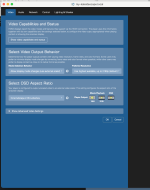
Confirm in your player settings (from your network interface) that your Kaleidescape knows you're using a Cinemascope screen.

Screenshot 2024-12-18 at 2.32.52 PM.png
 
I was able to access my player and it is set to "CinemaScape Native 2.35 Display". FWIW, I run it through a Denon AVR direct to my projector (no scaler in between).

Andy
 
@thrillcat thank you for sending. Interestingly itooks like my settings are the same, with different results

@andy I don't have an "CinemaScape Native 2.35 Display", there is only one"CinemaScape Native 2.35 Letterbox" and "CinemaScape Native 2.35 Anamorphic".
 

Attachments

  • Screenshot 2024-12-18 at 3.04.48 PM.png
    Screenshot 2024-12-18 at 3.04.48 PM.png
    270.9 KB · Views: 10
Is it possible to configure Kaleidescape (I run a Strato V and have a Terra Prime coming in a few days) to position the menu (eg when I pause a movie) entirely within the movie image, ie not over the black bars? I have a MadVR in the chain, which rescales the image (including the menu) to fit but it makes for a jumpy experience.
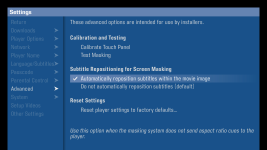
The setting your looking for is actually found in the Onscreen settings place on the "Advanced" tab. Change the Subtitle Positioning for Screen Masking setting to Automatically reposition subtitles within the movie image. This should also reposition any and all wedges and menu items.
 
@andy I don't have an "CinemaScape Native 2.35 Display", there is only one"CinemaScape Native 2.35 Letterbox" and "CinemaScape Native 2.35 Anamorphic".
CinemaScape Native 2.35 Display is not an available setting when you have the Video Output Behavior setting set to "Allow mode changes (use external scaler)"
 
Thanks @J.Green. I thought I activated that settings but let me confirm that tonight. If this is it, then a small feature suggestion would be to change the menu to "OSD and Subtitle Positioning for Screen Masking" and "Automatically reposition subtitles and OSD within the movie image"
 
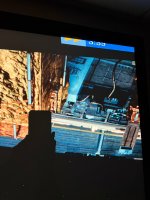
I’m having this problem also but can’t seem to find this setting? Has it be changed or removed in a recent update?
 

Attachments

  • IMG_2819.jpeg
    IMG_2819.jpeg
    3.9 MB · Views: 15
Back
Top