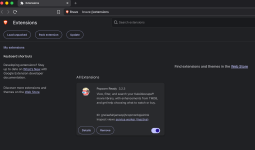
Oh ok thanks. No issues. Just wanted to make sure I’m on the latest.The link should only show up if you don’t already have the latest version. Are you having an issue? Does it say that the helper is ready?


-
Thanks for visiting the Kaleidescape Owners' Forum
This forum is for the community of Kaleidescape owners, and others interested in learning about the system, equipment, services, and the company itself.It is run by a group of enthusiastic Kaleidescape owners and dealers purely as a service to this community.
This board is not affiliated in any way with Kaleidescape, Inc.
For official technical support, product information, or customer service, please visit www.kaleidescape.com
You can dismiss this box forever by clicking the "X" in the upper right corner of this message. -
You are currently in "Guest" mode and not logged in with a registered account.
The forum is free to use and most of the forum can be used by guests who are not registered....
... but we strongly encourage you to register for a full account. There is no cost to register for a full account.
Benefits of registering for a full account:
- Participate in the discussions! You must have a registered account to make posts on the forums. You will be able to start your own thread on a topic or question, or you can reply to other threads/discussions.
- Use the "Conversation" feature (known as "private messaging" on other forums) to communicate directly with any of the other users here.
- Access the Files area. The "resources" area of the forum contains many "Favorite Scene" and Script files that can dramatically increase the enjoyment of your Kaleidescape system. Go directly to great scenes in your favorite movies, created by other owners, and add automation to playback of your system with Scripts.
- You won't see this annoying notice at the top of every screen!😊
This box goes away for registered users.
You are using an out of date browser. It may not display this or other websites correctly.
You should upgrade or use an alternative browser.
You should upgrade or use an alternative browser.
Popcorn Ready - Chrome extension for Kaleidescape users
- Thread starter OUTATIME
- Start date

- Joined
- Dec 4, 2024
- Messages
- 400
I figured that with all of the new Strato K units shipping that there could be more households that end up with multiple systems on the same network....so I put my own system in that mode and realized that I wasn't handling this scenario very well in the Popcorn Ready Chrome Extension and the Local Helper that allows for local system playback. Version 3.2 of the Chrome extension and the local helper will be pushed out today that should fix this issue.
- Joined
- Dec 4, 2024
- Messages
- 400
And one more thing.....I'll be creating a new thread soon, hopefully in the next few days, to invite you all to join my TestFlight group to try out my new iOS app Popcorn Ready Remote before I put it in the App Store. Here's a sneak peek:


Last edited by a moderator:
- Joined
- Dec 4, 2024
- Messages
- 400
I just posted the beta iOS app in a new thread here: Popcorn Ready app for iOS
I'd love feedback in that thread of what works well and also what doesn't. Thanks!
I'd love feedback in that thread of what works well and also what doesn't. Thanks!

Hey @OUTATIME is there a way to use Popcorn Ready to programmatically replace each film’s cover art with the first poster listed for that film’s entry in tmdb.org? And can it replace the spoilery plot summaries for each film with the first sentence of each film’s Wikipedia entry which typically simply cite the year, origin, specific genre and key filmmaker? Those are my default edits for any Kaleidescape film entry. I hate current marketing images and spoiling the movies I’m right about to show people.
EDIT: Actually, the Wikipedia topic sentences require some massaging, removing footnote symbols, inconsistent presentation, and so far one glaring omission. So maybe that won't work. Having said that, I'm still on "B" so this might take a while.
EDIT 2: I just started C, and learned that Casablanca was based on an unproduced stage play called Everybody Comes to Rick's. I never knew that! I think I'll stick to doing this manually, I'm learning things about my core movies!
EDIT: Actually, the Wikipedia topic sentences require some massaging, removing footnote symbols, inconsistent presentation, and so far one glaring omission. So maybe that won't work. Having said that, I'm still on "B" so this might take a while.
EDIT 2: I just started C, and learned that Casablanca was based on an unproduced stage play called Everybody Comes to Rick's. I never knew that! I think I'll stick to doing this manually, I'm learning things about my core movies!
Last edited:

Hi @OUTATIME and others... I haven't used the extension in quite a long time, but fired it up today to check it out. so many amazing improvements!
But, what am i missing or doing wrong here. Last night I bought "Disclosure Day" and "Project Hail Mary".
When I ask PT to sort my entire library by purchase date (newest), I get this... and the movies shown there are nowhere near my newest purchases... many of them were bought many years ago.
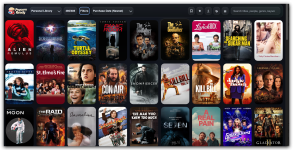
My Kaleidescape Store account, sorted the same way, is properly showing my 2 most recent purchases at the top, as expected, though I have no idea why Cars, Notting Hill, and Eternal Sunshine are showing up next as I can't recall when i bought those, but it was definitely many many years ago.

Any insight as to how that "purchase date" is used and why PR and Kstore are inconsistent in their sorting on that field?
Thanks!
But, what am i missing or doing wrong here. Last night I bought "Disclosure Day" and "Project Hail Mary".
When I ask PT to sort my entire library by purchase date (newest), I get this... and the movies shown there are nowhere near my newest purchases... many of them were bought many years ago.
My Kaleidescape Store account, sorted the same way, is properly showing my 2 most recent purchases at the top, as expected, though I have no idea why Cars, Notting Hill, and Eternal Sunshine are showing up next as I can't recall when i bought those, but it was definitely many many years ago.
Any insight as to how that "purchase date" is used and why PR and Kstore are inconsistent in their sorting on that field?
Thanks!
- Joined
- Dec 4, 2024
- Messages
- 400
Could you please check that you are on the latest version of the Chrome Extension. The latest version is 3.2.2. I just tried that version on my own library and that sort order is working for me.Hi @OUTATIME and others... I haven't used the extension in quite a long time, but fired it up today to check it out. so many amazing improvements!
But, what am i missing or doing wrong here. Last night I bought "Disclosure Day" and "Project Hail Mary".
When I ask PT to sort my entire library by purchase date (newest), I get this... and the movies shown there are nowhere near my newest purchases... many of them were bought many years ago.
View attachment 11444
My Kaleidescape Store account, sorted the same way, is properly showing my 2 most recent purchases at the top, as expected, though I have no idea why Cars, Notting Hill, and Eternal Sunshine are showing up next as I can't recall when i bought those, but it was definitely many many years ago.
View attachment 11445
Any insight as to how that "purchase date" is used and why PR and Kstore are inconsistent in their sorting on that field?
Thanks!
yes, it seems to be running 3.2.2.

- Joined
- Dec 4, 2024
- Messages
- 400
Hmmm.... it's interesting that your Kaleidescape Store website Purchase Date sort is also wrong. I just double checked my account on there as well and it looks perfect.
Does Popcorn Ready have those brand new purchases in the library at all?
Does Popcorn Ready have those brand new purchases in the library at all?
- Joined
- Dec 4, 2024
- Messages
- 400
Josh - I'm curious if you go to Kaleidescape Store and go to Manage Account and Movie Purchases, do you see anything strange in the latest purchase history there? Do Cars, Notting Hill, Eternal Sunshine show up recently for some reason?
checked... and that "manage account-->Movie Purchases" does match what i saw in the store interface. Unlike Popcorn Ready, it IS showing my most reacent purchases, followed by Cars and Notting Hill and the rest... I'm guessing that Cars and Notting Hill were simple updates... are those counting as "purchases" for purposes of this sort? if so, that sucks. i want to sort by the date i REALLY purchased, not when i accepted an update. Doable?Josh - I'm curious if you go to Kaleidescape Store and go to Manage Account and Movie Purchases, do you see anything strange in the latest purchase history there? Do Cars, Notting Hill, Eternal Sunshine show up recently for some reason?
Last edited:
- Joined
- Dec 4, 2024
- Messages
- 400
My movie updates are not showing up as recent purchases. Not sure if maybe you have a Premier or CoStar system and something related to that is causing these to show as recent purchases for some reason.
May need Mike or someone at Kaleidescape to investigate this for you.
May need Mike or someone at Kaleidescape to investigate this for you.
Hmmm.... it's interesting that your Kaleidescape Store website Purchase Date sort is also wrong. I just double checked my account on there as well and it looks perfect.
Does Popcorn Ready have those brand new purchases in the library at all?
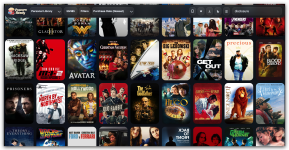
doesn't look like PR is even finding the purchases i made and downloaded last night. (Disclosure day and Project Hail Mary).
(and new question, why do 50 movies show up for the search on "disclosure" when that word doesn't appear in title or synopsis?)
- Joined
- Dec 4, 2024
- Messages
- 400
I noticed you are running Brave so I just tested there and when I clicked Refresh Library it asked me to login to Kaleidescape on that website and then the refresh worked fine for me. I'm still not sure what could be going on with your purchase dates though...but I should be able to match the Kaleidescape store. I was using default sort order (which should be by purchase date) but I can actually manually specify purchase date order which should match the Store website.
In regards to search, I agree that I don't love how the Chrome search always brings back the best 50 fuzzy matches across many fields. It should really filter it down to results that could actually be relevant. The iOS implementation is actually a bit too strict with no fuzzy matching for misspellings. I'm going to rewrite both so they are the same and both will get better. After I'm done I'll summarize how search should work for both Chrome and iOS app.
In regards to search, I agree that I don't love how the Chrome search always brings back the best 50 fuzzy matches across many fields. It should really filter it down to results that could actually be relevant. The iOS implementation is actually a bit too strict with no fuzzy matching for misspellings. I'm going to rewrite both so they are the same and both will get better. After I'm done I'll summarize how search should work for both Chrome and iOS app.
- Joined
- Dec 4, 2024
- Messages
- 400
Search now works consistently in Popcorn Ready for iOS build 66 and the Chrome extension version 3.2.3.
- Searches titles, series names, cast, directors, writers, genres, collections, keywords, and release years.
- Exact title matches rank first, followed by close title and metadata matches.
- Ignores capitalization, punctuation, and accents, and supports reasonable misspellings.
- Applies your Library, Downloaded, or Catalog filters before searching.
- Returns only relevant matches—up to 50—without padding the list with unrelated titles.
- Uses relevance first and your selected sort order to break ties.
- Purchase Date sorting now explicitly requests Kaleidescape’s purchase-date ordering.
well, somehow today the "refresh" button within PR did force the reload and the movies do now show in the same order as the store interface, with Disclosure Day and Project Hail Mary at the front. So it is working, though that button didn't fix it a couple days ago.
Thanks for diagnosing and/or fixing.
Thanks for diagnosing and/or fixing.
Mine is still showing 3.2.2 installed. What's the best way to force it to get the new one? Can't find a way to do that in "manage extensions" in the browser.Search now works consistently in Popcorn Ready for iOS build 66 and the Chrome extension version 3.2.3.
- Searches titles, series names, cast, directors, writers, genres, collections, keywords, and release years.
- Exact title matches rank first, followed by close title and metadata matches.
- Ignores capitalization, punctuation, and accents, and supports reasonable misspellings.
- Applies your Library, Downloaded, or Catalog filters before searching.
- Returns only relevant matches—up to 50—without padding the list with unrelated titles.
- Uses relevance first and your selected sort order to break ties.
- Purchase Date sorting now explicitly requests Kaleidescape’s purchase-date ordering.
Also - could you add a little bitty version number right in your PR U.I. so it's simple to see what version is running? Maybe in your title bar or within your little hamburger drop-down menu?
- Joined
- Dec 4, 2024
- Messages
- 400
Mine is still showing 3.2.2 installed. What's the best way to force it to get the new one? Can't find a way to do that in "manage extensions" in the browser.
Also - could you add a little bitty version number right in your PR U.I. so it's simple to see what version is running? Maybe in your title bar or within your little hamburger drop-down menu?
If that Browser doesn't have a logged in Kaleidescape store cookie then it won't be able to refresh, although you should get a popup telling you to login on the Kaleidescape store page.
I'm not really sure how Brave handles automatic updates for extensions, but you should be able to go to the extension page to see the version as well as to manually update. I just had to click the Update button here and it got 3.2.3. Then you should be able to test out the new search algorithm in that version (or on the latest iOS app). Thanks!