• Thanks for visiting the Kaleidescape Owners' Forum

    This forum is for the community of Kaleidescape owners, and others interested in learning about the system, equipment, services, and the company itself.

    It is run by a group of enthusiastic Kaleidescape owners and dealers purely as a service to this community.

    This board is not affiliated in any way with Kaleidescape, Inc.
    For official technical support, product information, or customer service, please visit www.kaleidescape.com

    You can dismiss this box forever by clicking the "X" in the upper right corner of this message.
  • You are currently in "Guest" mode and not logged in with a registered account.

    The forum is free to use and most of the forum can be used by guests who are not registered....

    ... but we strongly encourage you to register for a full account. There is no cost to register for a full account.

    Benefits of registering for a full account:

    • Participate in the discussions! You must have a registered account to make posts on the forums. You will be able to start your own thread on a topic or question, or you can reply to other threads/discussions.
    • Use the "Conversation" feature (known as "private messaging" on other forums) to communicate directly with any of the other users here.
    • Access the Files area. The "resources" area of the forum contains many "Favorite Scene" and Script files that can dramatically increase the enjoyment of your Kaleidescape system. Go directly to great scenes in your favorite movies, created by other owners, and add automation to playback of your system with Scripts.
    • You won't see this annoying notice at the top of every screen!😊

    It's easy and free to register for the forum. Just click the "Register" button in the upper right corner of this page, and follow the instructions there.

    This box goes away for registered users.

Migrating Strato C/8TB Compact to Strato K/30TB Compact

LionCiti

Member
Joined
Feb 21, 2024
Messages
16
Hi. Will be migrating current setup of Strato C/8TB Compact Strato K/30TB Compact. For clarity, the Strato C/8TB server will be removed after the migration. I have a bunch of movies not downloaded as well.

Have read the posts here on the recommended server migration steps, i.e. first setup 30TB as a new server, perform a restoration, add 30TB to the system and then remove the 8TB

How about the Strato K part, what will be ithe recommended steps?….Should I add in Strato K before or after the server migration?

Thanks for the attention
 
Been thinking about this, is it possible to download the movies manually instead of the automatic restoration?

Thanks
 
Of course. You can always manually download files. Also, I don't think adding the K will have any negative impact on the file transfers or downloads. You will likely set it up as part of the group not stand alone. If you do set it up as a stand alone, you can always change it.

As far as transfers or restoration, I know nothing of this.
 
As stated above, you can always manually download your content to the new 30TB. You should add it to your current system first, this will make it visible to your Store account, then remove the 8TB so that the only server in that system is the 30TB, this will ensure that the downloads go to the 30TB. The system will also provide an option to redownload all of the content that was on the removed Server.

If you change your mind and want to use the Replication process, your dealer should have a Replication Guide they can email to you. If they don't have it, or the dealer is unresponsive, email me at the address below and I'll email you the Guide.


Jim
CINELIFELLC@GMAIL.COM
 
Have read the posts here on the recommended server migration steps, i.e. first setup 30TB as a new server, perform a restoration, add 30TB to the system and then remove the 8TB
Well that's not how I'd do it.

If it was just about migrating from the 8TB server to the 30, then I'd:
  1. Add the 30 TB server to the existing system as a second server.
  2. If you have custom scenes, navigate to the Movies > Scenes page and "Export Your Scenes to File"
  3. Do the same for Scripts if you have them.
  4. Load the browser interface using the IP address of the new 30 TB server.
  5. On the Components page, click the "Remove from system" button for the 8 TB server.
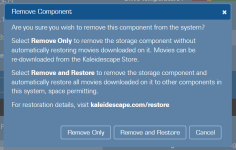
  6. Select "Remove and Restore" in the popup.
    1790602352166.png
This would remove the 8 TB server from the system and queue everything that was on it for download to the 30. No need for registering a second system and migrating content and moving players.

Once the downloads are completed, import your saved scenes and/or scripts files.

NOTE that user collection memberships and played/paused information will be lost.

However,
How about the Strato K part, what will be ithe recommended steps?….Should I add in Strato K before or after the server migration?
Since you're adding a Strato K, there's a good chance that you'll want to replace some or all of the downloaded content with 4K Cinematic versions if they are available.

In this case, I'd likely just do steps 1-5 (group the 30 and then remove the 8 in order to avoid having to run through registration again) but select "Remove only" without triggering a restoration. Then:
  1. Group the Strato K
  2. Load the web store and set my default Download preferences
  3. Load the store's My Movies page and select "Not downloaded to..." for the system
  4. Bulk select the movies you want and queue them for download. Based on your default download preferences, you'll get a mix of 4K Cinematic, standard 4K, and HD content based on availablility
 
Back
Top