• Thanks for visiting the Kaleidescape Owners' Forum

    This forum is for the community of Kaleidescape owners, and others interested in learning about the system, equipment, services, and the company itself.

    It is run by a group of enthusiastic Kaleidescape owners and dealers purely as a service to this community.

    This board is not affiliated in any way with Kaleidescape, Inc.
    For official technical support, product information, or customer service, please visit www.kaleidescape.com

    You can dismiss this box forever by clicking the "X" in the upper right corner of this message.
  • You are currently in "Guest" mode and not logged in with a registered account.

    The forum is free to use and most of the forum can be used by guests who are not registered....

    ... but we strongly encourage you to register for a full account. There is no cost to register for a full account.

    Benefits of registering for a full account:

    • Participate in the discussions! You must have a registered account to make posts on the forums. You will be able to start your own thread on a topic or question, or you can reply to other threads/discussions.
    • Use the "Conversation" feature (known as "private messaging" on other forums) to communicate directly with any of the other users here.
    • Access the Files area. The "resources" area of the forum contains many "Favorite Scene" and Script files that can dramatically increase the enjoyment of your Kaleidescape system. Go directly to great scenes in your favorite movies, created by other owners, and add automation to playback of your system with Scripts.
    • You won't see this annoying notice at the top of every screen!😊

    It's easy and free to register for the forum. Just click the "Register" button in the upper right corner of this page, and follow the instructions there.

    This box goes away for registered users.

MadVR integration causing Home Assistant Shutdown

Snoopy

Member
Joined
Jul 24, 2025
Messages
21
Location
North Carolina, US
Running Home Assistant on official Green hardware, integrated with my Kaleidescape (Strato C). A few times a day my HA instance goes completely unreachable (disconnect and reboot) for ~5 minutes, then recovers on its own — no manual reboot needed. It seems to happen especially right after pushing buttons on my dashboard related to KScape and Claude has narrowed it down to the Kaleidescape integration. I’m not sure if that is accurate or not.

Digging through the Supervisor logs, I found the actual cause: the watchdog misses two Core API responses in a row and force-restarts Core. That correlates directly with repeated "blocking call" warnings pointing at the Kaleidescape integration's device.connect() — it looks like it's doing synchronous file reads inside the async event loop, which stalls Core long enough to miss the watchdog pings.

Has anyone else running the Kaleidescape integration with a Strato C seen this? Curious whether:

1. Others get the same "blocking call" warnings from device.connect()

2. There's a known fix or workaround (different polling interval, alternate integration/fork, network setup change, etc.)

3. This is specific to Strato C or shows up on other Kaleidescape models too

Happy to share full log snippets if that helps narrow it down. I’m not very smart on these things, so it maybe not be Kaleidescape doing it. Thanks!
 
Just to put a bow on this...It wasn't the Kaleidescape integration, it was the MadVR I have. Claude incorrectly pointed at the KScape, but it was actually the MadVR (after much troubleshooting). I disabled the integration and had Claude Code build me a custom one that does everything I need.

(Delete post if needed)
 
It's worth reporting the issue and uploading logs to Github for the affected integration - open source benefits when you engage and report issues so that others can know they exist/get fixed.
 
Just to put a bow on this...It wasn't the Kaleidescape integration, it was the MadVR I have. Claude incorrectly pointed at the KScape, but it was actually the MadVR (after much troubleshooting). I disabled the integration and had Claude Code build me a custom one that does everything I need.

(Delete post if needed)
Ahh.. MadVR...

I would have commented on your post earlier, but didn't know you had a MadVR in the chain. I had exactly the same problem and ended up removing HA control completely.

Then I was still having significant issues switching sources (between K'scape and Apple TV) and moving between front-ends and actual content. That was finally fixed by updating the firmware on the MadVR - they have a really unintuitive way of naming their firmware versions, which would lead the uninitiated to believe that it's best to stay on stable rather than experimental versions.

Here is how they put it on their website:
  • Stable — The most thoroughly vetted builds. Great if you absolutely prioritize "nothing unexpected," but the trade-off is that these can be quite far behind the current Experimental builds in terms of features and fixes.
  • Release Candidates — A step between Beta and full Stable, for builds in the final stages of vetting.
  • Beta — Once an Experimental build has proven itself over time, it may be promoted to Beta. This is a middle ground for those who want relatively current firmware without being on the absolute bleeding edge.
  • Experimental — This is where all new firmware lands first. Despite the name, these builds are internally tested by madVR Labs and are generally very stable. In fact, this is the track most users run on, and it's what madVR Labs effectively recommends for everyone. The latest and greatest features and fixes always show up here first.
The most recent "Stable" version is 1.8.0.15, which was released in 2024. That's what I was on, because that's what they ship the units with - despite knowing that it is fundamentally flawed to the extent that it will ruin your ability to simply enjoy sitting down and watching a movie.

I'm now on the 'Experimental' build, which on their website they actually state as being the "Current/recommended" firmware version to install.

No doubt this naming convention makes sense to someone, but it sure as heck doesn't to me!

I will set about re-integrating with HA over the weekend...
 
Last edited:
Ahh.. MadVR...

I would have commented on your post earlier, but didn't know you had a MadVR in the chain. I had exactly the same problem and ended up removing HA control completely.

Then I was still having significant issues switching sources (between K'scape and Apple TV) and moving between front-ends and actual content. That was finally fixed by updating the firmware on the MadVR - they have a really unintuitive way of naming their firmware versions, which would lead the uninitiated to believe that it's best to stay on stable rather than experimental versions.

Here is how they put it on their website:
  • Stable — The most thoroughly vetted builds. Great if you absolutely prioritize "nothing unexpected," but the trade-off is that these can be quite far behind the current Experimental builds in terms of features and fixes.
  • Release Candidates — A step between Beta and full Stable, for builds in the final stages of vetting.
  • Beta — Once an Experimental build has proven itself over time, it may be promoted to Beta. This is a middle ground for those who want relatively current firmware without being on the absolute bleeding edge.
  • Experimental — This is where all new firmware lands first. Despite the name, these builds are internally tested by madVR Labs and are generally very stable. In fact, this is the track most users run on, and it's what madVR Labs effectively recommends for everyone. The latest and greatest features and fixes always show up here first.
The most recent "Stable" version is 1.8.0.15, which was released in 2024. That's what I was on, because that's what they ship the units with - despite knowing that it is fundamentally flawed to the extent that it will ruin your ability to simply enjoy sitting down and watching a movie.

I'm now on the 'Experimental' build, which on their website they actually state as being the "Current/recommended" firmware version to install.

No doubt this naming convention makes sense to someone, but it sure as heck doesn't to me!

I will set about re-integrating with HA over the weekend...
I am on the experimental build as well. Here's the summary (AI so don't shoot the messenger, I can barely understand these things):

  • The cause: the native madVR integration had a bug. When the connection dropped, it kept retrying in a tight loop, and HA's memory grew to 2.4–3GB on the 4GB Green until the box locked up. It matched a known upstream issue, home-assistant/core#154722.
  • The fix (2026-09-22): we replaced that integration with a custom polling script that connects once per check, so it can't loop.
  • Since then: it's been stable. Memory has sat around 2.6–3.4GB, but that comes from the services we added, not a return of the old bug.
  • What we ruled out: the Oppo/Magnetar integration, plus the Kaleidescape, Sonos, Cast and other integrations, were each tested and cleared as the sole cause.
Home assistant has been rock solid since I got rid of the native integration and Claude Code build me the custom polling script.

The issue has been documented at
github.com/home-assistant/core/issues/176016
 
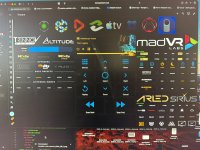
Don’t use the official madvr integration available in the official HA store. Get the fork on hacs from iloveicetea. The original will keep trying to connect when madvr in standby or off, creating a memory overflow pretty quick. Crashed my HA all the time. If you have trouble finding it let me know and I post a link when back home. Make sure you delete the old one first and reboot. Also any yaml related to it in your config file to be sure. Btw I am almost finished with a detailed HT dashboard for a Altitude,madvr,apple tv, magnetar/oppo, kaleidescape and Novastar MX2000 via tcp/ip. Tried to keep at as compact as possible, media player and d-pad’s all swap to the one associated with the selected input source. Brightness and colour changes when things are active/inactive. Sensors show correct data or logo,s/symbols as well. Have to work on d-pad’s by adding 2-3 buttons like search,shuffle wall, intermiSsion. on kaleidescape and some other sources. As well as adding lights and curtains. And finetuning text and logo’s buttons sizes etc. but it is all functional already. Here is a screenshot of what I have so far. image.jpg
 
Back
Top