• Thanks for visiting the Kaleidescape Owners' Forum

    This forum is for the community of Kaleidescape owners, and others interested in learning about the system, equipment, services, and the company itself.

    It is run by a group of enthusiastic Kaleidescape owners and dealers purely as a service to this community.

    This board is not affiliated in any way with Kaleidescape, Inc.
    For official technical support, product information, or customer service, please visit www.kaleidescape.com

    You can dismiss this box forever by clicking the "X" in the upper right corner of this message.
  • You are currently in "Guest" mode and not logged in with a registered account.

    The forum is free to use and most of the forum can be used by guests who are not registered....

    ... but we strongly encourage you to register for a full account. There is no cost to register for a full account.

    Benefits of registering for a full account:

    • Participate in the discussions! You must have a registered account to make posts on the forums. You will be able to start your own thread on a topic or question, or you can reply to other threads/discussions.
    • Use the "Conversation" feature (known as "private messaging" on other forums) to communicate directly with any of the other users here.
    • Access the Files area. The "resources" area of the forum contains many "Favorite Scene" and Script files that can dramatically increase the enjoyment of your Kaleidescape system. Go directly to great scenes in your favorite movies, created by other owners, and add automation to playback of your system with Scripts.
    • You won't see this annoying notice at the top of every screen!😊

    It's easy and free to register for the forum. Just click the "Register" button in the upper right corner of this page, and follow the instructions there.

    This box goes away for registered users.

Kaleidescape Web Browser

Goonybird

Member
Joined
Jan 28, 2025
Messages
17
Location
UK
Recently fired up my spare Cinema One to Replicate the first one.
Previously the Browser allowed all options.
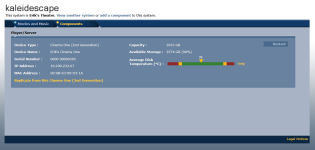
Since Re Install of Win10 I only get two tabs at the top bar "Movies & Music" and "Components"
I see Both Units on there but have no system tab etc.
I am Administrator in Windows
How do I get Admin mode on the browser?
 
There is no "Admin" mode.
Those are the only 2 tabs for the Cinema One 2nd gen browser interface. The Components tab should have a "Replicate from this system" link on it (if replication is enabled for your system).
1794602819573.png
 
Last edited:
Ok thanks
I have linked the two players. Not sure if thats needed
I don't get the option in the browser/components to replicate from this system
Will try unlinking the two
 
Back
Top